Electronic Signature in CMMS: Set Once, Auto-Apply to Every Approval

Article Written by:

Ganesh Veerappan

Created On:

April 28, 2026

Electronic Signature in CMMS: Set Once, Auto-Apply to Every Approval

An electronic signature in CMMS software is a digital representation of a user's approval - stored once in their profile settings and automatically applied to every work order approval, PM sign-off, and permit authorization without requiring the user to sign manually each time. According to a McKinsey Digital report, maintenance teams that eliminate repetitive manual steps in approval workflows reduce administrative overhead by up to 30%. This guide explains exactly how to configure your electronic signature in CMMS user settings - and how it auto-populates across every approval process so you never have to sign manually again.


What Is an Electronic Signature in CMMS Software?

An electronic signature in CMMS software is a secure, legally binding digital mark tied to a user's identity - configured once in their account settings and automatically applied whenever that user approves a work order, signs off a PM checklist, or authorizes a permit to work. Unlike a scanned image of a handwritten signature, a CMMS electronic signature is linked to a specific user account, time-stamped, and stored as part of the permanent audit trail.


The key distinction in modern CMMS platforms is the auto-populate feature: once a maintenance manager or technician saves their signature in user settings, the system inserts it automatically during any approval step - no re-drawing, no re-uploading, no delays.


Electronic Signature vs. Digital Signature: Key Differences

These two terms are often used interchangeably but mean different things in a compliance context:


  • Electronic Signature: Any digital mark - drawn, typed, uploaded, or auto-populated - that represents a person's intent to approve or authenticate a document. Broad in scope and widely accepted under laws like the US ESIGN Act and the EU's eIDAS Regulation.
  • Digital Signature: A specific cryptographic technique that uses public key infrastructure (PKI) to verify the signer's identity and ensure document integrity. Required for highly regulated industries under standards like FDA 21 CFR Part 11.
  • In CMMS context: Most maintenance operations use electronic signatures for day-to-day approvals. Digital signatures are reserved for pharmaceutical, aerospace, or highly regulated environments where cryptographic verification is mandatory.


How Electronic Signatures Work in Maintenance Workflows

In a CMMS like Cryotos, the workflow is straightforward. A user saves their signature image once inside their profile settings. From that point forward, every time an approval step is triggered - closing a work order, confirming a PM checklist, issuing a permit - the system pulls the saved signature from the user's profile and stamps it onto the record automatically. The user simply confirms the action; the signature is already there.


Why Manual Signatures Slow Down Maintenance Approvals

Manual signature collection is one of the most overlooked bottlenecks in maintenance operations. When every approval requires a technician to physically draw or upload their signature, small friction compounds across dozens of daily approvals into significant time loss.


The Hidden Cost of Repetitive Sign-Off Steps

Consider a mid-size manufacturing plant running 50 work orders per day. If each work order requires a technician signature and a supervisor signature, that's 100 manual sign-off events - each taking 30-60 seconds when done manually on a mobile device. That's up to 100 minutes of pure administrative time per day, just on signatures. Over a year, that's more than 400 hours lost to a process that can be automated entirely.


Beyond time, manual signatures create quality problems. Technicians under pressure skip signature fields, submit unsigned work orders, and trigger rework cycles. According to Plant Engineering's Maintenance Best Practices report, incomplete documentation is cited by 43% of maintenance managers as a leading cause of failed compliance audits.
 

Common Approval Bottlenecks in CMMS Without Auto-Sign


  • Delayed closures: Work orders sit open because the assigned technician hasn't returned to add their signature - especially common with field teams on mobile.
  • Approval chains breaking: Multi-level approvals (technician ? supervisor ? manager) stall when one person in the chain hasn't set up their signature method.
  • Audit trail gaps: Without a consistent, tied-to-identity signature, audit trails contain incomplete or disputed entries - a serious risk for ISO 9001 and OSHA inspections.
  • Mobile friction: Drawing a signature on a smartphone touchscreen is cumbersome. Many technicians give up and submit unsigned, creating exception workflows that maintenance managers have to manually resolve.


How to Set Up Your Electronic Signature in CMMS User Settings

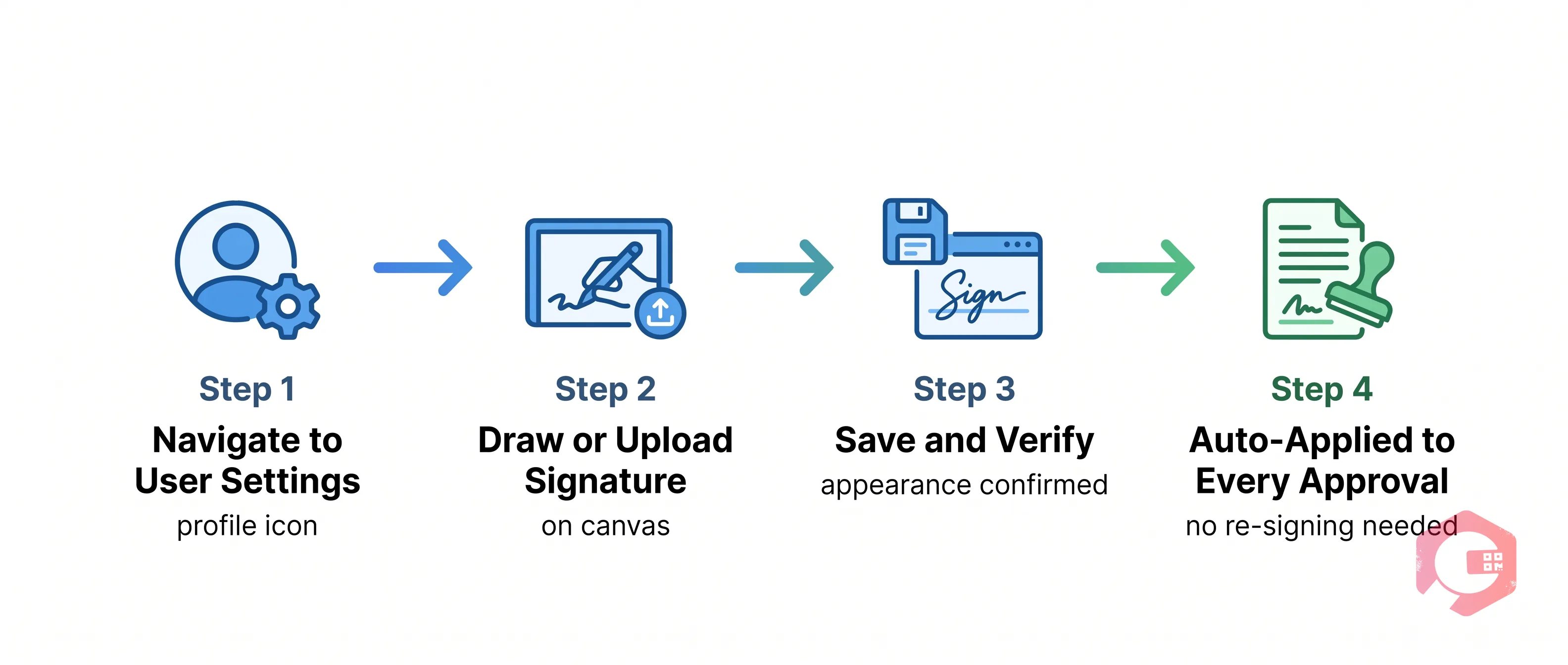
Electronic Signature in CMMS — workflow

Setting up your electronic signature in Cryotos CMMS takes less than two minutes. Once saved, it auto-populates across every approval workflow - work orders, PMs, permits, and checklists - without any additional action from you.


Step 1: Navigate to User Profile / Settings

Log into your Cryotos CMMS account on the web portal. Click your profile icon or name in the top-right corner of the dashboard. Select User Settings or My Profile from the dropdown menu. This opens your personal account configuration page where all your preferences - including your electronic signature - are stored.


Step 2: Upload or Draw Your Signature

In the User Settings panel, locate the Electronic Signature section. You have two options:


  • Draw your signature: Use your mouse, trackpad, or touchscreen to draw your signature directly in the signature canvas. This is ideal for mobile users who want a natural-looking signature.
  • Upload a signature image: Upload a pre-existing PNG or JPG of your signature (transparent background recommended for clean overlays on documents). This option gives you the most control over signature appearance.


Step 3: Save and Verify Your Signature

Once you're satisfied with your signature, click Save. The system stores your signature securely against your user account. You'll see a confirmation preview showing exactly how your signature will appear on approved documents. If the preview looks correct, you're done - the signature is now active.


Step 4: How It Auto-Populates During Approvals

From this point forward, whenever you encounter an approval step in Cryotos - closing a work order, confirming a PM, authorizing a permit - the system automatically inserts your saved signature. You'll see your signature already placed on the approval form. You confirm the approval with a single tap or click; no re-signing required. The signature is time-stamped, linked to your user account, and added to the permanent audit trail instantly.


Where Auto-Populated Signatures Apply in Cryotos CMMS

Electronic Signature in CMMS — problems grid

Once your electronic signature is saved in user settings, it auto-populates across the following approval touchpoints within Cryotos CMMS software:


Work Order Approvals

Every work order in Cryotos can require one or more signature approvals before closure - from the assigned technician, a supervisor, or a quality inspector. With auto-populated signatures, each approver's sign-off is applied the moment they confirm their review. Multi-level approval chains complete faster because no one in the chain has to manually provide their signature.


Preventive Maintenance Sign-Offs

Completing a preventive maintenance task requires the performing technician - and often a second verifier - to sign off on the checklist. Auto-populated signatures mean the PM record is complete and ready for audit the moment the last checklist item is checked. No chasing technicians for signatures after the fact.


Permit to Work (PTW) Authorizations

Permit to Work workflows in Cryotos involve multiple stakeholders: the requestor, the permit issuer, and the authorized safety officer. Each party's electronic signature is pulled from their user settings and applied at their respective authorization step. This ensures the entire PTW chain is documented without any manual signature collection - critical for high-hazard environments where speed and accuracy both matter.


Checklist Completions

Inspection checklists, safety audits, and quality verification checklists in Cryotos can all require sign-off at completion. The saved signature is applied automatically when the assigned user submits the completed checklist, creating an instant, verified record tied to that specific user's identity.


Benefits of Auto-Populated Electronic Signatures in CMMS

Electronic Signature in CMMS — lifecycle

Saving your signature once in user settings and letting it auto-populate across all approvals delivers measurable operational and compliance benefits:


  • Faster approvals: Eliminates the time technicians and managers spend manually signing each record. Approval cycles that once took minutes now complete in seconds - a direct contributor to Cryotos customers achieving 25% faster repair times.
  • Complete audit trails: Every approval is automatically timestamped and linked to a specific user account. Audit inspectors can verify who approved what and when - without chasing down paper records or incomplete digital entries.
  • Fewer unsigned records: When signing is automatic, technicians can't accidentally skip the signature step. Unsigned work orders and PM records - a common compliance risk - are eliminated by design.
  • Consistent signature appearance: Because the same stored signature is used every time, records look professional and consistent - important for external audits and customer-facing maintenance documentation.
  • Seamless mobile experience: Technicians working from the Cryotos mobile app don't need to draw their signature on a small touchscreen every time. Their saved signature is applied automatically - even when working in offline mode, with signatures synced when connectivity is restored.
  • Reduced approval delays: Multi-step approval chains no longer stall because one approver hasn't set up their signature method. Once saved in settings, every approver in the chain contributes their signature instantly when they confirm their action.
  • Lower training overhead: New technicians and managers don't need separate training on signature procedures. Setting up their profile signature is a one-time onboarding step - after that, the system handles it automatically.


Electronic Signature Compliance: What You Need to Know

Electronic Signature in CMMS — scenario

Electronic signatures in CMMS don't just speed up approvals - they also help maintenance teams meet regulatory and quality standards that require documented, verifiable sign-off on maintenance activities.


21 CFR Part 11 and Maintenance Records

For pharmaceutical, biotech, and food manufacturing facilities, FDA 21 CFR Part 11 requires that electronic signatures on maintenance records be unique to one individual, non-transferable, and tied to a verifiable identity. Cryotos satisfies this requirement by binding the saved signature to a specific user account with unique login credentials - each signature is traceable to one person and cannot be used by anyone else.


ISO 9001 Audit Trail Requirements

ISO 9001:2015 requires organizations to retain documented information as evidence of conformity to requirements - which includes signed maintenance records. Auto-populated electronic signatures in Cryotos create an unbroken, timestamped record of every approval, making ISO 9001 compliance documentation straightforward to produce and defend during external audits.


OSHA Documentation Standards

OSHA requires documented evidence of safety-related maintenance activities - particularly for lockout/tagout (LOTO) procedures and permit-to-work systems. Electronic signatures on PTW authorizations in Cryotos provide the legally valid, identity-tied documentation OSHA inspectors require, without the paperwork burden of wet signatures.


Frequently Asked Questions


Is an electronic signature legally valid for maintenance approvals?

Yes. Electronic signatures are legally valid for maintenance approvals in most jurisdictions under laws including the US ESIGN Act (2000), UETA, and the EU's eIDAS Regulation. When tied to a verified user identity and accompanied by a tamper-evident audit trail - as Cryotos provides - electronic signatures carry the same legal weight as handwritten signatures for standard maintenance documentation.


Can I set up one signature for all approval types in CMMS?

Yes. In Cryotos, a single signature saved in your user settings applies automatically across all approval types - work orders, PM checklists, permits to work, and inspection forms. You don't need to configure separate signatures for each module. One setup covers every approval touchpoint in the system.


What happens to my saved signature if I'm offline?

Cryotos's mobile app supports full offline operation. When you're working without connectivity, approvals you confirm are queued locally on your device. Your saved signature is applied to those records offline, and when connectivity is restored, the entire batch - including signatures, timestamps, and approval data - syncs automatically to the central system.


How is an electronic signature different from a wet signature in CMMS?

A wet signature is a physical, handwritten mark on paper - requiring physical presence, paper documents, and manual filing. An electronic signature in CMMS is a digital record tied to a user account, applied instantly, timestamped automatically, and stored in a searchable audit trail. Electronic signatures are faster, more consistent, easier to audit, and eliminate the document management overhead of paper-based sign-off systems.


Who can set up an electronic signature in Cryotos CMMS?

Any user with a Cryotos account - technicians, supervisors, maintenance managers, and administrators - can configure their electronic signature in User Settings. Signatures are role-specific: each user's signature only applies when that user is performing an approval action, maintaining a clean, identity-verified audit trail.


Managing approvals manually - chasing signatures, dealing with unsigned records, and rebuilding audit trails before every inspection - is a problem that Cryotos solves by design. With electronic signatures configured once in user settings and auto-applied across every approval workflow, your team spends zero time on signature logistics and all their time on actual maintenance. Explore how Cryotos CMMS streamlines your entire work order management and preventive maintenance operations - from signature setup to full compliance documentation.


Want to Try Cryotos CMMS Today? Lets Connect!
Thank you! Your submission has been received!
Oops! Something went wrong while submitting the form.
Related Post

Electronic Signature in CMMS: Set Once, Auto-Apply to Every Approval

Calendar
Duration:
8 min read
calendar today
Published on
April 28, 2026
Featured Image

An electronic signature in CMMS software is a digital representation of a user's approval - stored once in their profile settings and automatically applied to every work order approval, PM sign-off, and permit authorization without requiring the user to sign manually each time. According to a McKinsey Digital report, maintenance teams that eliminate repetitive manual steps in approval workflows reduce administrative overhead by up to 30%. This guide explains exactly how to configure your electronic signature in CMMS user settings - and how it auto-populates across every approval process so you never have to sign manually again.


What Is an Electronic Signature in CMMS Software?

An electronic signature in CMMS software is a secure, legally binding digital mark tied to a user's identity - configured once in their account settings and automatically applied whenever that user approves a work order, signs off a PM checklist, or authorizes a permit to work. Unlike a scanned image of a handwritten signature, a CMMS electronic signature is linked to a specific user account, time-stamped, and stored as part of the permanent audit trail.


The key distinction in modern CMMS platforms is the auto-populate feature: once a maintenance manager or technician saves their signature in user settings, the system inserts it automatically during any approval step - no re-drawing, no re-uploading, no delays.


Electronic Signature vs. Digital Signature: Key Differences

These two terms are often used interchangeably but mean different things in a compliance context:


  • Electronic Signature: Any digital mark - drawn, typed, uploaded, or auto-populated - that represents a person's intent to approve or authenticate a document. Broad in scope and widely accepted under laws like the US ESIGN Act and the EU's eIDAS Regulation.
  • Digital Signature: A specific cryptographic technique that uses public key infrastructure (PKI) to verify the signer's identity and ensure document integrity. Required for highly regulated industries under standards like FDA 21 CFR Part 11.
  • In CMMS context: Most maintenance operations use electronic signatures for day-to-day approvals. Digital signatures are reserved for pharmaceutical, aerospace, or highly regulated environments where cryptographic verification is mandatory.


How Electronic Signatures Work in Maintenance Workflows

In a CMMS like Cryotos, the workflow is straightforward. A user saves their signature image once inside their profile settings. From that point forward, every time an approval step is triggered - closing a work order, confirming a PM checklist, issuing a permit - the system pulls the saved signature from the user's profile and stamps it onto the record automatically. The user simply confirms the action; the signature is already there.


Why Manual Signatures Slow Down Maintenance Approvals

Manual signature collection is one of the most overlooked bottlenecks in maintenance operations. When every approval requires a technician to physically draw or upload their signature, small friction compounds across dozens of daily approvals into significant time loss.


The Hidden Cost of Repetitive Sign-Off Steps

Consider a mid-size manufacturing plant running 50 work orders per day. If each work order requires a technician signature and a supervisor signature, that's 100 manual sign-off events - each taking 30-60 seconds when done manually on a mobile device. That's up to 100 minutes of pure administrative time per day, just on signatures. Over a year, that's more than 400 hours lost to a process that can be automated entirely.


Beyond time, manual signatures create quality problems. Technicians under pressure skip signature fields, submit unsigned work orders, and trigger rework cycles. According to Plant Engineering's Maintenance Best Practices report, incomplete documentation is cited by 43% of maintenance managers as a leading cause of failed compliance audits.


Common Approval Bottlenecks in CMMS Without Auto-Sign


  • Delayed closures: Work orders sit open because the assigned technician hasn't returned to add their signature - especially common with field teams on mobile.
  • Approval chains breaking: Multi-level approvals (technician ? supervisor ? manager) stall when one person in the chain hasn't set up their signature method.
  • Audit trail gaps: Without a consistent, tied-to-identity signature, audit trails contain incomplete or disputed entries - a serious risk for ISO 9001 and OSHA inspections.
  • Mobile friction: Drawing a signature on a smartphone touchscreen is cumbersome. Many technicians give up and submit unsigned, creating exception workflows that maintenance managers have to manually resolve.


How to Set Up Your Electronic Signature in CMMS User Settings

Electronic Signature in CMMS — workflow

Setting up your electronic signature in Cryotos CMMS takes less than two minutes. Once saved, it auto-populates across every approval workflow - work orders, PMs, permits, and checklists - without any additional action from you.


Step 1: Navigate to User Profile / Settings

Log into your Cryotos CMMS account on the web portal. Click your profile icon or name in the top-right corner of the dashboard. Select User Settings or My Profile from the dropdown menu. This opens your personal account configuration page where all your preferences - including your electronic signature - are stored.


Step 2: Upload or Draw Your Signature

In the User Settings panel, locate the Electronic Signature section. You have two options:


  • Draw your signature: Use your mouse, trackpad, or touchscreen to draw your signature directly in the signature canvas. This is ideal for mobile users who want a natural-looking signature.
  • Upload a signature image: Upload a pre-existing PNG or JPG of your signature (transparent background recommended for clean overlays on documents). This option gives you the most control over signature appearance.


Step 3: Save and Verify Your Signature

Once you're satisfied with your signature, click Save. The system stores your signature securely against your user account. You'll see a confirmation preview showing exactly how your signature will appear on approved documents. If the preview looks correct, you're done - the signature is now active.


Step 4: How It Auto-Populates During Approvals

From this point forward, whenever you encounter an approval step in Cryotos - closing a work order, confirming a PM, authorizing a permit - the system automatically inserts your saved signature. You'll see your signature already placed on the approval form. You confirm the approval with a single tap or click; no re-signing required. The signature is time-stamped, linked to your user account, and added to the permanent audit trail instantly.


Where Auto-Populated Signatures Apply in Cryotos CMMS

Electronic Signature in CMMS — problems grid

Once your electronic signature is saved in user settings, it auto-populates across the following approval touchpoints within Cryotos CMMS software:


Work Order Approvals

Every work order in Cryotos can require one or more signature approvals before closure - from the assigned technician, a supervisor, or a quality inspector. With auto-populated signatures, each approver's sign-off is applied the moment they confirm their review. Multi-level approval chains complete faster because no one in the chain has to manually provide their signature.


Preventive Maintenance Sign-Offs

Completing a preventive maintenance task requires the performing technician - and often a second verifier - to sign off on the checklist. Auto-populated signatures mean the PM record is complete and ready for audit the moment the last checklist item is checked. No chasing technicians for signatures after the fact.


Permit to Work (PTW) Authorizations

Permit to Work workflows in Cryotos involve multiple stakeholders: the requestor, the permit issuer, and the authorized safety officer. Each party's electronic signature is pulled from their user settings and applied at their respective authorization step. This ensures the entire PTW chain is documented without any manual signature collection - critical for high-hazard environments where speed and accuracy both matter.


Checklist Completions

Inspection checklists, safety audits, and quality verification checklists in Cryotos can all require sign-off at completion. The saved signature is applied automatically when the assigned user submits the completed checklist, creating an instant, verified record tied to that specific user's identity.


Benefits of Auto-Populated Electronic Signatures in CMMS

Electronic Signature in CMMS — lifecycle

Saving your signature once in user settings and letting it auto-populate across all approvals delivers measurable operational and compliance benefits:


  • Faster approvals: Eliminates the time technicians and managers spend manually signing each record. Approval cycles that once took minutes now complete in seconds - a direct contributor to Cryotos customers achieving 25% faster repair times.
  • Complete audit trails: Every approval is automatically timestamped and linked to a specific user account. Audit inspectors can verify who approved what and when - without chasing down paper records or incomplete digital entries.
  • Fewer unsigned records: When signing is automatic, technicians can't accidentally skip the signature step. Unsigned work orders and PM records - a common compliance risk - are eliminated by design.
  • Consistent signature appearance: Because the same stored signature is used every time, records look professional and consistent - important for external audits and customer-facing maintenance documentation.
  • Seamless mobile experience: Technicians working from the Cryotos mobile app don't need to draw their signature on a small touchscreen every time. Their saved signature is applied automatically - even when working in offline mode, with signatures synced when connectivity is restored.
  • Reduced approval delays: Multi-step approval chains no longer stall because one approver hasn't set up their signature method. Once saved in settings, every approver in the chain contributes their signature instantly when they confirm their action.
  • Lower training overhead: New technicians and managers don't need separate training on signature procedures. Setting up their profile signature is a one-time onboarding step - after that, the system handles it automatically.


Electronic Signature Compliance: What You Need to Know

Electronic Signature in CMMS — scenario

Electronic signatures in CMMS don't just speed up approvals - they also help maintenance teams meet regulatory and quality standards that require documented, verifiable sign-off on maintenance activities.


21 CFR Part 11 and Maintenance Records

For pharmaceutical, biotech, and food manufacturing facilities, FDA 21 CFR Part 11 requires that electronic signatures on maintenance records be unique to one individual, non-transferable, and tied to a verifiable identity. Cryotos satisfies this requirement by binding the saved signature to a specific user account with unique login credentials - each signature is traceable to one person and cannot be used by anyone else.


ISO 9001 Audit Trail Requirements

ISO 9001:2015 requires organizations to retain documented information as evidence of conformity to requirements - which includes signed maintenance records. Auto-populated electronic signatures in Cryotos create an unbroken, timestamped record of every approval, making ISO 9001 compliance documentation straightforward to produce and defend during external audits.


OSHA Documentation Standards

OSHA requires documented evidence of safety-related maintenance activities - particularly for lockout/tagout (LOTO) procedures and permit-to-work systems. Electronic signatures on PTW authorizations in Cryotos provide the legally valid, identity-tied documentation OSHA inspectors require, without the paperwork burden of wet signatures.


Frequently Asked Questions


Is an electronic signature legally valid for maintenance approvals?

Yes. Electronic signatures are legally valid for maintenance approvals in most jurisdictions under laws including the US ESIGN Act (2000), UETA, and the EU's eIDAS Regulation. When tied to a verified user identity and accompanied by a tamper-evident audit trail - as Cryotos provides - electronic signatures carry the same legal weight as handwritten signatures for standard maintenance documentation.


Can I set up one signature for all approval types in CMMS?

Yes. In Cryotos, a single signature saved in your user settings applies automatically across all approval types - work orders, PM checklists, permits to work, and inspection forms. You don't need to configure separate signatures for each module. One setup covers every approval touchpoint in the system.


What happens to my saved signature if I'm offline?

Cryotos's mobile app supports full offline operation. When you're working without connectivity, approvals you confirm are queued locally on your device. Your saved signature is applied to those records offline, and when connectivity is restored, the entire batch - including signatures, timestamps, and approval data - syncs automatically to the central system.


How is an electronic signature different from a wet signature in CMMS?

A wet signature is a physical, handwritten mark on paper - requiring physical presence, paper documents, and manual filing. An electronic signature in CMMS is a digital record tied to a user account, applied instantly, timestamped automatically, and stored in a searchable audit trail. Electronic signatures are faster, more consistent, easier to audit, and eliminate the document management overhead of paper-based sign-off systems.


Who can set up an electronic signature in Cryotos CMMS?

Any user with a Cryotos account - technicians, supervisors, maintenance managers, and administrators - can configure their electronic signature in User Settings. Signatures are role-specific: each user's signature only applies when that user is performing an approval action, maintaining a clean, identity-verified audit trail.


Managing approvals manually - chasing signatures, dealing with unsigned records, and rebuilding audit trails before every inspection - is a problem that Cryotos solves by design. With electronic signatures configured once in user settings and auto-applied across every approval workflow, your team spends zero time on signature logistics and all their time on actual maintenance. Explore how Cryotos CMMS streamlines your entire work order management and preventive maintenance operations - from signature setup to full compliance documentation.

Want to Try Cryotos CMMS Today?

Get Free Demo

Let AI Take Control of Your Maintenance

Cryotos AI predicts failures, automates work orders, and simplifies maintenance—before problems slow you down.

Try AI-Powered CMMS
🡢