

A SAP PM data migration checklist covers four data categories that must move accurately to a cloud CMMS: asset master records, work order history, preventive maintenance (PM) plans, and spare parts inventory data. Get any one of these wrong and technicians inherit a system with gaps in equipment history, missed PM schedules, or phantom stock counts. This checklist walks through exactly what to migrate, in what order, and how to validate it before go-live.
Key Takeaways

SAP PM data migration is the process of extracting equipment, maintenance, and inventory records from SAP's Plant Maintenance module and loading them into a cloud CMMS in a structured, validated format. It's not a file copy. SAP stores this data across interconnected tables — equipment master (EQUZ), functional locations (IFLOT), maintenance plans (MPLA), and notifications (QMEL) — and a Computerized Maintenance Management System expects a flatter, asset-centric structure built around the technician's daily workflow rather than SAP's transaction model.
Four categories cover nearly everything a maintenance team needs on day one:
According to the ISO 55000 asset management standard, reliable asset data is a foundational requirement for any organization managing physical assets at scale, and that principle applies directly to how a migration project should be scoped. Treating the move as a data migration project with defined phases, rather than an IT export-import task, separates a clean cutover from a multi-month cleanup effort.
Asset lifecycle management is the practice of tracking an asset's condition, cost, and maintenance history from installation through retirement. A clean migration preserves this history instead of resetting every asset's clock to zero, which is why asset lifecycle management depends on getting historical data across intact, not just current-state snapshots.
Maintenance teams sometimes assume only "active" assets and open work orders matter. In practice, closed work order history feeds the failure analysis and MTBF calculations a new CMMS needs to be useful immediately, not just after a year of fresh data collection.
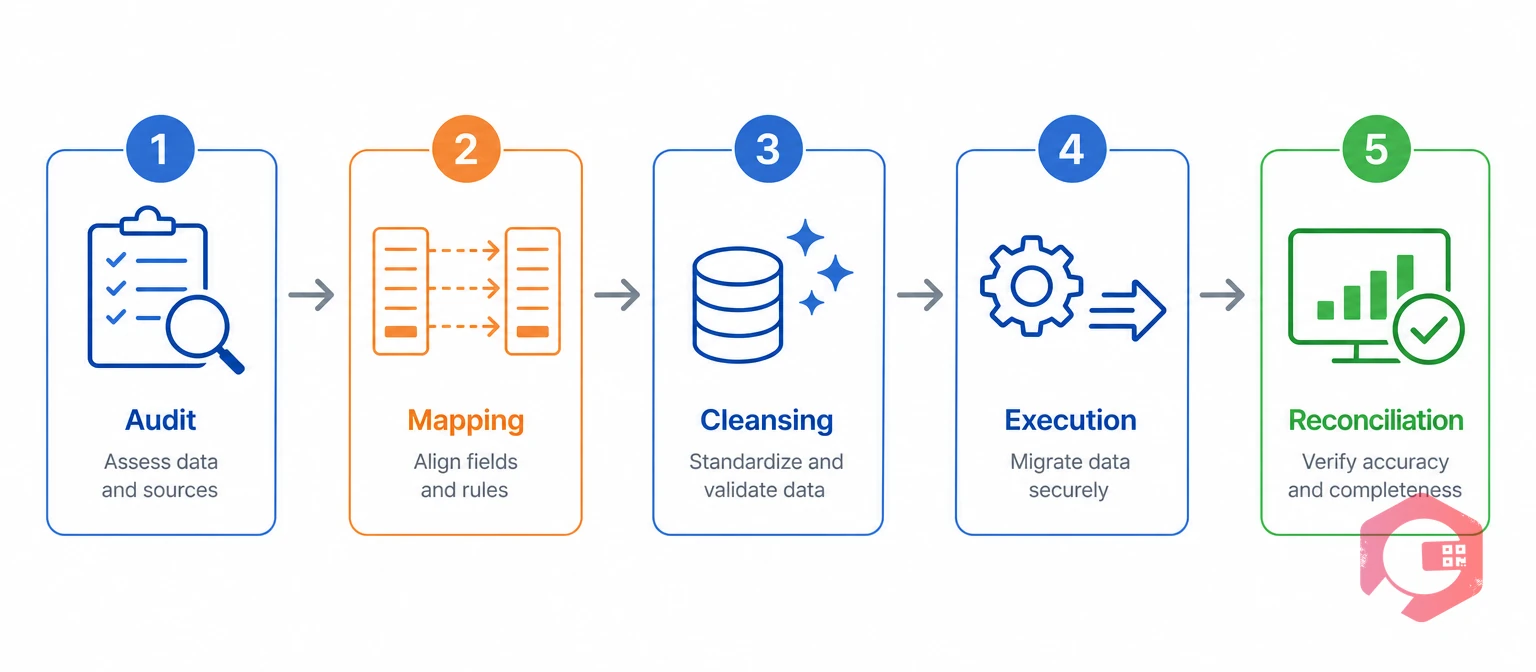
The 5-Phase Data Migration Checklist:
Start by pulling a full export of equipment master, functional locations, open work orders, and active maintenance plans from SAP. Most teams are surprised by how much of this data is stale — equipment marked active that was scrapped years ago, or PM plans still running against decommissioned lines.
SAP's functional location codes often encode plant, area, and system in a single string, while most CMMS platforms use separate hierarchy levels for site, building, and asset. This is the single biggest source of mapping errors, so it needs a dedicated pass before any data moves. This step is a form of master data management — establishing one authoritative definition for each asset, part, and location before two systems both claim to hold the truth about it.
Field mapping decisions made piecemeal are the most common reason teams have to re-map and re-migrate an entire data category months after go-live, once someone finally notices two batches used different rules.
SAP systems that have run for a decade or more accumulate duplicate equipment records, inconsistent naming (the same pump labeled three different ways across three plants), and blank required fields. Cleansing this before migration is faster than fixing it after go-live, when technicians are already relying on the data.
Load one site or one asset category first, not the entire register at once. A pilot batch of 100-200 assets surfaces mapping errors while the blast radius is still small, and fixing an error in a 200-record batch takes an afternoon instead of a week.
Most cloud CMMS platforms, including EAM software like Cryotos, accept structured imports via Excel or CSV with field-level validation, catching format errors before they load into production.
Reconciliation means comparing record counts and spot-checking field values between SAP and the CMMS after every batch loads, not just once at the very end. A 2% discrepancy in a 500-asset pilot is easy to trace; the same 2% across 10,000 assets after a single full-register load is not.
Asset master data forms the backbone every other migrated record links back to — work orders, PM plans, and parts all reference an asset ID, so getting this category right first prevents rework everywhere else.
Teams running asset tracking with QR codes or NFC tags on physical equipment should generate and assign those tags as part of this same pass, rather than as a separate project after go-live. Doing both at once means technicians see complete records the first time they scan a tag.
Work order history gives a new CMMS the failure patterns and repair times it needs to support meaningful reporting from day one, instead of starting every KPI dashboard at zero.
Maintenance teams that skip historical work orders often regret it within the first quarter, when a recurring failure pattern that SAP data would have shown clearly is invisible in a system with no history behind it.
PM plans are where SAP's rigid, calendar-heavy structure most often needs translation rather than a straight copy, since most cloud CMMS platforms support more flexible trigger types.
Condition-based maintenance is a PM strategy that triggers a work order from live equipment data — vibration, temperature, or runtime hours — rather than a fixed calendar date. Teams migrating from calendar-only SAP plans often use the move to a new CMMS as the moment to introduce condition-based maintenance on their highest-criticality assets, since the underlying trigger logic is already being rebuilt.
Spare parts data lives inside SAP's Materials Management module, which is built for enterprise procurement rather than a fast shop-floor stock check — migrating it into a maintenance-first structure is where most of the value shows up.
A dedicated spare parts management module gives technicians a direct, phone-based stock check instead of routing every lookup through a materials-management transaction screen.
The table below shows the most common SAP PM field pairings teams work through during Phase 2, along with the data type and a note on what typically needs manual review.
| SAP PM Field | Cloud CMMS Field | Data Type | Migration Note |
|---|---|---|---|
| Equipment Number (EQUNR) | Asset ID | Text/Numeric | Preserve as cross-reference field |
| Functional Location (TPLNR) | Asset Hierarchy Path | Structured Text | Split into separate hierarchy levels |
| Maintenance Plan (WARPL) | PM Schedule | Text/Interval | Map cycle type manually |
| Notification (QMEL) | Work Request/Fault Log | Text | Link to resulting work order |
| Material Number (MATNR) | Part ID | Text/Numeric | Reconcile unit of measure |
This mapping table isn't exhaustive — every SAP configuration has custom fields layered on top of standard ones — but it covers the pairings that show up in nearly every migration project.
Three methods cover most SAP PM to cloud CMMS migrations, and the right choice depends mainly on asset count and how often the two systems need to stay in sync afterward. None of the three methods skip the audit, mapping, and cleansing phases — they only change how the final load happens.
SAP transaction codes like IE05, IE07, and IW38 export equipment, functional location, and work order data to Excel or CSV. A CMMS import tool then loads that file with field-level validation. This method works well for one-time migrations under roughly 5,000 assets, since it needs no development work or ongoing connection between systems.
A REST API connection syncs data between SAP and the CMMS continuously, rather than as a one-time load. This suits organizations planning to keep both systems running long-term, with SAP as the financial system of record and the CMMS handling maintenance execution.
Some CMMS vendors, including Cryotos, offer guided data migration support that handles field mapping and validation as part of onboarding. This reduces the internal workload but still requires the audit and cleansing phases to happen on the customer side first, since no external service can judge which SAP records are stale or duplicated better than the team that created them.

Most migration problems trace back to a small set of recurring mistakes, not unique or unpredictable issues. Recognizing them ahead of time saves weeks of post-go-live cleanup.
Maintenance teams that build in a pilot batch and a dedicated reconciliation step report far fewer post-go-live support tickets than teams that migrate everything in a single weekend cutover.
A SAP PM data migration needs four roles at minimum, even at a single-site facility. Skipping any one of them tends to shift extra work onto whoever is left, slowing the whole project down.
Most facilities run this as a part-time project layered on top of regular duties rather than a dedicated full-time team, which is realistic as long as the timeline accounts for it. A typical week-by-week shape looks like: weeks 1-2 for the audit, weeks 3-4 for mapping and cleansing, weeks 5-6 for pilot batch execution and correction, and a final week for full-register load and reconciliation. Communicate the go-live date to technicians at least two weeks ahead, along with what changes for them on day one — not just that a new system exists.
Data reconciliation is the process of comparing migrated records against the original source system to confirm accuracy and completeness. This happens on two timelines: immediately after each batch during migration, and again 30 days after full go-live once technicians have used the new data in real conditions.
A mobile CMMS makes this final validation step faster in practice, since technicians can flag a missing photo, wrong location, or incorrect part directly from the work order screen instead of filing a separate IT ticket.
Most SAP PM to cloud CMMS data migrations take four to ten weeks from audit to full reconciliation, depending on asset count and how much cleansing the source data needs. A single-site operation with under 1,000 assets and reasonably clean SAP data can complete the full five-phase checklist in as little as three weeks.
Larger, multi-site organizations with tens of thousands of assets and years of inconsistent naming conventions should plan closer to two to three months, with most of that time spent in the audit and cleansing phases rather than the actual load. Organizations running multiple SAP instances across regions, or with heavily customized functional location structures, tend to land at the longer end of that range simply because the mapping phase has to reconcile several different conventions into one. Maintenance teams using Cryotos have reported up to 30% reduction in unplanned downtime and 25% faster repair turnaround within the first quarter after migration, largely because clean historical data lets reporting and PM logic work correctly from day one instead of after a year of fresh data collection.
Asset master records, functional location hierarchy, active PM plans, and at least 12 months of work order history are the minimum for a functional go-live. Spare parts data can migrate slightly later if inventory tracking isn't an immediate priority.
Yes, for small to mid-size asset registers. Most cloud CMMS platforms provide Excel or CSV import templates with field validation, and the five-phase checklist above is designed to be run by an internal maintenance or IT team without specialized SAP migration consulting.
Open work orders should migrate as active records with their current status preserved, not as closed history. Technicians should be able to find and continue any in-progress task in the new system on day one without re-entering details from memory.
Most cloud CMMS platforms support custom fields for exactly this situation. Map any SAP-specific field without a direct equivalent to a custom field rather than dropping the data, so nothing is lost even if it isn't used immediately.
A short parallel run of one to two weeks on a pilot group of assets is common practice, giving technicians a fallback while trust in the new data builds. Running both systems long-term defeats the purpose of migration and usually just delays full adoption.
Compare record counts by category against the original SAP export, spot-check a sample of records for field accuracy, and log any discrepancies technicians find in the first 30 days as a formal exception list to resolve in batches.
A one-time manual export and import is enough for organizations that don't plan to keep SAP running long-term for maintenance data. Teams keeping SAP as their financial system of record after migration typically set up an API connection instead, so cost and asset data continue syncing automatically.
Underestimating the audit and cleansing phases. Teams that jump straight to mapping and loading, without first identifying duplicate or stale SAP records, end up re-doing that cleansing work mid-migration once errors surface — which takes longer than doing it properly the first time.
A clean SAP PM data migration comes down to following the same five phases in order, every time, rather than shortcutting the audit or cleansing steps to hit a go-live date. Schedule a free demo to see how Cryotos handles structured data imports from SAP PM, with field-level validation built into the setup process.




Cryotos AI predicts failures, automates work orders, and simplifies maintenance—before problems slow you down.



