

F-Tags and M-Tags are the two color-coded labels used in autonomous maintenance (Jishu Hozen) to sort equipment abnormalities by who should fix them. An F-Tag — a white tag — marks a problem the machine operator can fix on the spot, such as a loose bolt, a dirty sensor, or a missing guard clip. An M-Tag — a red tag — marks a problem that needs a trained maintenance technician, such as a worn bearing, a hydraulic leak, or an electrical fault. Getting this split right is what makes Total Productive Maintenance (TPM) programs actually work on the shop floor.
Plants that skip this distinction end up in one of two bad places: operators calling maintenance for issues they could've fixed in two minutes, or operators attempting repairs that need a licensed technician. Either way, equipment reliability suffers.
Key Takeaways

Autonomous maintenance is one of the eight pillars of TPM, and it's built on a simple idea: the person running a machine every day is best positioned to notice when something's off. Toyota's original Jishu Hozen framework gave operators a two-tag system to act on what they see:
The white-and-red convention is the most common tag coloring in autonomous maintenance programs, chosen so operators and technicians can tell at a glance, from across the floor, which queue a defect belongs to. F-Tags (white) stay on the floor and close fast; M-Tags (red) escalate into the maintenance queue. This is the foundation of every mature CMMS-supported autonomous maintenance program.
A single "something's wrong" tag creates a bottleneck — every issue, however small, waits in the same queue as major repairs. Splitting abnormalities into F-Tags and M-Tags does three things:
| Attribute | F-Tag (White Tag) | M-Tag (Red Tag) |
|---|---|---|
| Who resolves it | Machine operator | Maintenance technician |
| Type of defect | Minor: cleaning, lubrication, tightening, adjustment | Technical: worn parts, electrical faults, hydraulic/pneumatic leaks |
| Tools/skill required | None beyond standard operator training | Specialized tools, spare parts, or certification |
| Typical resolution time | Within the same shift | Hours to days, based on priority |
| Routing | Stays on the shop floor | Escalates into the maintenance work order queue |
| Program signal | High F-Tag count reflects operator engagement | High M-Tag count reflects underlying equipment issues |
The color and the queue always move together — white stays with the operator, red moves to maintenance.

Autonomous maintenance only works if operators feel confident about what falls inside their lane. Without a clear F-Tag/M-Tag boundary, plants see one of two failure patterns.
Operators unsure whether an issue is "theirs" often just ignore it. A slightly loose fitting or a faint unusual sound doesn't get flagged because nobody's told the operator it counts as an F-Tag. Left alone, small issues compound into breakdowns — exactly what autonomous maintenance is supposed to prevent.
The opposite problem is just as costly: operators route every abnormality to maintenance, including ones they could resolve themselves. Maintenance teams end up buried in requests that don't need a technician, which pushes real M-Tag issues further down the queue and drags out mean time to repair.
A well-defined tagging system, backed by training and a short reference list of examples, keeps both patterns in check. It also gives plant managers a much cleaner signal: the ratio of F-Tags to M-Tags tells you how mature your autonomous maintenance program actually is.
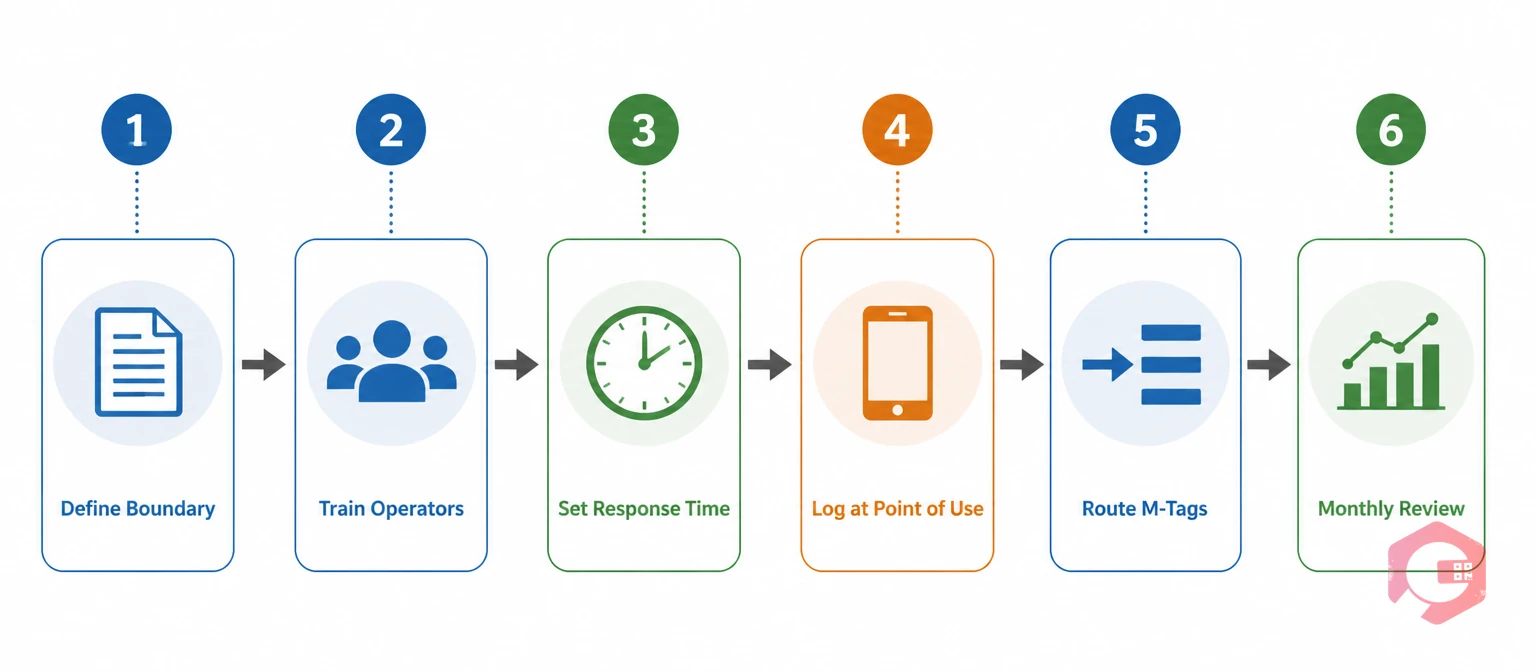
The Tag-to-Task workflow is a six-step framework for rolling out F-Tags and M-Tags so operators actually use them, not just tolerate them. Follow these steps in order:
Paper tags have an obvious weak point: they sit on a machine until someone walks by and notices them. A digital tagging workflow closes that gap. When an operator logs an M-Tag through a CMMS, it converts directly into a work order, complete with the asset ID, a description, photos, and a priority level.
This matters for three reasons:
Plants that digitize this step typically see M-Tags closed faster simply because the request reaches the right person the moment it's raised, rather than at the next supervisor walkthrough.
Because F-Tags and M-Tags start on the shop floor, the tools operators use to log them need to work on the shop floor too — not at a desktop terminal in an office down the hall.
A mobile CMMS lets an operator raise a tag from wherever they're standing, attach a photo of the defect, and add a short comment if typing isn't practical with gloves on. That photo alone often saves the technician a diagnostic trip — they know what they're walking into before they arrive.
Scanning an asset's QR code pulls up its full maintenance history, manuals, and open tags in seconds. This removes a common source of error on paper-based systems: tags getting attached to the wrong asset ID or losing context once removed from the machine.
The moment a high-priority M-Tag is logged — a safety-related issue, a leak, anything that could cause unplanned downtime — the system should alert the right technician immediately rather than waiting for a shift-change handoff. That immediacy is often the difference between a two-hour fix and a full production stoppage.
The real payoff of a digital F-Tag/M-Tag system isn't just faster closure — it's pattern recognition. When every tag is logged with a timestamp, asset ID, and description, you can start asking a more useful question: which M-Tags keep coming back?
Without digital records, these patterns stay invisible — each M-Tag looks like an isolated event. With them, a maintenance planner can spot the trend in a monthly report and act on the cause instead of the symptom, cutting unplanned downtime over time.

A few numbers tell you whether your tagging system is actually working:
Tracking these on a dashboard, rather than reconstructing them from paper logs at month-end, is what turns tagging from a shop-floor habit into a measurable part of your reliability program.
Even well-intentioned rollouts run into the same handful of problems. Watching for these early saves months of frustration.
An F-Tag — typically a white tag — flags a defect the equipment operator is trained and authorized to fix immediately, such as cleaning or minor tightening. An M-Tag — typically a red tag — flags a defect that requires a maintenance technician, specialized tools, or lockout procedures to resolve safely.
The operator makes the initial call based on training and a documented list of examples for each category. Ambiguous cases should default to an M-Tag, since routing a simple issue to maintenance is far less costly than an operator attempting a repair outside their skill or authorization level.
Yes. A CMMS lets operators log both tag types from a phone or tablet, attach photos, and have M-Tags convert automatically into assigned work orders. This removes the risk of lost paper tags and gives maintenance teams a searchable history for every asset.
TPM depends on operators taking ownership of basic equipment condition so maintenance teams can focus on higher-skill work and planned improvements. The F-Tag/M-Tag split is the practical mechanism that makes that division of labor work day to day.
Unresolved M-Tags tend to compound — a minor leak becomes a major failure, a loose connection becomes an unplanned shutdown. Setting response-time targets by severity and tracking backlog on a dashboard helps catch aging M-Tags before they turn into downtime events.
Managing F-Tags and M-Tags on paper works until a plant scales past a handful of machines — after that, tags get lost, patterns go unnoticed, and maintenance teams lose visibility into what's actually happening on the floor. Cryotos brings the entire abnormality management workflow into one system: operators log tags from a mobile device, M-Tags convert into work orders automatically, QR codes tie every tag to complete asset history, and dashboards surface recurring issues before they become breakdowns. If you're ready to move your autonomous maintenance program off paper tags, schedule a free demo to see how Cryotos supports your plant.



Cryotos AI predicts failures, automates work orders, and simplifies maintenance—before problems slow you down.



