

A facility management SLA (Service Level Agreement) is a formal document that defines minimum acceptable performance standards — response times, resolution targets, quality benchmarks, and escalation procedures — for every service your building depends on. It gives facility managers and service providers a shared, enforceable definition of what “good” looks like.
Without one, response times are guesses and vendor accountability is optional. This guide shows you how to set SLAs, which benchmark targets to use, and how to track compliance so nothing slips — all aligned with IFMA’s FM performance standards.
A facility management SLA is a written agreement between a building owner or facility manager and a service provider — internal team or external contractor — that defines minimum service standards. Unlike a basic service contract that lists what the provider will do, an SLA specifies how well and how fast they must do it, and what happens when they miss the mark.
SLAs cover both hard services (mechanical, electrical, HVAC, plumbing, lifts, fire systems) and soft services (cleaning, security, landscaping, waste management, pest control). Each category gets its own targets because a burst pipe in a server room demands a very different response than a broken lightbulb in a storage corridor. A well-written SLA makes that distinction explicit and enforceable.
Most facilities rely on a mix of in-house staff and third-party service providers. Without documented SLAs, vague commitments like “we’ll get to it” have no deadline attached. An SLA replaces that ambiguity with a specific, enforceable time commitment — say, a 2-hour response for critical HVAC failures — and a paper trail when that commitment isn’t met. This is essential for multi-vendor environments where finger-pointing is common.
SLAs drive proactive behaviour. When a vendor knows that preventive maintenance completion rates are tracked monthly, they schedule work in advance rather than react to breakdowns. Fewer unplanned callouts — the most expensive maintenance category — means lower labour costs, less downtime, and longer asset life. BSRIA’s building performance research confirms that SLA-tracked facilities consistently reduce reactive maintenance spend compared to those operating without formal agreements.
Many industries — healthcare, pharmaceuticals, food manufacturing — require documented proof of service performance. An SLA with tracked compliance data satisfies internal audits and external regulatory inspections. When an inspector asks how fast your team responds to critical equipment failures, a signed SLA with timestamped work order history is the answer. Without it, you’re relying on memory and spreadsheets.
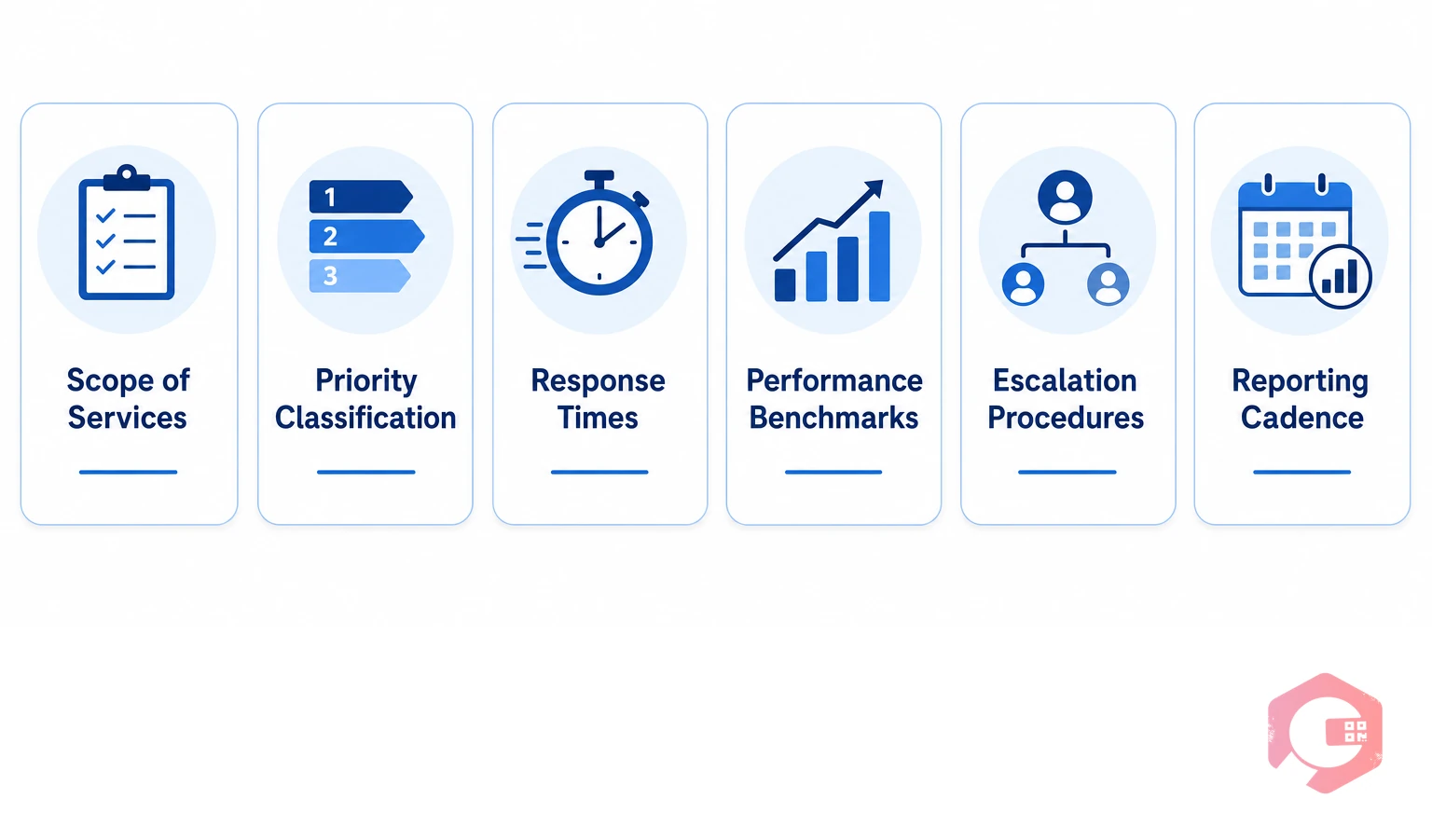
Every FM SLA should include these seven elements. Missing any one of them creates gaps that lead to disputes or untracked failures:
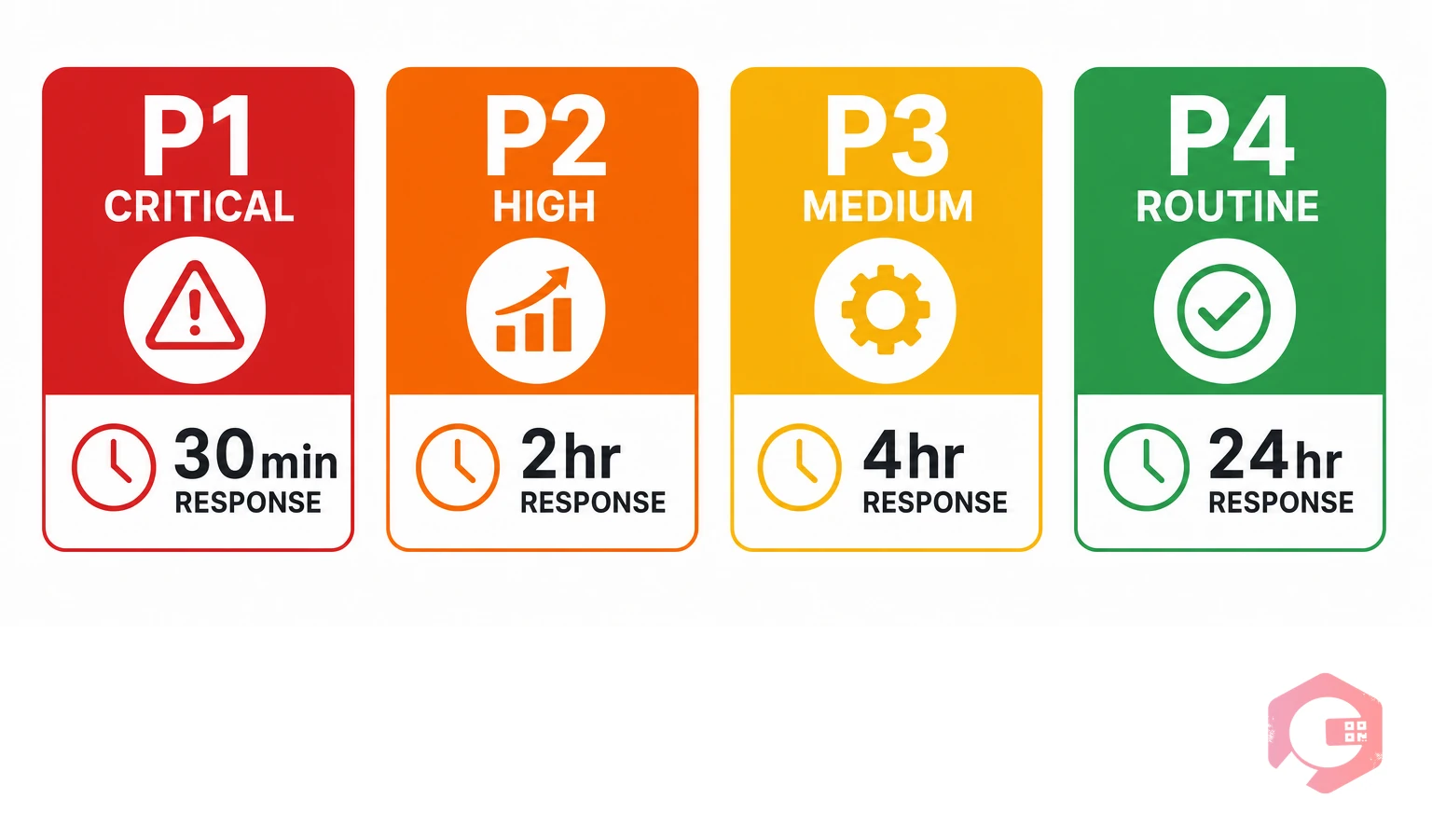
A four-tier priority system is the industry standard for FM SLAs. Use these as your baseline and adjust based on building type, occupancy profile, and operational criticality:
Beyond response times, track these service-specific performance targets as part of your SLA framework:
These benchmarks align with ISO 41001:2018, the international standard for facility management systems, which places measurable service performance and continuous improvement at the core of FM best practice.
List every service your team manages: HVAC, electrical, plumbing, cleaning, security, lifts, waste, landscaping. For each, specify whether it’s in scope, who handles it, and which buildings or zones are covered. Anything not listed is out of scope by default — and that ambiguity is where most SLA disputes start. Use asset categories from your asset tracking system to make sure nothing is missed.
Replace every vague term with a number. “Fast response” becomes “P2 acknowledged within 2 hours.” “Good cleaning standard” becomes “90%+ pass rate on monthly hygiene audits.” Specificity removes the biggest source of SLA disputes — disagreements about what “meeting the standard” actually means. Use the P1–P4 framework and service benchmarks above as your starting point, then calibrate to your building’s operational reality.
Define exactly what triggers an escalation and who responds at each stage. A practical structure: if a P1 ticket goes unacknowledged at T+15 minutes, alert the supervisor; at T+30 minutes, notify the department head; at T+60 minutes, trigger a client escalation call. Automating these notifications through a WhatsApp and email notification system removes the risk of manual oversight and ensures no breach goes unnoticed.
Agree on how often SLA data is shared, in what format, and who has access. Monthly performance reviews are the standard — they’re frequent enough to catch trends but not so frequent that they generate reporting fatigue. The review should cover compliance rate by priority tier, top recurring failure categories, and any open breach investigations. If you’re managing multiple vendors, each should receive their own segmented report.
Document what happens when SLA targets are missed. Options include service credits (a deduction from the monthly invoice proportional to the breach), formal improvement plans (a written corrective action with a 30-day deadline), or contract review triggers (three consecutive months below 85% compliance opens a formal contract review). Without stated consequences, your SLA is a wish list. According to research by Gartner’s facility management practice, SLAs with defined financial consequences see 40% higher compliance rates than those without.

Spreadsheet tracking works when you have a small number of open tickets and one or two service providers. It breaks down quickly. With hundreds of work orders across multiple vendors, asset types, and priority levels, manual tracking means missed breach notifications, disputed timestamps, and hours spent compiling reports that are outdated by the time they’re read.
A CMMS automates SLA tracking from the moment a ticket is raised — timestamping every stage, flagging tickets approaching their deadline, and sending automated breach alerts via WhatsApp or email before a violation occurs. Cryotos gives facility managers real-time compliance dashboards segmented by vendor, asset type, and priority level. Scheduled reports go to stakeholder inboxes automatically, so no one is chasing data at the end of the month. According to Plant Engineering, facilities using CMMS platforms report up to 30% improvement in planned maintenance compliance in the first year.
Track these metrics every month to keep SLA performance on course and catch problems before they become patterns:

Even well-intentioned SLAs fail when they’re set up the wrong way. These are the five most common mistakes and how to avoid them:
It depends on the priority tier. Critical (P1) issues — life safety failures, complete HVAC loss — carry a 30-minute response standard and 4-hour resolution. High-priority (P2) issues typically target a 2-hour response and 8-hour resolution. Routine (P4) requests are usually 24 hours to respond and 5 working days to resolve. Set targets based on occupant impact and your team’s real-world capacity, then review quarterly.
Response time is how long it takes to acknowledge a fault from the moment a ticket is raised. Resolution time is how long it takes to fully close it. Both must appear in every SLA — they measure different things. A team can respond quickly and still take days to fix, so tracking only one gives you an incomplete picture of actual performance.
SLA compliance is the percentage of service requests resolved within their agreed timeframe over a given period. A CMMS tracks every ticket’s timeline automatically — from raised to closed — and generates compliance reports by vendor, priority level, or service category. Most facilities target 90%+ compliance as a monthly baseline, with reviews triggered whenever compliance drops below 85%. Use Cryotos’s facility management software to automate this reporting so nothing requires manual calculation.
Yes — it’s the most practical approach at any meaningful scale. Cryotos timestamps every work order stage, sends breach alerts before deadlines are missed, and generates audit-ready compliance dashboards automatically. The system ties every work order directly to an SLA target, so compliance data is always current and never requires manual reconciliation.
SLA targets should be reviewed formally at least once a year, with a lighter performance review every month. Trigger an out-of-cycle review when scope changes significantly (new building, new vendor), when compliance drops below 85% for two consecutive months, or when a major service failure exposes a gap in the agreement’s coverage. Use your monthly KPI data to flag these moments early rather than waiting for the annual review cycle.
A facility management SLA is only as strong as your ability to track it. Setting clear P1–P4 priority tiers, specific measurable targets, and documented escalation paths gives your team and your vendors a shared standard to work toward. But the accountability loop closes only when compliance data flows automatically — timestamped work orders, breach alerts, and monthly reports that don’t require anyone to compile them by hand.
Cryotos facility management software tracks every SLA target automatically — from the moment a ticket is raised to the moment it’s closed. Real-time dashboards, automated breach alerts, and scheduled stakeholder reports give your team and leadership full visibility without the manual overhead. Book a free demo today to see how Cryotos helps your facility team hit SLA targets consistently and prove performance with data.




Cryotos AI predicts failures, automates work orders, and simplifies maintenance—before problems slow you down.



