

Building Information Modelling (BIM) is a digital process that creates and manages data about a built asset across its entire lifecycle — from design and construction through to operations and eventual demolition. Unlike traditional CAD drawings, BIM produces a live, data-rich 3D model that every stakeholder can use, update, and rely on simultaneously.
BIM adoption is growing fast. According to a McKinsey Global Institute report, the construction and real estate sector stands to gain $1.2–1.7 trillion annually through full digitalisation — and BIM is central to that shift. This post covers where BIM stands today, where it’s heading, and how facility and maintenance managers can capture the full value of BIM data once construction ends.
BIM has come a long way from early 3D modelling software. Today’s BIM platforms — Autodesk Revit, Bentley Systems, Archicad — produce models that embed detailed metadata for every component of a building: manufacturer specs, warranty periods, maintenance schedules, energy performance data, and spatial relationships. The global BIM market was valued at approximately $7.9 billion in 2023 and is projected to reach $15.8 billion by 2028.

Most people associate BIM with 3D modelling. But BIM extends well beyond geometry. Each dimension adds a new layer of data to the model, unlocking a different set of use cases:

Several converging technologies are expanding what BIM can do and making it far more accessible and powerful for the teams that rely on it:
Studies by the National Institute of Building Sciences (NIBS) estimate that 60–80% of BIM data generated during design and construction is never used by the operations team after handover. The COBie standard was developed specifically to solve this — providing a structured format for extracting asset data from a BIM model in a format that CMMS and CAFM systems can import directly.
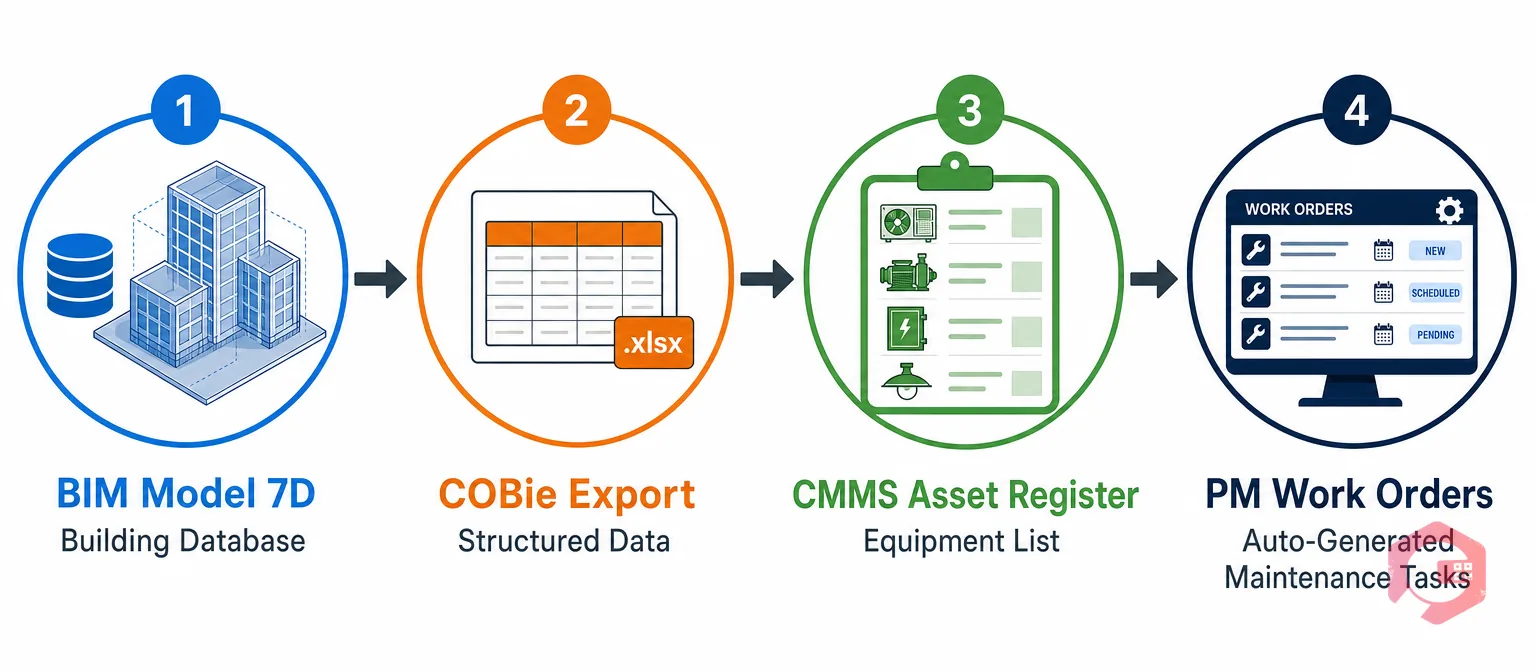
The fundamental data flow works like this: the BIM model holds the asset register. The CMMS holds the maintenance history. When these two data sets are linked, a maintenance technician can scan an asset’s QR code and instantly see both the live maintenance history and the original BIM-sourced specification data.
Cryotos CMMS supports exactly this workflow. Using asset QR code scanning, technicians can pull up an asset’s complete profile — BIM-sourced specifications, warranty status, last service date, upcoming preventive maintenance tasks — directly from the shop floor. Teams that make this transition typically see 20–30% reductions in reactive maintenance spend within the first year.

Despite its clear potential, BIM adoption remains uneven. The main barriers are: high software licence costs, skills gap in BIM-competent professionals, interoperability friction between proprietary file formats, data quality gaps at handover, and cultural resistance from teams with deep-rooted traditional practices. All of these barriers are solvable — mandates are driving adoption, cloud BIM is reducing cost barriers, and OpenBIM standards are improving interoperability every year.
CAD produces two-dimensional drawings and basic geometry without embedded data. BIM creates an intelligent, data-rich model where every component carries information — specifications, cost, maintenance schedules, performance data.
7D BIM refers to the facility management dimension of BIM. It embeds operational and maintenance data — asset specifications, warranty periods, recommended service intervals, spare parts information, and O&M documentation — into the BIM model, designed to feed into a CMMS at building handover.
BIM data — typically exported in COBie format — can be imported into a CMMS to create a verified asset register, populate preventive maintenance schedules, and provide technicians with specification data at the point of maintenance.
Cryotos CMMS is built for exactly this transition. From COBie-based asset register imports to IoT-triggered work orders, AI-assisted preventive maintenance scheduling, and real-time BI dashboards — Cryotos helps facility and maintenance teams get the full operational value out of the BIM data they already have.




Cryotos AI predicts failures, automates work orders, and simplifies maintenance—before problems slow you down.



