

A Remote Terminal Unit (RTU) works in SCADA by sitting at a remote field site and reading data from sensors and equipment. It processes that data locally, then sends it back to the SCADA master station over a communication link. It also gets commands from the control room and runs them on-site. It can open a valve, start a pump, or reset a breaker. No operator needs to visit.
Key Takeaways

A remote terminal unit is a field device that collects sensor data and sends it to a SCADA system. It also accepts control commands from that system and carries them out locally on connected equipment.
SCADA stands for Supervisory Control and Data Acquisition. It combines hardware, software, and networks to watch over industrial sites that are spread out. Oil and gas pipelines, water treatment networks, power substations, and remote pumping stations all rely on SCADA systems because their assets are too spread out for constant on-site staffing.
Most industrial sites use standard communication protocols to move data between the RTU and the SCADA master. DNP3, Modbus, and the IEC 60870-5 family are the most common. The International Society of Automation sets the ISA-95 rules for this data flow, from the field up to the enterprise. That is why remote terminal unit deployments tend to follow predictable design patterns across industries.
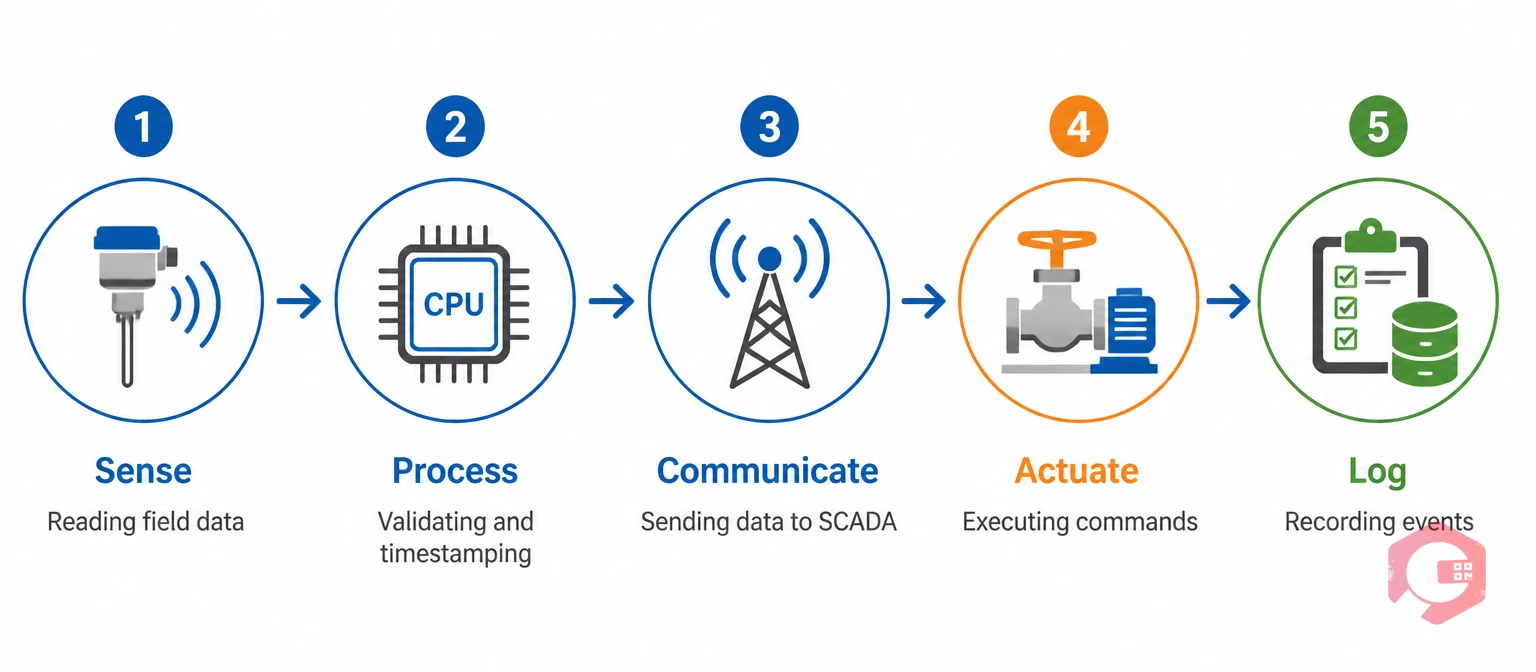
A remote terminal unit works by running a continuous five-stage cycle. This cycle connects field equipment to the SCADA control room. Most maintenance teams find it easier to picture this as one repeating loop instead of five separate jobs.
The RTU Data Loop:
This is the five-step cycle that keeps field data flowing to and from SCADA.
RTUs continuously collect analog and digital signals from field devices such as pressure, temperature, flow, level, and status sensors. A pipeline RTU might sample dozens of points every few seconds without any operator involved.
Most maintenance teams pair this raw sensor stream with IoT meter reading software. That way, the same readings feeding SCADA also fill in asset records on their own. No one has to re-type them later.
RTUs check inputs, run basic logic, timestamp events, and hold data when the link is down. This buffering keeps a pumping station's data safe even after a long radio outage. Nothing is lost. It just arrives late once the link comes back.
The RTU pushes processed data upstream and pulls commands downstream. It uses whatever link the site supports — radio, cellular, satellite, or fiber. A silent RTU is often logged as an alarm too, since it is often the first sign of trouble at an unmanned site.
Operators issue commands from the SCADA system to start, stop, open, close, or reset field equipment through the RTU. If a command causes a fault or a trip, most facilities open a task right away in work order management software. That way the fault gets investigated instead of just logged and forgotten.
RTUs record alarms, events, and communication logs for diagnostics and compliance. This log becomes the audit trail engineers rely on when tracing why a valve closed at 2 a.m. or why a substation breaker tripped during a storm.

Every remote terminal unit, regardless of manufacturer, is built from the same core hardware blocks. Understanding these components matters for maintenance planning as much as for system design.
RTUs are frequently installed at hard-to-reach or hazardous sites. Tracking which unit, firmware version, and battery is installed where matters just as much as the wiring diagram. Asset tracking software that stores RTU serial numbers, install dates, and warranty terms against each site location saves technicians a repeat trip just to confirm what hardware is out there.
Set up a quick RTU asset record before your next site visit. Cryotos BI dashboards can show RTU health and link status for every site in one screen, with no separate manual log.
A PLC is a ruggedized industrial computer built for fast, local logic and machine control. RTUs and PLCs both connect field equipment to a control system, but they are built for opposite priorities. PLCs are optimized for speed and precision at one fixed site. RTUs are built for low power use and steady uptime at unmanned sites spread far apart.
| Aspect | RTU | PLC |
|---|---|---|
| Primary use | Remote monitoring and control over long distances | Local, high-speed machine and process control |
| Typical location | Unmanned, dispersed field sites | Single plant or production line |
| Communication | Radio, cellular, satellite over long range | Ethernet or fieldbus over short range |
| Power draw | Low-power, often battery or solar backed | Continuous mains power |
| Logic speed | Slower scan cycles, fine for monitoring | Millisecond-level scan cycles for control loops |
| Common industries | Oil and gas, water/wastewater, power distribution | Manufacturing, automotive, packaging |
In practice, many SCADA systems use both. PLCs handle fast local control loops inside a plant. RTUs extend that same visibility out to pipelines, wellheads, and substations miles away. The Wikipedia overview of SCADA architecture covers how these two device types typically sit side by side in a single system.

RTUs give teams reliable remote monitoring and faster response to failures. They cut site visits and boost visibility and automation. Teams that run spread-out gear — pipelines, lift stations, cell towers — need this visibility. It helps them skip unplanned truck rolls.
Most facilities that link RTU data to a Computerized Maintenance Management System see the biggest gains in downtime response. An alarm can open a work order right away, instead of waiting for someone to spot a flag on a dashboard. Cryotos customers using connected RTU and IoT data alongside their CMMS report up to 30% less unplanned downtime and 25% faster repairs. The Cybersecurity and Infrastructure Security Agency also says device visibility is key to strong control systems.
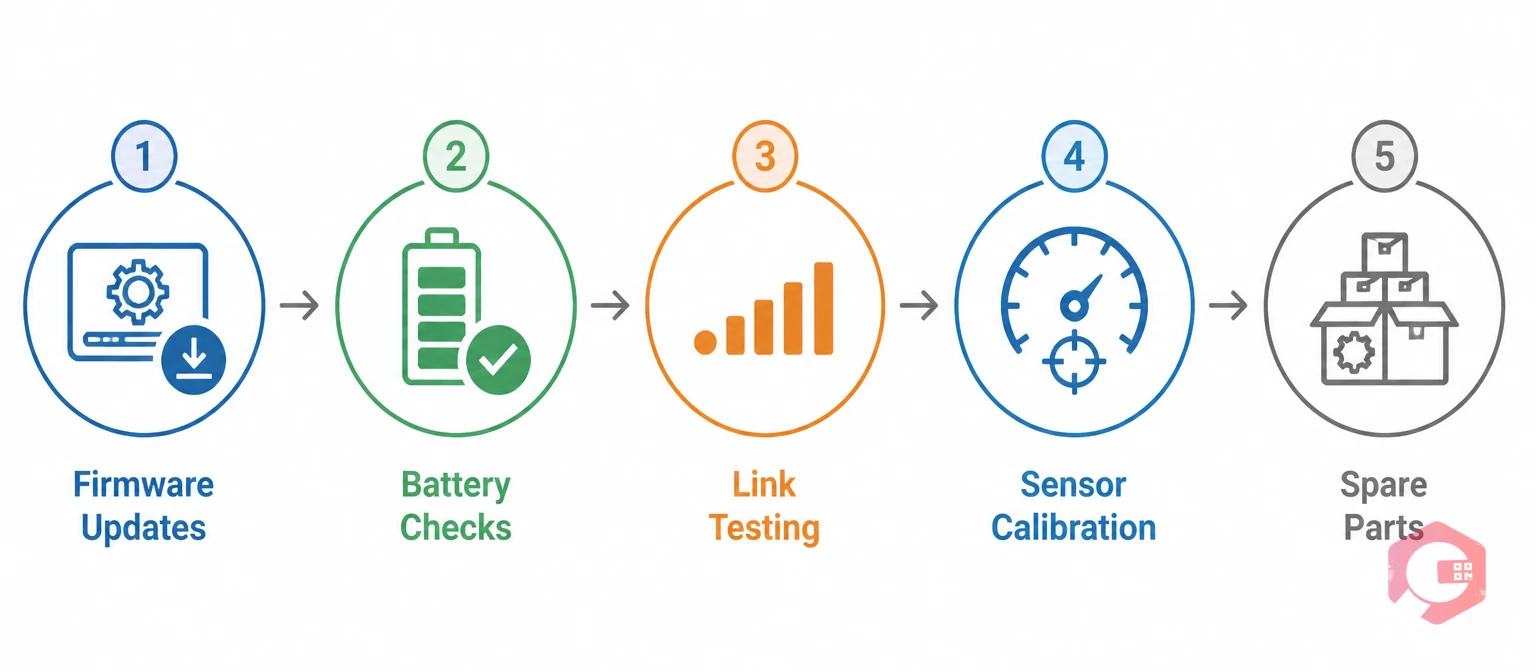
Routine checks keep an RTU reliable: inspections, firmware updates, battery tests, link tests, and calibration. An RTU that quietly drifts out of calibration is often worse than one that fails outright. It keeps sending data that looks normal but isn't.
Build the recurring schedule inside preventive maintenance software. That way RTU calibration and health checks happen on a fixed interval instead of relying on someone remembering. The NIST Guide to Industrial Control Systems Security backs the same routine for any field device on critical infrastructure. Pairing that schedule with spare-parts tracking for backup batteries and communication modules keeps one failed unit from turning into a multi-day site visit.
An RTU is built for remote monitoring over long distances, using radio, cellular, or satellite links. A PLC is built for fast, local control inside one facility, using Ethernet or fieldbus. Many SCADA systems use both: PLCs run local control loops, and RTUs extend visibility out to distant sites.
A remote terminal unit communicates using standard industrial protocols such as DNP3, Modbus, or IEC 60870-5. These are sent over radio, cellular, satellite, or wired links depending on the site's location and infrastructure. The master station either polls each RTU on a schedule or receives data whenever a new reading or alarm occurs.
Yes, an RTU stores collected data locally in its onboard memory whenever the link to the SCADA master is unavailable. Once the link is restored, the buffered data transmits automatically. Short-term outages do not cause permanent data loss.
The most widely used protocols are DNP3 and Modbus, along with the IEC 60870-5 family, particularly in utility and power distribution networks. Protocol choice depends on industry norms, the age of the SCADA setup, and what communication link the site can use.
Most facilities check RTUs every three to six months: inspections, battery checks, and link tests. Firmware updates happen as vendors release them, and calibration gets checked at least once a year. Safety-critical sites often check more often, based on vendor rules and local regulations.
Reliable SCADA performance starts with a remote terminal unit that is tracked, calibrated, and maintained on a fixed schedule instead of only after something fails. Schedule a free demo to see how Cryotos connects RTU and IoT data directly to preventive maintenance, work orders, and asset history in one system.



Cryotos AI predicts failures, automates work orders, and simplifies maintenance—before problems slow you down.



