
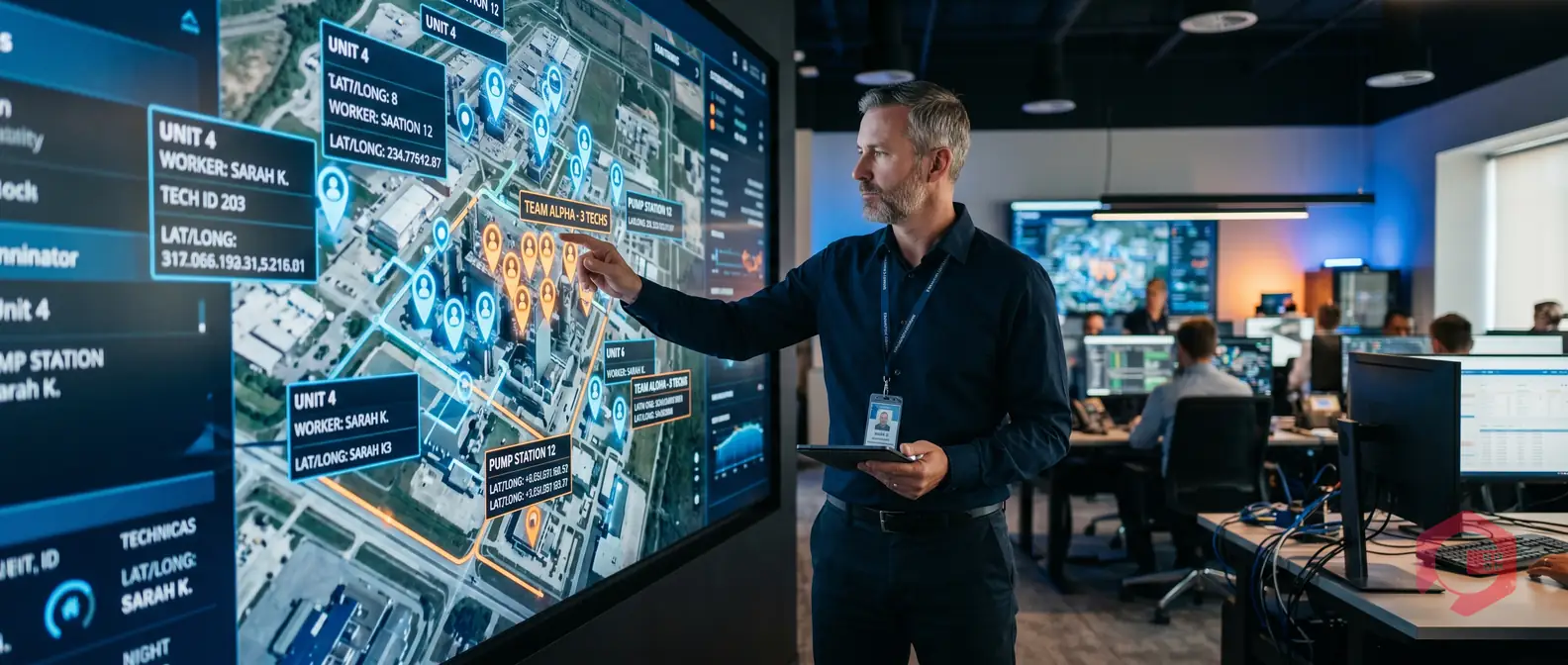
User location tracking in a CMMS lets maintenance managers monitor the real-time GPS position of every technician directly from the management dashboard. Once the feature is enabled, you can see where each team member is, assign the nearest technician to a new work order, and cut dispatch times significantly. According to McKinsey, field operations teams that use real-time location data reduce travel time by up to 20% and improve first-time fix rates. This guide walks you through exactly how to enable user location tracking in your CMMS and what you'll see once it's live.
Whether you're managing a small facility team or a large multi-site operation, location tracking removes the guesswork from dispatch and gives you a live picture of your workforce at any moment
User location tracking in a CMMS is a feature that uses GPS data from technicians' mobile devices to display their live position on a map inside the management console. Unlike basic attendance check-ins, real-time tracking updates continuously — so managers always have an accurate, current view of where each person is on the floor, on the road, or across a facility.
The tracking works through the CMMS mobile app installed on each technician's phone or tablet. When location sharing is active, the app sends GPS coordinates to the server at regular intervals. The management dashboard then plots these positions on an interactive map alongside open work orders, asset locations, and site boundaries.
The process is straightforward. The admin enables the location tracking option from the management settings panel. Technicians then receive a permission prompt on their mobile app and grant location access. From that point on, their position appears live in the management view — no manual check-ins, no radio calls, no guessing.
Location data is tied directly to the user's profile in the CMMS, so you can filter the map by team, shift, or skill set. This makes it easy to find the right person for an urgent job in seconds.
Knowing where your technicians are isn't just convenient — it directly affects how fast you can respond to breakdowns and how efficiently your team operates day to day. Without location visibility, dispatch relies on memory, phone calls, or manual check-ins. That adds minutes to every job, and those minutes add up fast across a shift.
When a high-priority work order comes in, every second counts. With live location tracking, a manager can instantly identify which technician is closest to the affected asset and assign the job directly from the dashboard — no calls, no delays. Studies from Plant Engineering show that location-aware dispatch can cut response time by 15–25% compared to manual assignment methods.
For multi-site operations, this matters even more. A manager overseeing technicians across two or three buildings can assign the right person without making a single phone call — the map does the thinking for you.
The management dashboard gives supervisors a live bird's-eye view of their entire field team. You can see who is on-site, who is in transit, and who is idle — all without leaving your desk. This visibility helps you balance workloads in real time, spot bottlenecks early, and confirm that time-sensitive tasks are actually being handled.
It also helps with accountability. When a technician marks a job complete, the location log confirms they were physically at the asset — removing any ambiguity in performance reviews or client-facing reports.
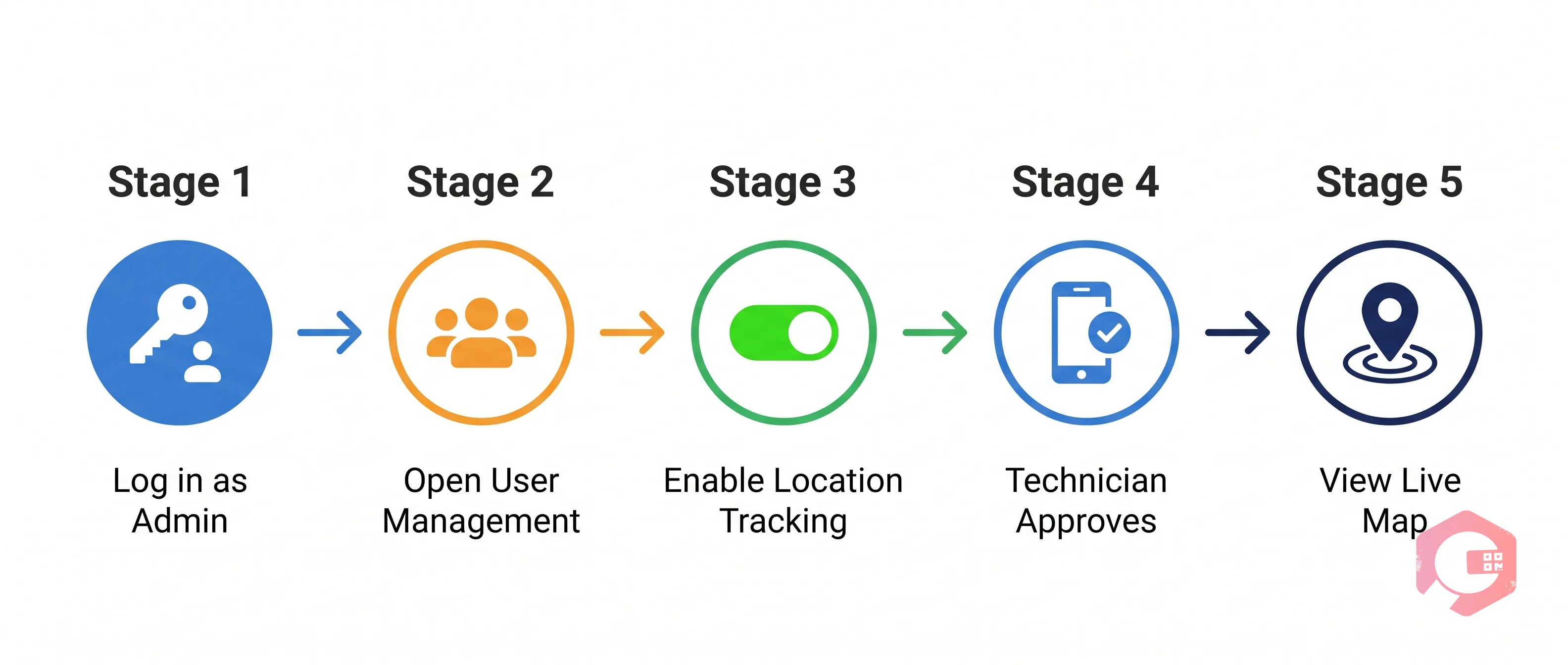
Enabling location tracking in Cryotos CMMS is a one-time setup that takes just a few minutes. Here's the exact process, step by step:
Step 1 — Log in as Admin: Sign in to the Cryotos management portal with your admin credentials and navigate to the Settings panel from the left-side navigation menu.
Step 2 — Open User Management: In Settings, go to User Management. You'll see a list of all users in your organization. Select the user or user group you want to enable tracking for.
Step 3 — Enable Location Tracking: Inside the user's profile, look for the "Location Tracking" toggle. Switch it on. This activates GPS data collection for that user whenever they're active on the Cryotos mobile app.
Step 4 — Save and Notify: Save the settings. The selected user will receive a prompt on their Cryotos mobile app asking for location permission. Once they approve, tracking begins immediately — no app restart required.
Step 5 — View Live Locations from Management: Go to the Management section in your Cryotos portal and open the Live Location or Map View. You'll see the enabled user's real-time position plotted on the map, updated continuously as they move. Each pin shows the user's name, status, and timestamp of the last location update.
You can enable or disable tracking individually for any user at any time. Tracking only runs while the Cryotos mobile app is active — it does not run in the background after the technician closes the app, which keeps battery usage and privacy concerns to a minimum.

Once tracking is live, the Management section of your Cryotos portal transforms into an operational command center. Here's what you get in the view:
Live Map View: Each tracked user appears as a pin on the map with their name, current status (active, idle, on a job), and last updated time.
Proximity to Assets: Open work orders are overlaid on the same map, so you can visually match the nearest technician to an open job in one glance.
Location History: Managers can review a technician's movement log for any given day — useful for audits, dispute resolution, or performance reviews.
Status Indicators: Color-coded pins show whether a technician is available, currently assigned to a job, or clocked out — so you never assign to someone who's already busy.
Multi-User View: All enabled technicians appear on the same map simultaneously. You can filter by team, department, or zone to manage large crews without visual clutter.
This level of visibility was previously only possible with expensive standalone field service tools. With Cryotos, it's built directly into the same platform where your work orders, assets, and maintenance schedules already live — no switching tabs, no separate systems.

Location tracking works best when it's used to help teams work smarter — not as a surveillance tool. Here are a few practices that get the best results:
Be transparent with your team: Let technicians know that tracking is active, what data is collected, and how it's used. Clear communication builds trust and reduces pushback. The ISO 29100 privacy framework recommends explicit consent as a baseline for any workplace location monitoring.
Use it for dispatch, not surveillance: The primary use case is assigning the right person to the right job faster. Avoid using location data to micromanage movement patterns or question break times — that erodes morale without adding operational value.
Combine with work order status: Location is most powerful when paired with work order status from your asset management module. A technician near an asset with no active job is your first call for a new urgent task.
Review location history for training: Use movement logs during monthly reviews to identify inefficiencies — for example, if a technician is consistently travelling farther than necessary, the work order assignment logic may need adjustment.
Set clear off-hours rules: Disable tracking outside of shift hours or configure auto-off based on clock-out events to respect personal privacy after work.
Yes. Location tracking in Cryotos runs through the mobile app installed on the technician's device. Once the admin enables the feature from the management settings and the technician grants location permission on their phone, their live position appears on the management dashboard automatically.
Yes, Cryotos supports simultaneous tracking of multiple users. All enabled technicians appear on the same map view in real time, each with individual status indicators. You can filter by team, department, or location zone to manage large field teams without clutter.
Location tracking requires an active internet connection to send GPS data to the management dashboard. The Cryotos mobile app does support offline mode for other features like work order updates and checklists, but the live location feed resumes only once the device reconnects to a network.
In most jurisdictions, location tracking in the workplace is legal when employees are notified and consent is obtained. Laws vary by country and region — for example, GDPR in Europe requires explicit disclosure and a documented lawful basis for processing location data. Always consult your legal team and establish a clear written policy before enabling tracking across your workforce.
User location tracking is one of those CMMS features that delivers value the moment you turn it on. Knowing exactly where your technicians are — in real time, from the Management section of your portal — changes how fast you respond to breakdowns and how confidently you run a team spread across a large facility or multiple sites.
The setup is simple: enable the option for a user in Settings, have them approve the location permission on the Cryotos mobile app, and the live map view in Management starts updating immediately. No integrations, no third-party tools, no extra hardware.
Combined with work order management, asset tracking, and preventive maintenance scheduling, location awareness rounds out a complete operational picture — so your maintenance team spends less time coordinating and more time fixing things.
If your maintenance team is still relying on phone calls and manual check-ins to figure out where everyone is, you're losing time on every single job. Cryotos CMMS puts live technician location, open work orders, and asset data all on one screen — so dispatch becomes a click, not a conversation. Book a free demo today and see how location-aware maintenance management works in your facility.



Cryotos AI predicts failures, automates work orders, and simplifies maintenance—before problems slow you down.



