

Integrated facility management companies don't have one SLA to manage — they have dozens, or hundreds. A 50-site IFM contract might carry 200 distinct SLA commitments across reactive response times, planned maintenance completion rates, helpdesk acknowledgement windows, and statutory compliance frequencies. Delivering those commitments consistently across every site, every week, with different local teams, different subcontractors, and different building types requires more than good intentions and a shared spreadsheet. The global IFM market is projected to reach $1.4 trillion by 2030 according to Grand View Research — and the margin pressure that accompanies that growth makes SLA breach penalties, which typically run at 0.5–2% of contract value per breach, an increasingly significant operational risk for IFM providers.
A CMMS is the operational infrastructure that turns SLA commitments from contractual text into enforced workflows. This guide covers how IFM companies configure CMMS for consistent SLA delivery at scale — what to standardise, what to allow to vary by site, and how to give portfolio directors and account managers the visibility they need to catch breaches before clients do.
The core challenge in IFM SLA delivery is not the SLA itself — it is variance. A single-site FM team can know its SLA commitments intuitively, respond by feel, and course-correct quickly when performance slips. An IFM company managing 50 sites cannot rely on feel. The same reactive work order that gets closed in 3 hours at Site 12 might sit unacknowledged for 6 hours at Site 34 — not because Site 34's team is less capable, but because Site 34 has a different local team, a different subcontractor mix, a slightly different intake process, and no visibility into the fact that a 4-hour SLA clock has been running since the request was logged.
Without a CMMS, this variance is invisible until it appears in the monthly SLA report — at which point the breach has already occurred, the client has already noticed, and the penalty clause is already triggered. With a properly configured CMMS, the variance is visible in real time: Site 34's open reactive work order appears on the portfolio dashboard at hour 2 with an amber flag, hour 3 with a red flag, and triggers an automated escalation at hour 3.5 before the SLA window closes. The breach that appeared in the monthly report becomes the near-miss that the account manager caught before it cost the business money.
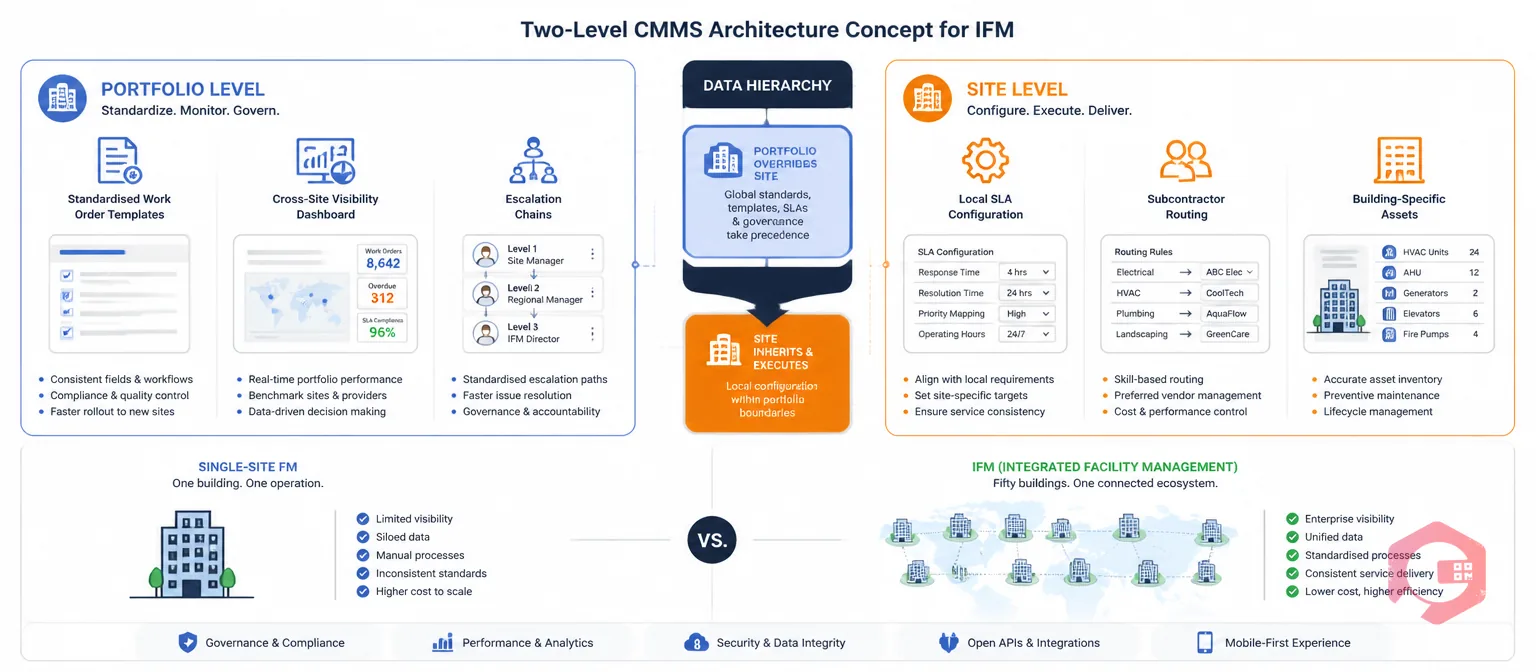
Most CMMS platforms are designed with a single site in mind. IFM operations require a CMMS configured to operate at two levels simultaneously — the portfolio level, where standardisation and cross-site visibility live, and the site level, where local accountability, site-specific configuration, and day-to-day workflow live. The IFM CMMS setup is not just a bigger version of single-site setup; it requires deliberate architectural decisions about what is standardised, what is localised, and how the two levels communicate.
The foundation of consistent SLA delivery is consistent work order creation. If reactive work orders are raised differently at different sites — different priority classifications, different category taxonomies, different information fields — the SLA clock starts from a different baseline at each site, and cross-site comparison becomes meaningless. Standardised work order templates, configured at the portfolio level and deployed to all sites, ensure that a P2 reactive electrical fault at Site 7 is created with the same category, the same SLA trigger, the same assignment routing logic, and the same escalation chain as a P2 reactive electrical fault at Site 43.
Template standardisation also ensures that the data collected at task completion — cause code, resolution action, asset affected, parts used — is consistent across sites, enabling meaningful cross-site analysis of failure patterns, repeat fault rates, and subcontractor performance rather than a collection of incomparable site-level records.
Standardisation does not mean uniformity. Different sites in an IFM portfolio will carry different contractual SLA obligations — a critical-infrastructure client may require a 2-hour reactive response; a standard commercial office client may have a 4-hour response SLA for the same priority category. The CMMS must support site-level SLA configuration that overrides the portfolio default without breaking the portfolio data model.
The practical implementation is a tiered configuration: a portfolio-level SLA framework defining the priority categories, escalation chain structures, and reporting metrics that apply across all sites, with site-level SLA value overrides that set the actual response and resolution times for each priority category at each specific site. The work order management software module applies the site-specific SLA value automatically when a work order is created at a given site — the operations team doesn't need to know each site's SLA table; the system enforces it.
The account director managing a 50-site portfolio needs a single view showing which sites are meeting their SLAs and which are not — without needing to log into 50 separate site instances or run 50 separate reports. At the same time, the site manager at Site 23 needs accountability for their own site's performance, not diluted into a portfolio average that masks local underperformance. A properly configured CMMS provides both: a portfolio-level dashboard showing aggregated SLA compliance by site, by service line, and by priority category, with drill-down to the site-level detail for any underperforming location. The BI Dashboard configures this multi-level view without requiring separate dashboards for each audience.
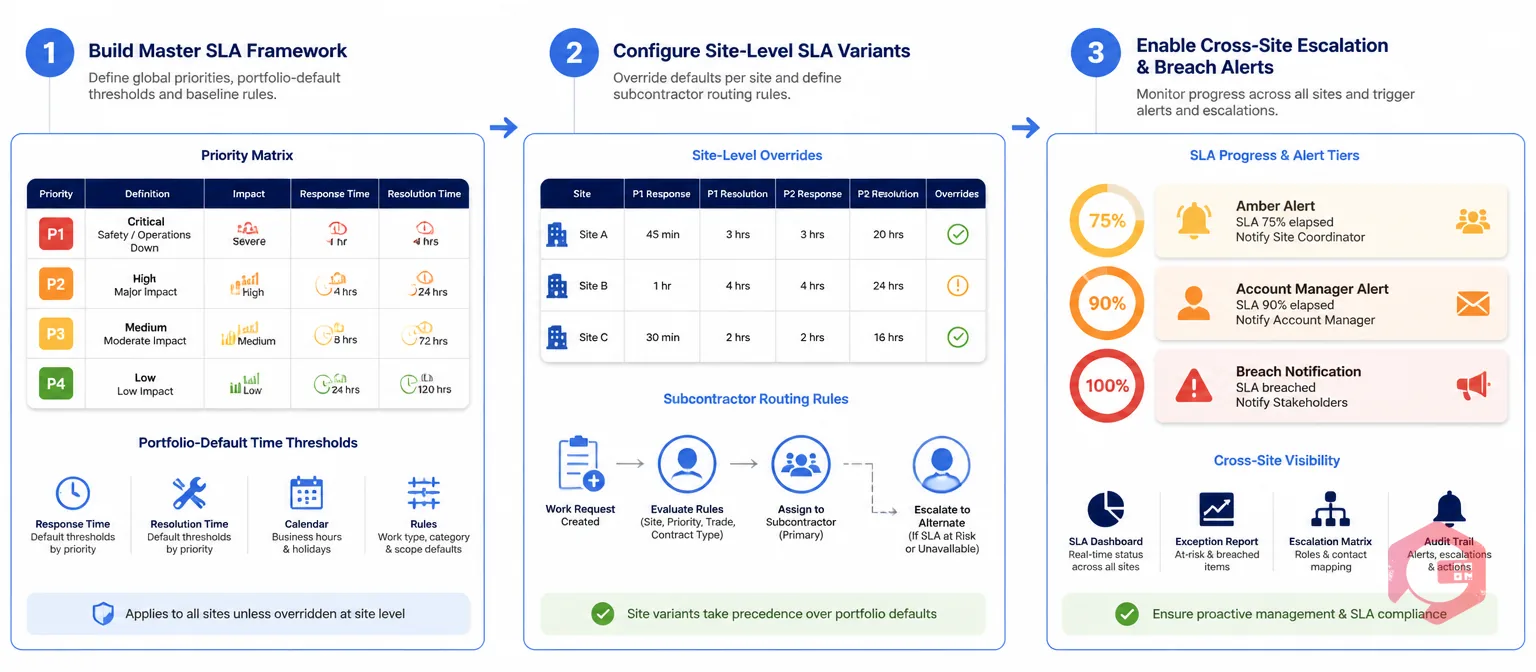
Configuration is where multi-site SLA management either works or fails. Three steps determine whether the CMMS delivers SLA consistency or simply records SLA breaches after they occur.
Start with the priority matrix. Define the priority categories that apply across the IFM portfolio — typically P1 (Emergency, life-safety risk), P2 (Urgent, significant impact on operations), P3 (Routine, planned resolution within business hours), P4 (Scheduled, PM and inspection activities) — and set the portfolio-default SLA times for each: acknowledgement, response, and resolution. These defaults apply to every site unless a site-specific override is configured.
Map each work order category to a default priority. A fire alarm fault maps to P1; a broken window maps to P2; a lighting fault in a non-critical area maps to P3. This mapping is configured once at the portfolio level — site teams don't classify priority on individual work orders; the category determines the priority and the CMMS applies the SLA automatically. This removes one of the most common sources of SLA inconsistency across sites: local teams applying different priority judgements to equivalent faults.
Once the master framework is built, configure site-level SLA overrides for any site where the contractual commitment differs from the portfolio default. A site with a 2-hour P2 response SLA — rather than the portfolio default of 4 hours — is configured with the override value. The priority category, escalation chain structure, and reporting taxonomy remain identical; only the time threshold changes. This preserves cross-site comparability while respecting individual contract terms.
Site-level configuration also covers local subcontractor assignments. At each site, the work order routing rules specify which subcontractor or in-house team receives assignments for each work category, based on the contracts and coverage agreements at that location. The workflow automation software handles routing automatically — the account manager doesn't manage a lookup table; the CMMS knows which team at which site handles which category and routes accordingly.
SLA alerts in a single-site CMMS notify the site manager. SLA alerts in an IFM CMMS must notify the right person at the right level — site manager for site-level breaches, account manager for persistent underperformance at a site, portfolio director for systemic failures across multiple sites simultaneously. Configure a tiered escalation structure: at 75% of SLA elapsed, the site manager receives an alert; at 90% of SLA elapsed, the account manager receives a copy; at 100% (breach), the account manager receives an immediate notification and the work order is flagged for client reporting. The notification builder delivers these alerts via the right channel — WhatsApp for site operatives, email for account managers, dashboard alerts for portfolio directors — without a separate communication system.
The portfolio-level SLA dashboard is the account director's primary operational tool. Six metrics drive the conversations that matter — with clients, with site managers, and in internal performance reviews:
| Dashboard Metric | What It Shows | Why It Matters for IFM SLA Management |
|---|---|---|
| SLA Compliance Rate by Site | Percentage of work orders closed within SLA at each site, current period | Surfaces underperforming sites immediately — not at month-end review |
| SLA Breach Count by Priority | Number of breaches broken out by P1/P2/P3/P4 across the portfolio | Identifies whether breaches are concentrated in critical or routine categories |
| Mean Time to Resolution by Site | Average resolution time per site vs. contracted SLA target | Shows sites consistently close to the SLA limit — at risk before they breach |
| Open Breach Log | All currently active work orders that have exceeded their SLA threshold | Live triage view — account managers intervene on active breaches, not historical ones |
| Repeat Fault Rate by Site | Percentage of reactive work orders at each site that are repeat faults | Identifies sites where reactive load is driven by underlying asset or PM programme failures |
| Subcontractor SLA Compliance | SLA completion rate by subcontractor across the portfolio | Holds third-party supply chain accountable with data rather than subjective assessment |
This dashboard is not a monthly reporting artefact — it is a live operational tool. Account directors who review it daily identify breach risks before they become breaches and subcontractor underperformance before it becomes a contractual dispute.
IFM contracts typically include a monthly performance report obligation — the IFM company must demonstrate to the client, in a specified format, that SLA commitments were met during the reporting period. For a 50-site portfolio, producing this report manually is a multi-day exercise that pulls data from multiple sources, reconciles inconsistencies, and hopes that nothing was missed. For an IFM company using a CMMS with standardised data capture across all sites, the monthly client report is generated in minutes.
The Report Builder generates client-formatted SLA reports covering the reporting period: SLA compliance rate by priority category and by site, breach count with root cause analysis, PM completion rates against scheduled frequencies, and any open items at period-end with their current status. These reports can be scheduled to generate automatically on the last working day of each month and delivered to the account manager for review before submission — removing the manual compilation effort and the risk of data errors in the reporting process.
For IFM clients with regulatory reporting obligations of their own — LEED-certified buildings, healthcare facilities with CQC inspection requirements, food production sites with BRC audit needs — the CMMS data that supports IFM SLA reporting also supports the client's own compliance evidence requirements. A single, well-configured CMMS data model serves multiple reporting audiences without duplicate data entry.
According to ISO 41001 Facility Management standard, performance measurement and reporting against agreed service levels is a core requirement of a compliant FM management system. The CMMS is the operational implementation of that requirement at scale — not a standalone reporting tool, but the system of record from which all performance evidence flows.

Cryotos CMMS is built for the operational complexity that IFM companies manage at scale. The multi-site architecture supports portfolio-level standardisation — work order templates, priority matrices, escalation chains, and reporting taxonomies configured once and deployed across every site — alongside site-level configuration for local SLA values, subcontractor assignments, and building-specific asset registers. There is no tension between standardisation and local variation; both exist in the same system with clear hierarchy rules governing which level takes precedence.
The preventive maintenance software module manages PM schedules across all sites from a central configuration — site-specific PM frequencies, asset-specific task checklists, and compliance completion tracking visible at both the site level and the portfolio level simultaneously. A portfolio director can see at a glance that PM compliance across the estate is at 93% this month and immediately identify which three sites are pulling that figure down, without running site-by-site reports.
For IFM companies with mobile workforces — technicians deployed across multiple sites within a day, subcontractors covering regional zones rather than fixed sites — the Cryotos mobile app gives every operative access to their assigned work orders regardless of which site they're physically at. Work orders follow the technician, not the site; the SLA clock and escalation chain operate correctly regardless of which site the technician is assigned from.
The consolidated reporting layer gives IFM account managers client-ready SLA performance reports across the full portfolio, subcontractor performance summaries for contract review meetings, and cross-site trend analysis for strategic conversations with clients about service investment and performance improvement. Teams using Cryotos report a 30% reduction in unplanned downtime, with IFM operators citing cross-site SLA visibility as the single biggest operational improvement in the first quarter of deployment.
Single-site FM requires a CMMS that manages work orders, PM schedules, and assets for one building or campus. IFM requires a CMMS that does all of that for 50 or more sites simultaneously, with a portfolio-level data model that enables cross-site comparison, standardised reporting, and centralised escalation management — while preserving site-level accountability and supporting site-specific SLA variations from a single configuration. The architectural difference is significant: an IFM CMMS must support hierarchical data structures (portfolio, account, site, building, floor, zone) that single-site CMMS setups don't require. Attempting to run an IFM operation on a single-site-designed CMMS typically results in either excessive centralisation (all sites look the same, local variation is unmanageable) or excessive fragmentation (50 separate CMMS instances with no cross-site visibility).
The CMMS enforces SLA compliance through the combination of standardised priority classification and site-level SLA value configuration. Work order priority is determined by the category of the fault — set at the portfolio level so it applies consistently — and the SLA clock runs from the portfolio-standard trigger point (typically work order creation timestamp). The SLA time threshold applied to that clock is the site-specific value configured for that priority category at that site. When the clock approaches the threshold, the escalation chain fires — regardless of which site the work order is at or which subcontractor is assigned. The result is consistent SLA enforcement behaviour across every site, even where the contractual time windows differ.
Standard client SLA reporting for an IFM portfolio typically requires: a period SLA compliance summary showing compliance rate by priority category and by site; a breach log with breach timestamps, response times, root causes, and resolution records; a PM completion report showing scheduled vs. completed tasks by site and asset category; and an open items log showing any work orders that remained unresolved at period-end with their current age and assigned team. For clients with additional compliance requirements — statutory inspections, regulatory maintenance frequencies — the CMMS also generates the compliance evidence records that underpin those obligations. Most of this data is generated from the CMMS records accumulated during the reporting period without any additional data entry at reporting time.
Effective IFM breach escalation operates on three levels. At the site level, the site supervisor or duty manager receives an alert when a work order is approaching its SLA threshold — giving them time to intervene, reassign, or expedite before the breach occurs. At the account level, the account manager receives notification when a breach occurs and when a site's cumulative breach count crosses a threshold that indicates a systemic problem rather than an isolated event. At the portfolio level, the IFM director receives alerts when multiple sites breach simultaneously or when a subcontractor's performance drops below the contractual minimum across multiple sites in the same period. Configuring this three-tier escalation structure in the CMMS, with the right thresholds and the right notification channels for each level, is what transforms SLA management from a retrospective reporting exercise into a real-time operational discipline.
Delivering consistent SLAs across 50+ sites is not a people problem — it is a systems and data problem. The right people at each site can manage their own performance; what they cannot do without the right system is make their performance visible and comparable to every other site in the portfolio, in real time, within a standardised framework that enables fair accountability and structured escalation. That is what a well-configured IFM CMMS provides.
For IFM companies managing multi-site portfolios and looking to move from monthly retrospective SLA reporting to daily proactive SLA management, Cryotos CMMS provides the multi-site architecture, portfolio dashboard, and automated escalation tools to make consistent delivery achievable rather than aspirational. Book a free demo today and see what your portfolio looks like when every site is managed to the same standard.




Cryotos AI predicts failures, automates work orders, and simplifies maintenance—before problems slow you down.



