

Intelligent technician auto-assignment is a CMMS feature that automatically selects and assigns the best-fit technician to a work order based on equipment criticality, technician workload, and real-time attendance — without requiring a supervisor to manually pick someone.
When a work request converts to a work order, the system evaluates every eligible technician, scores them, and assigns the most suitable one in seconds. This removes the bottleneck of manual dispatch and ensures that critical equipment gets attention from the right person at the right time.
In practice, this matters most during high-volume breakdown periods. Instead of a maintenance manager fielding calls and manually juggling assignments, the system handles the routing logic automatically — and every decision is logged for audit purposes.

Most maintenance teams still rely on supervisors or coordinators to assign work orders. This creates several predictable problems:
As maintenance operations scale — more assets, more shifts, more sites — manual assignment becomes a genuine bottleneck. Work order management software with built-in auto-assignment solves this at the system level rather than adding more coordinators.
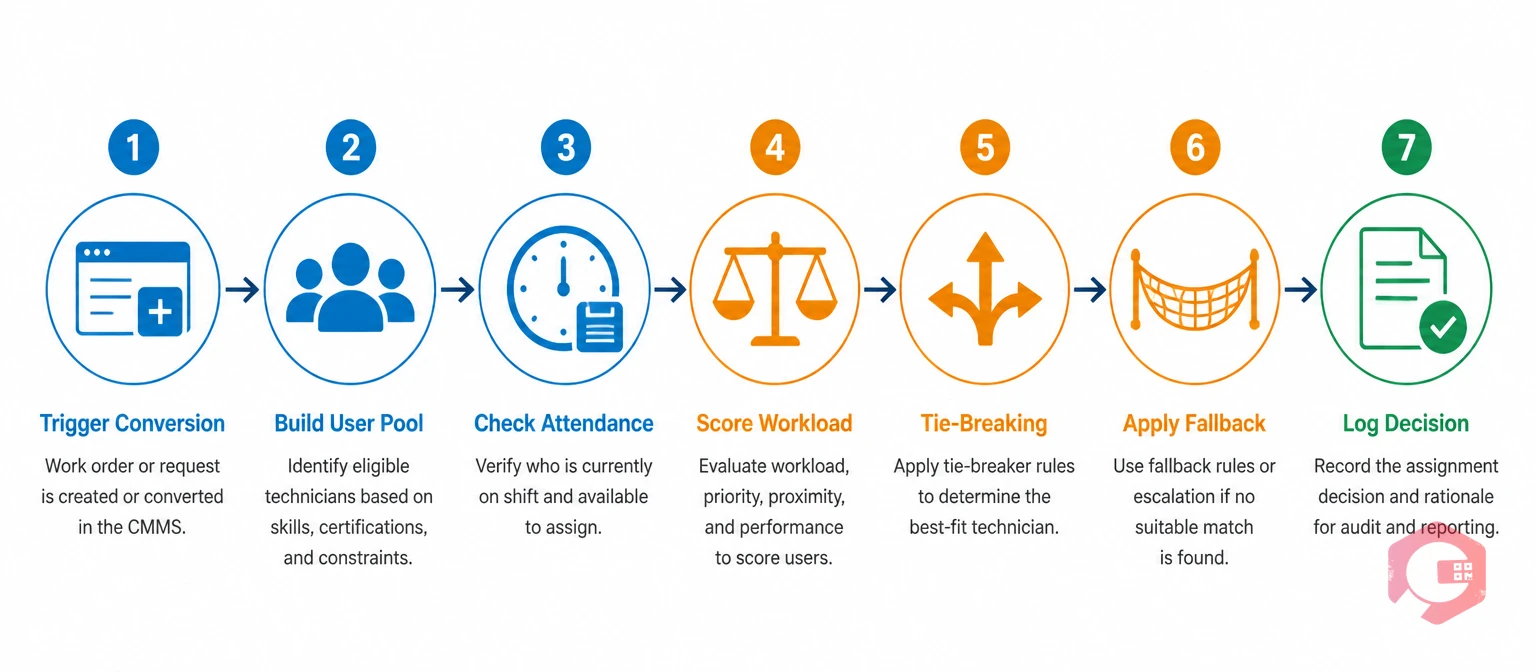
The assignment logic runs as part of the work request to work order (WR → WO) conversion process. Here is how the system walks through the decision:
A work request arrives through the client portal. When the request meets the required conditions — a valid clientPortalRequestId, an action status of submit or pending, and the auto-assign configuration turned on — the conversion process begins. Manual conversions and direct work order creation remain unaffected.
The system fetches the workflow template linked to the tenant's autoAssignWorkflowId configuration. Eligible technicians are drawn from two sources: the template's direct user list and any user groups attached to the template. This gives administrators control over which technicians can receive auto-assigned work.
The system checks whether each eligible technician has punched in on that day. Technicians on a break are still counted as punched in. This step filters out absent or off-shift staff entirely, so work orders never get assigned to someone who is not on site.
Each technician's workload score is calculated using a weighted formula. The weight for each active work order is 1 / equipment ranking — meaning work orders on higher-criticality machines (lower ranking number) carry more weight. A technician with no active assignments has a score of zero and is the cheapest assignment.
When two or more technicians share the same workload score, the system applies a four-stage tie-break in this order:
If no eligible technician has punched in for the day, the system assigns the work order to the tenant's configured autoAssignFallbackUserId. If no fallback is configured, the system scores all eligible users regardless of attendance and picks the best fit.
The chosen technician is assigned, the work order is created, and the system writes a row to the auto_assignment_audit table. This log captures the chosen user, the decision branch taken, scores for all candidates, the tie-breaker used, and any relevant flags. Every auto-assignment decision is fully traceable.
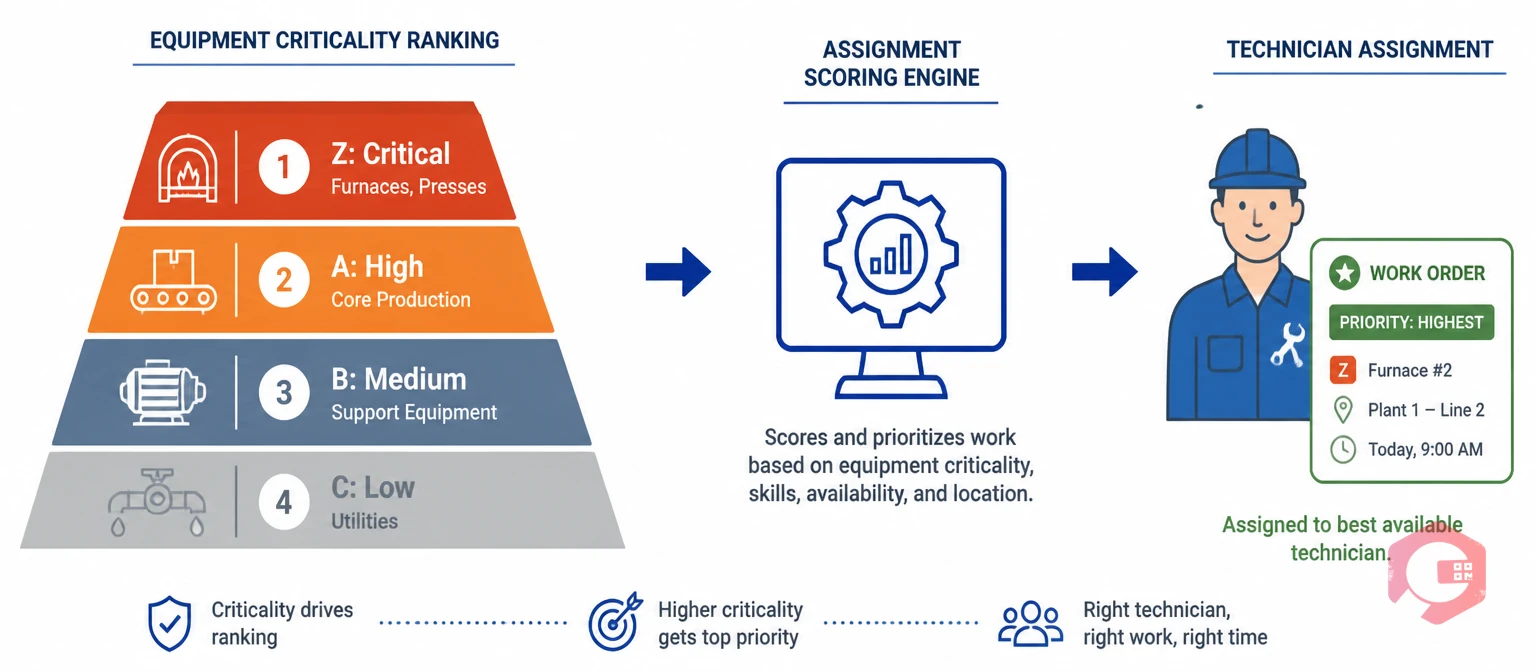
Equipment criticality ranking is the foundation of intelligent auto-assignment. Not every machine carries the same production impact, so work orders on higher-criticality equipment should be prioritised — and assigned to technicians with the capacity to handle them properly.
In Cryotos, equipment categories are defined hierarchically:
Within each category, individual machines carry a ranking number (1, 2, 3, etc.) based on their specific production impact, replacement difficulty, and maintenance history. A furnace ranked 1 in Category Z carries the highest overall priority in the entire plant.
These rankings are maintained through the front-end configuration screens and can be updated by authorised users as asset risk profiles change. Changes to ranking feed immediately into the allocation engine's scoring logic.
The asset tracking system connects individual equipment records to their criticality profiles — so every work order created for a ranked asset automatically carries that ranking into the assignment calculation.
Auto-assignment is fully opt-in and configurable per tenant. Three settings control the behaviour:
There is also a built-in validation gate: if auto-assign is enabled but the incoming work request has no asset attached — or the asset carries no valid equipment ranking — the conversion is blocked immediately with the message: Asset or asset ranking is required to convert this request to a work order. This prevents incomplete data from reaching technicians in the field.
Every auto-assignment decision is logged in the auto_assignment_audit table. This is not just a tick box — it's an operational record that maintenance managers can review during post-incident analysis, performance reviews, or compliance audits.
Each audit row includes:
This level of traceability supports both operational accountability and continuous improvement. If assignment patterns show that one technician consistently receives the highest-criticality breakdowns, that's a signal to review team sizing or training.
Cryotos CMMS implements priority-based auto-assignment as part of its work request to work order conversion workflow. The feature is designed to run silently in the background — maintenance teams see the result (a properly assigned work order) without needing to interact with the scoring logic.
Key implementation points:
The workflow automation layer that drives this feature also powers other Cryotos automation capabilities — including PM triggers, approval chains, and escalation routing.
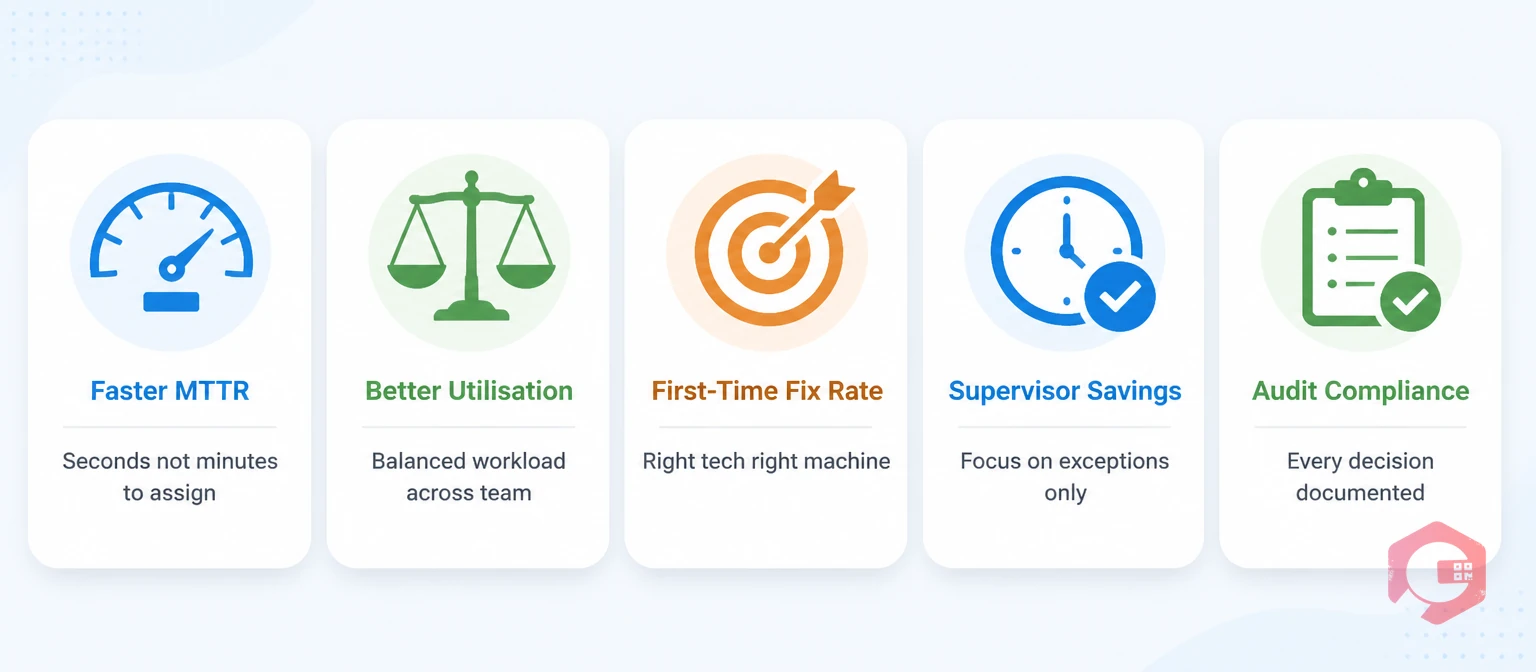
Teams that move from manual dispatch to intelligent auto-assignment typically see measurable improvements across several metrics:
Use the MTTR calculator to baseline your current response times before enabling auto-assignment — this gives you a concrete before/after comparison after the first month.
No. The auto-assignment engine runs only when a work request created through the client portal is converted to a work order and the tenant has the feature enabled. Preventive maintenance schedules, direct work order creation, and mobile-initiated work orders use standard assignment rules and are not affected.
The system routes the work order to the configured fallback user (set via autoAssignFallbackUserId). If no fallback user is configured, the system scores all eligible users regardless of attendance and selects the lowest-workload technician.
Yes. Manual reassignment is available at any time through the front-end interface. Supervisors can view each technician's current status (Available, Busy, or Unavailable), choose a new assignee, and the system stores the reassignment reason in the audit log with a mandatory comment field.
Each active work order on a technician's queue carries a weight equal to 1 divided by the equipment's ranking number. Work orders on higher-criticality machines (lower ranking numbers) add more weight to that technician's score. The system assigns the next work order to the technician with the lowest total score — meaning less busy technicians, especially those handling lower-criticality tasks, receive priority.
No. The feature is gated by three conditions: a valid portal request ID, the correct action status, and the tenant configuration being set to enabled. If any one of these conditions is not met, the system falls back to standard work order creation. Existing flows for PM, schedulers, and direct creation are completely isolated.
Cryotos' intelligent auto-assignment gives maintenance teams a scalable way to handle growing work volumes without adding dispatch overhead. If your team is still manually routing work orders, schedule a free demo to see how the assignment engine works in a live environment.




Cryotos AI predicts failures, automates work orders, and simplifies maintenance—before problems slow you down.



