

An effective preventive maintenance checklist contains eight structural components: asset identification, task instructions, frequency triggers, required tools and parts, safety protocols, acceptance criteria, sign-off fields, and photo evidence with audit trail. Miss any one and the checklist either gets ignored on the floor, fails an audit, or both.
This post breaks down each component — what it contains, what fails when it's missing, and the specific fields your team needs. By the end you'll be able to audit any PM checklist in your facility and spot exactly where it's weak.

A preventive maintenance checklist is a structured list of inspection and servicing tasks performed on a specific asset at a specific frequency to prevent failure. It's the tactical document that turns a preventive maintenance program from strategy into daily floor work.
Three things separate a checklist from a plan or schedule:
Without the right components, a checklist becomes a compliance-theater document — signed off without anything actually being inspected. The 8 components below prevent that.
Every checklist starts with unambiguous asset identification. If a technician can't tell which pump they're standing in front of, the rest of the checklist is meaningless.
Required fields:
What fails without it: Techs service the wrong unit, history accumulates on the wrong asset record, and reliability data becomes unusable. Plants with strong asset tracking typically cut diagnosis time by 30% just by getting this component right.
The task list is the heart of the checklist. Vague tasks like "check the motor" are useless — they let a rushed technician sign off without inspecting anything specific.
Each task needs three things:
Group tasks by physical location on the asset (top to bottom, inside to outside) so the tech walks a logical path instead of jumping back and forth. A checklist that takes 25 minutes done well is far better than one that takes 8 minutes done sloppy.
How often the checklist fires is as important as what's on it. Most plants over-schedule low-criticality assets and under-schedule the ones that fail.
Three trigger types belong in this component:
Define the trigger explicitly in the checklist header. "Every 250 run-hours OR 90 days, whichever comes first" is precise; "quarterly-ish" is not. Plants that mix triggers across asset classes typically reduce unnecessary PM work by 20% to 30% within six months.

The most common reason a PM task gets skipped is the tech didn't bring the right gear. Listing it on the checklist prevents the second trip to the storeroom.
Include in this section:
For digital checklists, link consumable items directly to the inventory module so usage decrements stock automatically when the PM is closed. This is what prevents the "spare parts on the spreadsheet that aren't actually in the cabinet" problem.
Safety steps that live in a separate document are safety steps that get skipped. They belong inside the checklist itself, ordered as tasks that must be checked off before the inspection begins.
What this component must contain:
OSHA penalties for missed LOTO procedures alone can hit $16,550 per violation per the OSHA penalty schedule, before counting injury costs. Embedding safety as required pre-task fields makes them non-skippable.
Every inspection task needs a clear pass/fail rule. Without it, "everything looks fine" becomes the default and real problems slip past.
Each measurable task should specify:
Pass/fail logic is what converts inspection data into reliability intelligence. When 30% of monthly bearing inspections trip the warning threshold, you have a leading indicator three months before the bearing fails.
Accountability lives in this component. Without it, you can't tell who actually did the work — or whether it was done at all.
Mandatory fields:
The start/end timestamp pair is one of the most powerful audit signals available. When a 30-minute checklist takes 90 seconds, the system can flag it for review automatically — catching pencil-whipping before it becomes a habit.
The final component is what makes the checklist defensible to auditors and useful for trend analysis later.
Build in:
An audit trail isn't just for compliance — it's what lets you go back six months later and ask "why did this pump fail" with real evidence instead of guesswork. ISO 55001 and FDA 21 CFR Part 11 both require this level of traceability for regulated industries.
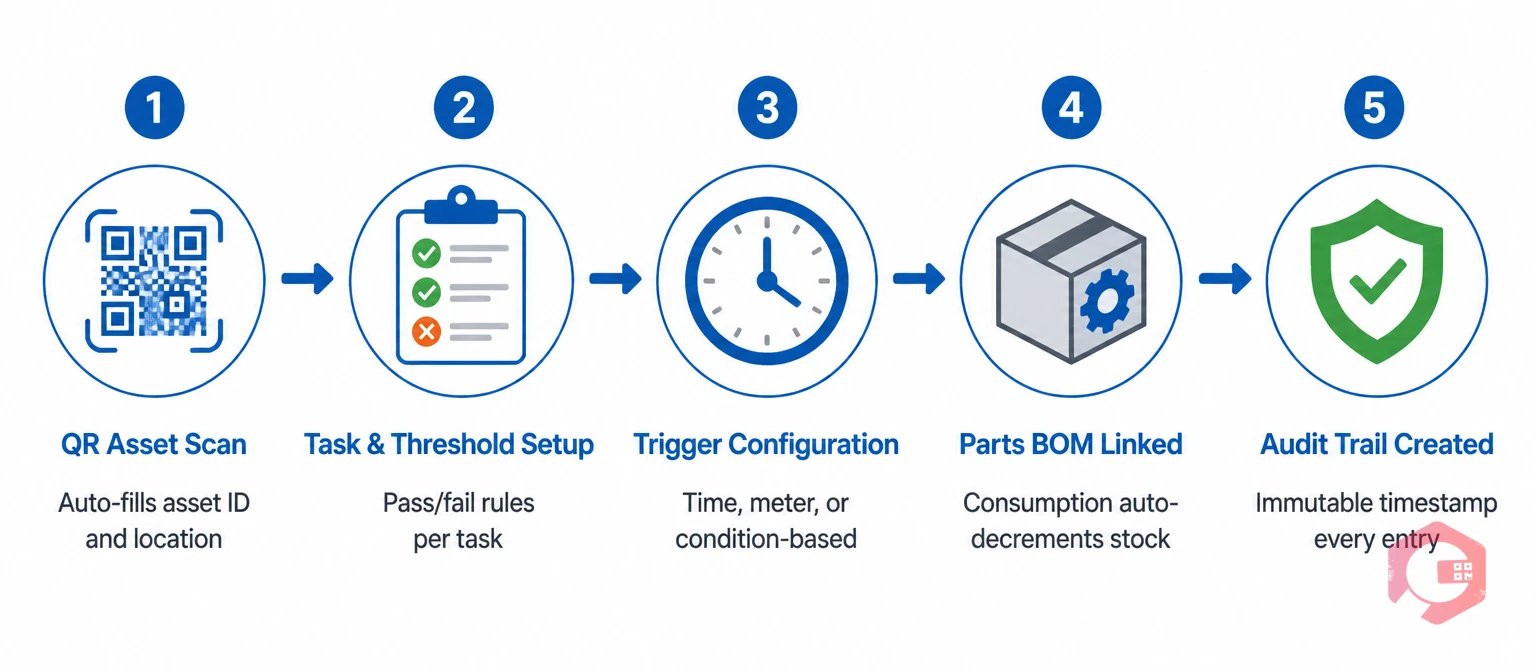
Cryotos ships with all eight components pre-structured into its maintenance checklists module. Asset identification pulls from the asset hierarchy via QR scan. Task lists support measurable fields with pass/fail thresholds. Triggers can be time, meter, or condition-based on the same checklist. Tools and parts link directly to the spare parts BOM so consumption auto-decrements. LOTO steps embed as required pre-task fields. Photo evidence captures geolocation and timestamp automatically. Sign-off uses login credentials with optional supervisor review for critical assets. Every change creates an immutable audit entry. Most teams configure their first 10 checklists in under a week using the built-in templates.
Most well-designed PM checklists have 8 to 25 tasks and take 15 to 45 minutes to complete. Anything under 10 minutes likely lacks acceptance criteria or skips safety steps. Anything over an hour usually combines two or three checklists that should be split — different frequencies, different skill levels, or different shutdown requirements.
Digital, in almost every case. Paper checklists can't capture timestamps, geolocation, or photos, can't link to inventory, and can't flag pencil-whipping. The only common exception is environments where mobile devices are restricted (some clean rooms, certain ATEX-rated areas), and even there hybrid models with tablet handoff at the boundary work better than full paper.
Review every checklist at least annually, and immediately after any of these events: an unexpected failure on the asset, a near-miss safety incident, an OEM service bulletin, or a major modification. Teams reviewing quarterly typically have 20% fewer recurring failures than those who set and forget.
Yes — that's how templates should work. Build one master checklist per asset class (say, "centrifugal pump 50–200 HP") with placeholder fields for asset-specific values. The system pre-fills serial number, location, and baseline readings when applied to a new asset, while the checklist body stays identical. This keeps your library manageable instead of growing one per asset.
A PM checklist that's missing any of these eight components isn't really a checklist — it's a clipboard ritual. Audit your existing checklists against this list, fix the gaps, and you'll see PM compliance, audit defensibility, and reliability data quality all improve in the same quarter. If you'd like to skip the rebuild and start from templates that already include every component, book a demo with Cryotos to see the eight-component framework configured for your asset base.




Cryotos AI predicts failures, automates work orders, and simplifies maintenance—before problems slow you down.



