You keep a lone maintenance worker safe by deciding which jobs can be done alone, confirming who is authorized, agreeing a check-in routine, and acting fast when a check-in is missed. These four controls matter most on night shifts and remote sites, where help is slow to arrive. Working alone is often safe, but only when the risks are assessed first.
This guide covers the risks, the jobs that should never be done alone, and a four-step framework you can start this month. It also shows where maintenance software helps and where you need a dedicated alarm device instead.
Key Takeaways
Lone working is any work done without a colleague nearby who can see or hear the worker. In maintenance, that includes a night-shift technician on a quiet plant floor, an electrician at an unmanned substation, and a contractor in a rooftop plant room.
Distance is not the key point. What matters is whether someone can notice a problem and reach the worker quickly.
Guidance from the UK Health and Safety Executive says working alone is often safe, but employers must assess the risks first. The US has no single lone worker standard. Employers rely on the general duty to provide a safe workplace and on task rules, such as OSHA 1910.146 for confined spaces and OSHA 1910.147 for lockout/tagout. The ISO 45001 standard adds a risk-based way to manage safety.
Some regions set specific check-in duties, so confirm the rules where you work.
Night shifts and remote sites both cut a worker off from help, but for different reasons. Night shifts add fatigue and thin cover. Remote sites add long response times and weak signal.
| Factor | Night Shift | Remote Site |
|---|---|---|
| Main added risk | Fatigue and fewer people on site | Delayed rescue and hard access |
| Why help is slow | Colleagues are working in other areas | No one else is on site at all |
| Communication | Radio dead spots; phones banned in some zones | Weak or no mobile signal |
| Key control | Task limits, fatigue limits and a named night contact | A tested communication link and an overdue-person plan |
Fatigue is a drop in alertness that raises the risk of errors at night. Alertness often dips in the early hours, so avoid planning the riskiest solo task for that window.
Remote sites add travel risk before and after the job, so plan the journey as part of the work.
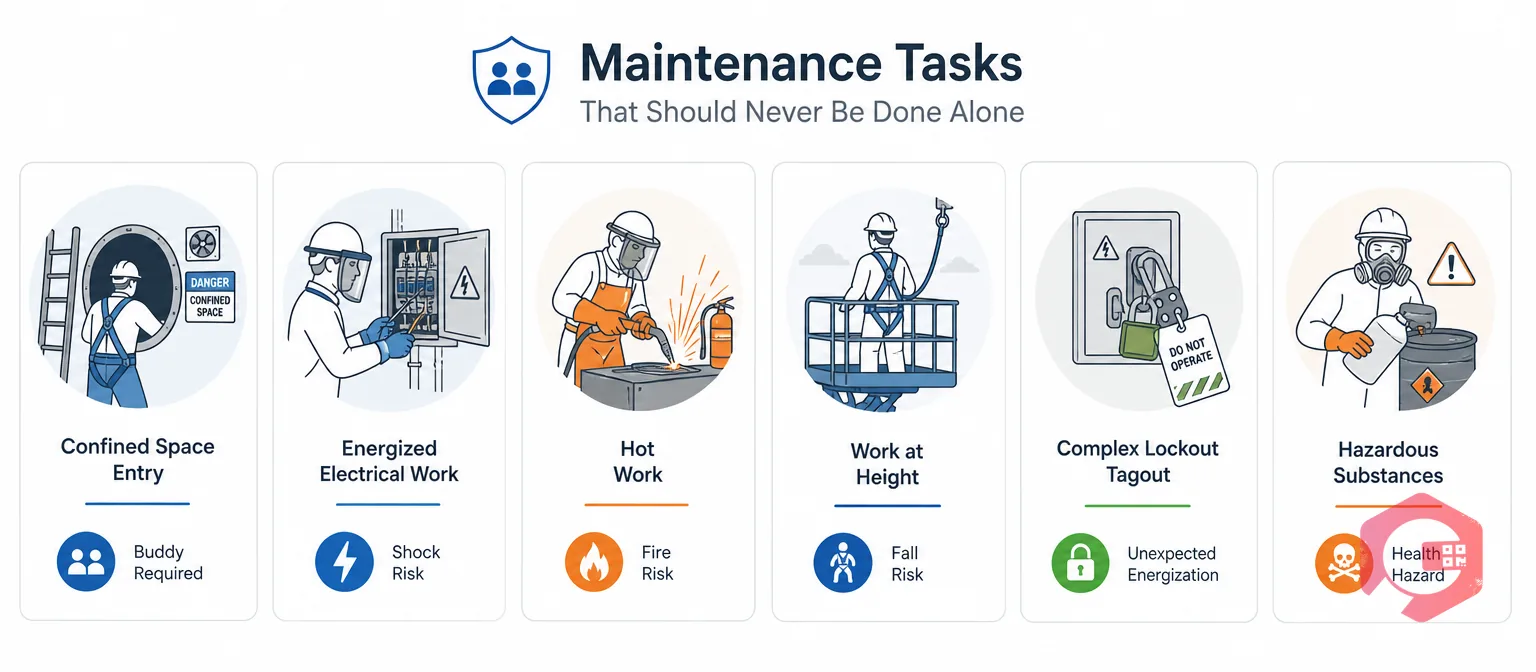
Some tasks need a second person because one mistake could leave a lone maintenance worker unable to call for help. Write the list down and build it into your work order templates, so planners cannot schedule these jobs as solo work.
Low-risk jobs such as readings, rounds and visual checks are usually fine to do alone with a working check-in routine. Your site risk assessment makes the final call.
Build the pre-job checks for each task from a safety compliance checklist.
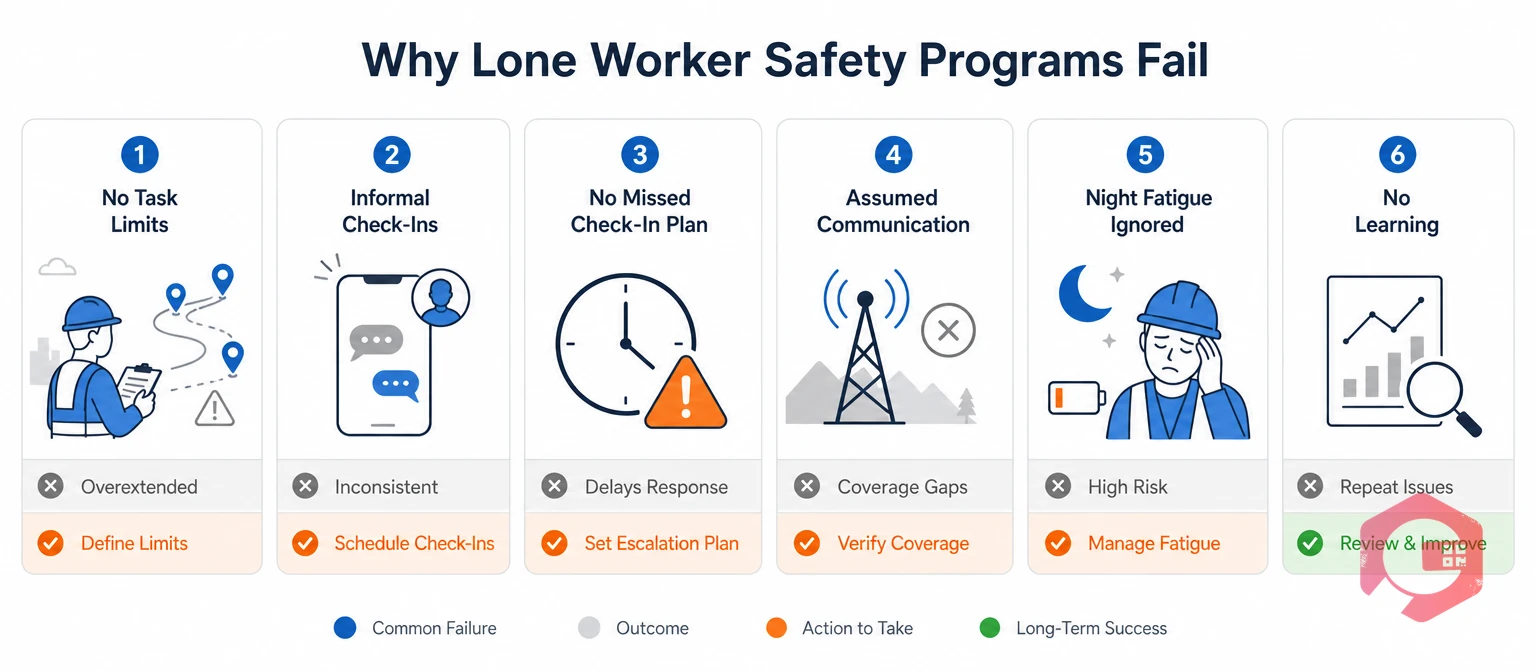
Lone worker programs fail when the controls exist on paper but break in practice. The common mistake is treating the policy as the control.
Most maintenance teams can fix these with a short routine and a few system settings.
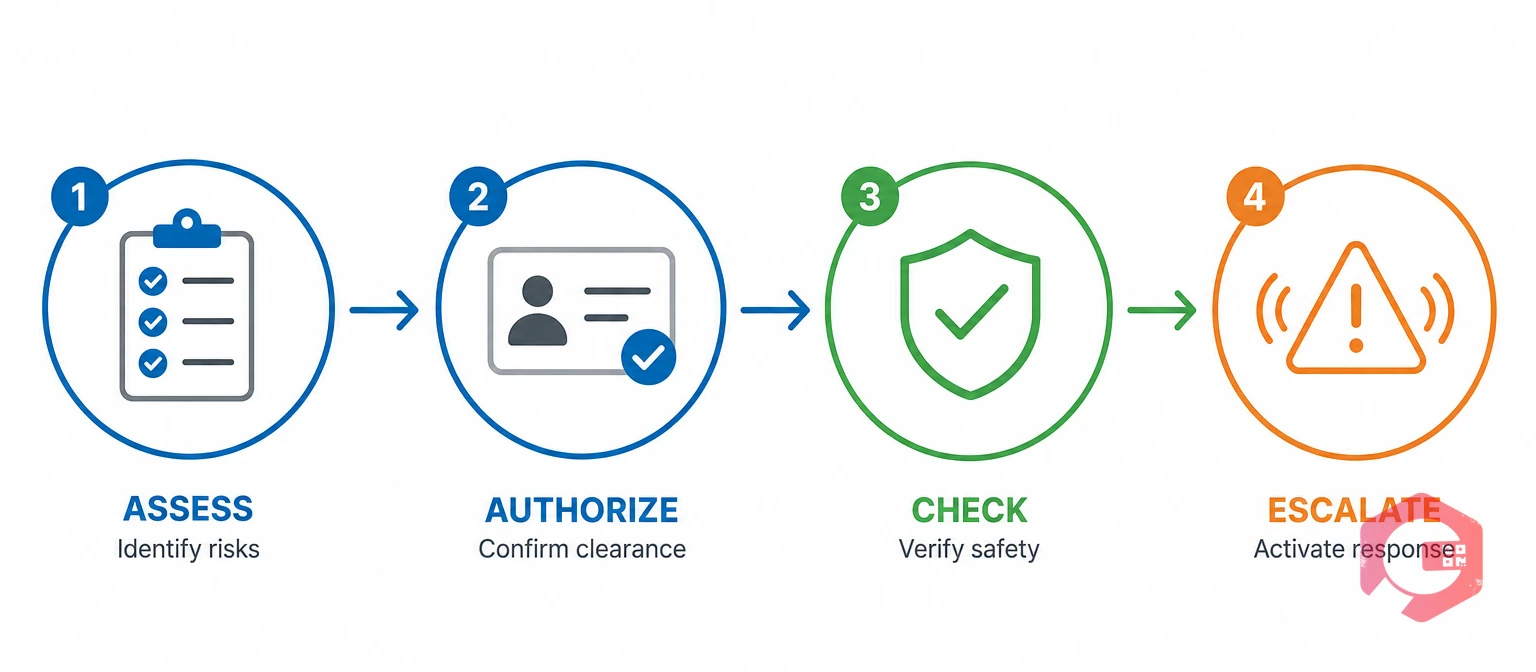
The ASSESS-AUTHORIZE-CHECK-ESCALATE framework turns a lone worker policy into four repeatable steps. Run them for every job a lone maintenance worker does alone.
The ASSESS-AUTHORIZE-CHECK-ESCALATE Framework:
A check-in is a timed confirmation that the worker is safe. Set the interval from the risk assessment and name the person who is watching for it.
A check-in schedule matches how often a worker confirms safety to how risky the job is. The intervals below are examples only, so set yours from your own risk assessment.
| Risk Tier | Example Tasks | Example Check-In Pattern | If a Check-In Is Missed |
|---|---|---|---|
| Low | Rounds, readings, visual checks | Start, finish, and about hourly | Call the worker, then send a nearby colleague |
| Medium | Mechanical repair, lubrication | Start, finish, and about every 30 minutes | Call twice, then send someone to the location |
| High | Solo work allowed only with extra controls and a tested link | Short interval or constant contact | Escalate at once; call emergency services if there is no contact |
| Not solo | Confined space entry, many energized tasks | Not applicable: two or more people | Not applicable |
A missed check-in is a signal that a worker may need help. Act on it fast, and write the wait times into the procedure, so nobody has to guess.
A Computerized Maintenance Management System supports lone worker safety by controlling who gets the job, which checks come first, and what record is left. It is not an alarm service. Cryotos is a maintenance system, so pair it with a lone worker device or monitored service for SOS and fall detection.
Maintenance teams using Cryotos have reported up to 30% reduction in unplanned downtime and 25% faster repair turnaround. Fewer breakdowns can also mean fewer emergency night callouts, which is when lone working is riskiest.
In many places, yes. HSE guidance says working alone is often safe when the risks are assessed first. The US has no single lone worker standard, so employers rely on general duty and task rules. Some regions set specific check-in rules, so check your local law.
Permit-required confined space entry, many energized electrical jobs, hot work in hazardous areas and work at height without a rescue plan are common examples. Your risk assessment and local rules make the final decision. When in doubt, send two people.
It depends on the risk. Low-risk rounds may need a check about every hour, while higher-risk jobs need a shorter interval or constant contact. Test that the communication method works at the job location before work starts.
Follow a set ladder. Call the worker, call again after a short wait, send someone to the location, then call emergency services with the exact location. Write the wait times into your procedure.
Test communication at the job location, limit the task to low or medium risk, and share the route and expected finish time with a named contact. Agree when that contact will raise the alarm, and keep the exact location ready for emergency services.
No. A CMMS controls planning, permits, checklists and records. It does not detect a fall or send an SOS, so use a dedicated device or monitored service for alarms and use the CMMS to show the controls were followed.
Lone work is safer when every step is planned, checked and recorded. Schedule a free demo to see how Cryotos manages checklists, permits and offline mobile records for each lone maintenance worker on your night shift and remote sites.


Cryotos AI predicts failures, automates work orders, and simplifies maintenance—before problems slow you down.