

Mean Time to Acknowledge (MTTA) is a maintenance and IT operations metric that measures the average time between when an alert or failure is detected and when a technician or team formally acknowledges it. A low MTTA means your team responds to problems fast — before small faults become costly breakdowns. According to Gartner, organizations with structured incident acknowledgment processes reduce unplanned downtime by up to 35%. In this guide, you'll learn the MTTA formula, industry benchmarks, and the exact steps to bring your numbers down.
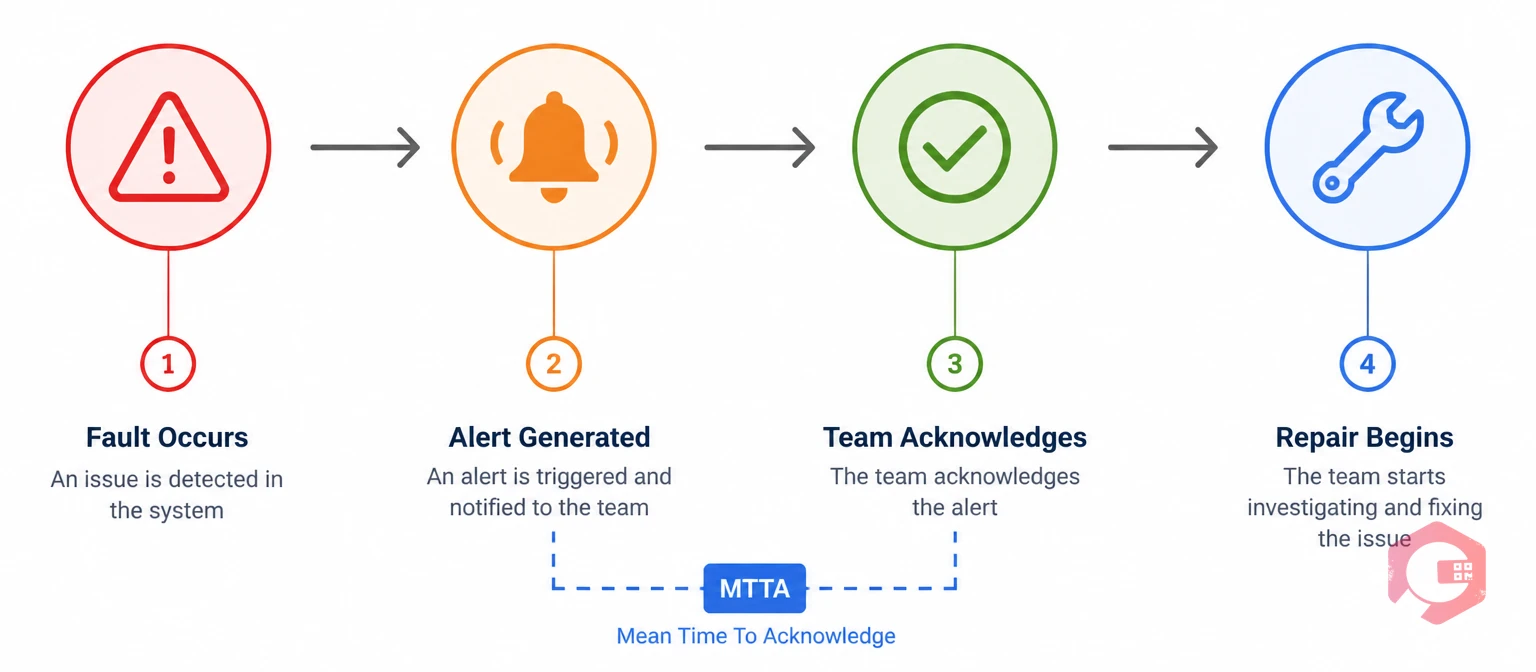
Mean Time to Acknowledge (MTTA) tracks how quickly your team picks up an alert after it fires. It starts the moment a fault, alarm, or work request is logged — and stops the moment someone on your team marks it as acknowledged or takes ownership of it.
Think of it as the gap between the system saying "something is wrong" and a person saying "I'm on it." The longer that gap, the more time equipment sits in a degraded or failed state before anyone acts.
MTTA is one of four core incident response metrics, alongside MTTR (Mean Time to Repair), MTTD (Mean Time to Detect), and MTTF (Mean Time to Failure). Together, they paint a full picture of your team's response capability. MTTA specifically focuses on the human side — it tells you whether your notification and escalation processes are working, and whether technicians are actually seeing and acting on alerts in time.
In downtime tracking, MTTA often reveals bottlenecks that raw repair time data misses. You might have fast technicians, but if alerts sit unacknowledged for 45 minutes due to unclear ownership or poor notification routing, your total downtime stays high regardless.
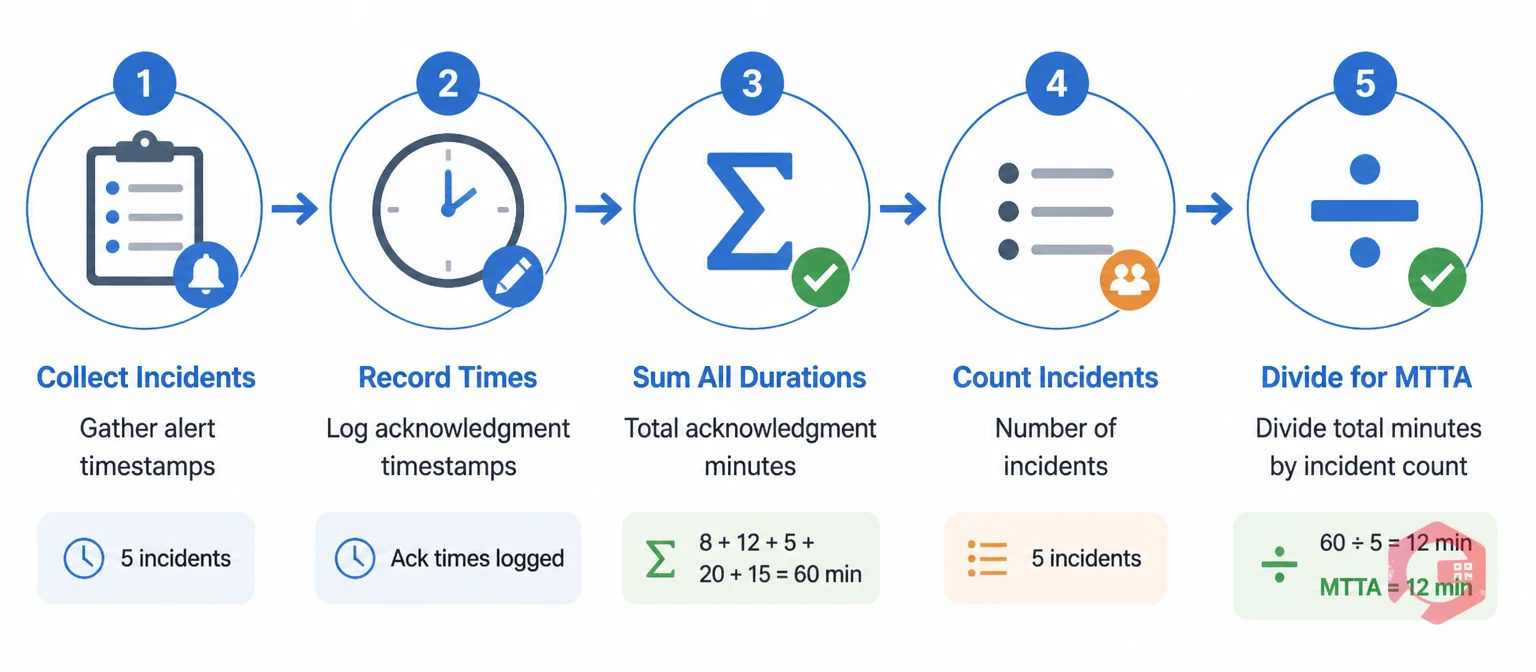
The MTTA formula is straightforward. You need two data points for each incident: the time the alert was generated and the time it was acknowledged.
MTTA = Total Acknowledgment Time Across All Incidents ÷ Number of Incidents
Here's how to apply it in practice. Say your team handled 5 incidents last week with acknowledgment times of 8, 12, 5, 20, and 15 minutes. Your MTTA = (8 + 12 + 5 + 20 + 15) ÷ 5 = 12 minutes.
To get the most accurate picture, track MTTA separately by asset type, shift, or department. A 12-minute average might look acceptable, but if third-shift acknowledgments average 35 minutes while day-shift averages 6 minutes, you have a specific staffing or notification coverage problem to fix — not a general one.
Your CMMS reporting tools should be able to generate this data automatically if you're capturing alert timestamps and acknowledgment timestamps on every work request. If you're still doing this manually in spreadsheets, you're likely underreporting incidents and overstating your performance.
These three metrics are often used together, and it's easy to confuse them. Here's a clear breakdown of what each one measures and when it applies.
| Metric | What It Measures | Starts When | Ends When | Reveals |
|---|---|---|---|---|
| MTTD | Time to detect a fault | Fault occurs | Alert is generated | Sensor/monitoring gaps |
| MTTA | Time to acknowledge the alert | Alert is generated | Team member acknowledges | Notification and ownership gaps |
| MTTR | Time to repair the fault | Alert is generated | Equipment is restored | Repair speed and skill gaps |
The key distinction: MTTD tells you about your detection capability, MTTA tells you about your response readiness, and MTTR tells you about your resolution speed. A team with excellent MTTR but poor MTTA is fast at fixing things once they start — but slow to notice problems are happening at all.
In a well-run maintenance operation, you want all three to be low. But MTTA is often the quickest win because it's usually driven by process and notification configuration, not technical skill. You can cut MTTA significantly without hiring a single extra technician.
What counts as a "good" MTTA varies by sector, asset criticality, and operational model. Here are realistic benchmarks based on industry data and maintenance best practices.
| Industry | Target MTTA | Acceptable Range | Red Flag |
|---|---|---|---|
| Manufacturing | < 5 minutes | 5–15 minutes | > 30 minutes |
| Oil & Gas | < 3 minutes | 3–10 minutes | > 20 minutes |
| Healthcare / Hospitals | < 2 minutes | 2–5 minutes | > 10 minutes |
| Food & Beverage | < 5 minutes | 5–20 minutes | > 40 minutes |
| Facility Management | < 10 minutes | 10–30 minutes | > 60 minutes |
| IT / Data Center | < 1 minute | 1–5 minutes | > 15 minutes |
These benchmarks assume 24/7 operations with structured on-call rotations. If your facility runs single-shift operations, your acceptable range is wider — but your target should still push toward the lower end during active hours.
If your MTTA consistently exceeds the "red flag" threshold, treat it as a system problem, not a people problem. The root cause is almost always one of three things: unclear alert ownership, poor notification delivery, or no defined acknowledgment process in your work order system.
Every minute an alert sits unacknowledged is a minute a fault is allowed to grow. In equipment-intensive environments, the difference between a 5-minute acknowledgment and a 45-minute one can mean the difference between a minor adjustment and a full component replacement.
Here's the practical impact: if a conveyor bearing failure alert fires at 2:14 AM and isn't acknowledged until 3:00 AM, the bearing has been running hot and degrading for 46 minutes. By the time a technician arrives, what could have been a $200 lubrication call has become a $4,000 bearing replacement — plus 6 hours of production downtime.
MTTA also directly affects your corrective maintenance cycle. A high MTTA inflates your total incident response time even when your actual repair speed is excellent. This makes it harder to hit MTTR targets and can skew your maintenance performance reporting.
Beyond cost, MTTA has safety implications. In industries like oil and gas, pharmaceuticals, and healthcare, a delayed acknowledgment on a critical alert isn't just an operational problem — it's a compliance and safety risk. OSHA Process Safety Management (PSM) regulations require documented response protocols for high-hazard equipment, and MTTA is a direct measure of whether those protocols are being followed.

Cutting MTTA doesn't require a complete overhaul of your maintenance program. Most teams can move the needle significantly by fixing a handful of process and tool gaps. Here are seven approaches that work.
Cryotos is built specifically for maintenance teams that need to close the gap between alert and action. Several features directly target the drivers of high MTTA.
The work request module captures alerts via QR code scan, mobile form, or IoT trigger — and immediately routes them to the right technician based on asset type, location, and shift schedule. There's no manual triage step where alerts sit in a queue waiting for a supervisor to assign them.
Real-time notifications go out via push, email, and WhatsApp the moment a work request is created. If the assigned technician doesn't acknowledge within your configured window, Cryotos automatically escalates to the next person in the chain. This eliminates the most common MTTA killer: alerts that technically "arrived" but were never seen.
The BI Dashboard tracks MTTA alongside MTTR and downtime percentage in real time, broken down by asset, team, and shift. You can spot acknowledgment delays the same day they happen — not weeks later during a monthly review. Cryotos customers report up to 30% reduction in unplanned downtime after implementing structured alert acknowledgment workflows, with faster response times visible within the first two weeks of use.
For most manufacturing operations, a target MTTA under 5 minutes during active shifts is realistic and achievable with a modern CMMS. For critical production lines with high downtime costs, pushing toward 2–3 minutes is worth the effort. During off-hours or skeleton-crew shifts, 10–15 minutes is generally acceptable if you have automated escalation in place.
Not exactly. Response time is a general term that could refer to how long it takes to start repairs, arrive on site, or resolve an issue entirely. MTTA is a specific, standardized metric that measures only the acknowledgment step — from alert generation to formal acknowledgment. It's one component of total incident response time, and it's the component most directly controlled by your notification and escalation processes.
You can calculate MTTA manually by logging alert timestamps and acknowledgment timestamps in a spreadsheet, then dividing the total acknowledgment time by the number of incidents. The challenge is accuracy — manual logging misses incidents, introduces timestamp errors, and takes time your team doesn't have. A CMMS captures these timestamps automatically on every work request, which gives you reliable data without the manual overhead.
MTTD (Mean Time to Detect) measures the time between when a fault occurs and when an alert is generated. MTTA picks up where MTTD ends — it measures the time from alert generation to acknowledgment by a team member. In a well-instrumented facility, MTTD is often very short because sensors catch faults quickly. MTTA reveals whether your team is actually responding to those alerts in time.
Yes. Any CMMS or incident management platform that logs alert creation timestamps and acknowledgment timestamps can calculate MTTA automatically. Cryotos, for example, captures both data points on every work request and surfaces MTTA in its BI Dashboard without any manual input from your team.
If your team is still finding out about equipment failures through phone calls or by walking the floor, your MTTA is likely measured in hours — not minutes. Cryotos gives maintenance teams the alert routing, mobile acknowledgment, and real-time reporting they need to bring that number down fast. Schedule a free demo and see how your team's response time compares to industry benchmarks.




Cryotos AI predicts failures, automates work orders, and simplifies maintenance—before problems slow you down.



