

A Microsoft Dynamics 365 CMMS integration links business transactions in Dynamics 365 to daily maintenance work in your Computerized Maintenance Management System. The goal is not to copy every record between two systems. It is to give planners, technicians, stores, buyers and finance one clean flow of asset, work, parts, labor and cost data. Each record still has one clear owner. Set up well, it cuts double entry, speeds up work orders and makes repair costs visible to the business. This guide covers the six steps teams use to scope, map, build and scale a Microsoft Dynamics 365 CMMS integration.
Key Takeaways
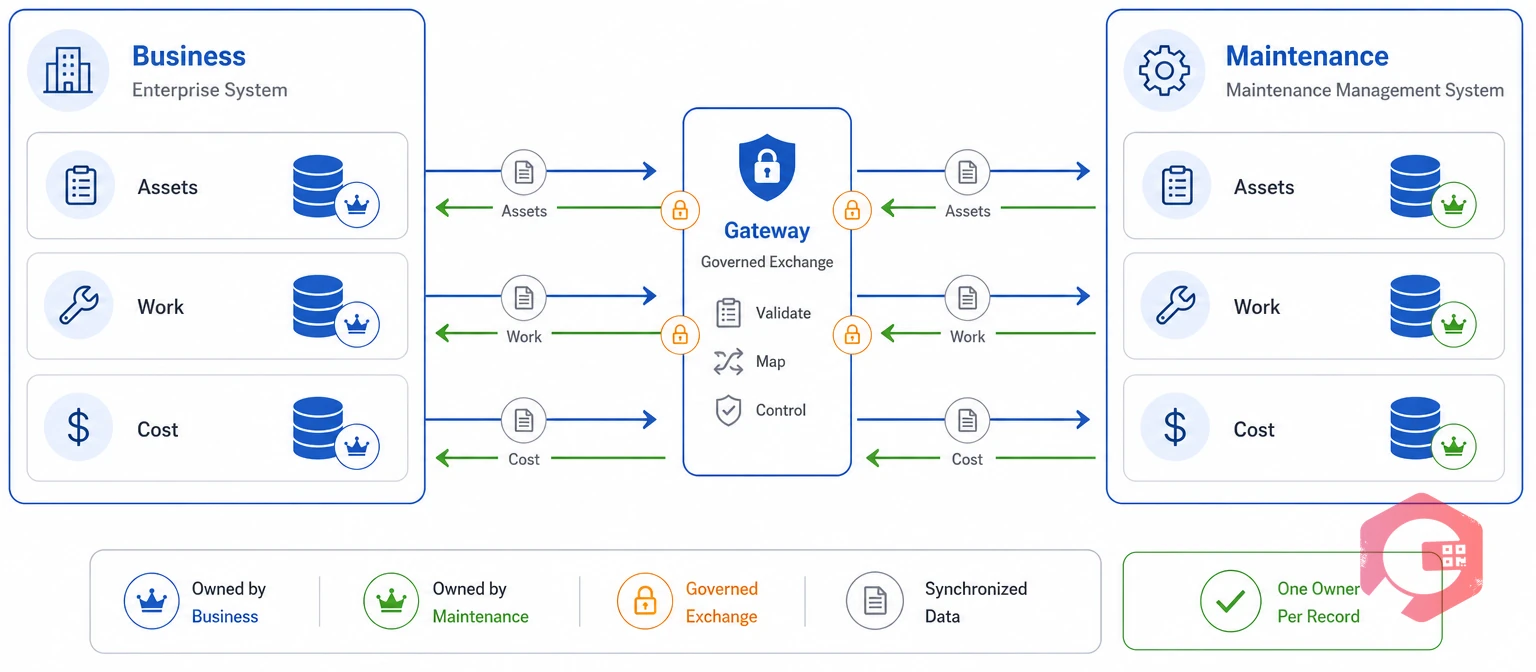
A Microsoft Dynamics 365 CMMS integration is a governed data exchange between business transactions and maintenance work. What it covers depends on which Dynamics 365 apps you run.
In most setups the CMMS stays the place where work gets done. Dynamics 365 owns finance, buying, stock, projects and customers. ISO 55000 makes the same point about assets: value comes from clear accountability, not from copying records twice.
Microsoft's integration guidance agrees, and points to data entities and documented services as the supported way in. Decide who owns each object before you write any code.
Discovery tells you what you are working with. Skip it, and you will likely rebuild the interface within a year.
Run process workshops too. Walk through seven flows: request to work order, preventive maintenance, parts issue, purchasing, contractor service, completion and cost posting. Maintenance teams that write these down early hit far fewer surprises later.
End with a short scope note that maintenance and IT both sign.
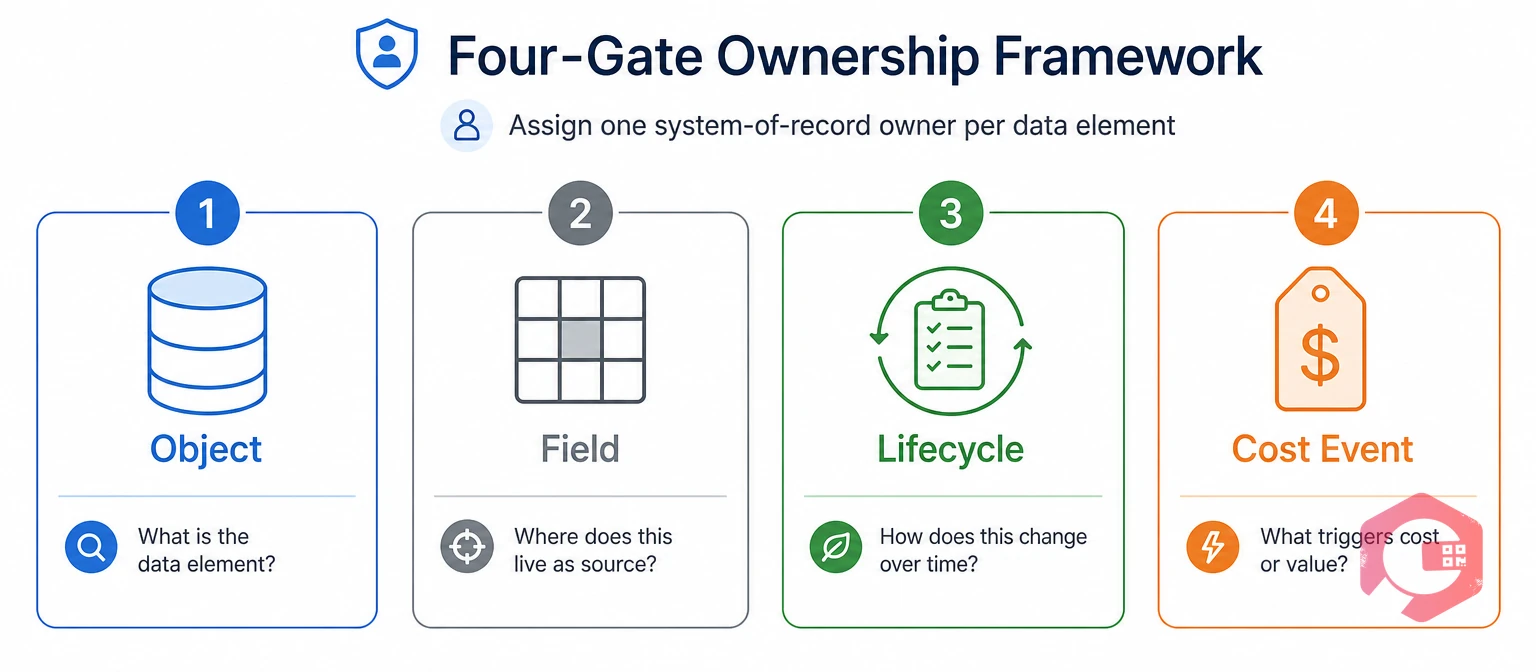
A system of record is the one app allowed to create and change a given field. When both systems can change the same status or cost, the records split apart. Then nobody trusts either one.
The Four-Gate Ownership Framework:
A common split looks like this. The CMMS closes the work. Dynamics 365 posts the approved cost. Field Service owns the customer asset, and the CMMS owns the engineering record.
Put these calls in a matrix, because spoken agreements do not survive a support handover.
Before you lock a design, look at how a purpose-built ERP integration for CMMS already handles asset, stock and cost sync.
Eight data areas carry almost every Microsoft Dynamics 365 CMMS integration. Map each one with its owner, direction and key fields before you build.
| Data domain | Usual system of record | Sync direction | Example fields |
|---|---|---|---|
| Asset and location master | Dynamics 365 or CMMS, never both | One-way to the consumer | Asset ID, hierarchy, functional location, serial, criticality |
| Maintenance demand | Dynamics 365 or IoT source | Inbound to CMMS | Request, notification, inspection finding, alarm, case |
| Work execution | CMMS | Outbound to Dynamics 365 | WO number, type, priority, status, labor, failure code |
| Materials and purchasing | Dynamics 365 | Bi-directional, event-based | Item, warehouse, reservation, issue, requisition, receipt |
| Preventive maintenance | CMMS | Outbound plus meter inbound | Plan, counter trigger, forecast date, compliance status |
| Cost and finance | Dynamics 365 | Inbound from CMMS, posted once | Labor, material, service, overhead, cost center, posting ref |
| People and vendors | Dynamics 365 | One-way to CMMS | Worker, craft, skill, team, supplier, approval authority |
| Condition and IoT | Device or historian | Inbound to both | Meter value, fault code, threshold, source timestamp |
Two details cause most of the rework. First, store stable cross-system keys in both apps. Never match on names or on tags that people can edit.
Second, build one master mapping for statuses, priorities, work types, units, currencies, time zones, warehouses and failure codes. Digital work order management helps here, since each work order already holds the labor, parts and failure fields Dynamics 365 expects.
Pick the pattern from volume, speed, offline needs, security and recovery. Do not pick the one that is quickest to build. Microsoft points to custom connectors when a service has no ready-made connector, and names Microsoft Entra ID as its preferred sign-in option.
| Pattern | Best for | Trade-off |
|---|---|---|
| Synchronous API call | Validating an asset or checking available stock while a user waits | An outage blocks the user immediately |
| Asynchronous event | Work-order creation, status updates, meter readings, cost postings | Needs sequencing and replay controls |
| Batch | Initial master loads and scheduled reconciliation | Not suitable for time-sensitive work |
| Dataverse and Power Automate | Low to moderate volume business workflows | Limited at high scale or complex transformation |
| Azure Logic Apps or similar | High volume, durable messaging, central monitoring | More platform and skills investment |
Finance and operations apps also expose OData and data-management endpoints for bulk and service access. Take care with dual-write. It covers supported finance-and-operations-to-Dataverse cases. It is not a general connector to every CMMS.
Most Microsoft Dynamics 365 CMMS integration projects end up using a mix, and that is the right outcome.
Idempotency is the promise that replaying a message updates one record instead of creating a copy. Build it in on day one. It is not a later clean-up job.
Test the failures, not just the clean path. Force duplicates, timeouts, out-of-order updates, offline mobile sync, part-posted costs, cancellations, reopened work orders and blocked users.
Give meter and sensor flows their own test pass. IoT meter reading data arrives with its own timestamp, and a later reading must never overwrite it blindly. An interface that handles its own failures quietly is the one that lasts.

Start with one end-to-end flow. For most teams that means asset sync plus corrective work and parts use. Prove it at one site before you add more.
Clean the asset, location, item, worker, supplier and open work-order records first. Then run the flow live for two to four weeks, and check the numbers daily until quantities and costs agree without manual fixes.
Maintenance teams using Cryotos have reported up to 30% less unplanned downtime and 25% faster repair turnaround once work, parts and cost data stop sitting in separate silos.
Six problems cause most incidents after go-live. Each has a simple control.
Accurate spare parts management rests on the third and fourth controls. A mistimed issue throws off both stock levels and asset cost.
Measure technical health and maintenance results together. An integration that posts cleanly but slows technicians down has not worked.
Set every baseline during the pilot, and give maintenance, finance and IT shared ownership of the numbers.
It depends on how much depth you need. Dynamics 365 Supply Chain Management can include Asset Management for your own equipment, which suits simpler setups. Teams with heavy mobile work, offline technicians or strict compliance usually keep a dedicated CMMS for the work itself, then run a Microsoft Dynamics 365 CMMS integration for finance and buying.
No. Dual-write is built for supported finance-and-operations-to-Dataverse cases, not as a general connector to outside apps. For a third-party CMMS, use documented APIs, data entities, a custom connector or a service such as Azure Logic Apps.
Dynamics 365 should own the posting in almost every design. It holds the chart of accounts, financial dimensions and approval controls. The CMMS supplies the facts: labor hours, parts used, service charges and the asset or cost center they belong to. Only one system should ever create the entry.
Timelines vary with scope. A single end-to-end flow at one site is a realistic first milestone, not a full rollout. Discovery and mapping usually take longer than the build, and cleaning master data is the step teams most often underrate.
Unclear ownership is the top cause. When both systems can change a status, quantity or cost field on their own, the records drift and users stop trusting the data. Give one writer to each field, and set conflict rules for the rest. That prevents most of it.
A Microsoft Dynamics 365 CMMS integration works best when the CMMS is built for the work and the link is built for control. Schedule a free demo to see how Cryotos syncs assets, work orders, parts and costs with Dynamics 365 without double entry or double posting.


Cryotos AI predicts failures, automates work orders, and simplifies maintenance—before problems slow you down.



