

OCR meter reading is a method that uses optical character recognition technology to automatically capture numeric values from analog or digital meters, gauges, and displays during inspections. Instead of a technician writing down a pressure gauge reading on a paper form or re-entering it into a spreadsheet later, a mobile device or fixed camera photographs the meter face and OCR software extracts the number directly into the maintenance system.
The difference between OCR-based capture and traditional manual entry is not just speed — it is accuracy. Studies from industries with high-frequency inspection cycles, such as utilities and oil and gas, consistently show manual transcription error rates between 1% and 3%. On a plant floor logging 500 readings per shift, that means 5 to 15 wrong values entering your records every day. Over months, those errors distort trend analysis, mask early equipment degradation, and produce false alerts that erode technician trust in the system.
OCR meter reading solves this at the source. The technician points, the system reads, and the value lands in the CMMS with a timestamp, location tag, and the original photograph as an audit trail — no transcription required.

Before diving into the technology, it helps to be specific about what manual data entry is actually costing your operation. The direct costs are the most obvious, but they are rarely the most expensive.
A technician records a flow meter reading as 142 when the actual value is 412. The number looks plausible, passes any manual review, and gets entered into the system. Three weeks later, a pump fails because no one noticed that flow had been running consistently high. The root cause analysis reveals the data was wrong the whole time — but the equipment damage is already done.
This scenario is not rare. It is the predictable outcome of any process that relies on humans to read, remember, and re-enter numbers across a long inspection route.
Manual data entry happens at least twice: once in the field on a paper form, and once back at a desk when those forms get typed into a spreadsheet or CMMS. In a mid-sized plant running daily rounds on 200 assets, this double-handling can consume one to two hours of technician time per day — time that could go toward actual maintenance work.
When you factor in wrench time, the opportunity cost becomes even more visible. Every minute a technician spends transcribing data is a minute they are not turning a wrench, diagnosing a problem, or preventing the next failure.
Regulated industries — pharmaceuticals, food and beverage, power generation, oil and gas — require traceable inspection records. Paper forms get lost, smudged, or filled in after the fact. Spreadsheets lack version control and time-stamped proof of when each reading was taken. When an auditor asks for the pressure log from six months ago, a stack of hand-written forms is a liability, not evidence.
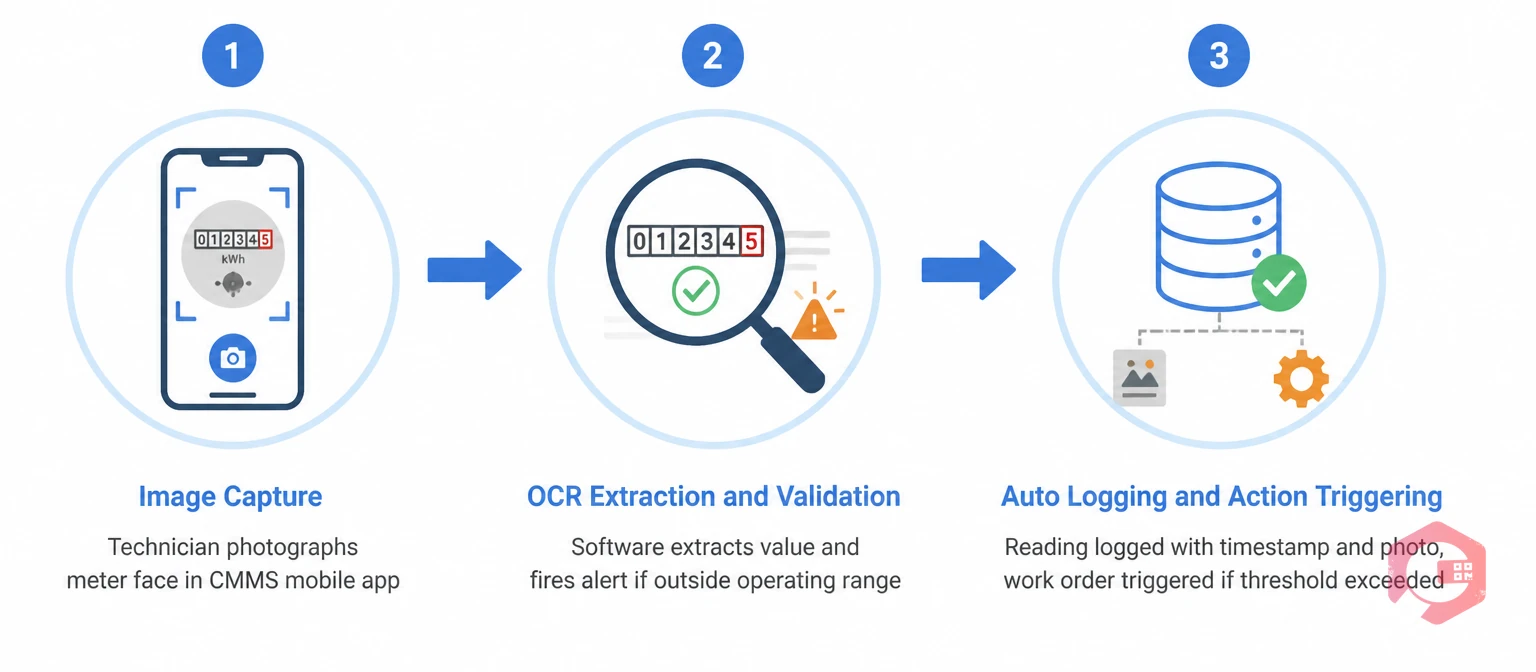
Modern OCR meter reading in a maintenance context works through three linked steps that happen in seconds on a technician's mobile device.
The technician opens the inspection checklist in the mobile CMMS app. When they reach a meter reading task, they tap to open the camera. They photograph the meter face — analog dial, digital display, or seven-segment LCD — and the image is sent to the OCR engine. No typing. No paper. No double-handling.
The OCR engine processes the image and extracts the numeric value. At this stage, the system can apply range validation automatically: if the extracted reading falls outside the defined operating range for that asset, an alert fires immediately. The technician sees the flagged value on their screen before they have even left the meter. This is early anomaly detection at its most practical — the person closest to the equipment gets the alert while they are still standing next to it.
The validated reading is written to the asset's history with a timestamp and the source photograph. If the reading exceeds a threshold, the workflow automation engine can trigger a work order automatically — no supervisor review required, no delay between detection and action.
When meter readings feed directly into preventive maintenance scheduling — for example, triggering a service when a machine logs 500 operating hours — the entire usage-based PM cycle runs without any manual input at all.
A common question when planning digital inspection programs is whether to invest in OCR-based capture or install IoT sensors on every asset. The honest answer is that they solve different problems, and the right mix depends on your asset mix and budget.
Cryotos supports both approaches through its IoT meter reading module, which handles sensor data from SCADA and PLC systems, alongside mobile OCR capture for walk-around inspections. Both feed into the same BI dashboard so your team always has a unified view of asset condition.
Getting OCR meter reading running across your inspection routes is straightforward when your CMMS supports it natively. Here is the typical setup sequence.
Start by listing every meter, gauge, and sensor display that technicians currently read manually. For each one, note the asset it belongs to, the reading frequency (shift, daily, weekly), the acceptable operating range, and the action threshold — the value at which someone needs to do something. This data becomes the foundation of your digital inspection checklists.
Replace paper inspection forms with digital checklists that include an OCR capture step for each meter. Cryotos lets you import checklists via Excel or configure them directly in the platform. Each checklist item for a meter reading includes the asset, the expected range, and the threshold logic that governs alert and work order creation. The maintenance checklists module supports all of this without custom coding.
For each meter on your inspection route, define what happens when a reading falls outside range. Options typically include sending a WhatsApp or email alert to a supervisor, creating a work order automatically and assigning it to the nearest available technician, escalating to a manager if the reading is not acknowledged within a defined time window, and logging the out-of-range event in the asset history for trend analysis.
The transition from paper forms to mobile OCR typically takes one to two training sessions. The workflow is simpler than the paper equivalent — open the checklist, photograph the meter, move to the next task. Technicians on the Cryotos mobile app can work offline during rounds and sync data when they return to an area with connectivity, which matters in facilities with patchy network coverage.
After the first few weeks of live operation, review the reading history for any assets where OCR extraction has struggled — typically because of poor lighting, dirty meter faces, or unusual display formats. Adjust the camera guidance in the checklist or clean the meter faces as part of the inspection protocol. Over time, extraction accuracy approaches 99% for standard analog and digital displays.

OCR-based inspection data capture is relevant across almost every maintenance-intensive sector, but the return on investment is sharpest where inspection frequency is high, regulatory requirements are strict, or the cost of missing an anomaly is severe.
Yes. OCR engines designed for industrial use can read analog dial gauges, not just digital displays. The technician photographs the gauge face and the software interprets the needle position to extract a numeric value. Accuracy is slightly lower than for digital displays but still significantly better than manual transcription for most gauge types.
Most implementations include a confirmation step where the extracted value is shown to the technician before it is logged. If the extracted number looks wrong, the technician can correct it or retake the photo. The original photograph is always stored alongside the recorded value, so there is always an audit trail to review.
Not always. Many CMMS mobile apps, including Cryotos, support offline operation. The technician completes their inspection rounds offline, and the data — including photographs and OCR-extracted readings — syncs to the system when connectivity is restored. This is important for facilities with basement plant rooms, remote sites, or areas with poor mobile signal.
Mobile forms reduce paper but do not eliminate transcription errors — the technician still has to read the meter and type the value. OCR eliminates the human reading and typing steps entirely. The camera reads the meter directly, which removes the most common source of error in the inspection data chain.
Yes. When meter readings are configured as usage-based PM triggers in the CMMS, each OCR capture updates the asset's usage counter. When the counter reaches the service threshold — say, 500 operating hours — the system automatically schedules the PM work order. This is how meter-based maintenance works in practice: the data drives the schedule, and no one has to remember to check a spreadsheet.
Manual data entry in daily inspections is one of the most persistent sources of error in maintenance operations — and one of the most straightforward to fix. OCR meter reading closes the gap between what a meter shows and what your CMMS records, eliminates double-handling, and turns inspection rounds into a live data feed that your maintenance team can actually act on.
The technology works today, without expensive sensor retrofits, on the meters and gauges you already have. All it takes is a mobile CMMS that supports OCR capture, digital checklists, and automated threshold alerts.
Cryotos gives maintenance teams all of this in one platform — from OCR and IoT meter reading to automated work orders, custom reporting, and full audit trails. If your team is still transcribing meter readings by hand, explore how Cryotos can help you eliminate that step for good at cryotos.com.

Cryotos AI predicts failures, automates work orders, and simplifies maintenance—before problems slow you down.



