

Office TPM is the eighth pillar of Total Productive Maintenance. It applies the same zero-loss thinking used on production equipment to office and support work, including planning, procurement, HR, and maintenance paperwork. Most TPM programs stop at the plant floor. But the approvals, data entry, and reports behind every work order create losses that are just as costly as a jammed conveyor. This guide breaks down the nine categories of office loss. It maps each one to a specific software fix, and gives maintenance teams a practical framework for extending TPM into the office.
Key Takeaways

Office TPM treats information flow and paperwork as processes that can break down, run inefficiently, or create waste. That's the same way a pump or a motor can fail on the shop floor.
The concept comes from Japan's original 8-pillar TPM model. Pillars one through seven cover equipment. They include autonomous maintenance, planned maintenance, quality maintenance, and similar disciplines. Pillar eight, Office TPM, extends that same discipline into departments that never touch a machine directly.
Maintenance teams that successfully adopt Office TPM usually start small. They measure how long a work request takes to move from submission to completion. That single number exposes most of the hidden loss in a department.
TPM is built around eliminating the "six big losses" on the shop floor. Office TPM applies that same thinking to paperwork and decisions instead of machines. Researchers increasingly discuss this shift as part of broader total productive maintenance practice. More organizations are pushing lean principles past the factory floor every year.
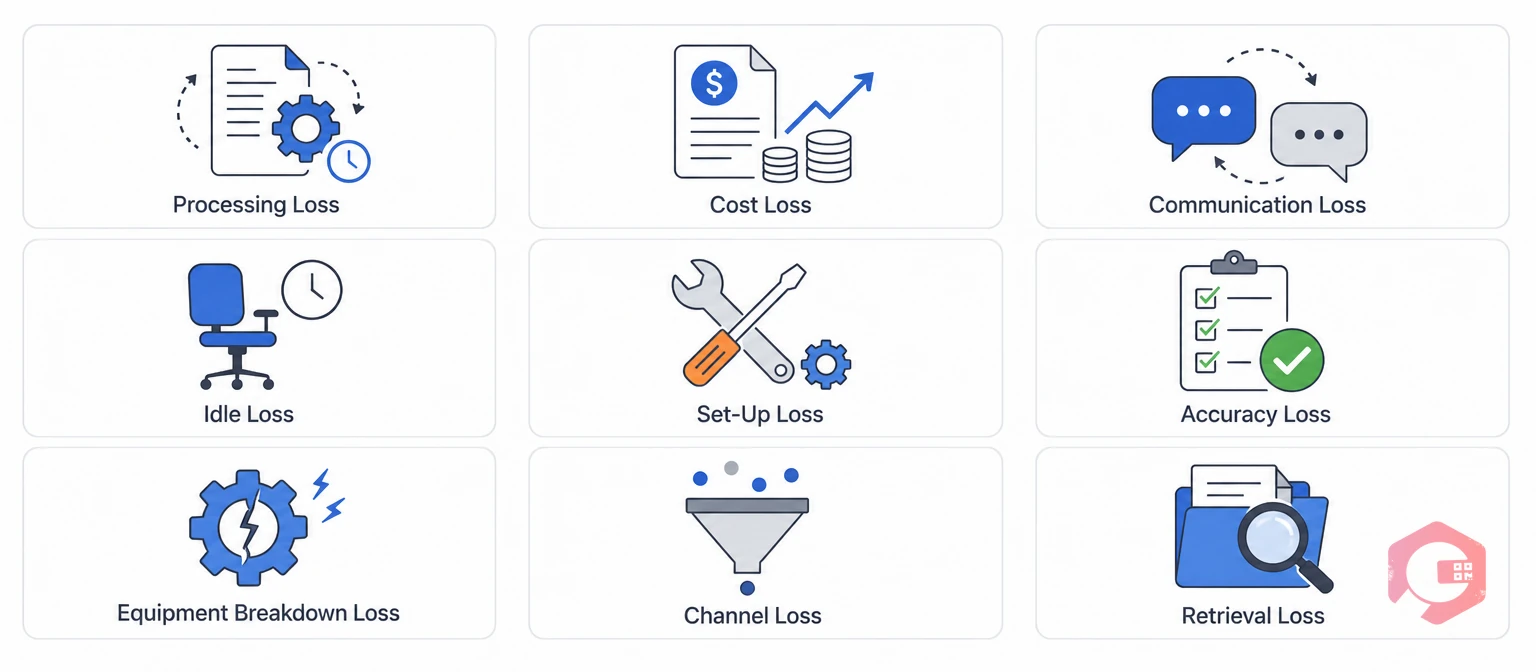
Office TPM sorts administrative waste into nine loss categories. Each one has a clear, everyday symptom you can spot in almost any maintenance department.
Most maintenance departments only track the shop-floor version of these losses. Office TPM asks the same question about the admin side. How much time and money disappears into these nine categories every week?
Office TPM matters because a maintenance department can run flawless equipment-level TPM and still lose productivity to admin bottlenecks. Planning, scheduling, and procurement are office functions, even inside a maintenance team. They create the same nine losses as any other back-office group.
Most facilities that measure both shop-floor and office-level cycle times find the office side hides the larger losses. A connected Computerized Maintenance Management System closes this gap. It turns work order management, procurement, and reporting into one tracked workflow instead of scattered emails and spreadsheets.
See how a live maintenance dashboard exposes these bottlenecks: explore the Cryotos BI Dashboard.

The Office TPM Loss-to-CMMS Mapping Framework is a method that pairs each loss category with its software fix. It helps teams prioritize fixes instead of guessing where to start.
| Loss Category | Office Symptom | Software Fix | Result |
|---|---|---|---|
| Processing loss | Work requests stuck in an inbox | Work order management | Faster dispatch, no manual hand-offs |
| Communication loss | Updates lost between shifts | Team messaging and mobile alerts | Shared visibility across shifts |
| Accuracy loss | Manual stock counts don't match reality | Inventory management | Real-time, scanned stock data |
| Cost loss | Duplicate or emergency purchase orders | Min-threshold reorder alerts | Lower emergency-purchase premiums |
| Set-up/switching loss | Toggling between spreadsheets and tools | Workflow automation | One connected process, fewer tools |
| Information retrieval loss | Searching for manuals or history | Centralized document repository | Instant access from any device |
This framework works because it forces a one-to-one match between a named loss and a named fix. That's the same discipline Office TPM asks teams to apply outside the shop floor.
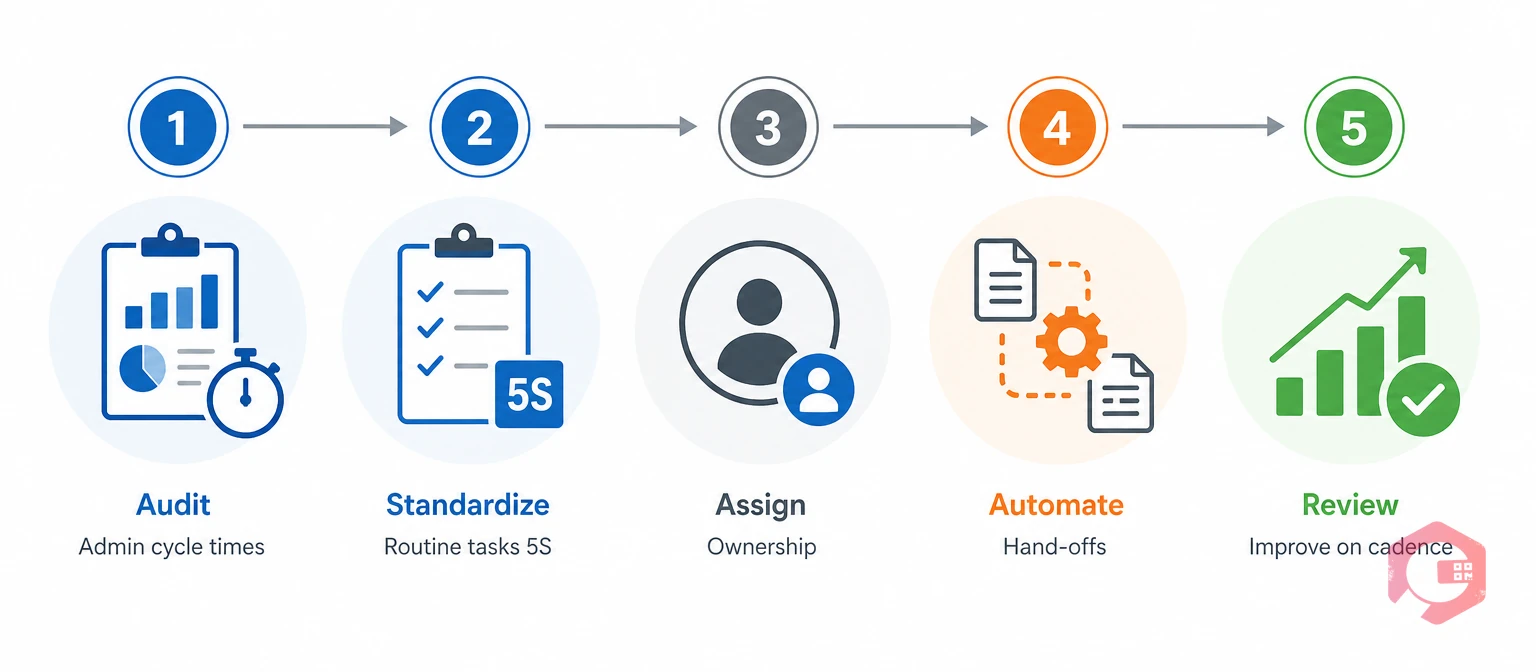
Implementing Office TPM starts with measuring admin cycle times. From there, teams standardize the workflows that create the most delay. The rollout mirrors the same 5S and autonomous-maintenance thinking used on equipment.
Track how long a purchase requisition, work request, or compliance document takes from creation to close. This baseline shows which of the nine loss categories costs the most time. Most teams are surprised by how much time sits in approval queues rather than actual work.
Apply Sort, Set in order, Shine, Standardize, and Sustain to digital workflows. Use structured digital checklists so every admin task follows the same format every time. This removes the guesswork that causes accuracy loss.
Give planners, storekeepers, and clerks clear ownership of their part of the workflow. This mirrors the autonomous-maintenance principle, where operators own their equipment's basic condition instead of waiting for someone else to notice a problem.
Replace email-based approvals with rule-based routing. Requests should never sit waiting in a single person's inbox for a decision that a workflow rule could make automatically.
Schedule recurring reports on cycle time. Run root cause analysis on any recurring delay, the same way a 5 Whys investigation would target a repeat equipment failure. Improvement only sticks when it's reviewed on a schedule, not just once after a complaint.
Office TPM and shop-floor TPM share the same zero-loss goal. But they differ in what counts as an asset, who owns the fix, and how progress gets measured. Knowing the difference keeps teams from applying the wrong metric to the wrong function.
| Focus Area | Shop-Floor TPM | Office TPM |
|---|---|---|
| Primary "asset" | Machines and equipment | Information and workflows |
| Losses targeted | Breakdowns, changeovers, defects | Processing, accuracy, communication loss |
| Ownership model | Operators own equipment condition | Clerks and planners own process quality |
| Core metric | OEE, MTTR, MTBF | Cycle time, approval time, error rate |
Neither version of TPM works alone. Office-level delays in parts ordering or documentation directly inflate shop-floor repair time. The two disciplines ultimately feed the same result: less downtime and lower cost.
Most Office TPM rollouts fail for the same handful of reasons. Knowing them in advance saves months of wasted effort.
Most facilities that stall on Office TPM eventually trace it back to one of these four pitfalls. Fixing the ownership gap alone often produces the fastest improvement.
A single spare-parts request shows how all nine office losses connect in practice. Following one request end-to-end makes the framework concrete instead of theoretical.
Maintenance teams using Cryotos have reported up to 30% reduction in unplanned downtime and 25% faster repair turnaround. Much of that gain comes from office-side delays like this one no longer compounding into shop-floor downtime.
Facilities that run this loop consistently often find the biggest surprise isn't the software. It's discovering how much staff time was lost to steps nobody had measured before. Once teams see the number, they rarely go back to the old process.
The other seven pillars target physical equipment through activities like autonomous maintenance and planned maintenance. Office TPM applies the same loss-elimination approach to administrative workflows, documentation, and information flow instead of machines.
Any support function that touches maintenance operations can benefit, including procurement, planning, HR, finance, and IT. Each one generates processing, communication, or accuracy losses that slow down the maintenance cycle.
Yes. A Computerized Maintenance Management System centralizes work orders, inventory, documentation, and reporting in one place. That directly addresses the nine office loss categories instead of leaving them scattered across email and spreadsheets. Most teams see the biggest gains in the first month simply from having one shared system of record.
Track administrative cycle times such as purchase-order approval time, work request closure time, and data-entry error rates before and after implementation. Apply the same discipline used for shop-floor metrics like MTTR and MTBF.
Office TPM overlaps with both. It borrows 5S standardization principles and Kaizen-style continuous improvement. But it specifically targets administrative and support-function waste rather than general workplace organization.
Most teams see measurable cycle-time gains within 60 to 90 days. The initial audit alone usually reveals one or two quick fixes. Full adoption across every department typically takes longer, closer to six to twelve months, as ownership and automation habits become routine.
Office TPM turns hidden administrative waste into a measurable, fixable part of your maintenance strategy. Pairing it with a recognized standard like ISO 55000 gives the program a framework to report against. Schedule a free demo to see how Cryotos turns the nine office loss categories into one connected, trackable workflow.



Cryotos AI predicts failures, automates work orders, and simplifies maintenance—before problems slow you down.



