

Parts reservation is how maintenance teams protect planned jobs from losing their spare parts. When you reserve parts for a work order, those parts are set aside in the system and cannot be consumed by other jobs. When a technician arrives for a scheduled PM and finds the bearing was used on an emergency job three days earlier, the planned work order stalls. That costs wrench time, extends asset downtime, and means buying parts at emergency prices.
This guide covers how to reserve and allocate spare parts to planned work orders. It follows the PRKI-R Framework — a five-step process any maintenance team can use, with or without a Computerized Maintenance Management System.
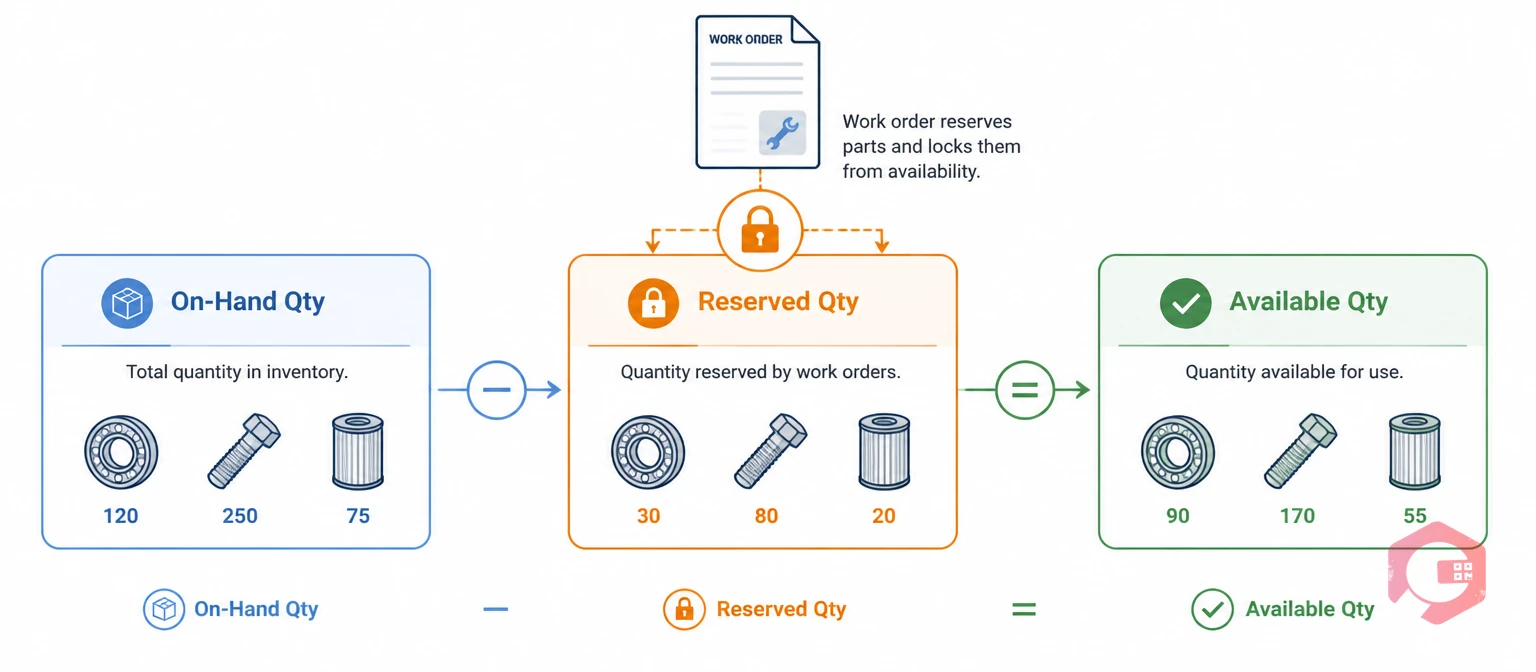
Parts reservation in maintenance is the practice of allocating specific spare parts and quantities to a planned work order before the job begins — so those parts cannot be consumed by other jobs. When a planner creates a planned work order, they attach a bill of materials to it. The system locks those quantities from total stock. They stay unavailable to any other job until the reservation is released.
Most Computerized Maintenance Management Systems track three inventory states: on-hand quantity (total physical stock), reserved quantity (locked to open work orders), and available quantity (free for any job). The formula is straightforward: Available = On-Hand − Reserved.
Key Takeaways

When maintenance teams skip parts reservation, they expose every planned work order to a silent risk: the part they need is gone before the job starts.
A bearing earmarked for a scheduled PM gets pulled for an emergency breakdown. The planned job is rescheduled, the asset stays offline longer than it should, and the cost compounds fast.
SMRP (Society for Maintenance & Reliability Professionals) lists unplanned parts stockouts as a top-five cause of maintenance schedule failures. When a stockout hits mid-job, the direct costs stack up fast:
Maintenance teams using Cryotos have reported up to 30% reduction in unplanned downtime and 25% faster repair turnaround when parts are pre-reserved and staged before job execution.
Effective inventory management is about making sure the right parts are available for the right job at the right time.
Want to eliminate work order delays caused by missing parts? See how Cryotos preventive maintenance software ties parts planning directly to scheduled jobs.
Allocated stock is the quantity of a spare part that has been ring-fenced for one or more open work orders. The parts are still on the shelf. But no other job can use them. Knowing this distinction is essential before you build a reservation process.
| Term | Definition | Example (10 Bearings On-Hand) |
|---|---|---|
| On-Hand Qty | Total physical stock in the storeroom | 10 bearings |
| Reserved Qty | Locked to one or more open work orders | 6 bearings (3 PMs × 2 each) |
| Available Qty | Free for any job (On-Hand minus Reserved) | 4 bearings |
| Reorder Point | Min threshold triggering a purchase order | Alert fires when Available falls below 3 |
Most manual systems — spreadsheets, whiteboards, paper stores logs — only track on-hand quantity. They miss reserved quantities entirely. That is why planned jobs run out of parts even when the storeroom looks well-stocked.
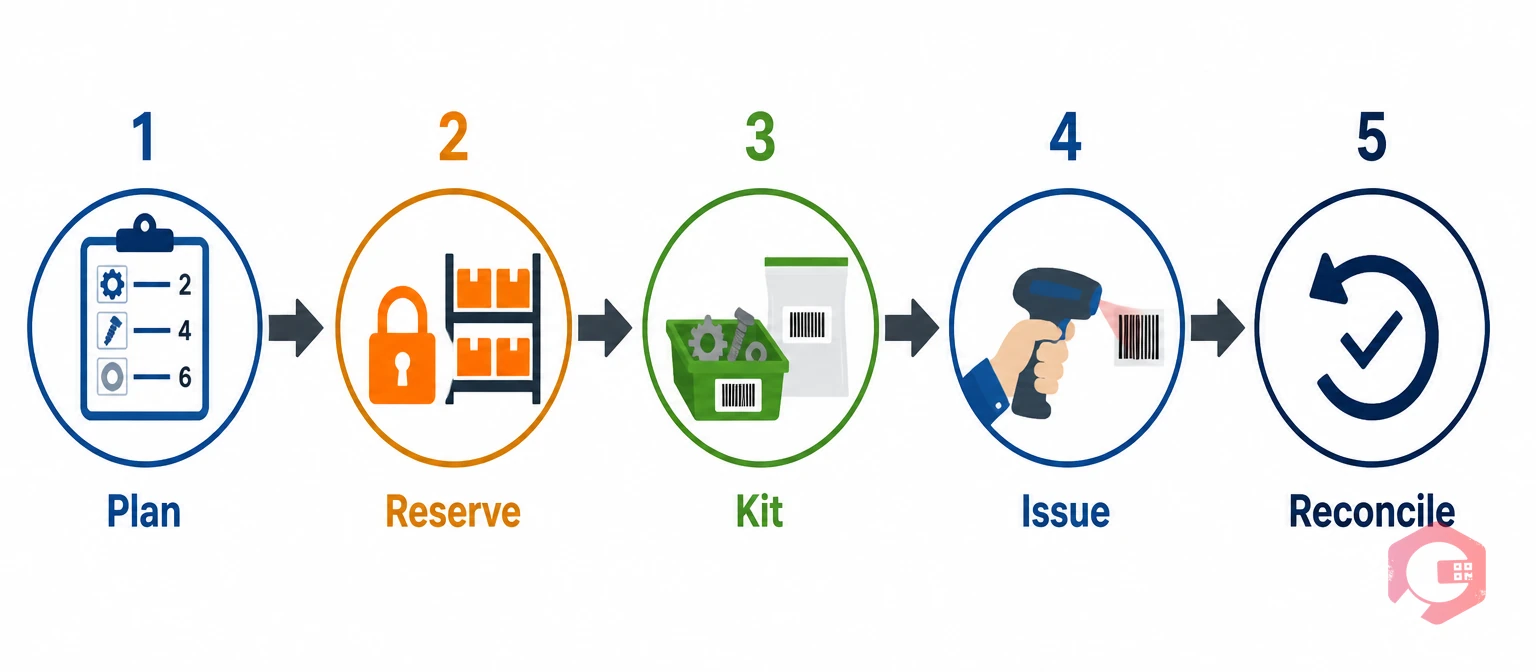
Most maintenance teams that successfully eliminate parts-related delays follow a consistent process. Here is a named framework that captures it:
The PRKI-R Framework:
Parts reservation starts at work order creation, not on the day of the job. When a planner creates a scheduled PM or planned corrective job, they attach a full bill of materials — every part number, quantity, and unit of measure required to complete the task. Effective work order management treats the parts list as mandatory, not optional.
This step relies on accurate asset history. Equipment with CMMS maintenance history carries forward known parts requirements from past jobs. That cuts the effort of building a parts list from scratch each time.
Before reserving, confirm the available quantity — not just the on-hand quantity. If on-hand is 8 but 6 are reserved for other jobs, you only have 2 available. If the new work order needs 4, raise a purchase order now — not on the day of the job.
Reserving parts means flagging specific quantities against a specific work order in the system, so no other job can consume them. The CMMS reduces the available quantity immediately. After that, any planner checking stock sees the correct available figure — not the inflated on-hand number.
This step is where most manual systems fail. A spreadsheet cannot enforce the reservation — anyone can pull the part. A CMMS enforces it at the system level.
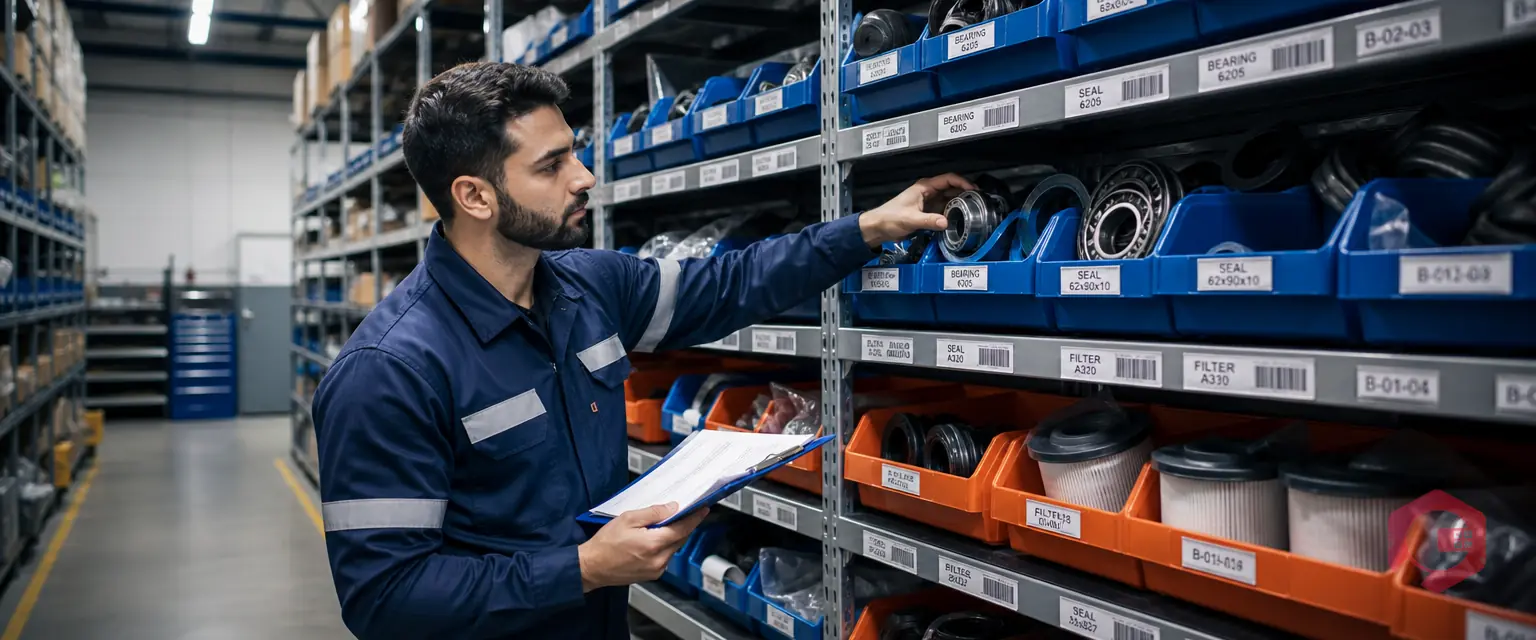
Kitting is the physical act of staging reserved parts. A stores technician pulls the reserved parts, groups them in a labelled bag or bin, and places them in a staging area ready for the technician at job start. Good warehouse management puts kitting areas close to the job staging zone.
Kitting eliminates the most common cause of technician downtime: trips to the storeroom during job execution. A Plant Engineering benchmark found that unplanned storeroom trips can account for up to 15% of wrench time loss on complex jobs.
When the technician picks up the work order, they collect the kitted parts from staging. The CMMS records the issue — part number, quantity, work order, date, and tech name. This ties consumption directly to the work order and feeds your maintenance costs reporting.
QR code or barcode scanning at the point of issue removes manual transcription errors. Cryotos supports QR and barcode issuing from the mobile app. The transaction logs against the work order automatically.
When the job closes, any parts that were reserved but not consumed must be returned to stock and the reservation released. This step is often skipped. When it is, you get phantom reservations. These are parts locked to closed or cancelled work orders. They appear unavailable even though they are physically on the shelf. Phantom reservations inflate false scarcity. They suppress available quantity figures and trigger reorders that are not needed.
Clean reconciliation also confirms actual vs. planned consumption. Planners get better data for future parts lists on the same job type.
When two work orders need the same part and stock is short for both, you have a conflict. This happens often in facilities that run both planned PMs and reactive breakdown jobs.
Most operations use a priority hierarchy: emergency corrective jobs take precedence over scheduled PMs, which take precedence over non-critical planned work. When a conflict fires, the CMMS should flag it for the planner right away — not hide it until both jobs are at execution stage.
As the MRO inventory management literature makes clear, demand visibility is the key difference between well-run storerooms and ones that are always short on parts.
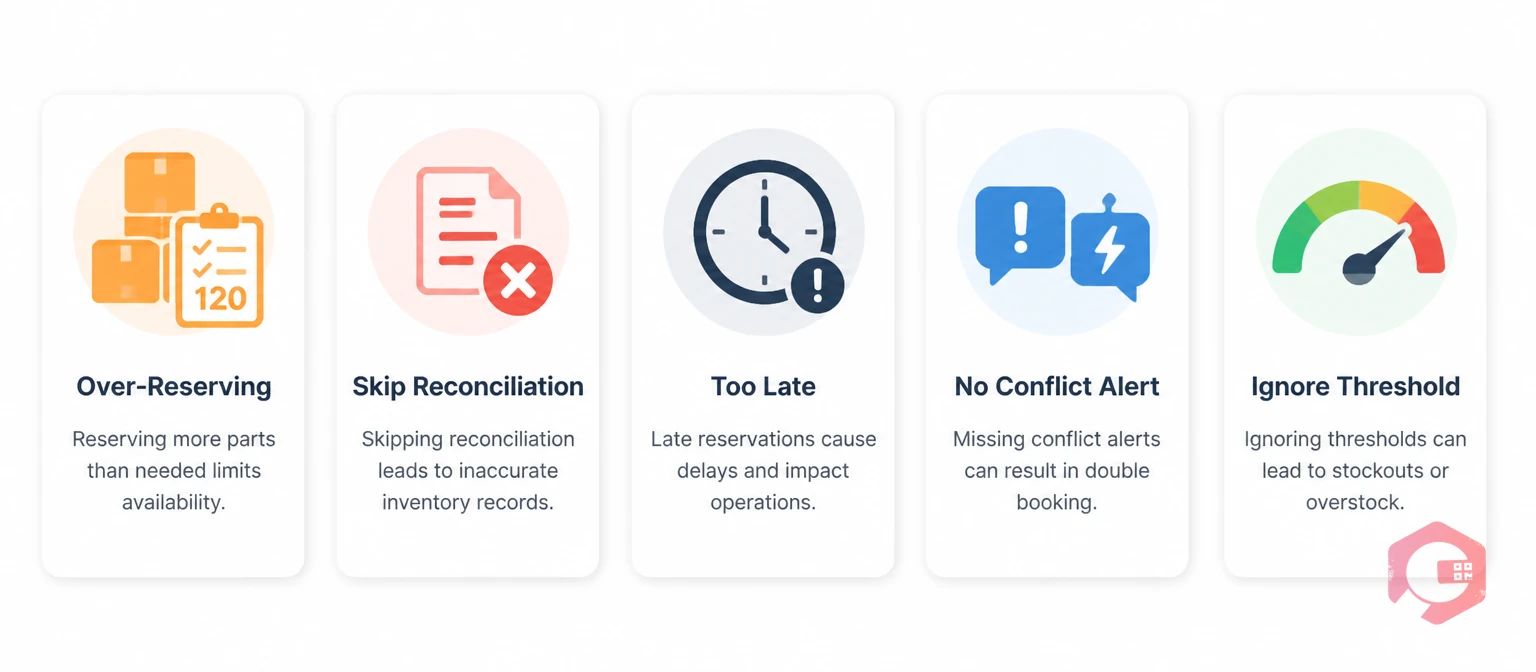
Most parts reservation failures follow predictable patterns. Review the MRO inventory checklist to audit your current process against these common errors.
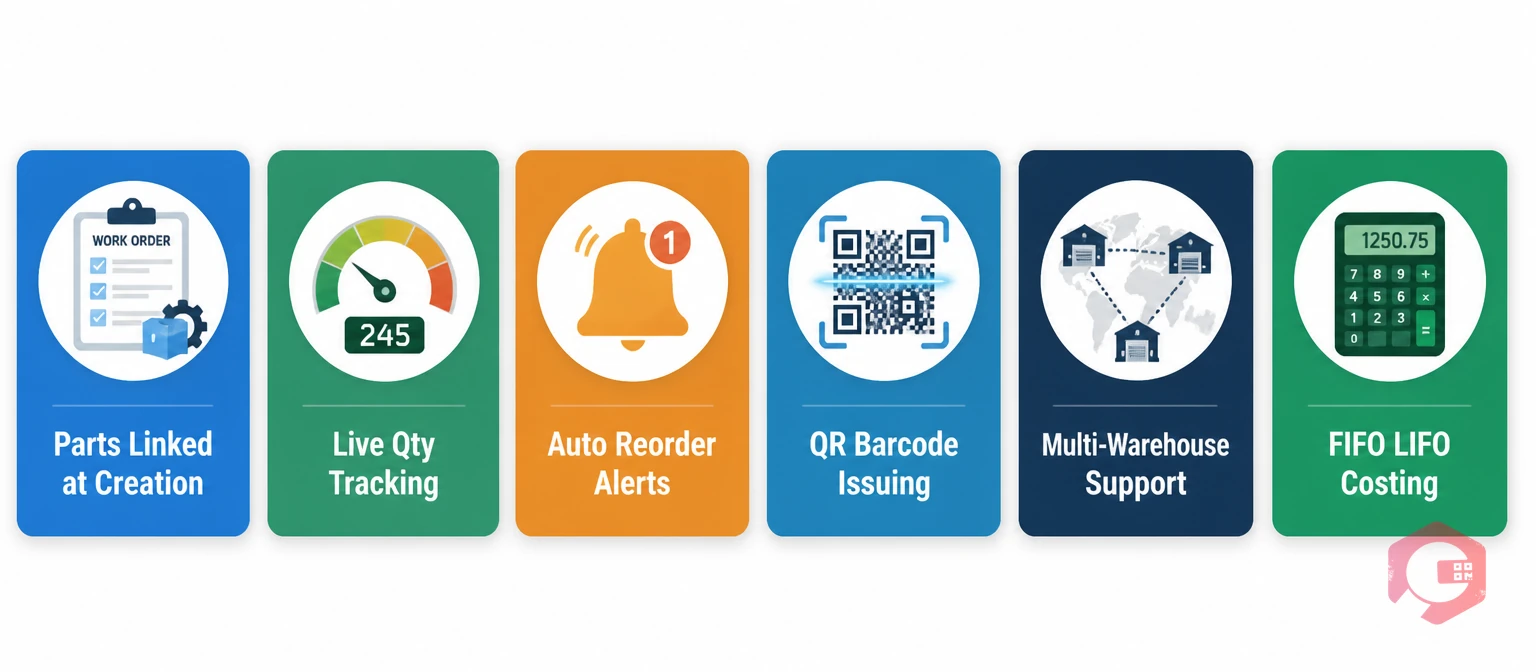
Managing parts reservation manually breaks down fast. When two planners work at the same time, or a stores tech pulls parts without logging it, the available quantity data becomes unreliable. A CMMS enforces the reservation at the system level, making the process reliable regardless of team size.
Cryotos supports the full PRKI-R process natively through its spare parts inventory software:
Parts reservation is a system action. It flags specific quantities against a work order in your CMMS so no other job can consume them. Parts kitting is a physical action. It means pulling reserved parts from their bins and staging them together for collection. Reservation happens first in the CMMS; kitting happens in the storeroom as the job date approaches.
Yes — and you should. Reserving at scheduling time — days or weeks ahead — gives your team time to source shortfalls before the job starts. Same-day reservation is the most common cause of parts-related delays, because there is no recovery window if stock is short.
If a planned work order is cancelled or rescheduled, all part reservations must be released right away. If you do not release them, you get phantom reservations — parts that look locked but are physically free. A CMMS should release reservations on cancellation automatically — or prompt the planner to confirm.
Set reorder points against available quantity — not on-hand quantity. If your reorder point is set at 3 units and on-hand is 8 but 6 are reserved, your available is 2 — already below the reorder threshold. A CMMS that tracks reserved and available quantities separately will fire the reorder alert based on the correct available figure, preventing the silent stockout that a pure on-hand calculation misses.
It is possible but unreliable. Manual methods — shared spreadsheets, colour-coded bin tags, whiteboard tallies — can simulate reservation, but they cannot enforce it. Any team member can pull a part without updating the spreadsheet. A CMMS enforces the reservation at the system level: no one can consume a reserved part without logging the transaction, which updates available quantity in real time for everyone.
Stop letting reactive jobs drain the parts your planned maintenance depends on. Schedule a free demo to see how Cryotos makes parts reservation, kitting, and issuing automatic — so every planned work order starts on time, with every part in place.


Cryotos AI predicts failures, automates work orders, and simplifies maintenance—before problems slow you down.



