

Key Takeaways
Project-based budget tracking sets a fixed budget for one maintenance project — a shutdown, a facility upgrade, a capital refurbishment — and pulls labor, parts, and other costs from that budget the moment work is done. It replaces the common habit of logging spend in a spreadsheet that gets updated weeks after the money is already gone. Done well, it gives maintenance teams a live answer to the question finance always asks: are we still on budget, and if not, where did it go?
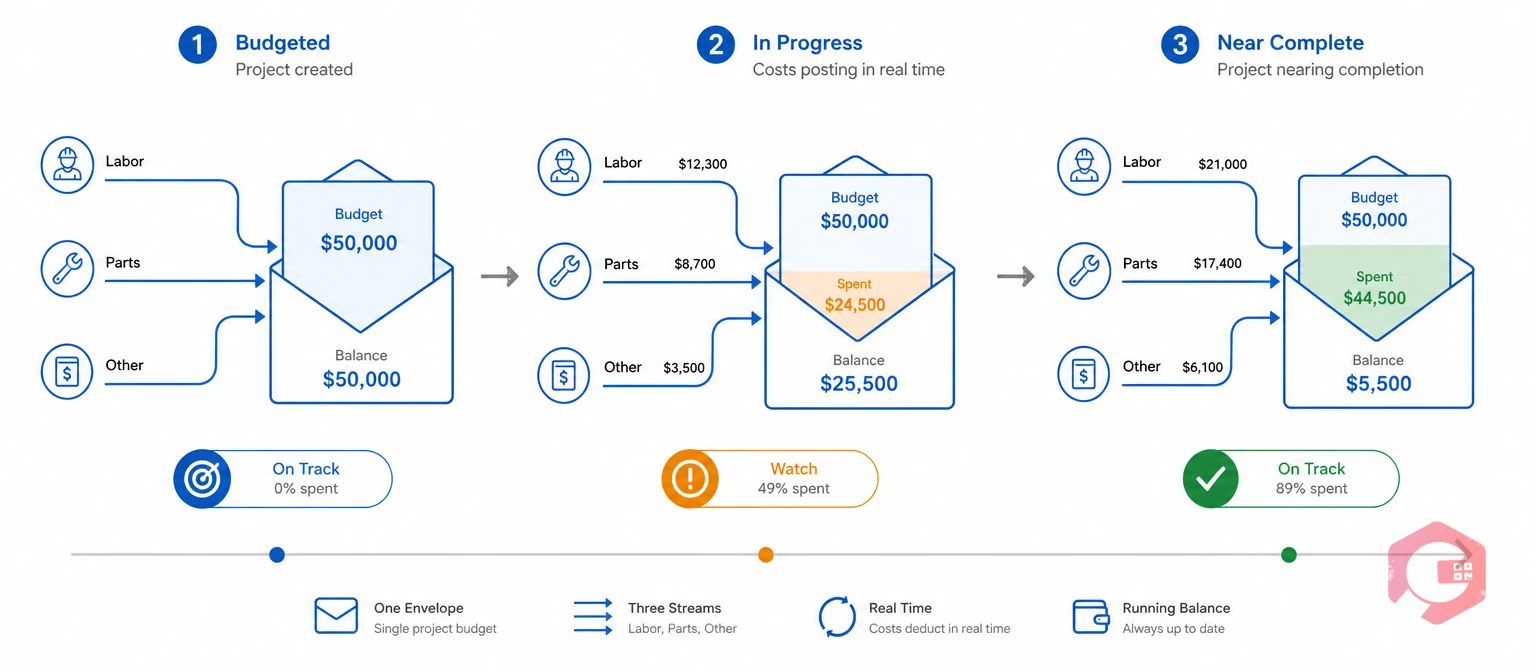
Project-based budget tracking is tying a maintenance budget to one project and tracking spend against it in real time. Instead of one annual maintenance budget covering an entire site, each project — a line upgrade, a shutdown, a compliance retrofit — gets its own budget, its own milestones, and its own running total.
This matters because maintenance spend rarely comes from one source. A single project can draw on technician labor, spare parts pulled from inventory, and a contractor invoice for specialist work. Tracking those three cost streams against one project total is what lets a manager say exactly how much budget is left, and which category is burning through it fastest.
A general annual maintenance budget spreads spend across a full year of unrelated work orders. It rarely gets reviewed until the numbers are already in the red.
Traditional maintenance budgeting falls short because it tracks total spend against one broad annual figure, not against the specific job that caused the cost. A plant might know it has spent 60% of its annual budget by June. It rarely has a clear way to say which project, asset, or cost category drove that spend.
The Society for Maintenance and Reliability Professionals benchmarks total maintenance cost at roughly 2-5% of replacement asset value each year for most industrial operations. Facilities that run above that range usually trace it back to spend they could not attribute to one clear cause until the year was already over.
The ISO 55000 asset management standard frames good maintenance spend as a balance of cost, risk, and performance. That balance is hard to strike when spend is only visible at the level of one annual total, not the project driving it.
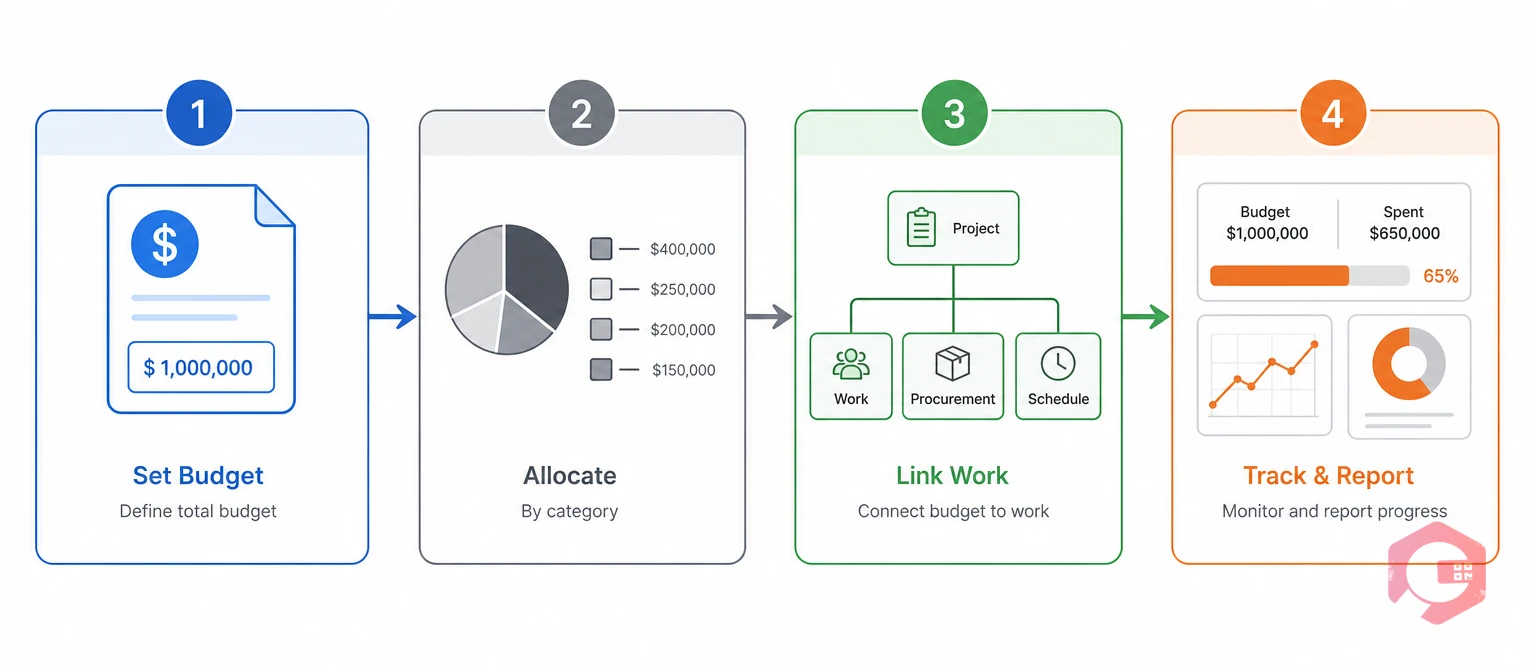
The Four-Layer Project Budget Control Stack: a way to turn any maintenance project into one with real spend control, built from four connected steps.
Each layer builds on the one before it. A project with no category split can still show a total that's over budget, but not why — and knowing why is the entire point.
Use a mean maintenance cost calculator to check what a similar project has cost in the past before setting next quarter's budget. That turns a guess into a number grounded in your own data.

Setting up project-based budget tracking starts with defining the project, then building the cost controls around it. Here is the sequence maintenance teams use in practice.
A project that skips Step 3 still shows a running total, but it cannot say whether labor or parts is the problem. That is usually the more useful question during an active shutdown.
Project-based budgeting and traditional annual budgeting differ most in when an overrun becomes visible, and how precisely it can be traced. The table below breaks down the differences maintenance teams run into most often.
| Dimension | Project-Based Budgeting | Traditional Annual Budgeting |
|---|---|---|
| Budget scope | One defined project with its own start and end date | One total covering a full year of unrelated work |
| When overruns surface | In real time, as costs post against the project | Usually at month-end or year-end review |
| Cost visibility | By category: labor, parts, other costs | Lump sum, rarely broken down by cause |
| Accountability | Clear owner per project and per milestone | Shared across the whole maintenance department |
| Best fit for | Shutdowns, refurbishments, capex work, retrofits | Steady-state routine maintenance with stable spend |
Most facilities run both models side by side: a stable annual budget for routine PM work, and project-based tracking layered on top for anything with a defined start, end, and dedicated spend.
Cryotos supports project-based budget tracking through its Project and Budget module. Teams set up a project with a total budget, milestones, and category allocations. The system then deducts real costs on its own as linked work orders close, so parts, labor, and other costs subtract from the project's running total with no manual reconciliation.
Parts consumed against a project draw from the same inventory management data that tracks stock valuation. The cost hitting the project budget reflects actual parts cost, not a rough estimate. Maintenance teams using Cryotos have reported up to 30% reduction in unplanned downtime and 25% faster repair turnaround. Fewer emergency repairs also means fewer unplanned hits to a project's budget.
Once a project closes out, the report builder turns the project summary into a recurring report. Schedule it weekly during an active shutdown, or monthly on a longer capital project, so budget oversight does not depend on someone remembering to open a dashboard.
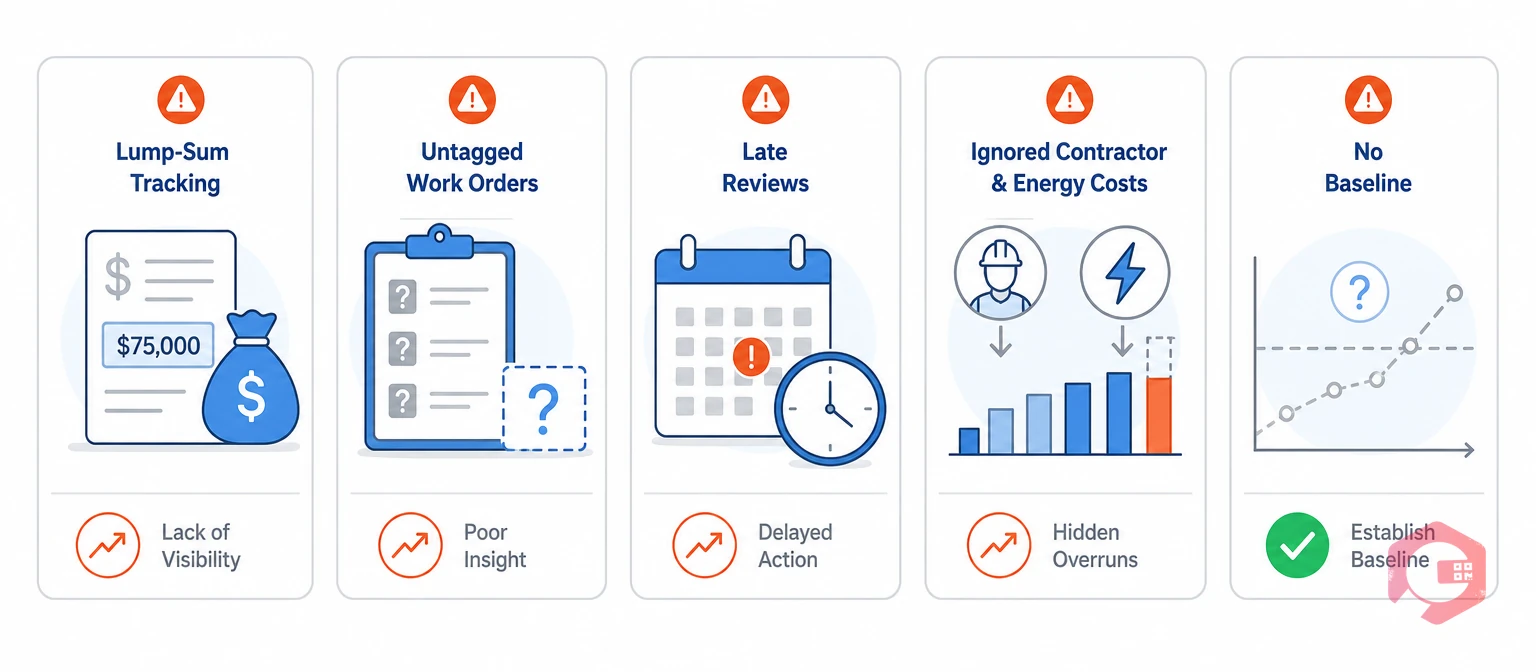
Most maintenance budget overruns trace back to a handful of repeat mistakes, not genuinely unpredictable costs.
Most teams that successfully control project spend catch these five patterns early, usually within the first project or two after adopting category-level tracking.
Project-based budget tracking sets a dedicated budget for one maintenance project — like a shutdown or refurbishment — and deducts actual labor, parts, and other costs from that budget as work is completed, instead of logging all spend against one general annual total.
A regular maintenance budget covers a full year of routine, largely unrelated work orders. Project-based budgeting ties a specific budget to one defined project with its own start date, end date, and milestones, so you can see exactly what a single project cost rather than a blended annual figure.
Yes. Allocating a project's budget by percentage across labor, parts, and other costs is one of the most effective ways to catch an overrun early, since a category running hot shows up well before the total budget is gone.
Check which cost category is driving the overrun first: labor, parts, or other costs. The fix differs by cause. A labor overrun might mean reassigning technicians or reviewing overtime. A parts overrun often points to emergency purchases that a better inventory reorder threshold could have prevented.
You can track a project budget in a spreadsheet, but every cost still has to be entered by hand after the fact. That delay is exactly what lets overruns go unnoticed. A CMMS with a built-in project and budget module deducts costs on its own as linked work orders close, so the budget stays current with no extra data entry.
Controlling maintenance spend comes down to tracking costs at the level where decisions actually get made: the project, not the annual total. Schedule a free demo to see how Cryotos ties project budgets directly to your work orders, parts inventory, and reporting in one system.


Cryotos AI predicts failures, automates work orders, and simplifies maintenance—before problems slow you down.



