

Preventive maintenance holiday rules decide what happens to a PM work order when its due date lands on a holiday. Set them well, and a major PM moves earlier, moves later, or is dropped on purpose. Set them badly, and it quietly disappears from the calendar.
Every plant calendar has holidays and shutdown days. Each one can collide with a monthly, quarterly, or annual PM. This guide explains three holiday actions: pre-date (advance), post-date (defer), and skip. It also shows how to assign them so your team never skips a major PM by accident.
Key Takeaways

A PM holiday action is the rule that tells a schedule what to do when a due date lands on a holiday. You set it once, and it applies every time a holiday collides with a scheduled PM.
Without a rule, a Computerized Maintenance Management System (CMMS) creates the work order on the closed day. Nobody is on site to work it. Maintenance teams often find the gap only when an asset fails.
Asset management standards such as ISO 55000 ask organizations to manage asset risk through defined, repeatable controls. A holiday rule is one small control that keeps planned preventive maintenance on track. It turns a calendar clash into a decision made in advance.
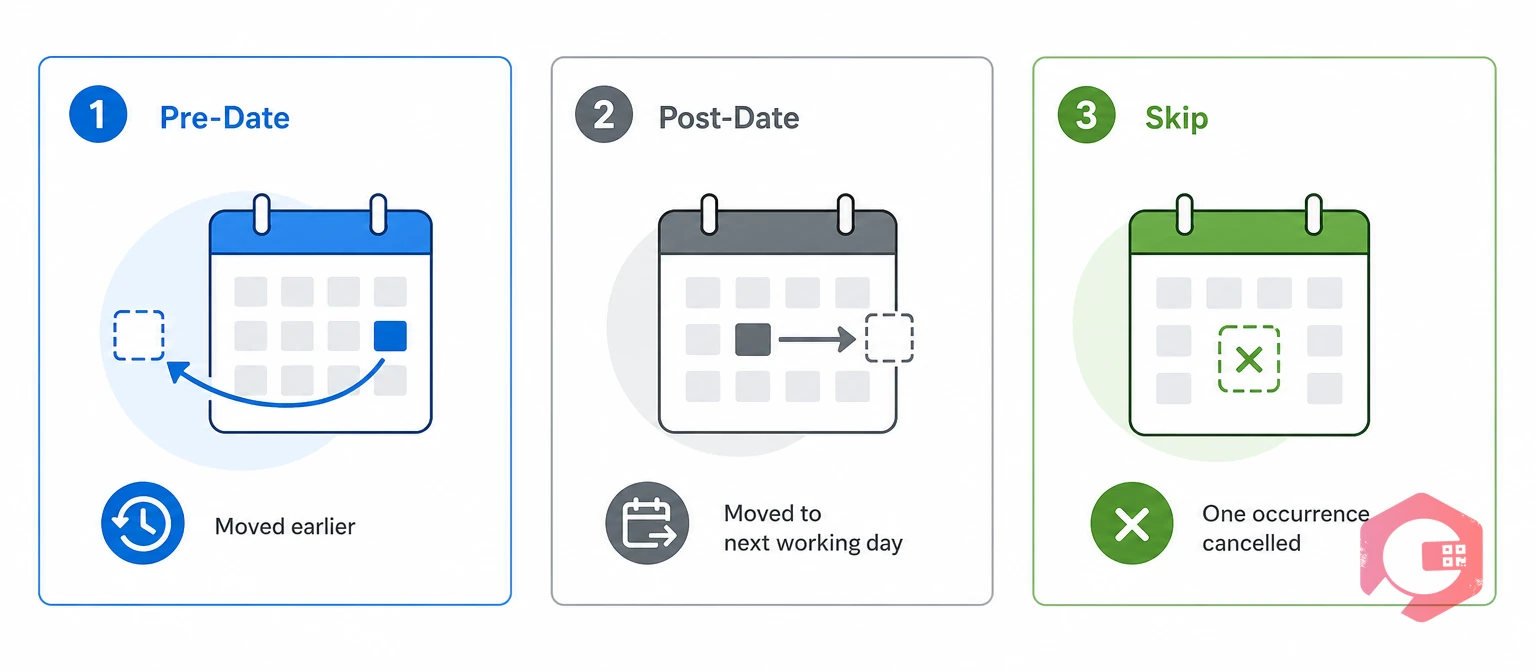
A PM can follow one of three holiday actions, and each one answers a different question about the work.
Pre-dating is the holiday action that generates a PM work order a set number of days before the holiday. This ensures maintenance is completed ahead of time.
Say a PM is due on a Thursday holiday with a two-day offset. The work order is generated on Tuesday, and the team finishes it before the plant closes. Pre-date suits major PMs that cannot wait.
Post-dating is the holiday action that moves a PM generation or due date to the next available working day. The work still happens, but later.
If a PM falls on a Sunday holiday, it moves to Monday, or to the next day the plant runs. Post-date suits routine PMs that can wait a day or two without adding risk.
Skipping is the holiday action that cancels one PM occurrence and leaves the rest of the schedule unchanged. It applies only when the maintenance is non-critical.
The next occurrence follows the normal schedule, and nothing is made up. That makes skip safe only for low-risk tasks, such as a routine visual check on non-critical equipment. The three actions cover every case: do it early, do it later, or drop it on purpose.
Want to see these options in a live schedule? Explore Cryotos preventive maintenance software and its calendar-based PM scheduling.
Within any set of preventive maintenance holiday rules, use pre-date when a PM must finish before the plant closes. Use post-date when it can wait a day or two, and skip only when missing it carries no risk.
| Factor | Pre-Date (Advance) | Post-Date (Defer) | Skip |
|---|---|---|---|
| What it does | Generates the work order a set number of days before the holiday | Shifts the generation or due date to the next available working day | Cancels that one occurrence |
| Timing | Earlier than scheduled | Later than scheduled | No work order for that date |
| Best for | Major PMs, safety checks, and regulated inspections | Routine PMs that can wait a day or two | Non-critical, low-risk tasks |
| Main risk | Tight crew capacity before the holiday | Small drift from the ideal interval | The work is never made up |
| Safe for a major PM? | Yes | Yes, if the delay is short | No |
Only one of the three actions loses work. That is why the choice matters more than it first seems.
A holiday causes a missed PM because the work order lands on a day when nobody is scheduled to work it. The task goes overdue, the backlog grows, and the next real chance to do it may be a week away.
A major PM is a task whose miss could stop production, create a safety risk, or breach compliance. Operations that avoid these misses treat the holiday calendar as part of the PM plan. The fix is to write preventive maintenance holiday rules before the holiday arrives, so every PM in its path already has a plan.
Well-built preventive maintenance holiday rules protect major PMs because skip is a deliberate choice, while pre-date and post-date keep the work alive on the calendar. Each PM gets its own holiday action based on how critical it is.
The Classify-Choose-Confirm Method:
Three parts of the setup do the protecting:
Operations that successfully protect major PMs make this choice when they build the schedule. They do not wait for the week before a holiday. Given early, late, or never, a major PM always gets early or late.
A holiday rule register lists each PM with its criticality, its holiday action, and the reason for that choice. The examples below are illustrative, so replace them with your own PMs.
| PM task | Criticality | Holiday action | Offset or rule | Reason |
|---|---|---|---|---|
| Annual boiler safety inspection | Major | Pre-date | 5 days before the holiday | Compliance duty, so it cannot slip past the due date |
| Monthly compressor oil and filter service | Major | Pre-date | 2 days before the holiday | Production stops if the compressor fails |
| Quarterly chiller condenser cleaning | Major | Post-date | Next working day | A short delay does not raise the risk |
| Weekly conveyor belt tension check | Routine | Post-date | Next working day | Keeps the interval close to plan |
| Daily office air filter visual check | Non-critical | Skip | Cancel that occurrence | Low risk, and the next check follows the normal schedule |
Only the last row uses skip. Every major PM in this set of preventive maintenance holiday rules keeps a work order, an owner, and a date.
When a holiday overlaps a shutdown week, treat the window as planned downtime and pull major PMs into it. A shutdown is often the best moment for work that needs the asset stopped.
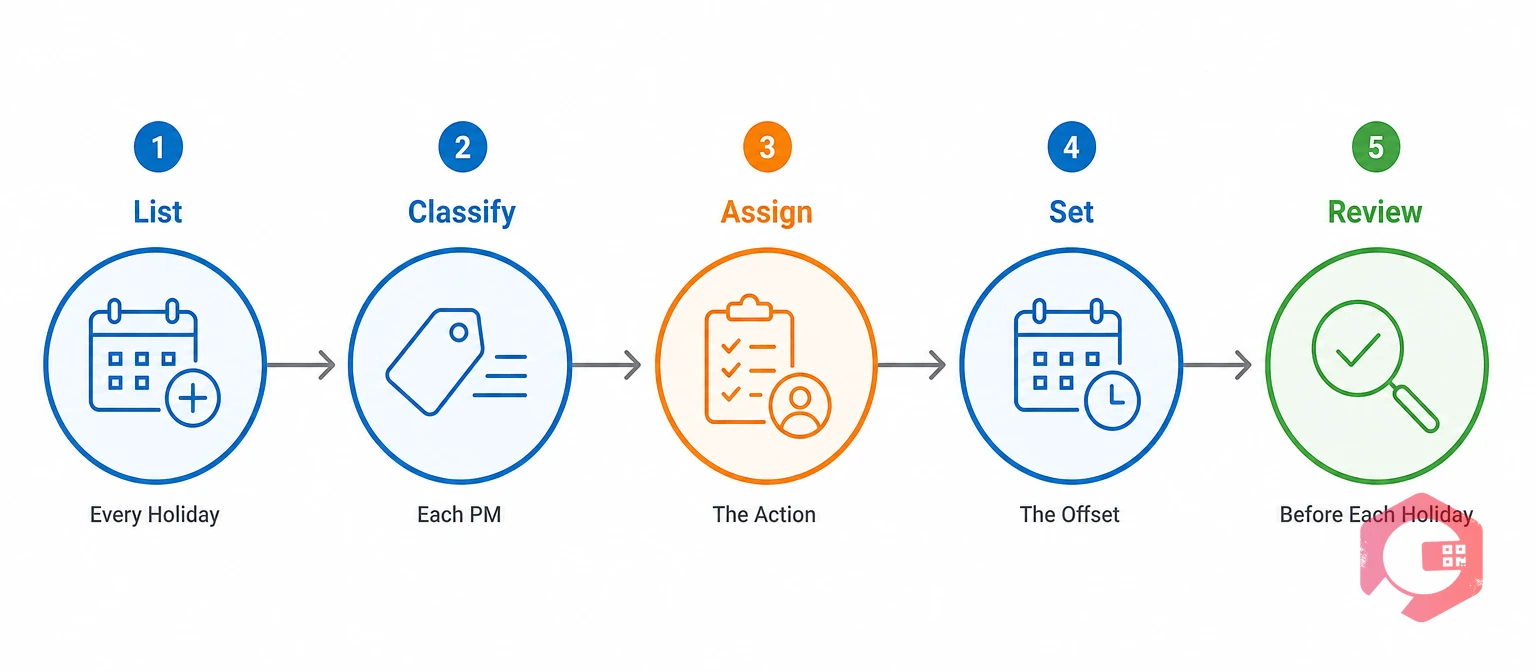
To set up preventive maintenance holiday rules, list your holidays, classify your PMs, assign an action to each, set the offsets, and review before every holiday.
Attach a standard task list to each major PM so the technician on the day knows exactly what to do. Cryotos maintenance checklists cover that step. A one-time setup plus a short pre-holiday review keeps the calendar under control.
The most common mistake is using skip as the default, because it cancels major PMs along with trivial ones.
Each mistake is a setup gap, not a technician error. Fix them once, and the calendar protects itself.
Cryotos lets a maintenance team choose pre-date, post-date, or skip for PM work orders that fall on a holiday, so the decision lives in the schedule instead of on the day.
Maintenance teams using Cryotos have reported up to 30% reduction in unplanned downtime and 25% faster repair turnaround. Sound preventive maintenance holiday rules are part of what protects those gains, because a PM plan that survives holidays keeps assets on their service interval. The setting does the remembering, so the team does not have to.
Pre-date generates the work order a set number of days before the holiday, so the PM is completed early. Post-date shifts the generation or due date to the next available working day, so the PM is completed later.
Skip is safe only when the task is non-critical and missing one occurrence carries no safety, compliance, or production risk. The skipped occurrence is not made up, and the next one follows the normal schedule.
Use pre-date when the PM must be finished before the plant closes, or post-date when a short delay is acceptable. Avoid skip for major PMs, because it cancels the occurrence.
Choose an offset that leaves time to plan labor, parts, and permits, often a few working days. Larger jobs need longer offsets. Test the number against your crew capacity.
Yes. Post-dating moves the date to the next working day, and the PM is overdue if nobody completes it by the new due date. Keep an owner and a due date on every deferred PM.
Holidays should move a PM, not erase it. Schedule a free demo to see how Cryotos applies your preventive maintenance holiday rules to every PM work order on your calendar.



Cryotos AI predicts failures, automates work orders, and simplifies maintenance—before problems slow you down.



