

QR code based asset tracking for facility management is the practice of affixing unique QR code labels to physical assets - HVAC units, elevators, fire panels, generators, and more - so any team member with a smartphone can instantly scan, identify, and update asset records in real time. Unlike manual spreadsheets, QR-based systems connect directly to a CMMS, creating a live digital record for every asset. According to IDC research, facilities teams spend up to 30% of their working week on manual data entry - time QR tracking eliminates at near-zero cost. This guide covers how QR code asset tracking works, what to encode in your tags, how it compares to RFID, and how to implement it with a CMMS.
QR code asset tracking assigns each physical asset a printed or engraved QR label encoding a unique identifier. When scanned with a smartphone or CMMS mobile app, the code instantly pulls up the full asset record: serial number, installation date, maintenance history, assigned technician, service schedule, and compliance certificates. The data lives in a centralised database - not on the label - so it can be updated at any time without replacing the physical tag.
In a facility, QR codes bridge the physical and digital worlds. A technician scans a pump's QR code, sees three open work orders, reviews the last service date, and logs today's inspection - all from a mobile device, without returning to a desktop. Building occupants can scan the same code on a conference room air handler and submit a maintenance request in under 60 seconds. This two-way access - for maintenance staff and end users alike - is what separates QR tracking from older barcode systems limited to read-only access.

Most facilities still rely on spreadsheets, email chains, and logbooks to track assets. The consequences compound at scale: equipment is misidentified during maintenance visits, compliance certificates expire unnoticed, and auditors arrive to find incomplete paper trails. A 2023 Plant Engineering report found unplanned downtime costs industrial facilities an average of $125,000 per hour - heavily influenced by slow asset identification and poor maintenance records.
Spreadsheet dependency also concentrates risk: when the person who built the tracking file leaves, institutional knowledge walks out with them. Version conflicts, transcription errors, and the absence of real-time updates mean data is always slightly stale. QR tracking solves this by making every asset self-documenting - the code is the front door to a live record anyone with the right permissions can read and update.
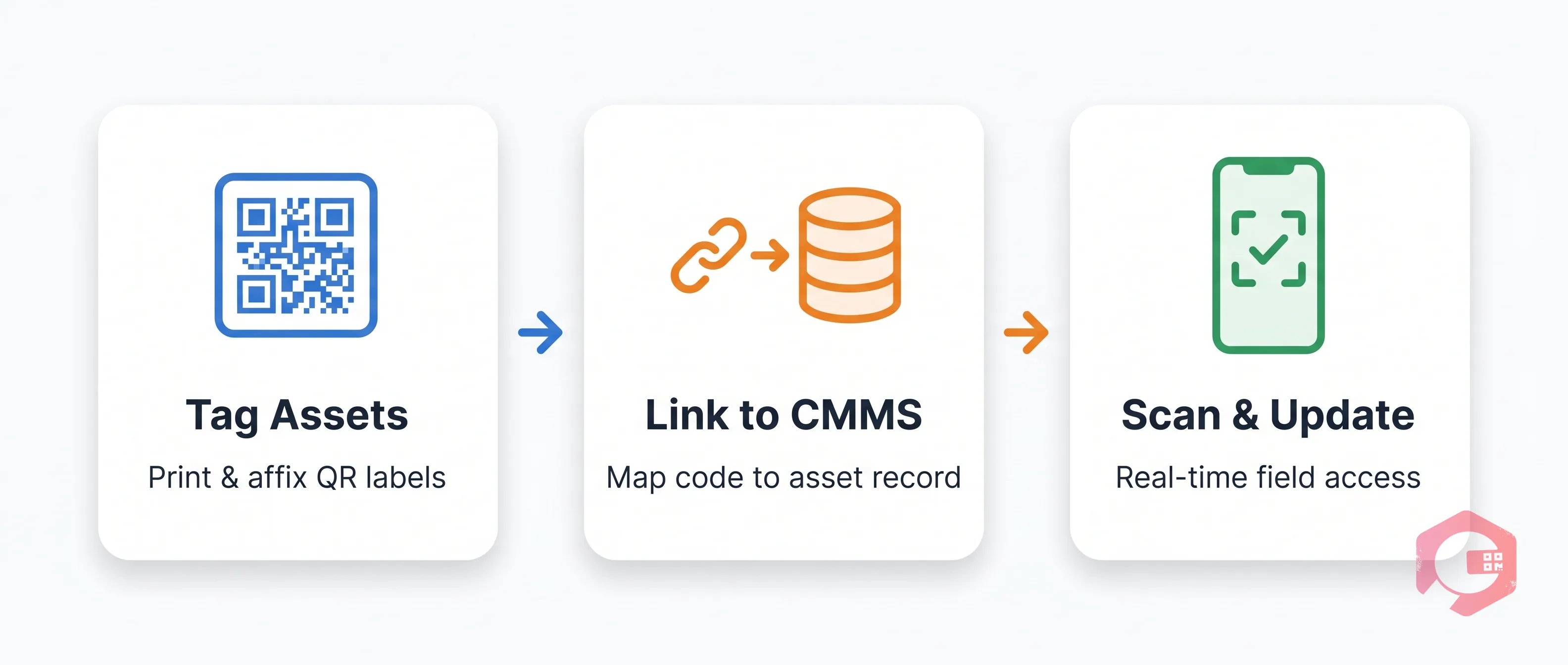
Implementing QR code asset tracking requires no specialised hardware beyond a standard smartphone. Here is the workflow used by facility management teams running the process through a CMMS.
Generate a unique QR code for each asset directly from your CMMS. Most modern platforms allow bulk QR generation so an entire equipment register can be tagged in a single export. Print the codes on durable polyester or metal-backed labels rated for the asset's environment. Affix the label in a consistent, scannable position - front panel on HVAC units, side panel on electrical boards, eye-level on doors and access points.
Each QR code maps to an asset record inside the CMMS containing: asset ID, make and model, purchase date, location, maintenance schedule, linked spare parts, and historical work orders. When an asset is moved or decommissioned, the CMMS record updates - the QR code remains the stable identifier throughout the asset lifecycle. This integration is what separates a simple label from a true asset management system.
Once tagged and linked, every asset interaction becomes a scan. Technicians scan before starting a job to confirm they have the right asset, scan to log completion, and scan to report anomalies. Facility managers see a real-time dashboard of which assets were serviced, which are overdue, and which have open faults. Compliance reports generate automatically from scan history - no manual compilation required.
The QR code stores only a unique identifier - a URL or alphanumeric string. All detailed information lives in the CMMS record it links to. Every asset record should contain:

For facility teams managing hundreds or thousands of assets, QR code tracking delivers measurable improvements across three key areas.
When a building occupant notices a fault, they scan the nearest QR code and submit a request linked directly to that asset - no phone calls, no misidentification. The work order lands in the CMMS pre-populated with the asset's location, history, and maintenance contact. Facilities that move from phone-based requests to QR-scan workflows typically cut average request-to-assignment time from hours to under 15 minutes. Technicians also arrive prepared: they know the asset's service history before they reach the plant room.
Fire suppression systems, pressure vessels, electrical switchboards, and HVAC equipment all carry mandatory inspection cycles. QR code tracking creates an automatic audit trail - every scan, completed work order, and uploaded certificate is timestamped against the asset record. When an OSHA or ISO audit occurs, the compliance report is generated from the CMMS in minutes rather than assembled from disparate files over days.
A QR label typically costs under $0.10 per asset. The cost of a missed preventive maintenance visit - a failed compressor, an unplanned chiller shutdown - runs to thousands. QR tracking supports preventive maintenance programmes by keeping every scheduled task visible and assigned. Organisations that shift from reactive to PM-led maintenance report a 10-25% reduction in maintenance costs within 12 months, according to the Reliable Plant Institute.

QR codes, RFID tags, and IoT sensors serve different needs and often work best in combination. For most facilities, QR codes are the right starting point:
A practical approach: deploy QR codes across 100% of assets as the baseline tracking layer, add RFID for high-turnover moveable items, and layer IoT sensors on critical, high-value plant where predictive insights justify the investment.
Cryotos CMMS generates unique QR codes for every asset, supports bulk printing, and links each code to a fully structured asset record - maintenance history, spare parts, compliance certificates, and scheduled PM tasks all in one place. Technicians use the Cryotos mobile app to scan asset QR codes in the field, log work order completions, capture fault photos, and update asset status - all offline-capable for plant rooms and basements without connectivity. Facility managers get a real-time dashboard across sites, with compliance reports available on demand. Book a demo to see QR asset tracking live in your facility context.
The QR code only needs to encode a unique asset identifier - typically a URL linking to the asset record in your CMMS. All detailed information (maintenance history, compliance status, service schedules, spare parts) lives in the CMMS record, not in the QR code. This means you can update asset data at any time without replacing the physical label.
Yes - when using a CMMS mobile app that supports offline mode. Cryotos caches asset records on the device so technicians can scan, view history, and log work orders without connectivity. Data syncs automatically when the device reconnects to the network.
Every scan is timestamped and logged against the asset record. Completed inspections, uploaded certificates, and technician sign-offs form a traceable audit trail. When auditors request compliance evidence, the facility manager exports a report directly from the CMMS - typically reducing audit preparation time from days to hours.
For most small and mid-sized facilities, QR codes offer a stronger return on investment than RFID. Labels cost pennies and require no reader infrastructure - any smartphone with a camera works. RFID delivers advantages in high-throughput, gate-based scanning scenarios (large warehouses, healthcare linen tracking), but those use cases rarely apply to a standard commercial or industrial facility.
QR code based asset tracking for facility management is one of the highest-impact, lowest-cost improvements a facilities team can make. It eliminates manual tracking errors, creates a real-time picture of every asset in the building, supports compliance with minimal administrative effort, and gives technicians the information they need at the point of the asset. The technology requires nothing beyond a smartphone and a CMMS that supports QR integration. For facilities still running on spreadsheets, the migration is simple: generate codes, print labels, and scan. Start your QR asset tracking journey with Cryotos and see the difference in your first week of use.


Cryotos AI predicts failures, automates work orders, and simplifies maintenance—before problems slow you down.



