

Equipment and inventory tracking reduces project delays by showing you, before each phase starts, which assets are ready, which maintenance is overdue and which spare parts are running low. Most schedule slips do not come from one big failure. They come from small gaps, such as a pump that missed its service or a bearing nobody reordered.
This guide gives you a three-gate readiness check to run before every project phase, a scorecard to track it and a 30-day plan to put it in place. A Computerized Maintenance Management System (CMMS) automates the check, but the steps work with any tracking method.
Key Takeaways
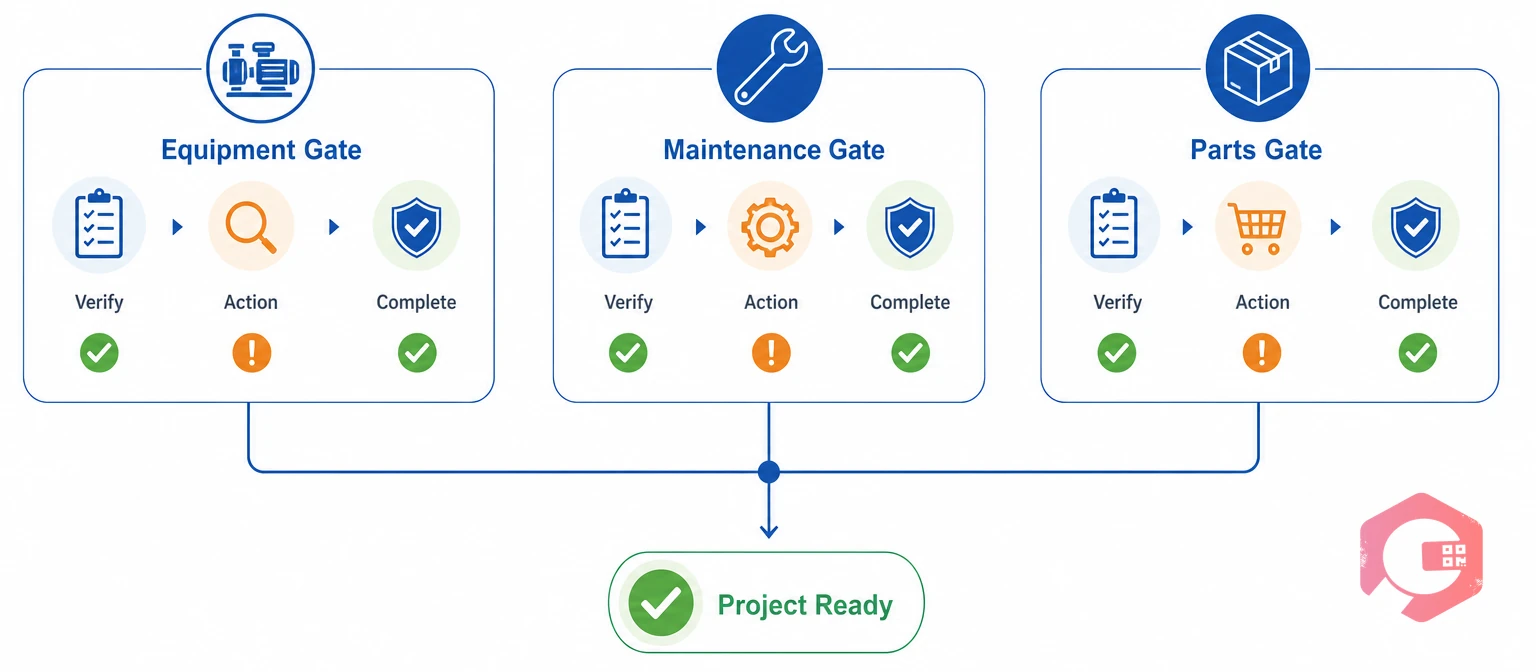
An equipment-driven project delay is a schedule slip caused by an asset that is unavailable, unserviced or waiting on a part. Maintenance teams usually trace these slips back to the same few information gaps.
The ISO 55000 family of asset management standards rests on the idea that decisions about assets need reliable information. Project scheduling is no exception.
Each gap has the same root cause: the data existed somewhere, but not where the right person could see it in time. One repeatable check built on equipment and inventory tracking closes all three.
The 3-Gate Project Readiness Check:
Skip any gate and the delay shows up in the next phase.
Asset tracking is the live record of where each piece of equipment is, what shape it is in and when it is due for service. With that record, a project manager can confirm a generator or compressor is available in seconds instead of making phone calls.
Tracking also lets sites share equipment. When one site finishes with a crane early and another needs one, the transfer happens on data instead of a hallway conversation.
Cryotos asset tracking supports QR code scanning plus GPS, beacon and NFC tracking, so crews can confirm location and status on the spot. Tool lending history covers the small items that also stall work.
For each critical asset, record these five details:
If you cannot say where an asset is and whether it is fit to run in under a minute, it is not project-ready.

Maintenance is ready when every asset a phase depends on has completed its service and passed inspection before the start date. The method is to schedule backward from project milestones. If a phase begins on the 15th, supporting equipment should be serviced and verified by the 12th.
Unlike reactive repair, preventive maintenance fixes wear before it stops work. Good preventive maintenance software runs it on a calendar or on triggers like operating hours and mileage, and flags overdue tasks before they reach a project.
Maintenance teams using Cryotos have reported up to 30% reduction in unplanned downtime and 25% faster repair turnaround. Operations that hit their dates tend to treat pre-deployment inspection as a hard gate, not a courtesy. A phase that starts with verified equipment rarely stops for a preventable breakdown.
Curious what unplanned downtime costs you? Run your numbers in the unplanned downtime calculator.
A reorder point is the stock level that triggers a purchase so new parts arrive before the old ones run out. Set it too low and a critical repair waits days for a bearing. Set it too high and cash sits on the shelf.
Multiply average daily use by supplier lead time, then add safety stock. If you use two bearings a week and the supplier needs three weeks, the base reorder point is six. Add two as a buffer and reorder at eight.
Cryotos inventory management supports QR and barcode stock visibility, warehouse mapping and alerts when stock drops below its minimum. That warning arrives days or weeks ahead of a stock-out, which matters most for parts with long lead times.
Start with maintenance, repair and operations (MRO) items that would stop a phase if they ran out, such as bearings, seals, filters and fuses. Track those first and expand later.
Equipment and inventory tracking is only as reliable as the list behind it, because a part that is not tracked cannot trigger an alert.
Field teams stay in the loop when they can update work orders, checklists and asset status from a phone, even without a signal. Sites and remote facilities rarely have reliable internet, so offline mode matters.
Cryotos mobile works offline and syncs automatically once the connection returns, so the central record reflects the latest field data. Work order updates also reach teams by email and WhatsApp.
The payoff is speed. A problem found at 8 AM can have a work order raised, a part allocated and a technician dispatched before 9 AM, wherever those people are.
A readiness scorecard is a one-page table that rates each gate green, amber or red before a project phase starts. Review it five working days before each phase so there is time to act.
| Gate | What to check | Green | Red |
|---|---|---|---|
| Equipment | Location, condition, project assignment | All critical assets located and fit to run | Any asset missing, faulty or double-booked |
| Maintenance | Overdue tasks, open work orders, inspections | No overdue tasks and inspections signed off | Overdue tasks or urgent work orders still open |
| Parts | Critical spares against reorder points | Every critical part above its reorder point | A critical part is below minimum with no order placed |
Any red gate moves the start date or triggers an expedite. Amber means you have a plan and a date to turn it green. A dashboard that pulls all three checks into one view makes the review a five-minute job.

You can put equipment and inventory tracking in place in 30 days by starting with your most critical assets and parts, not your whole inventory. Work in four weekly steps.
After the first live review, adjust the list and thresholds, then expand to the next tier of assets.
It shows which assets are available, serviced and located before a phase begins. That lets you fix problems while there is still time, instead of discovering them mid-project.
Equipment tracking follows durable assets such as pumps, generators and cranes through their location, condition and service history. Inventory tracking follows spare parts through stock levels, usage and reorders. Projects need both, because a serviced machine still stalls without the right part.
No. Small teams can run it from a spreadsheet. A CMMS becomes worth it when you manage many assets, several sites or long lead-time parts, because it automates reminders and alerts.
Review it five working days before every project phase. For long phases, add a weekly check on any amber or red items until they turn green.
Start with the five to ten assets and the critical spare parts that would stop your next project phase if they failed. Track their location, service dates and stock levels first. Add the rest once the routine holds.
Delays that start with a missing part or an overdue service are among the easiest to stop. Schedule a free demo to see how Cryotos tracks equipment, maintenance and spare parts in one place before your next project phase.



Cryotos AI predicts failures, automates work orders, and simplifies maintenance—before problems slow you down.



