Resource efficiency in maintenance operations means getting the most output — uptime, completed work orders, asset reliability — from the labor, parts, budget, and equipment you have available. When teams run without a structured system, studies show that up to 30% of maintenance labor is wasted on avoidable travel, waiting for parts, or duplicated work. A Computerized Maintenance Management System (CMMS) changes that by centralizing data, automating scheduling, and giving managers real-time visibility into every resource they control.
This guide explains exactly how to use a CMMS to optimize resource efficiency across your maintenance operations — from technician scheduling and parts inventory to key performance metrics and a step-by-step implementation plan.
What Is Resource Efficiency in Maintenance Operations?
Maintenance resource efficiency is the ratio of productive maintenance output to the total resources consumed — including labor hours, spare parts, equipment time, and budget. A team with high resource efficiency completes more planned work orders, reduces unplanned downtime, and keeps costs predictable. A team with low efficiency burns through overtime, stockpiles the wrong spare parts, and reacts to breakdowns instead of preventing them.
According to a McKinsey analysis of industrial operations, companies that apply structured maintenance resource management see a 10–25% reduction in overall maintenance costs and a 20–30% improvement in equipment uptime. The gap between top-performing and average teams isn't technology — it's how they use data to allocate resources before problems occur.
Why Poor Resource Management Is Costly
Without a system in place, maintenance teams fall into predictable traps. Technicians spend time traveling to jobs without the right parts. Stockrooms hold excess inventory for assets that no longer exist, while critical spares run out. Reactive repairs cost 3–5x more than scheduled ones, according to the Plant Engineering 2023 Maintenance Report. And without visibility, managers can't identify which patterns drive those costs.
A CMMS solves this by giving you a single source of truth: every asset, every technician, every work order, and every spare part — connected and searchable.
The 5 Core Resources CMMS Helps You Manage
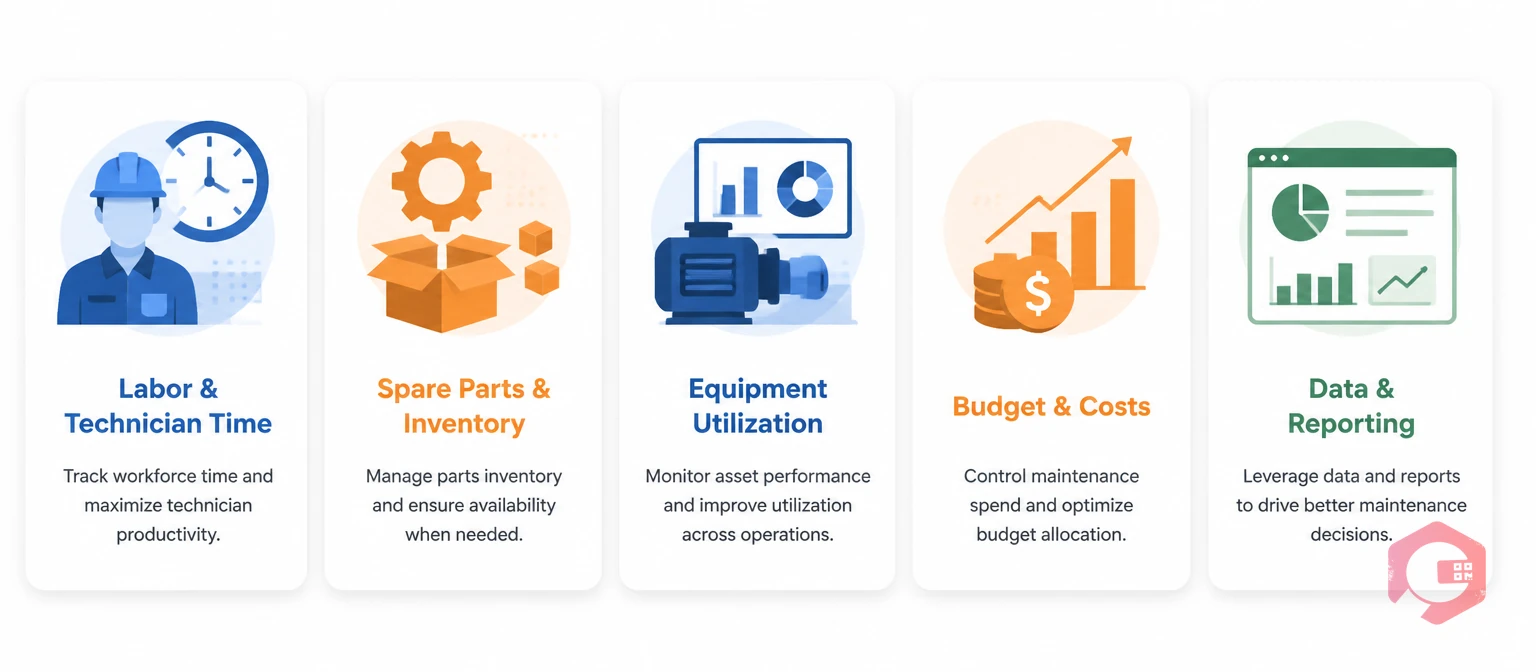
Every maintenance operation runs on five core resources. Here's how a CMMS addresses each one directly:
Labor and Technician Time: A CMMS assigns work orders based on technician location, skill set, and current workload — so the right person gets the right job, fast. Real-time status updates eliminate guesswork and wasted check-ins.
Spare Parts and Inventory:Inventory management tools inside a CMMS track stock levels in real time, trigger automatic reorder alerts at minimum thresholds, and log parts consumption by asset — so you always know what's on hand and what's being used.
Equipment and Asset Utilization: By linking maintenance history, downtime logs, and PM schedules to each asset, a CMMS shows which equipment is over-maintained, under-maintained, or approaching end of life — letting you reallocate service effort where it creates the most value.
Budget and Maintenance Costs: Work order cost tracking, labor hour logging, and parts valuation give finance and operations teams a clear view of where maintenance money goes — and where it's being wasted.
Data and Reporting: A BI dashboard turns raw maintenance activity into actionable KPIs — OEE, MTTR, MTBF, PM compliance — so managers can make decisions based on data, not gut feel.
How CMMS Optimizes Technician Scheduling and Labor Utilization
Labor is typically the largest single line item in a maintenance budget — and the hardest to optimize without good data. A CMMS addresses this through intelligent work order management and real-time scheduling.
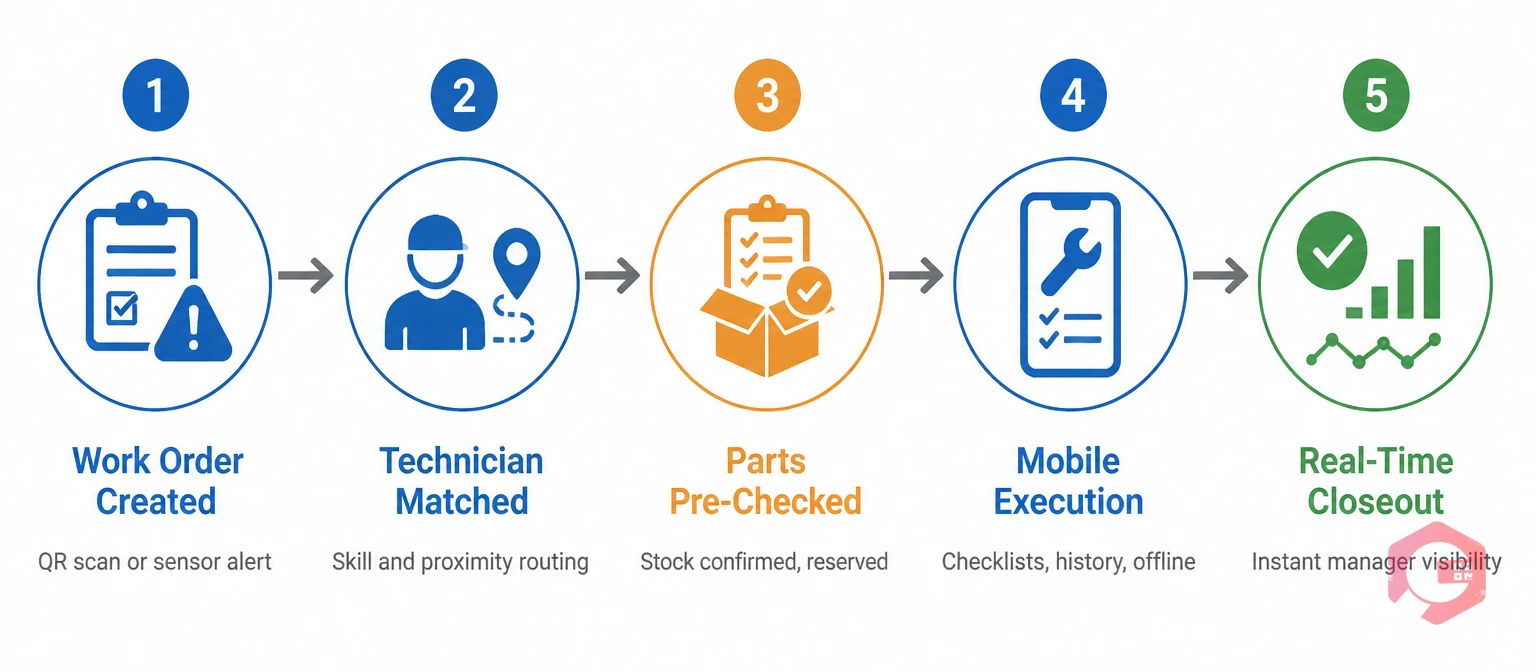
Here's how the workflow looks in practice:
Work Order Creation: A new request comes in — via QR code scan, sensor alert, or manual entry. The CMMS logs it immediately with asset details, priority level, and required skills.
Technician Matching: The system identifies available technicians with the right certifications and routes the job to the closest qualified person, cutting travel time significantly. One manufacturing plant using Cryotos reduced average job-response time by 28% within the first 90 days of deployment.
Parts Pre-Check: Before the technician departs, the CMMS confirms that required parts are in stock and reserves them — preventing the single most common cause of repeat trips.
Mobile Execution: Technicians access job details, checklists, manuals, and past maintenance history on their mobile device — including offline mode when connectivity is limited.
Real-Time Closeout: On completion, the technician logs parts used, time spent, and any observations. Managers see updates instantly, without phone calls or paper logs.
The result is higher wrench time — the percentage of a technician's shift spent doing actual maintenance work rather than administration, travel, or waiting. Industry benchmarks put average wrench time at around 25–35%; well-run CMMS users consistently hit 45–55%, according to Reliable Plant's Wrench Time research.
Reducing Parts Waste with CMMS Inventory Management
Spare parts inventory is a silent budget drain for many maintenance teams. Over-ordering ties up capital in slow-moving stock. Under-ordering causes emergency purchasing at premium prices — and production stops while you wait for delivery.
A CMMS brings inventory control directly into your maintenance workflow:
Minimum Stock Alerts: Set a reorder threshold for each part. When stock drops below that level, the CMMS sends an automatic alert — so you restock on your schedule, not when a technician discovers an empty shelf.
Parts Linked to Assets: Every spare part in the system connects to the assets it supports. When an asset is retired, the CMMS flags orphaned inventory so you can stop reordering parts you no longer need.
Consumption Tracking: Managers can see which parts are used most frequently, on which assets, and in what volume — making it easy to negotiate better supplier contracts and improve purchasing decisions.
MRO Cost Visibility: Full MRO spend is tracked per asset, department, and time period — giving leadership the data to set meaningful budget targets.
Cryotos customers have reported a 20–30% reduction in emergency parts purchases after implementing CMMS inventory management, replacing last-minute procurement with planned, cost-effective replenishment.
Using CMMS Preventive Maintenance to Maximize Asset Uptime
Reactive maintenance — fixing equipment after it breaks — is the enemy of resource efficiency. Every unplanned breakdown pulls technicians off scheduled work, demands emergency parts procurement, and creates production losses that ripple through your entire operation.
Preventive maintenance software within a CMMS flips this dynamic. Instead of waiting for failures, you schedule inspections and service intervals based on time, usage, or condition data — and the CMMS handles the rest automatically.
Here's what that looks like in resource terms:
Time-Based PMs: A monthly lubrication check or quarterly calibration gets scheduled once and recurs automatically. No manager needs to remember. No task falls through the cracks.
Usage-Based PMs: For equipment measured in run hours or production cycles, the CMMS triggers maintenance when the threshold is reached — not before (wasting resources) and not after (risking failure).
Checklist Templates: Standardized maintenance checklists ensure every technician follows the same procedure, reducing variability and repeat visits caused by missed steps.
According to the U.S. Department of Labor, shifting from reactive to preventive maintenance reduces overall maintenance costs by 12–18% and cuts unplanned downtime by up to 25%. A CMMS is the operational backbone that makes this shift possible at scale.
Key Metrics to Track Resource Efficiency in CMMS
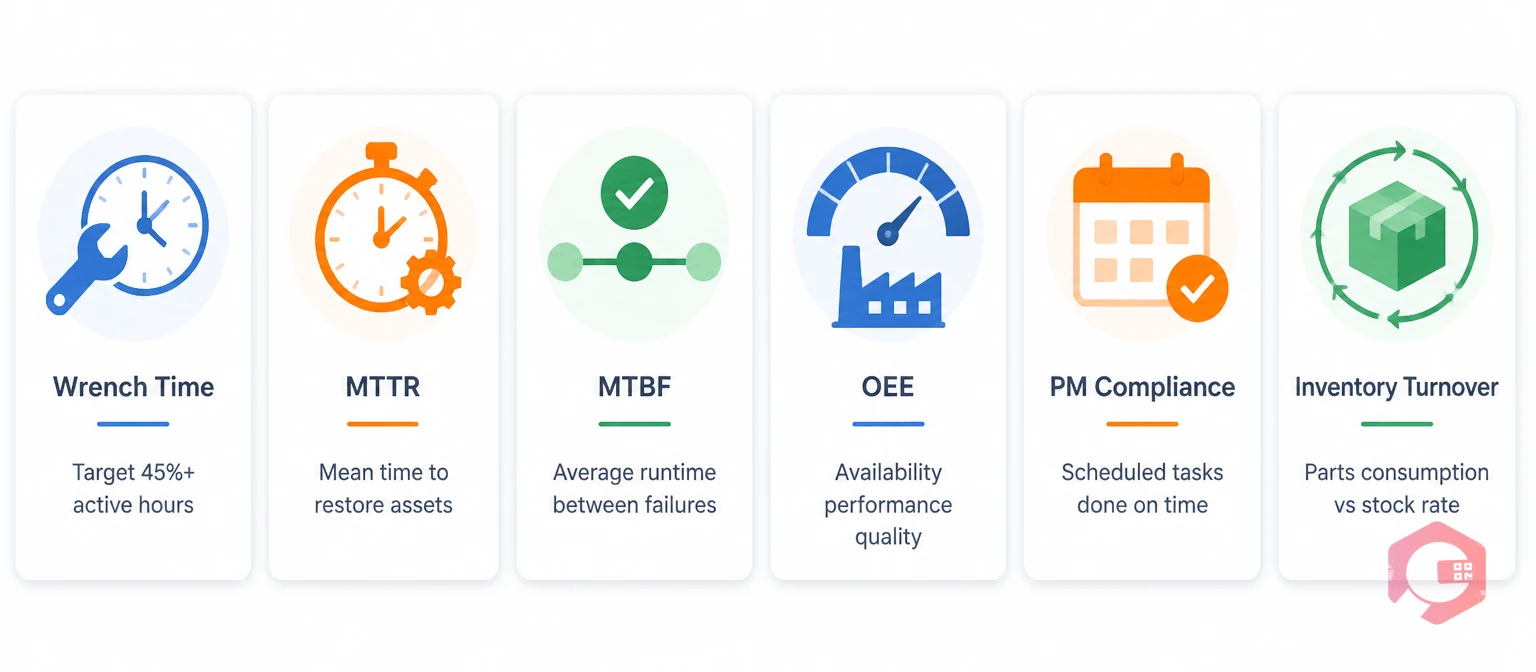
You can't improve what you can't measure. A well-configured CMMS gives you real-time access to the metrics that matter most for resource efficiency:
Wrench Time: The percentage of a technician's available hours spent on active maintenance tasks. Target: 45%+. Below 30% signals scheduling, travel, or parts-availability problems.
Mean Time to Repair (MTTR): How long it takes to restore a failed asset to service. Use the MTTR calculator to benchmark your current performance and set improvement targets.
Mean Time Between Failures (MTBF): How long an asset runs before failing again. Rising MTBF means your PM program is working. Flat or declining MTBF signals gaps in your maintenance strategy.
Overall Equipment Effectiveness (OEE): A composite metric covering availability, performance, and quality. OEE ties maintenance resource decisions directly to production outcomes — making it the clearest measure of whether your efforts are paying off.
PM Compliance Rate: The percentage of scheduled preventive maintenance tasks completed on time. Below 85% typically indicates scheduling overload, parts shortages, or technician capacity gaps.
Inventory Turnover Rate: How quickly spare parts are consumed and replenished. Very high turnover may indicate under-stocking; very low turnover signals excess inventory tying up budget.
Cryotos's downtime tracking module surfaces all of these metrics in one place, with drill-down capability from organization level to individual asset — so you always know exactly where resource efficiency gains are waiting.
Step-by-Step: How to Build a Resource Efficiency Plan with CMMS
Implementing a CMMS isn't just a software project — it's an operational transformation. Here's a practical five-phase approach:
Phase 1 — Baseline Your Current State: Before changing anything, measure your existing wrench time, MTTR, PM compliance rate, and parts spend. These numbers become your benchmark. Without them, you have no way to prove improvement.
Phase 2 — Asset and Inventory Setup: Load every active asset into the CMMS with its full maintenance history, warranty status, and associated spare parts. Use the asset management checklist to make sure nothing is missed. This step takes time upfront but pays off immediately in work order accuracy.
Phase 3 — Build Your PM Schedule: Translate your existing maintenance procedures into CMMS-based PM tasks with defined intervals, checklists, and assigned technician roles. Start with your highest-criticality assets and expand from there.
Phase 4 — Train and Launch: Roll out the CMMS to technicians with hands-on training focused on mobile work order management. Prioritize adoption early — a CMMS only improves resource efficiency when everyone uses it consistently.
Phase 5 — Review and Optimize: After 60–90 days, pull your KPI reports and compare them to your baseline. Identify the areas where efficiency gains are strongest and the areas where gaps remain. Adjust PM schedules, reorder points, and technician assignments based on what the data shows.
Common Pitfalls That Undermine Maintenance Resource Efficiency
Even teams that implement a CMMS sometimes fail to capture the full resource efficiency gains available. These are the most common mistakes — and how to avoid them:
Incomplete Asset Data at Launch: A CMMS is only as accurate as the information inside it. Teams that skip the asset-loading phase — or load assets without maintenance history, associated parts, or criticality ratings — end up with work orders that don't reflect real-world conditions. The fix is simple: dedicate time upfront to a thorough asset inventory before going live. Use the asset and equipment inspections checklist to guide this process systematically.
Using CMMS as a Work Order Tool Only: Many teams configure their CMMS to manage reactive work orders and stop there. They miss the PM scheduling, inventory management, and reporting capabilities that deliver the biggest long-term resource savings. Think of the CMMS as an operating system for your entire maintenance function — not just a task tracker.
Ignoring Technician Adoption: A CMMS that technicians don't use consistently produces incomplete data — and incomplete data leads to poor scheduling decisions. Invest in hands-on training and make the mobile app the easiest way to receive and close out jobs. When technicians see how the system reduces their own wasted time, adoption follows naturally.
Setting and Forgetting PM Schedules: A PM schedule built on manufacturer recommendations in year one may not reflect actual asset behavior by year three. Review PM frequencies every six months using the MTBF and failure data your CMMS accumulates. Assets that fail between scheduled services need more frequent attention; assets with no failure history may be over-maintained.
Not Tracking Wrench Time: Teams that measure only work order completion rates miss the single most important labor efficiency indicator. Low wrench time (below 30%) tells you something structural is wrong — whether it's parts availability, travel time, or scheduling. Without measuring it, you can't fix it.
Avoiding these pitfalls is what separates maintenance teams that buy a CMMS and see modest gains from those that transform their operations within a year. The lean maintenance principle applies here: eliminate every step in your process that doesn't add value to uptime or asset reliability, and use your CMMS data to identify exactly where that waste lives.
Frequently Asked Questions
What is the best way to measure maintenance resource efficiency?
The most reliable approach combines wrench time (labor utilization), PM compliance rate (schedule adherence), MTTR (repair speed), and overall equipment effectiveness (asset output). Tracking these four metrics together gives a complete picture of how efficiently your maintenance resources are being used, and where the biggest opportunities for improvement lie.
How does a CMMS reduce maintenance labor costs?
A CMMS reduces labor costs primarily by eliminating wasted time — time spent searching for parts, traveling to jobs without the right tools, or repeating work because steps were missed. By automatically routing work orders to the nearest qualified technician, pre-checking parts availability, and standardizing procedures through checklists, a CMMS increases the percentage of each shift spent doing productive work rather than administrative tasks.
Can CMMS help with both preventive and reactive maintenance resource planning?
Yes. A CMMS manages both planned and unplanned work within the same system. Preventive maintenance tasks are scheduled automatically based on time or usage triggers. When a breakdown does occur, the reactive work order enters the same queue, gets triaged by priority, and is assigned to an available technician — giving managers full visibility into both streams at once, without switching between systems.
How long does it take to see ROI from CMMS resource optimization?
Most operations see measurable improvements within 60–90 days of full adoption — particularly in PM compliance rates and parts order accuracy, which improve quickly once the system is populated with accurate data. Broader gains in labor utilization and downtime reduction typically show clearly at the 6-month mark, as historical data accumulates and scheduling decisions become more precise.
If you're ready to close the gap between the maintenance resources you have and the results you're getting, Cryotos CMMS gives you the tools to do it — from automated PM scheduling and real-time work order management to inventory tracking and the KPI dashboards that show exactly where to focus next. Start with a free trial and see what your baseline numbers look like inside the system.