

Retail chains onboard new maintenance technicians faster with an AI knowledge base in their CMMS by giving every new hire immediate access to asset-specific repair procedures, fault histories, parts lists, and troubleshooting guides — searchable by natural language query from a mobile device on the job. The average retail maintenance technician takes 3 to 6 months to reach full productivity without structured knowledge support, according to SHRM workforce research on onboarding effectiveness. In a retail chain with high technician turnover and equipment spread across dozens or hundreds of stores, that productivity gap has a direct maintenance quality cost — more repeat repairs, more escalations, more time spent finding an experienced colleague to ask a question that the CMMS already knows the answer to.
This guide covers what an AI knowledge base in a CMMS actually does for retail maintenance teams, how it compresses technician ramp-up time, and how to build knowledge content that new technicians actually use — rather than a document library that nobody opens.
Retail maintenance has a knowledge transfer problem that sits underneath the more visible challenges of parts availability and contractor management. When a maintenance technician with 8 years of experience on a specific estate leaves, they take with them an asset-specific understanding that took years to build: which HVAC unit in Store 14 runs warm in summer and needs a coil inspection before the peak season, which refrigeration condenser in Store 7 has a known refrigerant weep at the service valve, which conveyor in the distribution centre needs a specific tensioning sequence because the standard OEM procedure doesn't account for the non-standard belt specification fitted two years ago.
None of this knowledge lives in a system. It lives in that technician's head. When they leave, the next person who works on those assets starts from zero — often discovering the quirks the hard way, through a repeat failure or a misdiagnosis that costs time and parts. The new technician spends the first months of their role calling the previous person for advice, shadowing a colleague who may not know the specific assets either, or working through trial and error on live equipment in a trading store where every extra minute the fault is unresolved has a customer experience cost.
Retail makes this problem worse in three specific ways. First, high technician turnover: retail maintenance roles see above-average staff movement, particularly at the operative level, which means the onboarding cycle repeats frequently. Second, geographic spread: a technician covering 15 stores across a region encounters dozens of different asset configurations, brands, and ages — a knowledge surface area far wider than a maintenance tech working a single site. Third, pressure to perform quickly: a new technician arriving at a store with a refrigeration fault during trading hours doesn't have time for a 30-minute learning exercise. They need the relevant information in under a minute.
An AI knowledge base integrated into the CMMS directly addresses all three. It captures asset-specific knowledge in a searchable, retrievable format. It's accessible from the mobile app in the field without calling anyone. And it gets smarter over time as work order history, fault findings, and repair outcomes populate the underlying knowledge layer.
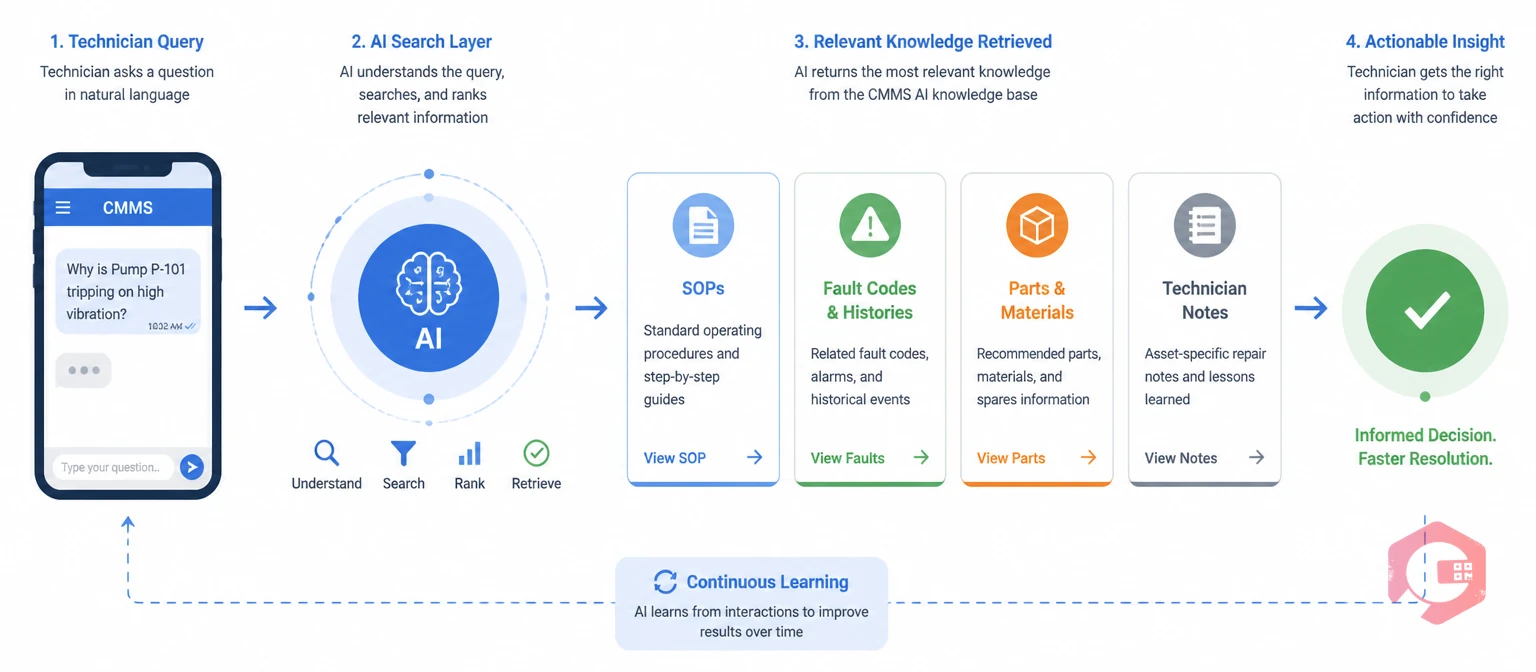
An AI knowledge base in a CMMS is a searchable repository of maintenance knowledge — SOPs, repair procedures, OEM documentation, fault histories, parts guides, inspection checklists, and site-specific notes — that a technician can query using natural language rather than navigating a folder structure or remembering a document name.
The AI layer is what makes the difference between a document library and a functional knowledge tool. Instead of a technician opening a file browser and searching through folders of PDFs, they type or speak a question into the CMMS mobile app: "how do I reset the temperature controller on the Carrier unit in Store 12 after a power cut?" The AI knowledge base retrieves the relevant procedure — whether that's from a stored OEM manual, a previous technician's repair note on that specific asset, or a general troubleshooting guide — and returns a structured answer in seconds. No phone call needed. No waiting for a colleague to respond on WhatsApp.
The knowledge base integrates with the work order record directly. When a technician opens a work order on a refrigeration unit, the CMMS surfaces the relevant knowledge content for that asset automatically — the last three fault findings, the most-used parts in previous repairs, the specific checklist items that experienced technicians have flagged as critical for that asset type. The new technician isn't starting from a blank work order — they're starting from the accumulated knowledge of everyone who has worked on that asset before them.
Cryotos's knowledge base supports text documents, PDFs, images, and video content — so a standard operating procedure can include a photograph of the specific valve location on a non-standard installation, or a short video clip of the correct tensioning technique for a belt configuration that differs from the OEM diagram. This multimedia capability is particularly valuable for retail maintenance where asset configurations vary by store fit-out vintage, refurbishment history, and original contractor specification.

The productivity gap for a new retail maintenance technician comes from two sources: not knowing the assets, and not knowing the procedures. A well-structured knowledge base addresses both simultaneously — not by replacing the learning process, but by compressing it from months to weeks by giving the technician reliable, retrievable information at the moment they need it.
Asset-specific knowledge is the highest-value content category for accelerating ramp-up. Every asset in the CMMS asset register can have knowledge content linked directly to it — accessible when a technician opens a work order on that asset, or when they search by asset ID in the knowledge base. For a new technician encountering an unfamiliar HVAC unit, this means they can pull the service manual, the last 6 months of fault history, the preferred parts list with stock locations, and any site-specific notes in under 30 seconds. What previously required a call to an experienced colleague now resolves from the CMMS on the technician's phone.
Fault-code-to-procedure mapping accelerates diagnostic work for technicians who haven't yet built the pattern recognition that experienced techs rely on. When a refrigeration controller displays a fault code, a new technician who doesn't immediately recognise it can search the knowledge base by fault code and get the diagnostic procedure, the most common root cause for that code on that asset type, and the parts typically required to resolve it. This compresses a 20-minute diagnostic investigation into a 3-minute knowledge retrieval and confirmation exercise.
Step-by-step SOPs for complex or infrequent tasks eliminate the risk of procedure errors on maintenance activities that a new technician may not have performed before. Compressed air system isolation procedures, refrigerant recovery sequences, electrical panel lockout/tagout checklists — these are tasks where a procedural error has safety or compliance consequences. A knowledge base SOP that walks the technician through each step, with sign-off checkpoints captured in the work order record, reduces both error risk and the anxiety a new technician feels when performing an unfamiliar high-stakes task for the first time.
Peer knowledge — repair notes and findings logged by experienced technicians on previous work orders — is the most underutilised accelerator in most retail maintenance programs. When an experienced technician notes in their work order closure that "the belt tension on this unit needs to be set 10% higher than the OEM specification due to the extended drive centre distance on the non-standard installation," that note is available to every subsequent technician who works on that asset. The knowledge doesn't leave when the technician does — it stays in the system, linked to the asset record, retrievable the next time someone opens a work order.
The difference between traditional technician onboarding and knowledge base-supported onboarding shows up at every stage of the ramp-up period — from the first week to the first six months. The table below compares the two approaches across the dimensions that determine how quickly a new technician reaches full productivity.
| Dimension | Traditional Onboarding | AI Knowledge Base Onboarding |
|---|---|---|
| Asset knowledge source | Shadowing an experienced tech; calling colleagues | Asset-linked knowledge content in CMMS, retrievable in seconds |
| Fault diagnosis support | Memory, OEM manual search, phone call to supervisor | Natural language search returns fault code procedures, common causes, parts list |
| Procedure guidance | Printed SOPs if they exist; usually verbal instruction | Digital SOP with multimedia steps, sign-off checkpoints in work order |
| Site-specific knowledge | Lost when experienced tech leaves; rebuilt from scratch each time | Captured in work order closure notes; linked to asset; persistent across staff changes |
| Time to first solo job | 4–8 weeks with supervisor sign-off | 1–2 weeks — knowledge base provides the reference layer that reduces reliance on supervision |
| Repeat repair rate | High in first 3 months — diagnosis errors, missed steps | Lower from week 1 — procedure guidance reduces first-time fix failures |
| Experienced tech burden | High — constant questions, callbacks, shadowing demands | Low — new tech answers most questions independently via knowledge base |
| Knowledge retention on departure | Zero — leaves with the technician | Captured in CMMS — available to all future technicians |

Tribal knowledge — the asset-specific, site-specific, experience-derived information that exists only in your experienced technicians' heads — is the most valuable and most fragile element of a retail maintenance program. Every departure of a long-serving technician is a knowledge loss event that the next person hired will spend months recovering from. The window to capture that knowledge is narrow: it requires a systematic effort to extract and document it before the departure happens, not after.
Work order closure notes are the most practical capture mechanism for most retail maintenance teams. Rather than asking experienced technicians to write documentation (which rarely happens), you capture knowledge as a byproduct of the job they're already doing. A structured work order closure form in Cryotos prompts the technician to record: what they found, what they did, what parts they used, and any asset-specific observations that would help the next technician. Over 12 months of consistent work order closure, a high-performing technician's knowledge about their asset estate is captured in hundreds of documented repair events — all linked to specific assets, searchable, and persistent.
Dedicated knowledge article creation is the second mechanism, best used for complex procedures that work order notes don't fully capture. For a retiring technician or a key departure, a structured exit interview that produces 5 to 10 knowledge articles on their highest-criticality assets — each reviewed by a supervisor and loaded into the CMMS knowledge base — captures the most valuable institutional knowledge before it walks out the door. The document management module in Cryotos stores these articles against the relevant asset records, so they surface automatically when a technician opens a work order on those assets.
Video documentation is increasingly the most effective format for procedural knowledge, particularly for physical tasks with spatial components — the correct approach angle for accessing a confined refrigeration service point, the specific sequence of valve operations for a refrigerant recovery on a particular plant configuration. A 2-minute video recorded on a smartphone by an experienced technician conveys in visual detail what would take 500 words to describe in text. Stored against the asset record in Cryotos, that video is accessible to every technician who works on that asset going forward — indefinitely.
The capture effort pays compound returns. Every piece of knowledge added to the CMMS knowledge base reduces the ramp-up time for every future technician who encounters those assets, reduces callbacks to experienced colleagues, and reduces the repeat repair rate on the assets where tribal knowledge was previously the only guide to effective maintenance.
The failure mode of most CMMS knowledge base implementations isn't technical — it's adoption. A knowledge base populated with content that technicians can't find quickly, trust fully, or access easily on their phone in the field will be ignored in favour of a phone call. Building a knowledge base that actually gets used requires attention to four things: content quality, search effectiveness, mobile accessibility, and content freshness.
Content quality means every article is accurate, complete, and written at the right level for the technician using it. Procedures that assume knowledge the new technician doesn't have yet are useless. Generic OEM documentation that doesn't account for site-specific installation variations misleads rather than helps. The standard for a knowledge article should be: a new technician with basic maintenance training can follow this and produce the correct outcome without additional support. If it can't meet that standard, it needs rewriting before it goes into the knowledge base.
Search effectiveness determines whether the right content surfaces when the technician needs it. Tagging articles with asset IDs, fault codes, equipment models, and symptom descriptions — not just document titles — ensures that a natural language search for "freezer door won't seal Store 22" returns the refrigeration door gasket inspection procedure and the relevant asset history, rather than a blank result. The AI search layer in Cryotos's knowledge base handles semantic matching, so the search works even when the technician's query wording doesn't exactly match the article title.
Mobile accessibility is non-negotiable for retail maintenance. Technicians are in the field, not at a desk. Knowledge base content that isn't fully accessible, readable, and functional on the Cryotos mobile app won't get used. This means avoiding content formats that don't render on mobile — large PDFs without mobile-optimised layouts, spreadsheets, documents requiring desktop software to open. Articles, images, and videos stored in the CMMS knowledge base render natively in the mobile app and are accessible offline in areas with poor connectivity.
Content freshness requires a quarterly review cycle where knowledge articles are checked against current asset configurations and recent work order findings. An SOP that reflects an asset configuration that was modified 18 months ago is worse than no SOP — it misleads the technician into following a procedure that doesn't match the actual asset. Assigning article ownership to specific team members, with review due dates tracked in Cryotos's task management module, keeps the review cycle running without relying on anyone remembering to check.
Retail maintenance teams using Cryotos report a 30% reduction in downtime and 25% faster repair times — outcomes that a strong knowledge base directly supports by reducing diagnostic time, reducing procedure errors, and reducing the repeat repair rate on complex assets. The asset and equipment inspections checklist gives your team a structured framework for the store-level asset walks that generate the first layer of knowledge base content — asset conditions, site-specific configurations, and installation observations that form the foundation of every technician's asset familiarity.
If your retail maintenance program is losing institutional knowledge every time an experienced technician leaves, or your new hires are spending their first months operating below productivity because the information they need lives in colleagues' heads rather than a system, Cryotos CMMS gives you the knowledge base, mobile access, and work order integration to change that. Book a demo at cryotos.com to see how the AI knowledge base and technician onboarding workflow operates across a multi-site retail estate.
An AI knowledge base in a CMMS is a searchable repository of maintenance procedures, fault histories, OEM documentation, and asset-specific repair notes that technicians can query using natural language from a mobile device in the field. It helps technician onboarding by giving new hires immediate access to the asset-specific information they would otherwise spend months learning through experience or by asking colleagues. Instead of calling a supervisor to ask how to reset a specific controller or which parts are needed for a common fault on a particular asset, the technician searches the knowledge base and gets the answer in seconds — reducing ramp-up time and reducing the burden on experienced team members.
A CMMS knowledge base prevents knowledge loss through two mechanisms. First, structured work order closure notes capture asset-specific observations as a byproduct of every completed repair — when experienced technicians consistently close work orders with detailed findings and notes, their knowledge accumulates in the CMMS linked to specific assets rather than remaining in their heads. Second, dedicated knowledge articles document complex procedures, site-specific configurations, and non-standard installation details that work order notes alone don't fully capture. Both mechanisms make knowledge persistent — available to future technicians regardless of staff changes, accessible from the asset record whenever someone works on those assets.
Yes — multi-site knowledge management is one of the primary use cases for CMMS knowledge base functionality in retail. Cryotos's knowledge base links content directly to asset records in the CMMS asset register, which covers all store locations under a single account. A technician covering 15 stores can access asset-specific knowledge for any asset at any location from the mobile app — including site-specific notes, previous fault histories, and installation-specific procedures — without needing local access to any physical documentation. This is particularly valuable for retail where the same equipment model may have different configurations across store fit-outs of different vintages.
Prioritise in this order: asset-specific repair notes for your highest-criticality assets (refrigeration plant, HVAC units, electrical panels), fault-code-to-procedure guides for equipment with complex control systems, SOPs for infrequent but high-risk tasks (refrigerant recovery, electrical lockout/tagout), and site-specific configuration notes for assets that differ from standard OEM specifications. Start with the assets that generate the most reactive call-outs or the most technician questions — these are the highest knowledge gaps. Build content for these assets first and expand coverage progressively rather than attempting to document everything at once before going live.
Most retail maintenance teams see measurable onboarding improvements within the first 4 to 8 weeks of a new technician using the knowledge base actively. The leading indicators are: fewer calls to experienced colleagues per shift, faster first-time fix rates on common fault types, and higher work order closure quality (more detailed findings and notes). Full ramp-up time — the point at which a new technician is operating at or near the productivity level of an experienced team member — typically compresses from 4 to 6 months to 6 to 10 weeks when a well-populated CMMS knowledge base is used consistently from day one.



Cryotos AI predicts failures, automates work orders, and simplifies maintenance—before problems slow you down.



