

A safety observation workflow in a CMMS is a structured, end-to-end process that captures hazard reports from field workers, routes them to the right team, triggers corrective work orders, and tracks resolution through to verified closure. Unlike paper logs or spreadsheets, a Computerized Maintenance Management System ensures every observation is assigned, actioned, and auditable. It turns reactive safety reporting into a proactive risk-reduction system.
According to OSHA, near-miss events are 300 times more common than serious injuries. Yet only 1 in 3 workers formally reports them — because the reporting process is too slow or complex. Building this workflow inside your CMMS removes that barrier entirely. This guide walks you through six steps to get it done.
Key Takeaways
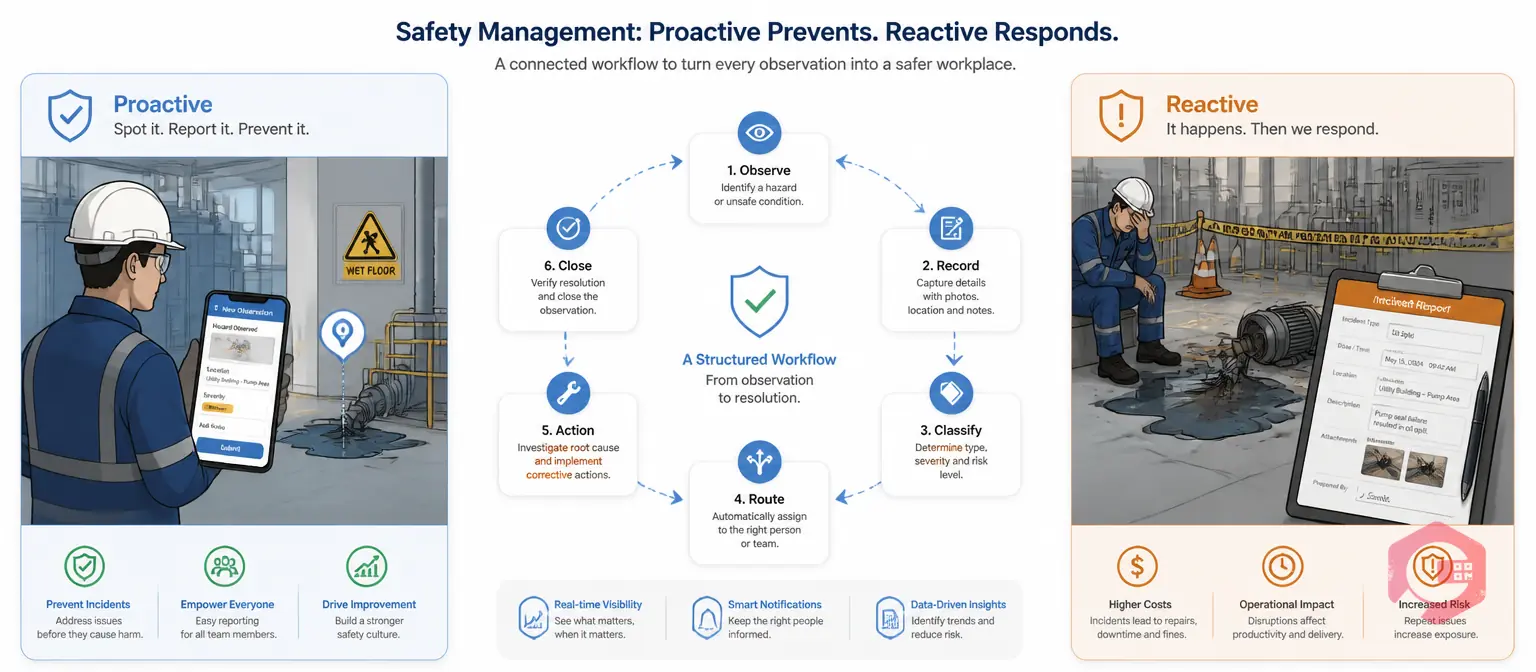
A safety observation is a documented record of a hazard, near-miss, or unsafe behavior spotted before an incident occurs. The safety observation workflow is the structured process that determines what happens to that record — who receives it, who acts on it, and how resolution is confirmed and verified.
Most facilities collect observations. Few have a reliable safety observation workflow that ensures every one is resolved. The difference between a safety culture and a safety checkbox exercise is almost always the presence — or absence — of that workflow.
| Aspect | Safety Observation | Incident Report |
|---|---|---|
| Timing | Before anything happens (proactive) | After injury or damage occurs (reactive) |
| Purpose | Prevent future incidents | Document what already happened |
| Who Files It | Any worker, any time | Supervisor + injured party |
| CMMS Action | Corrective work order | Investigation + RCA + regulatory filing |
| Regulatory Requirement | Best practice (not always mandated) | Often legally required (OSHA, HSE) |
The key distinction is timing. Safety observations catch hazards before they escalate. A CMMS-based workflow ensures that catching a hazard actually leads to fixing it — with a clear audit trail that proves it.
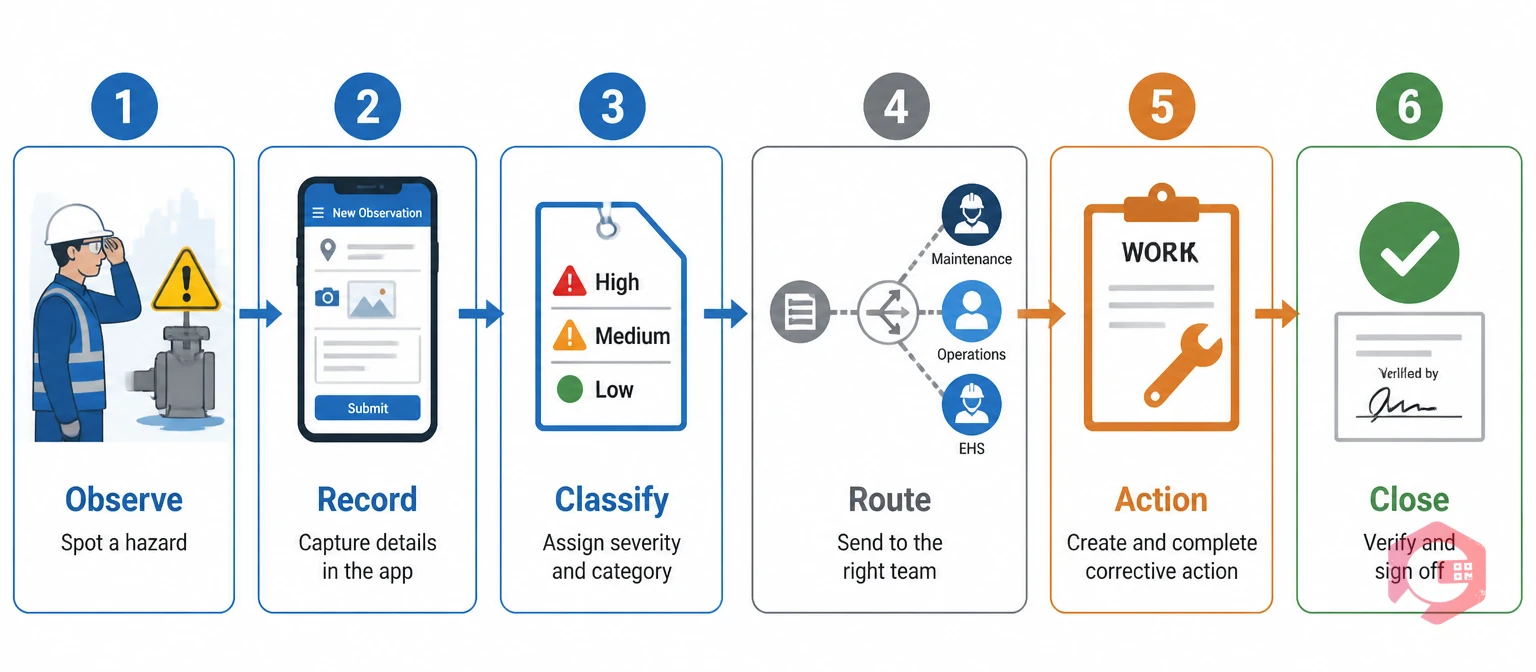
The Safety Observation Loop (SOL) is a 6-stage named framework that maps every observation from identification to verified resolution inside your CMMS. Defining each stage explicitly before go-live is what separates programs that sustain themselves from programs that collapse after the first safety walk.
The Safety Observation Loop (SOL):
Maintenance teams using Cryotos have reported up to 30% reduction in unplanned downtime and 25% faster repair turnaround when corrective actions are managed through structured workflows like this — because every action has a clear owner and a hard deadline.

Before your first observation is submitted, your CMMS needs a clear taxonomy. Without it, every observation lands in the same queue and gets treated with the same urgency — which means critical hazards wait alongside housekeeping items.
Tracking positive observations is an emerging best practice recommended by the American Society of Safety Professionals (ASSP). It shifts the safety culture from policing to recognition — which consistently improves reporting rates for negative observations too.
Configure these as dropdown fields in your CMMS work requests form so every observation is classified at the point of submission — not after the fact by a coordinator.
The observation capture form is the front door of your entire safety observation workflow — and most programs fail here. Forms that ask for too much information kill reporting rates. Workers on a dirty factory floor will not spend 10 minutes filling in a form on a tablet.
Keep the safety observation workflow submission form to seven fields or fewer:
Let the safety team add detail, root cause, and corrective action recommendations after submission. The observer's job is to flag the hazard quickly and accurately — not to investigate it. Use Cryotos's workflow automation to configure the form so it triggers the routing logic automatically on submission, with no manual intervention required.
Ready to standardize your observation capture? Download the Cryotos safety compliance checklist to ensure your form and workflow cover every required field before go-live.
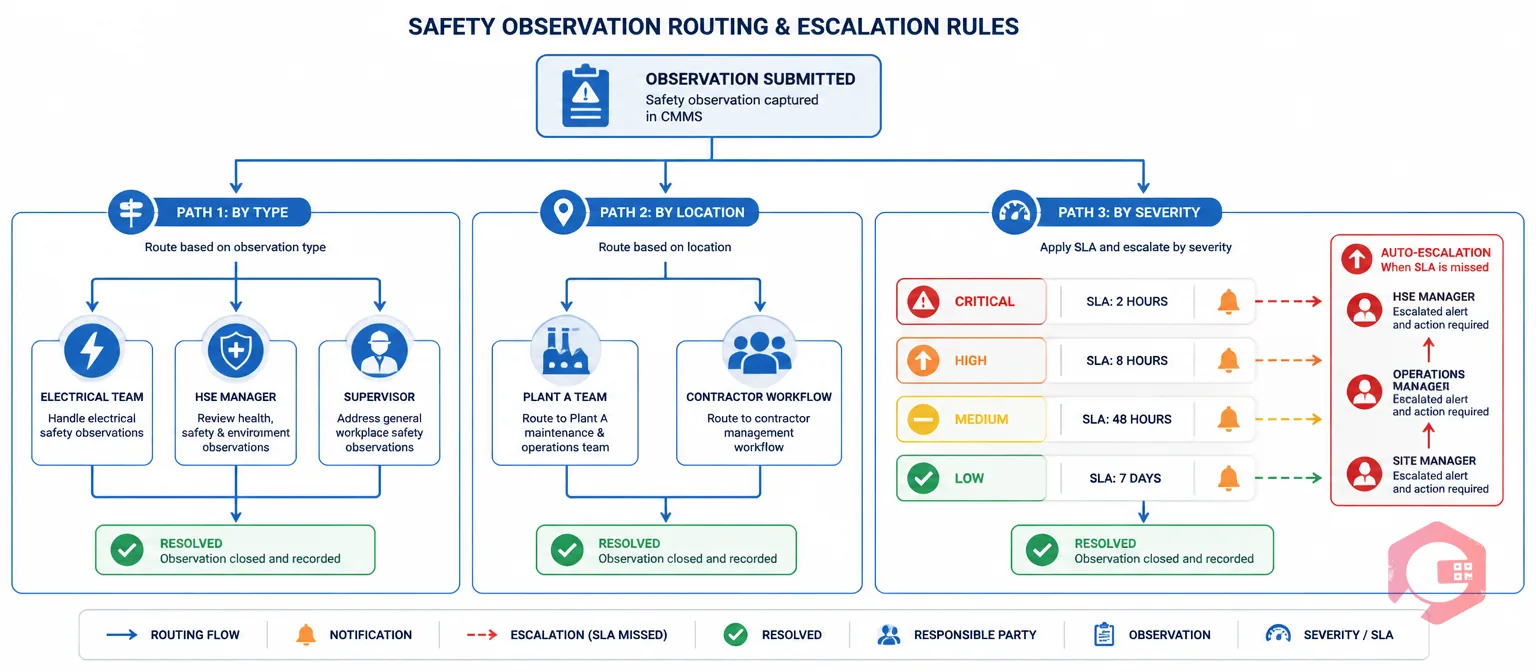
Routing rules decide what happens to an observation the moment it is submitted. Without them, every observation lands on the same desk. The person at that desk becomes a bottleneck. Well-designed routing logic sends the right observation to the right team within seconds — automatically.
SLA clocks start the moment an observation is submitted. Set acknowledgement deadlines by severity: Critical = 2 hours, High = 8 hours, Medium = 48 hours, Low = 7 days. If the SLA is missed, the CMMS escalates to the next level automatically.
Most operations that successfully run safety observation programs use work order management to enforce these rules without relying on any individual remembering to forward or escalate a report manually.

This is where most safety observation workflow programs fail. Observations get logged. A spreadsheet grows. Nothing changes. The reason is that logging an observation and assigning a corrective action are treated as two separate processes — often in two separate systems.
In a CMMS-native workflow, they are one continuous process. The observation record becomes the source document for the corrective work order. No copy-pasting, no data re-entry. The work order inherits the hazard description, location, asset ID, and severity automatically — and the observation stays linked to the work order for the full audit trail.
The number one reason safety observation programs lose momentum is the feedback loop gap. Workers report observations but never hear what happened. Reporting rates drop within weeks because it feels pointless.
Fix this with three automated notifications:
This 3-touch notification loop is the difference between a program workers trust and one they stop using after three months.
Corrective action is not complete until someone physically verifies the fix. Observation-to-resolution cycle time is only meaningful if the closure includes verified physical confirmation — not just a technician marking a work order complete from their phone.
Build this as a digital sign-off using Cryotos's maintenance checklists — the safety officer cannot close the observation without completing every required step. Digital signatures are timestamped and stored against the work order for full audit traceability.
For observations involving electrical isolation, confined space entry, hot work, or work at height, the corrective action cannot start until a permit to work is issued and approved. Configure your CMMS so that work orders generated from Critical or High-severity observations in these categories require PTW approval before the work order status can move to "In Progress." This single configuration point prevents one of the most common high-risk incidents in industrial maintenance: corrective work starting without the required safety authorization.
Individual observations are events. Aggregated over time, they become intelligence. The National Safety Council recommends tracking observation trends by location, hazard type, and recurrence rate as a leading indicator of incident risk.
Key KPIs to monitor on your CMMS dashboard:
If the same unsafe condition is flagged three or more times, that is not a corrective action problem — it is a preventive maintenance problem. Configure a recurring PM task to address the root cause on a scheduled basis, converting a reactive pattern into a proactive one.
A safety observation captures a potential hazard before any injury or damage occurs — it is a proactive tool for preventing incidents. An incident report documents what happened after an injury, near-miss with consequences, or equipment damage. In a CMMS, observations generate corrective work orders while incident reports typically trigger a full root cause investigation, regulatory documentation, and CAPA workflows. Both are important, but observations are the earlier and more powerful intervention.
Keep the initial submission form to seven fields or fewer: date/time (auto-populated), location, observation type, severity, a short description, a photo attachment, and optionally the asset involved. Long forms are the most common reason workers stop reporting — especially in industrial environments where mobile use on the floor is challenging. Safety teams should add investigation detail, root cause, and corrective action recommendations after submission, not before.
For most maintenance-intensive operations, a CMMS with configurable work requests, workflow automation, and corrective work order linking handles the full safety observation lifecycle without a separate EHS platform. The advantage of keeping it inside the CMMS is that corrective actions are automatically linked to the asset maintenance record — giving you a complete picture of which assets generate repeated safety observations. Dedicated EHS platforms add value when regulatory filing, incident investigation, and compliance reporting require capabilities beyond what a maintenance-focused CMMS provides.
The four most reliable leading indicators are: observation rate per 100 workers per month (rising rates indicate growing reporting culture), corrective action closure rate within SLA (target ≥90%), mean time to close for Critical observations (target <24 hours), and repeat observation rate for the same hazard or location (target <10%). A declining recordable incident rate over 12–24 months, correlated with a rising observation rate, is the strongest lagging indicator that the program is producing real risk reduction.
Building a safety observation workflow in a CMMS is one of the highest-impact steps any maintenance or HSE team can take to move from reactive incident management to proactive risk prevention. Schedule a free demo to see how Cryotos configures safety observation workflows, corrective work orders, and permit to work integration for facilities across manufacturing, oil and gas, and facilities management.

Cryotos AI predicts failures, automates work orders, and simplifies maintenance—before problems slow you down.



