

SAP vs CMMS comes down to one core difference: SAP is an enterprise resource planning (ERP) platform built to manage finance, procurement, and supply chain data across an entire organization, while a Computerized Maintenance Management System (CMMS) is purpose-built software that runs the daily work of keeping physical assets running - work orders, preventive maintenance schedules, and technician workflows. SAP tracks what an asset costs and where it sits in the supply chain. A CMMS tracks what condition that asset is in right now and who is fixing it. Plants that run SAP alone still report unplanned downtime, because SAP was never built to schedule a work order or hold a technician's repair history. That's why a growing number of manufacturing and facilities teams run SAP and a dedicated CMMS side by side, syncing data between the two instead of forcing one system to do both jobs.
| Factor | SAP | CMMS |
|---|---|---|
| Primary purpose | Enterprise finance, procurement, and supply chain | Day-to-day maintenance execution |
| Main users | Finance, procurement, supply chain teams | Technicians, planners, maintenance managers |
| Work order scheduling | Basic, add-on module (SAP PM) | Core function, built for shop-floor speed |
| Real-time asset condition | Limited | Native - IoT, meter readings, checklists |
| Mobile technician experience | Often clunky or unavailable offline | Built mobile-first, offline capable |
| Implementation time | Months to years | Days to weeks |
| Best fit | Enterprise financial control and reporting | Fast, accurate maintenance operations |
Key Takeaways
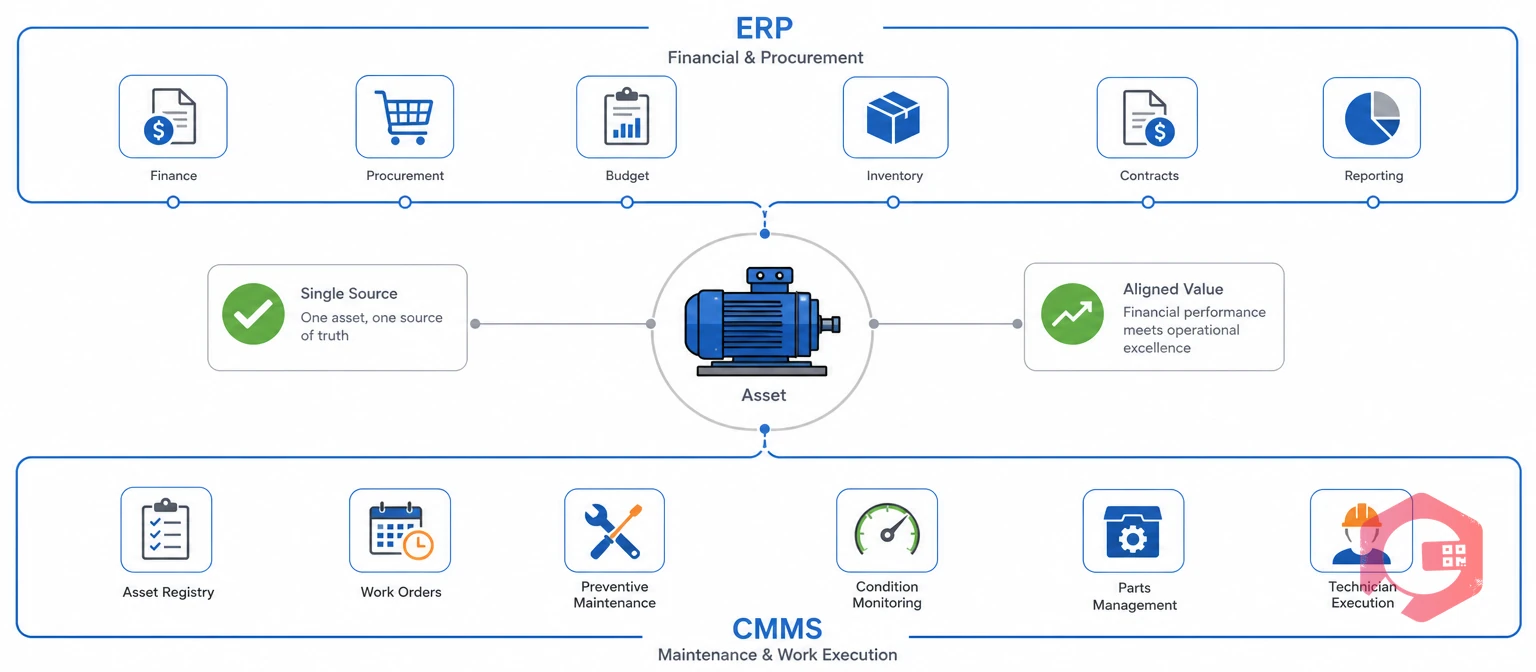
SAP is an enterprise resource planning (ERP) software suite that centralizes financial, procurement, supply chain, and human resources data for an organization. Originally built around financial accounting, SAP has expanded into modules covering materials management (MM), production planning (PP), and plant maintenance (PM), all sharing one underlying database.
Large manufacturers, distributors, and multi-site enterprises use SAP because it gives finance and operations leaders one system of record for cost centers, purchase orders, vendor contracts, and inventory valuation. According to the enterprise resource planning model SAP is built on, every department works from the same master data, which removes the reconciliation problems that come from running finance and operations on separate spreadsheets or point systems.
SAP's plant maintenance (PM) module can log equipment records, track costs against work orders, and generate basic maintenance reports. Most facilities that rely on it for daily maintenance work find it built for financial oversight, not for the pace of a shop floor where a technician needs to open, update, and close a work order in under a minute from a phone.
Large manufacturers rarely choose SAP for its maintenance capability - they choose it because finance, procurement, and HR already run on it, and adding a maintenance module keeps everything under one vendor contract and one data model. That single-vendor logic makes sense at the balance-sheet level, even when it creates friction at the work-order level.
A plant controller reviewing SAP's cost reports can trace every dollar of maintenance spend back to a purchase order, a vendor invoice, and a cost center - a level of financial traceability that few dedicated maintenance tools attempt to match. That traceability is exactly why finance teams resist removing SAP from the stack, even when maintenance teams push for something faster.
A CMMS is software that manages the maintenance side of asset operations - work orders, preventive maintenance schedules, spare parts inventory, and technician assignments. Where SAP asks "what did this asset cost and who approved the purchase order," a CMMS asks "what condition is this asset in today and who is fixing it right now."
A modern CMMS platform like Cryotos lets a technician scan a QR code, open a work order on a phone, log parts used, and close the job - all without touching a desktop terminal. Preventive maintenance schedules trigger automatically based on calendar dates, running hours, or sensor thresholds, and the system keeps a full history against every asset.
Most maintenance teams that adopt a dedicated CMMS do so because they hit a wall with generic enterprise software: work orders that take too many clicks, no offline mobile support, and no easy way to track condition-based maintenance triggers like vibration or temperature. A CMMS is purpose-built to remove exactly that friction.
Picture a maintenance supervisor at a food and beverage plant starting a shift. Every open work order, every asset flagged by a low-stock alert, and every PM due that day sits on one dashboard, sorted by priority. A technician on the floor gets a push notification, walks to the asset, scans a QR code to pull up its full history, and closes the job with a photo before moving to the next task - no paperwork, no end-of-shift data entry catch-up.
That kind of workflow is the reason most operations teams describe a CMMS as the system technicians actually want to use, in contrast to enterprise software they use only because finance requires it.
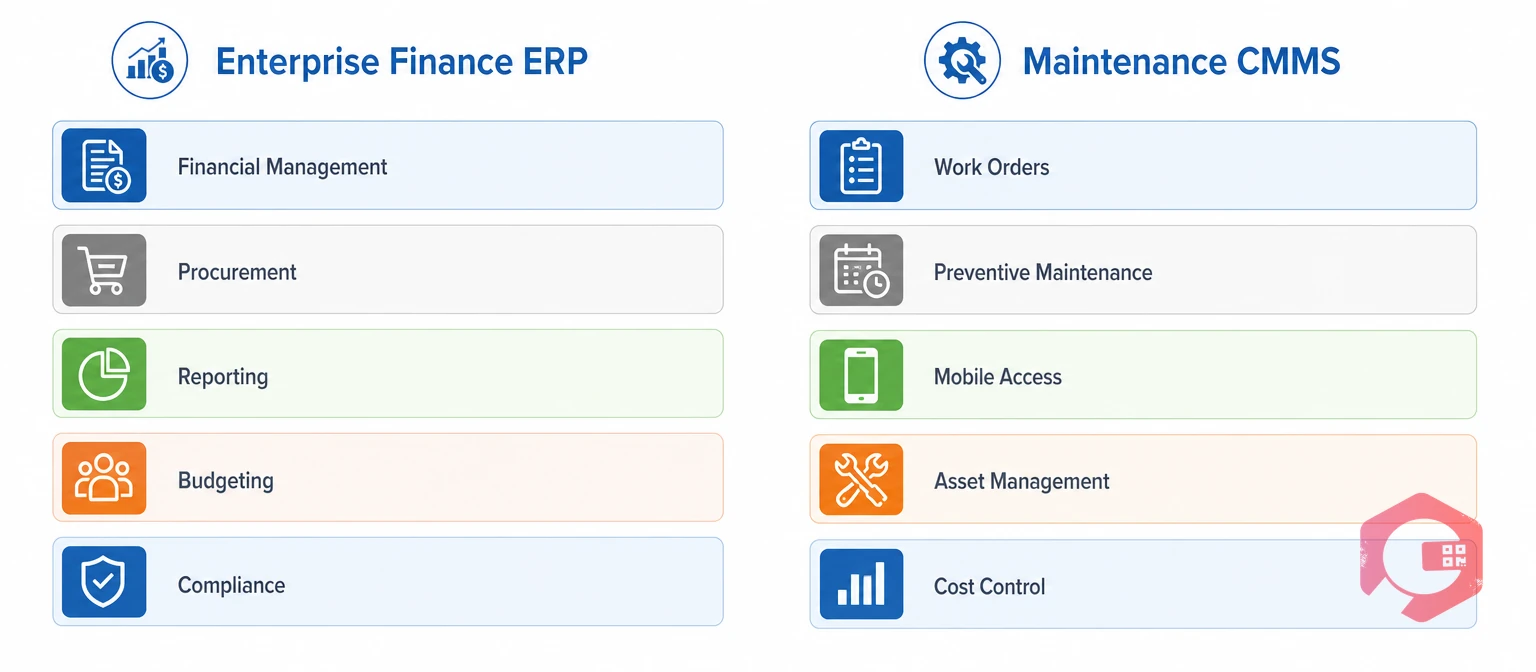
The differences between SAP and a CMMS come down to what each system was designed to optimize: SAP optimizes for financial accuracy across an enterprise, and a CMMS optimizes for maintenance speed and asset uptime on the ground. Understanding these differences up front helps a plant avoid the common mistake of expecting one system to deliver both.
| Dimension | SAP | CMMS |
|---|---|---|
| Data model | Cost centers, GL accounts, purchase orders | Assets, work orders, PM schedules, parts |
| Speed of use | Multi-step approval workflows | One-tap work order creation and closure |
| Preventive maintenance | Calendar-based, manually configured | Calendar, meter-based, and sensor-triggered |
| Inventory granularity | Financial valuation focus | Bin-level, min-threshold, QR-tracked |
| Reporting focus | Cost variance, procurement spend | MTTR, MTBF, downtime, OEE |
| Rollout cost | High - consultants, customization | Low to moderate - configuration, not code |
The gap widens further once IoT and predictive maintenance enter the picture. A CMMS is built to ingest sensor data and trigger a work order automatically when a threshold is crossed; SAP typically needs custom middleware to do the same thing well.
Maintenance teams using ERP integration between the two systems get the accounting rigor of SAP and the maintenance speed of a CMMS without either team giving anything up.
See how real-time maintenance metrics compare to SAP's standard cost reports in Cryotos's BI dashboard.
Running SAP alone for maintenance typically costs a plant more in unplanned downtime than it saves in software licensing. The gap doesn't show up as a line item - it shows up as slower response times, incomplete data, and technicians working around the system instead of through it.
Most facilities that eventually add a CMMS do so after a specific incident - a missed PM that caused a breakdown, or an audit that revealed maintenance records nobody could trust. The pattern is common enough that operations leaders increasingly treat a CMMS as a prerequisite for getting real value out of an existing SAP investment, not a competing purchase.
SAP earns its place in the enterprise stack through financial discipline. It consolidates purchasing, budgeting, and cost tracking across every plant in a company, giving finance leaders one number they can trust for total maintenance spend.
Where SAP falls short is speed on the shop floor. Most facilities running SAP PM find that creating a work order requires navigating several screens built for a desk-bound clerk, not a technician standing at a machine. Offline mobile support is limited, and the interface was not designed around fast, repeated daily use by hundreds of technicians.
A maintenance planner at a large automotive parts plant described the pattern well: SAP tells finance exactly what last quarter's maintenance spend was, down to the cent, but it can't tell a technician which of forty pumps is most likely to fail this week. That gap between historical financial accuracy and forward-looking operational insight is where most SAP-only maintenance programs eventually run into trouble.
A CMMS earns its place through operational speed. Technicians can create, update, and close work orders from a phone in under a minute, and preventive maintenance schedules fire automatically without a planner manually checking a calendar every morning.
Where a CMMS falls short is enterprise-wide financial consolidation. Most CMMS platforms were never designed to run general ledger accounting, multi-entity tax reporting, or complex vendor contract management - and they should not try to. That's the job SAP already does well.
BI dashboard reporting inside a CMMS gives maintenance managers real-time visibility that SAP's standard reports rarely match - but it works best feeding summary cost data back into SAP, not replacing SAP's financial role.
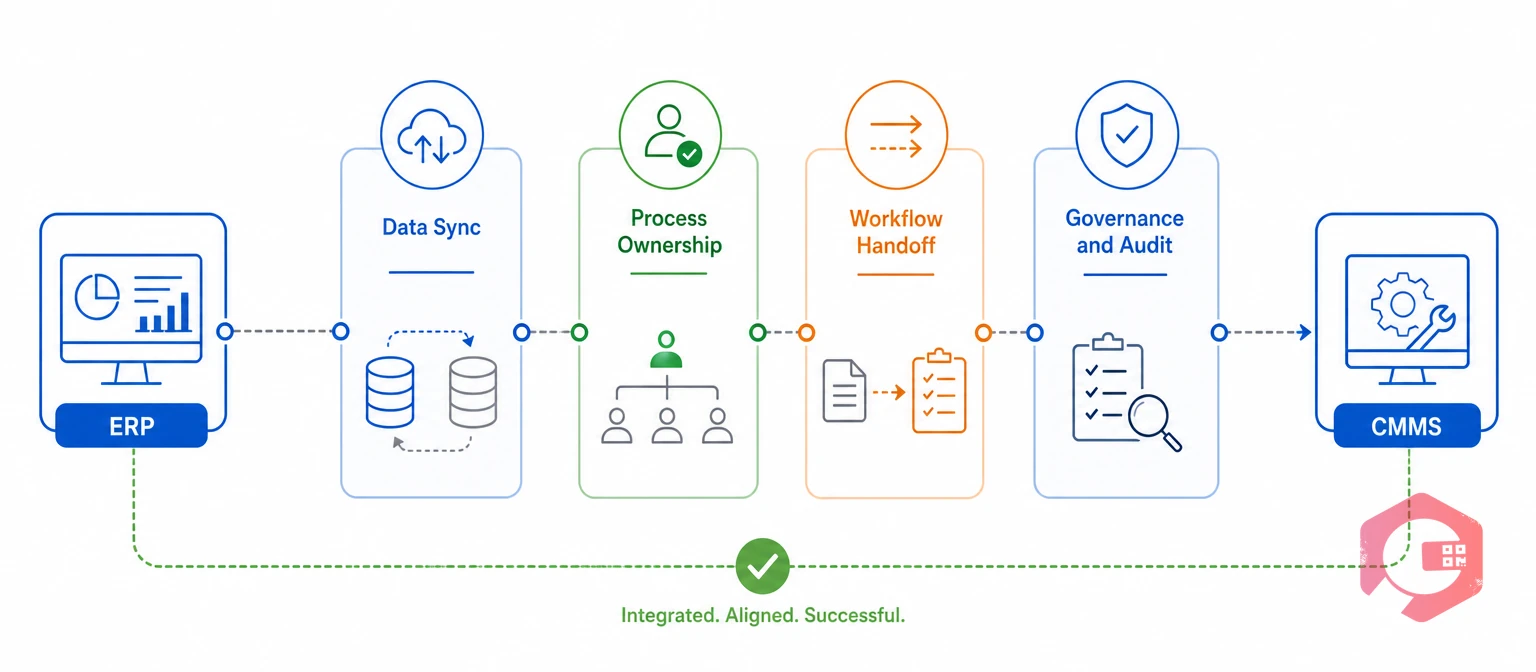
Plants that run both systems side by side avoid a false choice between financial control and maintenance speed. SAP stays the system of record for cost and procurement, while the CMMS stays the system of record for asset condition and work execution - and the two sync automatically.
The 4-Pillar SAP-CMMS Integration Model:
Maintenance teams using Cryotos have reported up to 30% reduction in unplanned downtime and 25% faster repair turnaround after connecting the CMMS to their existing SAP environment - gains that come almost entirely from technicians spending less time on data entry and more time on the tools.
Most operations teams describe the same pattern once both systems are connected: SAP finally gets accurate, timely maintenance cost data instead of a monthly manual upload, and maintenance finally gets a CMMS built for the pace of the shop floor instead of a finance-first interface.
Consider a manufacturer running five plants on a shared SAP instance for finance and procurement. Before adding a CMMS, each plant tracked work orders differently - some on paper, some in spreadsheets, one on an outdated point solution. Corporate maintenance spend reports took weeks to compile and rarely matched what plant managers saw on the floor.
After standardizing on a CMMS connected to the shared SAP instance, every plant logs work orders the same way, PM schedules trigger consistently, and cost data flows into SAP automatically at the moment a work order closes. Corporate finance gets the consolidated reporting SAP was built for, and every plant manager gets the real-time maintenance visibility SAP alone never provided.
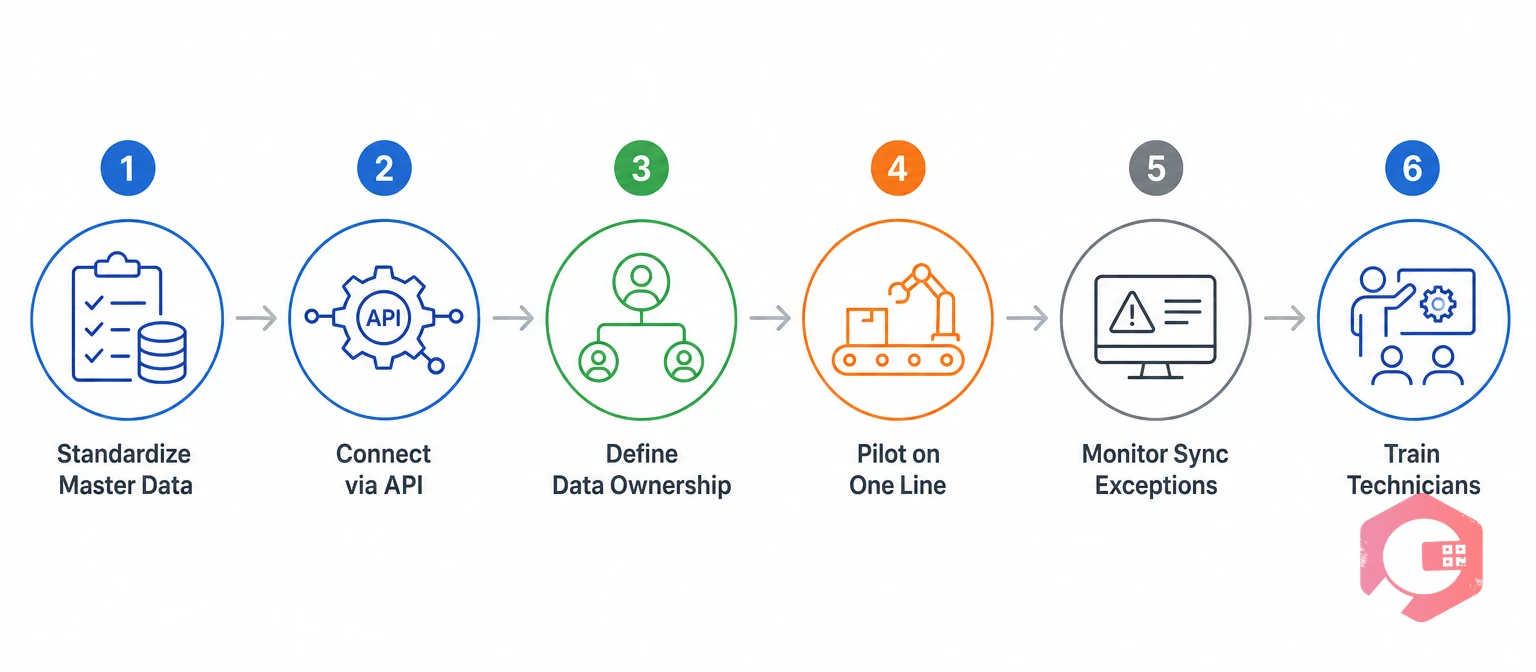
Integrating SAP and a CMMS is a data and process project first, and a technical project second. Getting the sequence right avoids the most common failure mode: connecting two systems before either one has clean, agreed-upon data.
Reconcile asset IDs, part numbers, and cost center codes between SAP and the CMMS before any data flows automatically. A mismatched part number is the single most common cause of failed integrations, and fixing it after go-live is far more disruptive than fixing it before.
Most CMMS platforms, including Cryotos, connect to SAP through a REST API or a middleware layer, syncing work order costs, parts consumption, and asset records without custom development on the SAP side. This step typically takes days, not the months associated with a full SAP module rollout.
Assign one system as the source of truth for each data type - typically the CMMS for maintenance history and condition data, SAP for financial valuation and procurement. Write this ownership down; verbal agreements tend to break down the first time a discrepancy appears.
Run the integration on a single production line or building for two to four weeks, checking that every closed work order posts correctly into SAP before expanding further. A short pilot surfaces mapping issues while the blast radius is still small.
Assign a planner or systems owner to review failed or delayed sync transactions every week, catching mapping errors before they compound into inaccurate cost reports. A CMMS that surfaces sync exceptions automatically turns this into a fifteen-minute task instead of a quarterly audit.
Once the integration is live, make it clear to technicians that the CMMS is now the only place they need to log work - SAP updates automatically behind the scenes. Removing the temptation to double-enter data in both systems is what actually delivers the time savings. Most plants see technician adoption climb sharply within the first two weeks once double entry disappears, since the CMMS becomes the faster path rather than an extra step layered on top of SAP.
According to ISO's asset management standards, treating asset and maintenance data governance as a defined organizational responsibility - not an IT afterthought - is a core marker of a mature maintenance program, and that discipline applies directly to a SAP-CMMS integration project.
Choosing between SAP alone, a CMMS alone, or both together depends on plant size, maintenance complexity, and how tightly maintenance costs need to tie back to enterprise finance.
| Scenario | Recommended Setup |
|---|---|
| Small single-site operation, low asset count | A CMMS alone is usually enough |
| Large enterprise, finance-first reporting needs, low maintenance complexity | SAP alone with its PM module may suffice |
| Multi-site manufacturer with real-time maintenance demands | SAP and a dedicated CMMS integrated together |
| Regulated industry needing audit-ready cost and compliance trails | SAP and a dedicated CMMS integrated together |
For most mid-size and large manufacturing, facilities, and industrial operations, the recommendation is straightforward: keep SAP as the financial backbone and add a CMMS for maintenance execution, connected through real-time sync rather than manual data entry.
Facilities scaling maintenance operations often standardize on mobile CMMS tools specifically because technicians spend most of their day away from a desktop terminal, and a mobile-first workflow closes work orders faster than any desktop-only system can.
Research from SMRP on maintenance reliability benchmarking consistently points to integrated, data-driven asset management - spanning both financial and operational systems - as a mark of a mature maintenance program, reinforcing why the strongest operations run SAP and a CMMS together rather than relying on either alone.
A few warning signs tend to show up before a plant formally decides it needs a dedicated CMMS. Recognizing them early avoids months of workarounds that end up costing more than the integration itself.
Any one of these signs on its own might be manageable. Two or more together usually mean the cost of staying on SAP alone has quietly exceeded the cost of adding a CMMS.
The questions below cover what plant managers and IT teams ask most often when they first consider connecting SAP and a CMMS.
A CMMS can replace SAP's plant maintenance (PM) module for day-to-day work order execution, but it cannot replace SAP's core financial, procurement, and enterprise accounting functions. Most plants keep SAP for finance and add a CMMS for maintenance operations.
Most CMMS platforms, including Cryotos, connect to SAP through a standard REST API, which keeps integration costs far lower than a custom SAP development project. Costs scale with how many data fields need to sync and how complex the existing SAP configuration is.
SAP's PM module was built inside a finance-first system, so creating and closing a work order often takes more clicks and screens than a dedicated CMMS requires. Offline mobile support is also limited, which slows technicians working in areas with poor connectivity.
Most small, single-site operations do not need SAP at all and get everything they need from a CMMS alone. SAP typically becomes relevant once an organization needs enterprise-wide financial consolidation across multiple sites or business units.
The most common data synced includes work order costs, labor hours, parts consumption, asset master records, and cost center codes. The CMMS usually pushes maintenance and cost data into SAP, while SAP pushes procurement and vendor data back to the CMMS.
Most SAP-CMMS integrations using a standard API connection go live within two to six weeks, depending on how much master data cleanup is needed beforehand. Projects that skip the data-standardization step tend to take longer overall because of rework after go-live.
No. Finance, procurement, and vendor management teams typically continue using SAP exactly as before. The change is limited to maintenance work order execution, which moves to the CMMS while cost and asset data continue flowing back into SAP automatically.
Choosing between SAP and a CMMS isn't really a choice at all for most growing plants - it's a question of how well the two systems talk to each other. SAP will keep doing what it does best: enterprise finance, procurement, and compliance reporting. The plants that pull ahead are the ones that stop asking SAP to also run the shop floor, and instead give technicians a CMMS built for that job, connected back into SAP automatically. Schedule a free demo to see how Cryotos connects to your existing SAP environment and closes the maintenance execution gap SAP alone leaves open.


Cryotos AI predicts failures, automates work orders, and simplifies maintenance—before problems slow you down.



