

Shift calendar holidays are the exclude and include overrides on a location's shift calendar. They mark specific dates as non-working or extra-working, so MTTR and MTBF count only the days a machine was actually scheduled to run. They sit on top of the base weekly pattern. That pattern sets the working days, number of shifts, and shift timings for a financial year period. Shift calendar holidays adjust that pattern one date at a time.
Most Computerized Maintenance Management System (CMMS) platforms get the base pattern right and stop there. That leaves every declared holiday, plant shutdown, and compensatory working Sunday counted as a normal working day. Every MTTR and MTBF figure built on that count comes out wrong. This guide walks through how to exclude and include those dates, step by step. The goal: an available-days count that matches what actually happened on the shop floor.
Key Takeaways
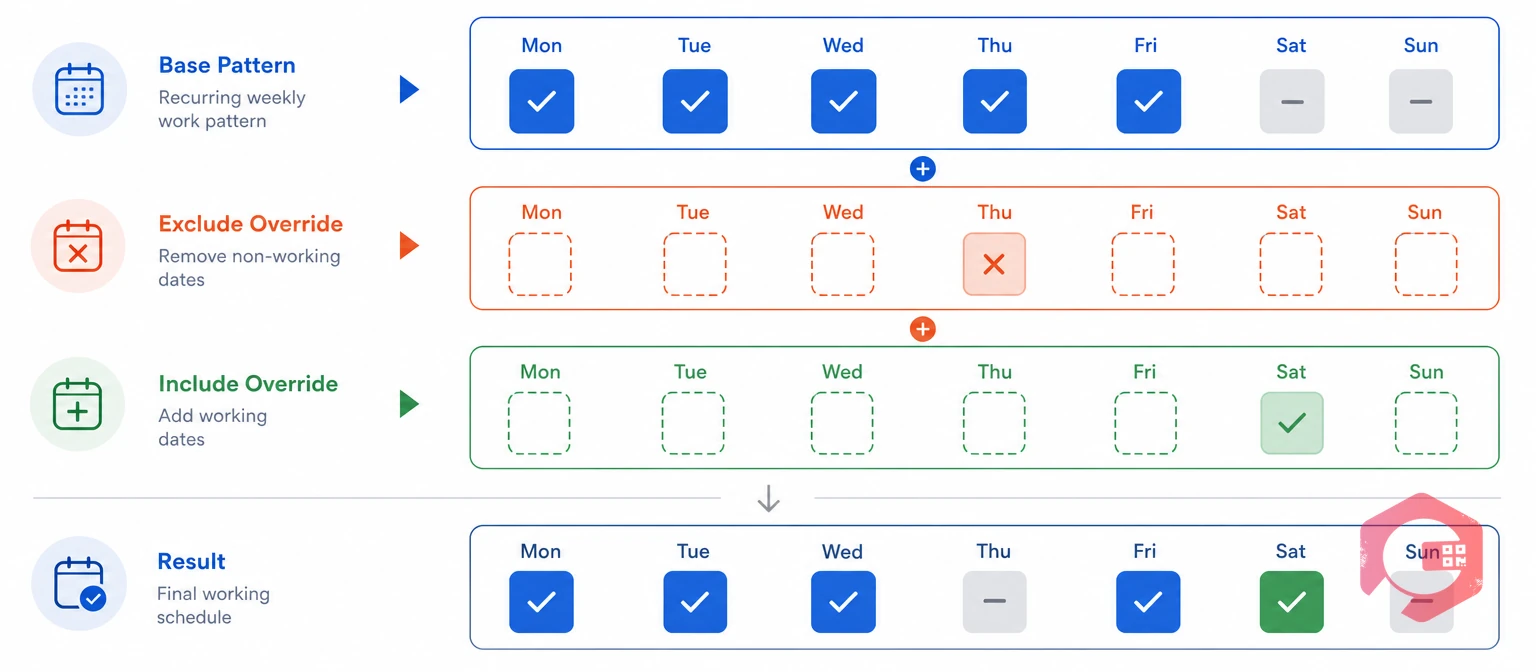
Shift calendar holidays are the exclude and include overrides on specific dates in a location's shift calendar. They sit on top of the base weekly pattern. That pattern sets the working days, the number of shifts, and each shift's start and end time for a financial year period. Shift calendar holidays fix that pattern for the dates that don't follow it.
A location's calendar might say Monday to Saturday, two shifts, April to September. That pattern alone can't flag the 15th of August as a national holiday. It also can't flag a Sunday in October as a working day, even if the plant ran a catch-up shift that day. Exclude and include days capture exactly those two exceptions.
The base weekly pattern is set once per location and financial year period. It answers one general question: which days of the week does this site normally run? Shift calendar holidays answer a narrower question, for a single date: does this day break that general rule? Asset management standards such as ISO 55000 judge an asset's reliability against planned running time, not total calendar time. Exclude and include days protect exactly that distinction.
That distinction matters for a reason. A base pattern change should apply going forward only. A single excluded or included date is a one-time exception. Mixing the two causes problems: editing the base pattern to handle one holiday reclassifies every future week, not just that one day.
Exclude and include days are the two moves inside shift calendar holidays. Both change the available-days count for a period, but they move it in opposite directions, and they apply to opposite situations.
| Factor | Exclude a Day | Include a Day |
|---|---|---|
| What it does | Removes a normally working day from available days | Adds a normally off day into available days |
| Typical use case | National holiday, company holiday, planned shutdown | Compensatory working Sunday, festival make-up day, catch-up shift |
| Effect on MTBF denominator | Lowers planned operating time for the period | Raises planned operating time for the period |
| Effect on MTTR | Strips non-working clock hours from any breakdown spanning the date | Counts the date's shift hours normally for any breakdown that day |
| Base pattern touched? | No, only that date is flagged | No, only that date is flagged |
Neither override changes the base weekly pattern itself. That's what makes them safe to apply. Every other week in the period stays untouched.
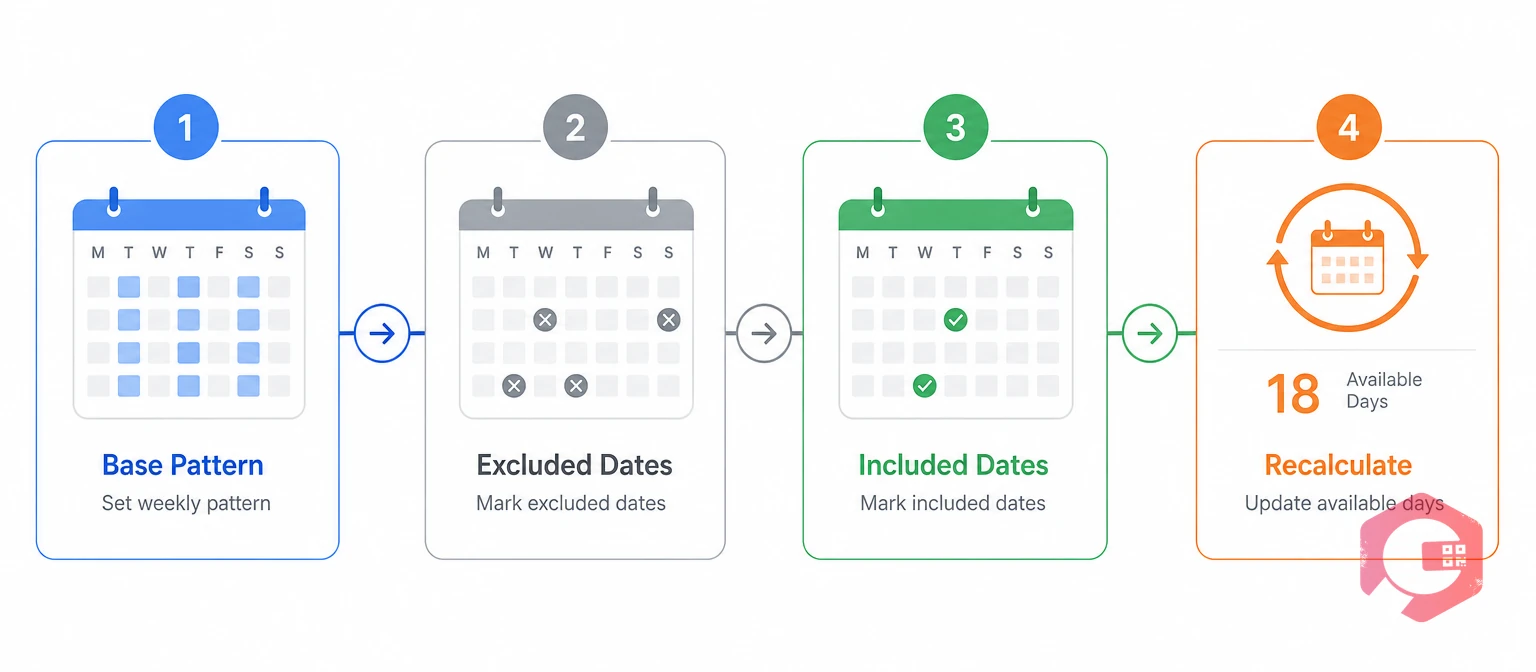
Configuring shift calendar holidays follows the same four steps every time. That's true whether you're setting up a new site or adding one holiday to an existing calendar.
Before adding any override, confirm the base pattern is correct. Check the working days, the number of shifts, and each shift's start and end time for the financial year period you're configuring. The financial year period is the From and To month range a shift pattern applies to. That's what lets one location run two shifts from April to September, then three shifts from October to March.
Get this base pattern right first. Every exclude or include date you add later is measured against it. A wrong base pattern makes every override wrong too.
An excluded date is a calendar day removed from available days for a period, regardless of the base weekly pattern. List every declared holiday, regional observance, and planned shutdown day for the period. Then flag each one as excluded on the location's calendar. These are the same dates covered by a region's official public holiday calendar.
A shutdown with technicians still on-site needs a second decision, covered in the mistakes section below. Exclude the day from MTBF's operating-time base. But don't strip the technicians' own work-order timestamps from MTTR.
An included date is a calendar day added to available days for a period, regardless of the base weekly pattern. List every date that breaks the pattern the other way: a normally off day where the location actually ran. Flag each one as included.
Skip this step, and a machine that ran on an included day gets no credit for that exposure in its MTBF. Any breakdown that day also gets pushed into an undefined "outside shift hours" bucket, instead of its normal shift.
Want to see the effect of a single override before changing your live calendar? Try the free Cryotos MTBF calculator with and without a holiday excluded from the period.
Once every exclude and include date is flagged, you can calculate the available-days count for the period. Take the base working days in the range. Subtract the excluded dates. Add the included dates. That final number feeds planned operating time for MTBF. It also defines which clock hours count toward MTTR for any breakdown in the period.
Check this number against the production calendar before you trust any report built on it. A mismatch here is one of the most common reasons MTTR and MTBF figures don't match what the shop floor experienced that month.
The available-days count from Step 4 feeds directly into both metrics. But it changes each one through a different mechanism.
Planned operating time is shift hours multiplied by available days in the period. Excluding a holiday removes its hours from that total. Including a compensatory working day adds them back. A lower operating-time base, with the same failure count, gives a lower, more accurate MTBF. A higher base, from a skipped exclusion, inflates it. Reliability engineers use this same exposure logic when they calculate availability.
Take a single-shift location running an 8-hour shift. It has 26 base working days in a month. One national holiday falls on a working day. The month also had 6 hours of breakdown downtime across 4 failures.
| Metric | Without Excluding the Holiday | After Excluding the Holiday |
|---|---|---|
| Available days | 26 | 25 |
| Planned operating time | 208 h | 200 h |
| Breakdown downtime | 6 h | 6 h |
| Breakdowns | 4 | 4 |
| MTBF | 50.5 h | 48.5 h |
One missed exclusion inflated this location's MTBF by about 4%. A calendar with several unflagged holidays and shutdowns compounds that gap across every reporting period. This is exactly why shift calendar holidays exist: to keep planned operating time honest.
MTTR isn't affected by the available-days count directly. But it is affected by which clock hours count while a breakdown is open. Say a breakdown starts before an excluded holiday and finishes after it. That excluded day's non-working hours should be stripped from the elapsed repair time. It's handled the same way as a weekend or an overnight gap. An included compensatory working day works the other way. It's a normal working day for MTTR purposes, so a breakdown that day is timed like any other shift, not treated as an exception.
Cross-check any shift's MTTR figure with the free MTTR calculator, once the excluded hours are removed from a breakdown's elapsed time.
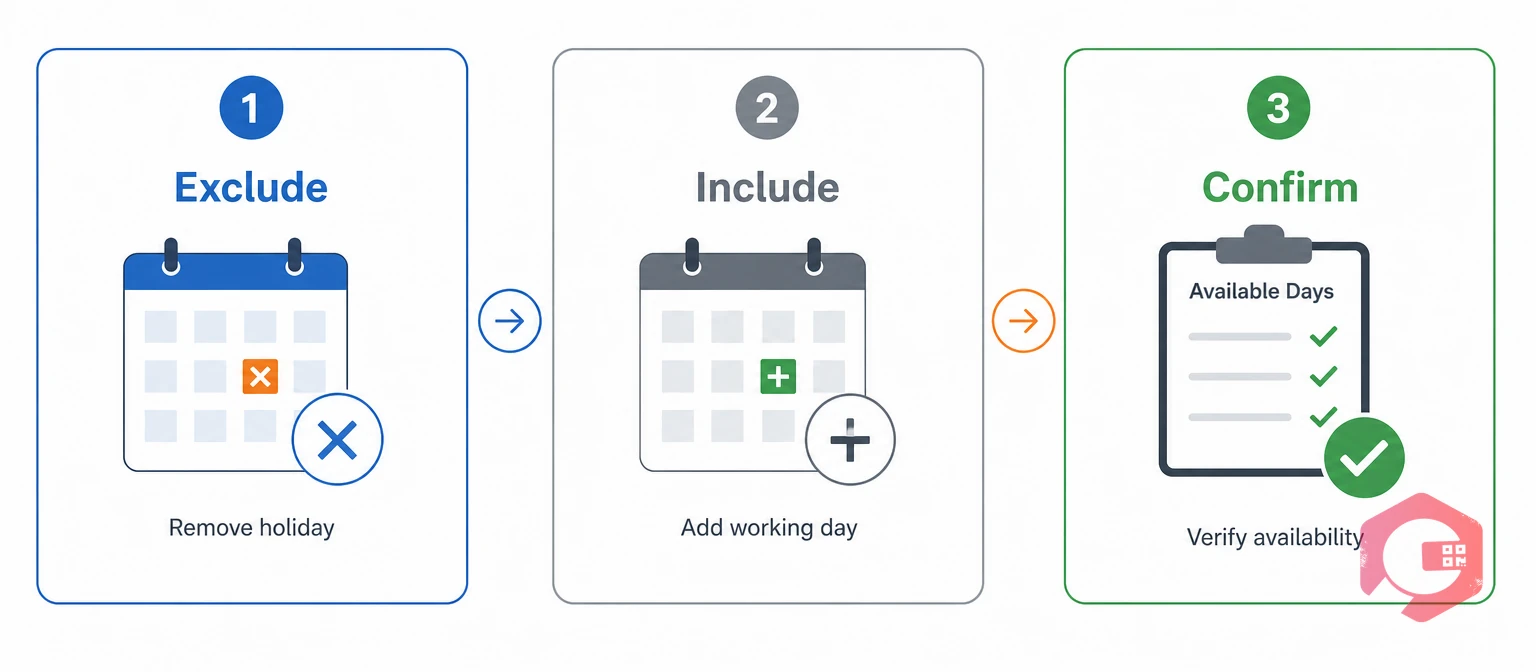
The EIC Method: a three-step audit for reviewing shift calendar holidays before you trust an MTTR or MTBF report for a period.
Run the EIC Method once at the start of the financial year period. Run it again whenever a new holiday, shutdown, or catch-up shift is announced mid-period.
Most errors in shift calendar holidays setup come from a handful of repeated mistakes, not from the formulas themselves.
Each of these is a data-entry gap, not a formula problem. The four-step setup above closes them once. The EIC Method catches anything that slips through later.
Cryotos ties shift calendar holidays directly to the same location shift calendar that feeds MTTR and MTBF. Flag a holiday or catch-up shift once, and the available-days count changes everywhere it's used, not just on one report.
Maintenance teams using Cryotos have reported up to 30% reduction in unplanned downtime and 25% faster repair turnaround. An accurate available-days count is part of what makes those figures trustworthy in the first place. The shift calendar sits on the same record as every asset under that location. That makes asset maintenance management software the one place to see how holidays and catch-up shifts actually moved a site's reliability numbers.
Excluding a day removes it from available days. This applies even if it falls on a normal working day in the base weekly pattern, typically for a declared holiday or shutdown. Including a day adds it into available days. This applies even if it falls on a normal off day, typically for a compensatory working day or catch-up shift.
Excluding a holiday usually lowers MTBF slightly. It removes hours from the planned operating time denominator without changing the failure count. That lower figure is the more accurate one. It reflects only the hours the asset was actually scheduled to run.
The non-working hours inside the excluded date should be stripped from the elapsed repair time. It's handled the same way as a weekend gap. That way, MTTR reflects the technician's actual working time, not the full calendar span.
Yes. Each location keeps its own excluded and included dates on top of its own base weekly pattern. This matters for multi-site operations, where regional holidays and local production schedules differ from site to site.
The day should still be excluded from MTBF's operating-time base, since the asset wasn't in production. But work-order timestamps from technicians actively working during that window should still count toward MTTR, for the tasks they completed.
Getting exclude and include days right keeps MTTR and MTBF built on real operating time, not calendar time. Schedule a free demo to see how Cryotos applies your shift calendar holidays automatically, across every location's reliability report.



Cryotos AI predicts failures, automates work orders, and simplifies maintenance—before problems slow you down.



