

A shutdown critical path is the longest chain of dependent activities between shutdown and restart, and it sets the shortest possible outage. To build one, freeze scope, estimate durations, link dependencies, and calculate float. To track it, update status every shift, recalculate float, and act on any slip before it reaches restart.
Most maintenance teams build the plan once and compare it with reality too late. This guide walks through five steps to build the shutdown critical path, run the numbers, and keep the plan honest while crews work around the clock. You also get a worked example with real float values.
Key Takeaways

A shutdown critical path is the longest chain of dependent activities between shutdown and restart. Any delay on that chain moves restart by the same amount, because no other work can absorb it.
The idea comes from the critical path method, which schedules activities by their dependencies and durations. A shutdown is planned downtime with extra limits: isolations, permits, and shared work areas all shape the logic.
Standards support this discipline. ISO 55000 asset management principles favor planned, risk-based decisions, and SMRP publishes planning metrics such as schedule compliance. OSHA's lockout/tagout rule (29 CFR 1910.147) fixes the order of isolation steps, so those steps always open the chain.
Every hour offline costs production, so one hour saved on the shutdown critical path is worth more than ten hours saved on work that has float.
Freeze scope early, because every job added later reshapes the plan. Build the work list from asset history, inspection findings, and deferred repairs. Then challenge each item: can it run before or after the shutdown? Set a freeze date and a late-addition approval process, so planners judge new work against float instead of reacting to it.
Identify parts with long lead times and order them against critical tasks first. A missing gasket set or valve can hold the longest chain, and the gap stays invisible until crews reach that task.
Include support activities too: scaffolding, gas testing, insulation removal, cleaning, reinstatement, and commissioning. Most facilities that skip them find a gap in the chain on day one.
A Computerized Maintenance Management System keeps asset history in one place, so planners scope from failure data instead of memory. Digital work order management lets each package carry its checklist, parts, and permits.
Estimate each activity from historical actuals, not optimism. Use three-point estimates for uncertain jobs, and ask the crews who will do the work. Keep contingency visible at project level instead of padding single tasks.
Next, link every activity to its predecessors and successors. Use only technical, safety, and resource dependencies.
Check for open ends. Every activity needs a predecessor and a successor, except the first and last. Clean logic makes the float numbers trustworthy.
Every overrun day has a price. Estimate yours with the unplanned downtime calculator before you set the target date.
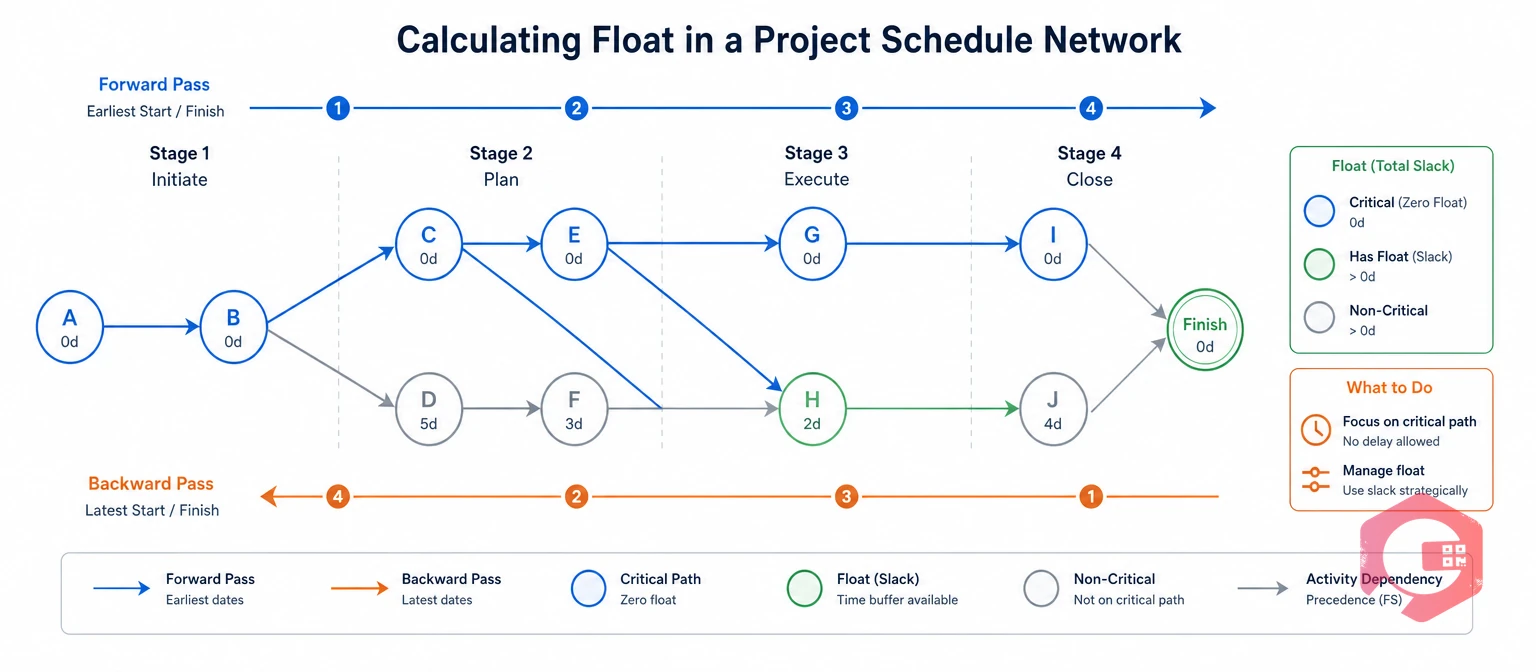
Total float is the amount of time an activity can slip without delaying restart. A forward pass gives each activity its earliest start, and a backward pass gives its latest start. The gap is float, also called slack.
Activities with zero float form the shutdown critical path. Activities with a few hours of float are near-critical and need the same attention. This extract comes from a heat-exchanger bundle replacement plan with a 118-hour chain.
| Activity | Duration (h) | Earliest start (h) | Float (h) | Status |
|---|---|---|---|---|
| Isolate and lock out | 8 | 0 | 0 | Critical |
| Drain, purge, and gas test | 12 | 8 | 0 | Critical |
| Erect scaffold | 10 | 8 | 2 | Near-critical |
| Pull the bundle | 14 | 20 | 0 | Critical |
| Overhaul isolation valves | 20 | 20 | 48 | Float available |
The valve overhaul has 48 hours of float, so planners can use it to level labor. The scaffold has only 2 hours, so a three-hour delay puts it on the critical path. Adding a second crew to the 30-hour re-tubing task (not shown) cuts restart from 118 to 112 hours.
Calculate the network in a scheduling tool such as Primavera P6 or Microsoft Project, or view it as a Gantt chart. Then resource-load the plan and level any peaks, because levelling can lengthen the chain.
Read the results in three passes. Confirm the chain makes sense with the field team, list every activity under a few hours of float, and test what happens if the longest critical task slips by a shift.
Baseline the shutdown critical path only when these gates are met:

Track the plan by updating real status every shift and recalculating float. Waiting for the morning meeting is too slow, because a critical delay found at 8 a.m. may have started 12 hours earlier.
Measure progress with completed steps and evidence, not estimated percentages. Ask supervisors for remaining duration instead of percent complete.
The Five-Point Shift-Cycle Method:
Each outgoing lead reports critical-task status, blocked permits, and missing parts. The incoming lead then starts with the true picture instead of a rumor.
Real-time status matters here. Maintenance teams using Cryotos have reported up to 30% reduction in unplanned downtime and 25% faster repair turnaround. Mobile work orders with maintenance checklists give supervisors step-level evidence from the field, even offline.
Emergent work is any job discovered only after equipment is opened or inspected. It is the main reason a plan grows during execution.
Log every item in one register, triage it, and assess its float impact before approval. If it fits inside float, approve it. If it extends the path, escalate it with the hours of impact.
For example, a six-hour emergent repair on a path with ten hours of float is safe to approve. The same repair on the critical chain adds six hours to restart, so it needs a decision from the shutdown manager. A small change board with clear authority keeps those decisions fast.
Speeding up tasks that have float does not bring restart forward. Point every recovery action at the critical path first.
It is the longest sequence of dependent activities from shutdown to restart. Any delay on it delays restart by the same amount.
List each activity with an ID, duration, and predecessors, then run a forward and backward pass. Primavera P6 and Microsoft Project do this automatically, while Excel works for small plans.
Update it every shift and review it in a daily meeting. In 24/7 shutdowns, shift-level updates catch slips hours earlier.
Yes. When a low-float chain slips by more than its float, it becomes critical. That is why you review near-critical activities every cycle.
Falling float, late critical activities, permits not ready at shift start, and emergent hours above allowance are the earliest signals. Float usually moves first, so check it every shift.
A reliable shutdown plan starts with complete data and fast status. Schedule a free demo to see how Cryotos keeps work packages, parts, and field progress connected in one place.



Cryotos AI predicts failures, automates work orders, and simplifies maintenance—before problems slow you down.



