

SLA breaches in facility management are usually reported as demand problems, contractor problems, or access problems. The maintenance causes — the operational failures that made the breach inevitable before the technician even left the depot — almost never make it into the breach report. And because they don't make it into the report, they don't get fixed, and the same breach pattern repeats next quarter.
This is one of the most persistent problems in FM performance management. The SLA breach report tells you which jobs missed their window. It doesn't tell you why those jobs were set up to fail from the moment the fault was raised. The "why" lives in the CMMS data — in the PM that was skipped three weeks earlier, the parts that weren't staged, the technician dispatch that matched the wrong skillset, or the fault log that was created two hours after the fault was first reported. According to IFMA's facilities management operations research, a majority of SLA breaches in commercial FM contracts have a traceable upstream maintenance cause that wasn't identified or addressed in the breach review. This guide names those causes, shows you where to find them in your data, and explains how to stop them from generating the next round of breaches.

The SLA breach report in most FM operations is a downstream document. It captures what happened at the point of breach — the job that missed its target, the technician who didn't arrive in time, the work that wasn't completed within the resolution window. What it almost never captures is the upstream maintenance state that made the breach outcome likely or inevitable.
This happens for two reasons. First, the people writing breach reports are the same people who responded to the emergency — they're explaining what they experienced, not auditing what caused it. From their perspective, the job was raised, they responded, the parts weren't available, the contractor was delayed. Those are accurate descriptions of what they encountered. They're not accurate descriptions of why the situation existed.
Second, attributing a breach to a missed PM, a ghost inventory failure, or a skill-matching error requires access to the CMMS history behind the job — not just the job itself. Most FM teams don't look at that history in their breach review process because the breach report template doesn't ask for it, and pulling the upstream data requires someone to run reports rather than just fill in a form.
The result is a reporting culture where the same maintenance failures generate repeated SLA breaches, the breach reports attribute them to surface-level causes, and the root causes remain unaddressed in the FM operation. According to RICS guidance on FM service delivery and performance management, effective SLA management requires root cause analysis at the operational level — not just breach recording at the output level. The six causes below are the ones that most commonly don't make it into FM breach reports despite being the actual drivers.

This is the most underreported cause of reactive SLA breaches. A fault that triggers an SLA clock and then fails to resolve within the target window is usually treated as a reactive maintenance problem. But a significant proportion of those reactive faults were preceded by a scheduled PM on the same asset that was deferred, rescheduled, or simply not completed in the weeks or months before the failure.
The bearing that failed on a Monday morning would have been flagged as a wear item in a PM inspection three weeks earlier — if that inspection had been completed. It wasn't. The PM compliance report shows it at 60% for the past quarter on that asset type. The SLA breach report says "unexpected equipment failure." Both are accurate. Only one is useful for preventing the next breach.
When you look at the CMMS history for any repeated reactive SLA breach, ask one question: was there a PM due on this asset in the 60 days before the failure? If yes, was it completed? If not, the PM miss is the cause you should be investigating — not the reactive response time.
Parts unavailability is regularly listed as a cause in SLA breach reports. What the breach report doesn't say is why the parts weren't available — because the min/max reorder alert wasn't configured, because the alert fired but nobody acted on it, or because the part was consumed on a previous job and booked out without updating the stock record (ghost inventory). The parts problem is real. The cause of the parts problem is what doesn't get reported.
In a properly configured inventory management system, the stock level for a critical spare part fires an alert before it reaches zero. The planner stages the part against the scheduled job before the technician is dispatched. The technician arrives with what they need. The SLA window is used for the repair, not for sourcing a part that should have been there already. When the breach report says "parts unavailable," the CMMS should be able to show you exactly when the stock went below minimum and whether an alert was triggered — and whether anyone acted on it.
A P2 HVAC fault is raised. The first available technician is dispatched. The technician arrives, identifies that the fault requires refrigerant handling, and isn't F-Gas certified. They can't complete the repair. A second technician with the right certification is dispatched two hours later. The SLA window is now breached or at risk. The breach report says "technician availability." The real cause is a dispatch decision that matched availability rather than competency.
This failure mode is common in FM operations where job allocation is driven by who is available rather than who is qualified for the specific fault type. In a field service management system with competency-based dispatch, the allocation logic matches the job's required skill set against the technician's certified competencies before availability is even considered. A job requiring specialist certification is never assigned to a technician who doesn't hold it — not because the dispatcher remembered, but because the system enforces it.
The fault occurred at 09:00. The fault was logged in the CMMS at 11:15 — because the tenant called the general FM number, someone took a message, and the helpdesk didn't create the work order until their next available moment. The SLA clock started at 11:15. The technician arrived at 12:30 and completed the repair at 13:45. The report shows a job closed within the SLA target. Nobody noticed that the actual fault time was two hours before the log-in time, and the client experienced a 4-hour 45-minute outage on what should have been a 4-hour SLA.
The reverse version is equally damaging. A work order is created and the SLA clock starts running. The technician isn't dispatched for 90 minutes because the job sat in a queue. By the time they arrive, half the SLA window has been consumed by queue time rather than response time. The breach report says "technician response time." The real cause is a dispatch process with no queue time monitoring or escalation trigger.
The work order management system should timestamp every stage of the job lifecycle — fault report received, work order created, job dispatched, technician en route, arrival on site, work start, work complete, SLA closed — with alerts that fire when any stage is taking longer than the window allows. Without that granularity, the SLA performance data is measuring the documented timeline, not the actual service delivery.
The work order was closed on Tuesday. The same fault was re-raised on Thursday. The second job is a new SLA event — a new clock, a new breach opportunity, a new entry in the reactive maintenance count. The breach report for the second job says "repeat fault." Neither breach report mentions that the first job was closed without a verified fix — because the closure was a status update, not a confirmed resolution.
False closures in FM operations are more common than most FM managers want to admit. They happen under time pressure when a technician updates a job status in the system without completing the repair — either because the job was more complex than the SLA window allowed, because parts were needed and a follow-up was intended but never scheduled, or because the closure was entered in error. Each false closure generates a new SLA event when the fault recurs, and the cumulative SLA exposure from this single failure mode is often significant.
A maintenance checklist that requires a specific resolution confirmation step before job closure — confirmation that the fault was repaired, tested, and the asset was returned to service — prevents false closures structurally. The job cannot be closed without that confirmation in the system. The follow-up work order for an incomplete job becomes a scheduled task, not a reactive breach event.
The job was subcontracted. The subcontractor was allocated and notified. Nobody checked whether they acknowledged the job, confirmed their attendance, or arrived on site. The SLA clock ran to breach while the job sat in an unacknowledged state in the contractor's inbox.
In FM operations that manage a significant volume of subcontracted work, the contractor acknowledgement gap is a recurring SLA breach cause that almost never appears in breach reports because it requires someone to connect the breach event to the dispatch record and check the acknowledgement timestamp. Manual contractor management processes — email, phone, WhatsApp — don't generate the audit trail that makes this connection visible. The workflow automation module in Cryotos handles this through automated escalation: if a contractor hasn't acknowledged a job within a defined window after dispatch, the system automatically re-notifies and escalates to the FM helpdesk — before the SLA clock reaches the breach threshold, not after.
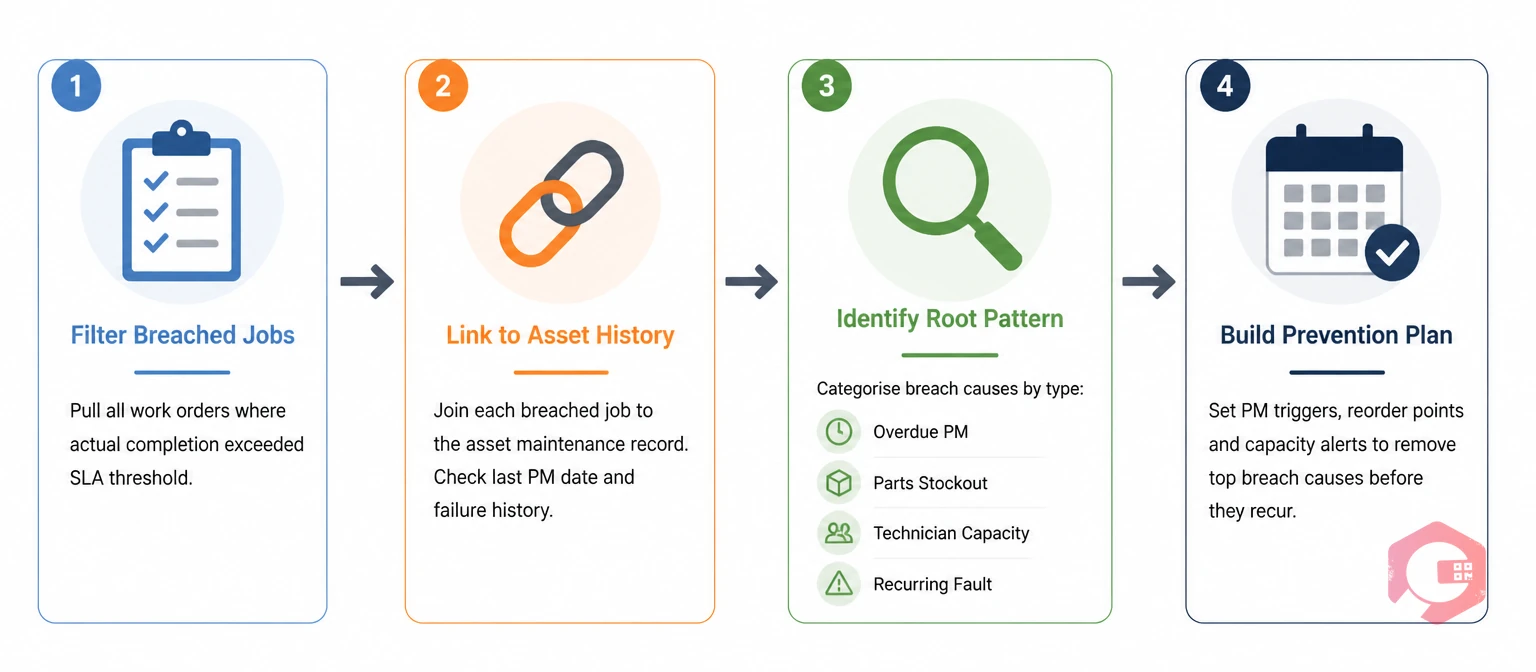
If your CMMS has been operational for 6 months or more, the data to identify these six causes for your most common SLA breach jobs already exists. You need to look in the right place for each one. According to McKinsey's analysis of maintenance operations performance, organisations that systematically analyse the upstream causes of service failures rather than the failures themselves reduce their repeat incident rate by 30–40% within 12 months — because they address root causes rather than symptoms.
For the PM miss cause: pull a PM compliance report for every asset that generated a reactive SLA breach in the past 90 days. Check whether a PM was scheduled and not completed in the 30–60 days before the reactive fault. A correlation rate above 40% confirms the PM miss as a primary driver of reactive demand.
For parts unavailability: check the inventory history for the parts used in SLA-breaching jobs. Look for the date the stock dropped below minimum and the date the purchase order was raised. If the gap between those two dates exceeds your supplier lead time, the reorder alert either didn't fire or wasn't acted on in time.
For late SLA clock starts: compare the "fault reported" timestamp (from tenant or helpdesk call records) with the "work order created" timestamp for breach jobs. Any gap over 30 minutes represents SLA time consumed before the clock officially started.
For false closures: query work orders that were closed and then had a new work order raised on the same asset for the same fault code within 72 hours. That list is your false closure index.
For contractor acknowledgement gaps: pull the average time between job dispatch and contractor acceptance confirmation across all subcontracted jobs. Any average above 45 minutes on a 4-hour SLA represents a structural risk.
The BI Dashboard in Cryotos surfaces all of these as configurable views — reactive-to-PM correlation by asset, inventory event timeline, work order lifecycle timestamps, job closure and re-raise patterns, and contractor acknowledgement rates — giving FM operations managers the analytical view to identify the real causes of their SLA breach pattern rather than the reported ones.
Cryotos CMMS is built to give FM operations teams the data visibility to move beyond surface-level breach reporting and into root cause management — connecting the SLA outcome to the upstream maintenance event that caused it.
Key capabilities for SLA breach cause analysis and prevention:
FM teams using Cryotos consistently report SLA breach rates that improve significantly within 90 days of implementing root cause discipline — not because the breach response process changed, but because the upstream maintenance causes that were generating the breaches became visible and addressable. If your SLA breach reports are describing symptoms rather than causes, Cryotos CMMS gives your operations team the data infrastructure to find the real causes in the history that already exists in your system.
The six most common maintenance causes are: a missed PM on the asset that later failed reactively; parts unavailability caused by a ghost inventory or missing reorder alert; a specialist job dispatched to a technician without the required certification; an SLA clock that started late because the fault wasn't logged at the time it was reported; a work order closed without confirming the repair was complete; and a contractor who never acknowledged the dispatch and never attended within the SLA window. Each of these causes is traceable in CMMS data but rarely appears in breach reports because breach reports describe the outcome rather than the upstream cause.
A missed PM allows wear to accumulate on an asset beyond the point where it would have been caught and addressed in a planned inspection. The subsequent reactive fault triggers an SLA clock. Even if the reactive response is fast, the fault may be more complex than a planned repair would have been — because the wear has progressed further — which extends the repair time and increases breach risk. The breach report records the reactive fault. It doesn't record that the PM miss was what made the reactive fault necessary and more complex.
A false closure — a work order closed without the repair being verified as complete — means the fault recurs, typically within 24–72 hours. The second occurrence is a new SLA event with a new clock. The cumulative impact is two SLA windows consumed by what is functionally one fault event. If the second job also fails to resolve the fault, a third SLA event follows. The repeat pattern inflates the reactive work order count, consumes technician time disproportionately, and damages client relationships — all from a single failure to verify resolution before closure.
The most effective fix is automated escalation: configuring the CMMS to send a follow-up notification and an FM helpdesk alert if a contractor hasn't acknowledged a dispatched job within a defined time window — typically 20–30 minutes for a P1 fault, 45–60 minutes for a P2. This converts the contractor acknowledgement check from a manual oversight task into a system-enforced process. Without automated escalation, the acknowledgement gap is only discovered when the SLA window is already at risk.
Pull the work order history for the breached job and look at five data points: whether a PM was due on the same asset in the 60 days before the fault; whether the relevant parts were in stock when the job was dispatched; whether the dispatch-to-arrival timestamp shows a queue time that consumed the SLA window; whether the fault code and closure date suggest a previous false closure on the same asset; and whether the contractor acknowledgement timestamp shows the job sat unacknowledged for a significant portion of the SLA window. The real cause is usually visible in one of these five data points — it just isn't in the breach report.
SLA breaches in FM are rarely random. They are almost always the downstream outcome of an upstream maintenance failure — a PM that wasn't completed, a part that wasn't staged, a dispatch decision that matched availability instead of competency, or a contractor follow-up that never happened. The breach report records the output. The CMMS history contains the cause.
The FM teams that reduce their SLA breach rates consistently are the ones that look past the breach report and into the operational data behind it — finding the PM miss correlation, the inventory gap, the false closure pattern, and the contractor acknowledgement problem before they generate the next round of breaches. The ISO 41001 facility management standard requires FM organisations to monitor, measure, and analyse the performance of their maintenance management systems — a requirement that root cause breach analysis directly satisfies and that surface-level breach reporting cannot. That analysis isn't optional for FM companies that want to retain contracts and renew them on competitive terms. It's the work that turns a breach report into a prevention programme.
If your breach reports describe symptoms rather than causes, book a free Cryotos demo to see how the CMMS data views surface the upstream maintenance causes of your current SLA breach pattern — and what a root cause-driven breach reduction programme looks like in practice.




Cryotos AI predicts failures, automates work orders, and simplifies maintenance—before problems slow you down.



