

Small business inventory management focuses on simplicity. One location, a few people, and stock tracked by sight or spreadsheet. Enterprise inventory management adds layers that small teams rarely need, such as multiple warehouses, ERP integrations, and formal approval chains. Both aim for the same result: the right part, in the right place, at the right time. But the tools, staff, and risks change a great deal as a company grows. A five-person facilities team and a 500-person manufacturing group are solving the same basic puzzle. They just solve it at very different scales, with very different tools.
Key Takeaways
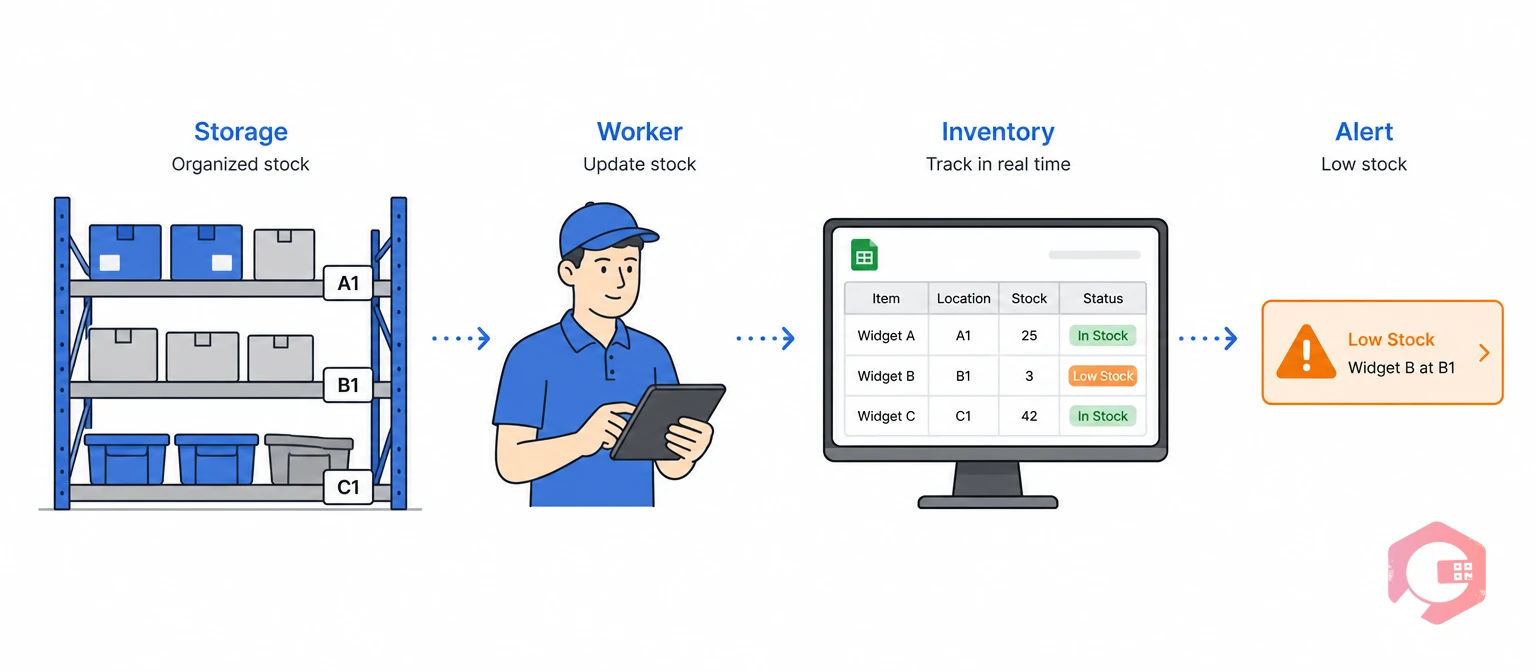
Small business inventory management is tracking parts and supplies at one site using simple, low-cost tools. Most small maintenance teams use spreadsheets, whiteboards, or basic apps instead of dedicated software.
Picture a five-person facilities team. They keep spare parts in one storeroom. One person handles reordering. Decisions happen fast because there is no approval chain. If a technician needs a part, they grab it and log it later, if at all.
Most small teams get more value from a simple spare parts inventory system than from a full enterprise stack. The goal at this stage is visibility, not complexity. The U.S. Small Business Administration notes that most small businesses run lean teams that wear many hats. This is exactly why small business inventory management needs to stay simple.
Enterprise inventory management is tracking parts across many sites while syncing with finance and procurement systems. It has to work the same way whether a technician is in Ohio or Dubai.
Operations at this scale carry more risk. A missing bearing at a small shop causes a delayed repair. The same missing part at a large plant can stop a production line. That line might cost thousands of dollars per hour once it goes down. Multiply that risk across ten plants instead of one, and it is easy to see why enterprises invest heavily in inventory discipline long before a shortage ever happens.
Enterprises typically standardize on warehouse management structures and multi-organization management tools. This keeps every site working from the same data. Manufacturers scaling up often turn to public resources like the NIST Manufacturing Extension Partnership for help standardizing these steps.
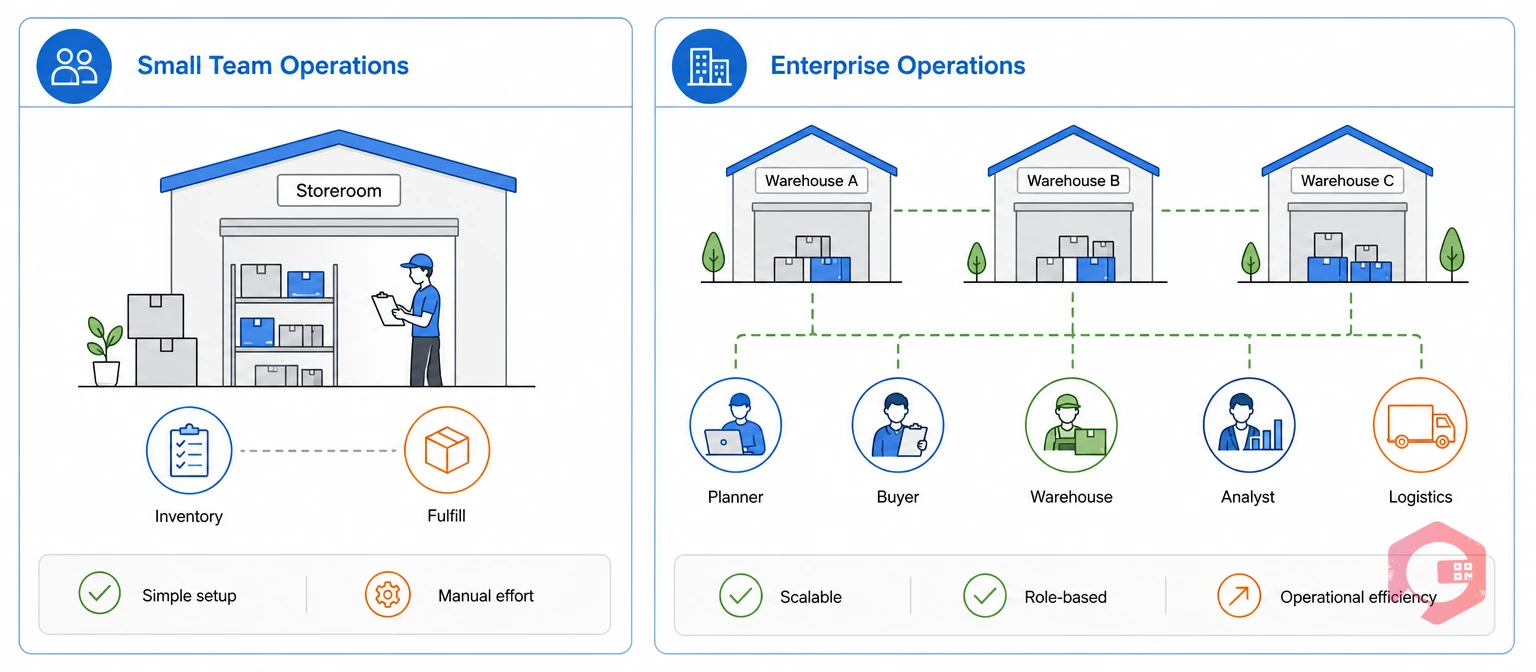
The differences between small business inventory management and enterprise operations come down to scale, structure, and technology. The underlying goal, avoiding stockouts, stays the same at any size.
| Factor | Small Teams | Enterprise Operations |
|---|---|---|
| Locations tracked | One storeroom or site | Multiple warehouses, plants, or regions |
| Ownership | One or two people, informal | Dedicated inventory or procurement roles |
| Technology | Spreadsheets, basic mobile apps | CMMS/ERP integration, barcode or IoT tracking |
| Valuation method | Estimated, rarely formal | FIFO, LIFO, or average cost, audited often |
| Reordering | Manual, reactive | Min-threshold alerts, automated purchase steps |
| Compliance needs | Minimal | Formal audit trails, regular reporting |
Most companies do not choose one column or the other on purpose. They start with small business inventory management because that is all they need on day one, then adjust column by column as headcount, sites, and part counts grow. Neither approach is wrong for its context. Problems start when a growing business keeps small-team habits after it outgrows them. Problems also start when a small team adds enterprise complexity it does not need yet.
Before scaling any process, check current stock habits against a standard MRO inventory checklist. This shows which gaps matter most right now.
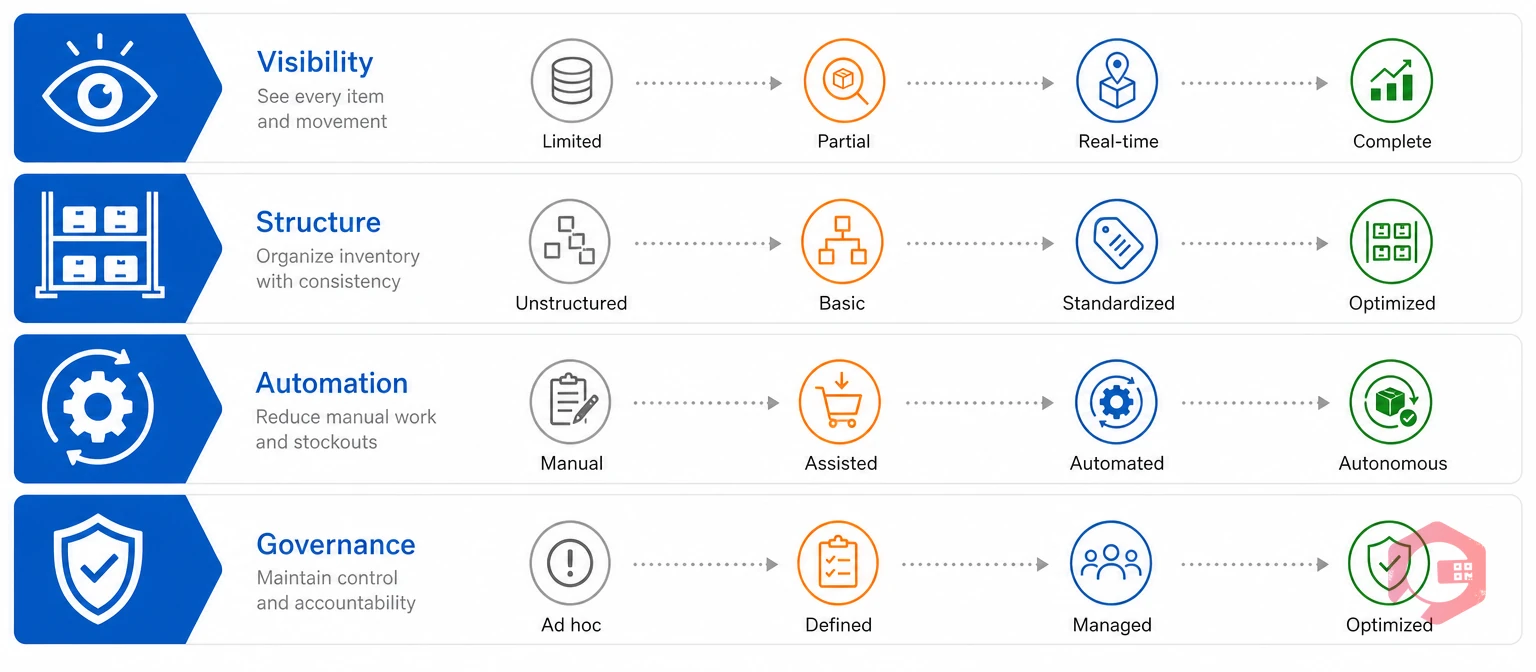
The Four-Layer Inventory Scaling Framework:
Small teams usually only need the first layer, visibility, to run well. Enterprises need all four layers working together. A gap in any one layer creates a blind spot. That blind spot spreads into procurement, finance, and production planning.
Small teams and enterprises tend to make different mistakes. Spotting the pattern early helps prevent a costly stockout or overstock.
Common mistakes at small teams:
Common mistakes at enterprises:
Most operations that scale well catch these patterns during a planned upgrade. They do not wait for a costly stockout to force the issue. A quick self-check helps either way: list the last three inventory problems your team faced, and note whether each one came from too little structure or too much. That single exercise often reveals which side of the small-team versus enterprise divide your current process is stuck on.
A CMMS platform is software that centralizes maintenance and inventory data for teams of any size. The same platform can scale from a five-person team to a multi-site enterprise. That is why more growing operations start with a Computerized Maintenance Management System before they hit a crisis point.
Maintenance teams using Cryotos have reported up to 30% reduction in unplanned downtime. They also report 25% faster repair turnaround. Much of that gain comes from technicians spending less time hunting for parts or waiting on manual reorders.
Because inventory management tools built on one platform grow with the business, teams do not have to replace software every time they add a location. Industry groups such as SMRP point to this kind of standardized, data-driven tracking as a mark of a mature maintenance program. Whether you started with small business inventory management or run enterprise-scale sites already, the underlying discipline is the same.
Small businesses usually manage inventory informally at one location with one or two people responsible. Enterprises need standard steps, dedicated roles, and integrated systems across many sites. The core difference is coordination, not the underlying goal.
Spreadsheets work fine for a small team with a low part count and one location. They break down once stock volume grows or more than one person needs to update records. Many teams switch to lightweight software once manual tracking starts causing missed reorders.
Enterprise inventory systems usually connect with ERP platforms for finance and procurement. They also use barcode or IoT tracking for real-time stock visibility. As inventory management software has matured, these integrations have become standard for larger operations.
A business should consider upgrading once it runs more than one storage location or tracks more than a few hundred parts. Repeated stockouts despite manual tracking are another sign. These signs show that informal steps can no longer keep pace with the work.
Whether you run a five-person team or a multi-site enterprise, getting inventory visibility right today prevents the downtime, delays, and rushed orders that come from missing parts tomorrow. Schedule a free demo to see exactly how Cryotos scales inventory management from a single small storeroom to a global operation.



Cryotos AI predicts failures, automates work orders, and simplifies maintenance—before problems slow you down.



