

A spare parts audit trail for insurance claims is a timestamped record. It shows which part was used, when it was installed, on which asset, and who approved it. Without that record, an adjuster has nothing to verify your claim against. Claims examiners routinely reduce or deny payouts when parts documentation doesn't hold up. If your team still tracks spare parts on spreadsheets or paper slips, you're one lost invoice away from a disputed claim. This guide covers what a solid audit trail includes, why insurers check it so closely, and how a CMMS builds one automatically as work gets done.
Key Takeaways
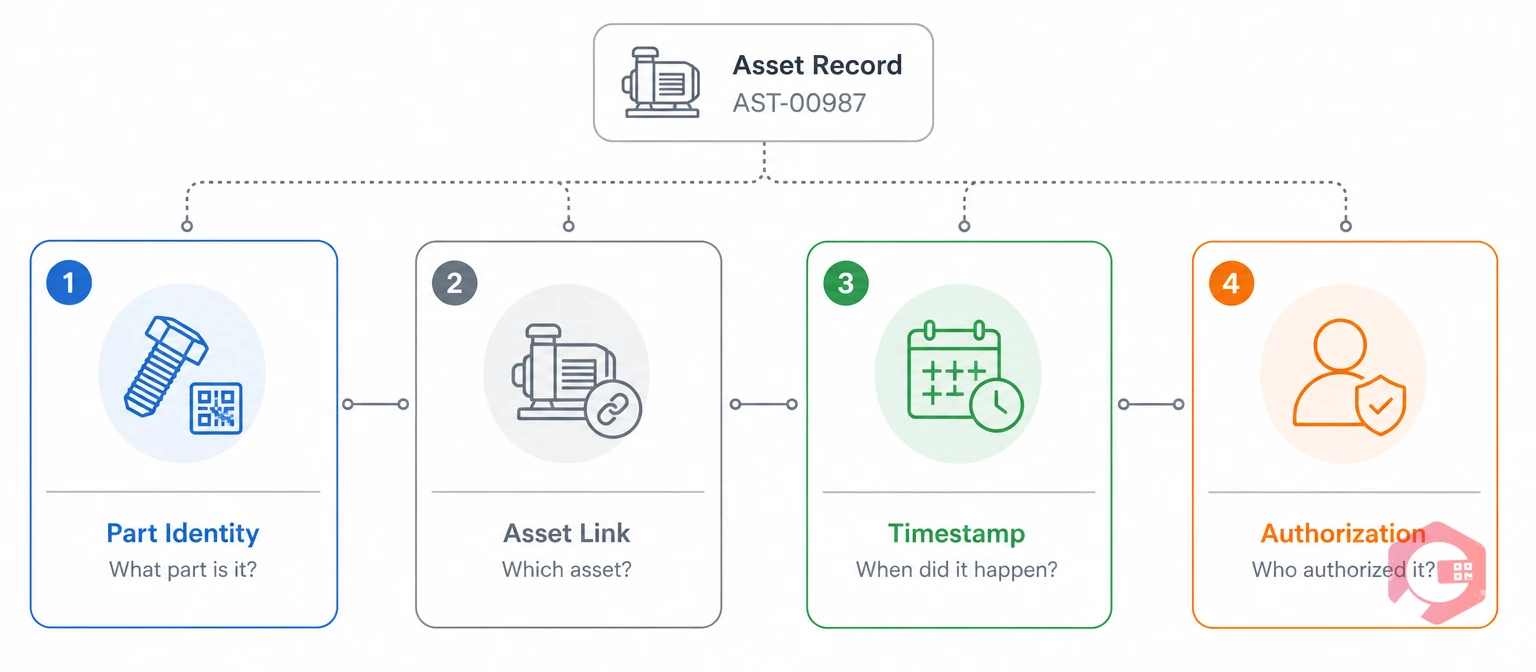
A spare parts audit trail is a timestamped record of every part received, issued, and installed against a specific asset and work order. For insurance purposes, that record must answer four questions on its own: which part, which asset, when, and who signed off. An audit trail, in general, is any chronological record built to survive outside scrutiny. Insurance claims are just one more place where that scrutiny comes from an adjuster instead of an auditor.
Most maintenance teams already track parts in some form. The gap is usually in work order management software linkage. A part shows up in inventory, but nothing ties its removal to the specific breakdown, technician, or timestamp an insurer needs.
Without all four elements tied together, a parts record isn't a spare parts audit trail. It's just inventory data, and that's not proof an insurer can act on.
Insurers scrutinize spare parts records because parts costs are easy to inflate or misrepresent in an equipment claim. A claims examiner reviewing a machinery breakdown or business interruption claim wants proof. They need to know the failed part was genuinely defective, genuinely replaced, and genuinely tied to the incident being claimed. A routine wear item shouldn't get billed as accident damage.
Equipment coverage has always leaned on inspection and maintenance history to validate a loss. Boiler and machinery insurance underwriters often require proof of routine servicing before honoring a breakdown claim. That requirement doesn't disappear once the claim is filed.
Most facilities learn this the hard way. The claim gets flagged, and the adjuster asks for records that were never centralized in the first place. A claim without a traceable spare parts audit trail reads as unverified, whether or not the underlying loss was real.
Insurance adjusters typically check five things in a spare parts claim: part identity, purchase or issue date, installation date, technician sign-off, and the asset's prior maintenance history. Missing one item doesn't always sink a claim. But it invites a follow-up request, and every follow-up request slows down the payout.
Most operations that clear this scrutiny quickly run work through a system that timestamps each step automatically. They don't reconstruct records after the fact. Asset management standards such as ISO 55000 already call for this kind of traceable maintenance history. Insurance documentation just applies the same discipline to a different audience. Facilities that already run scheduled inspections and track parts by asset tend to clear this step without any extra scramble.
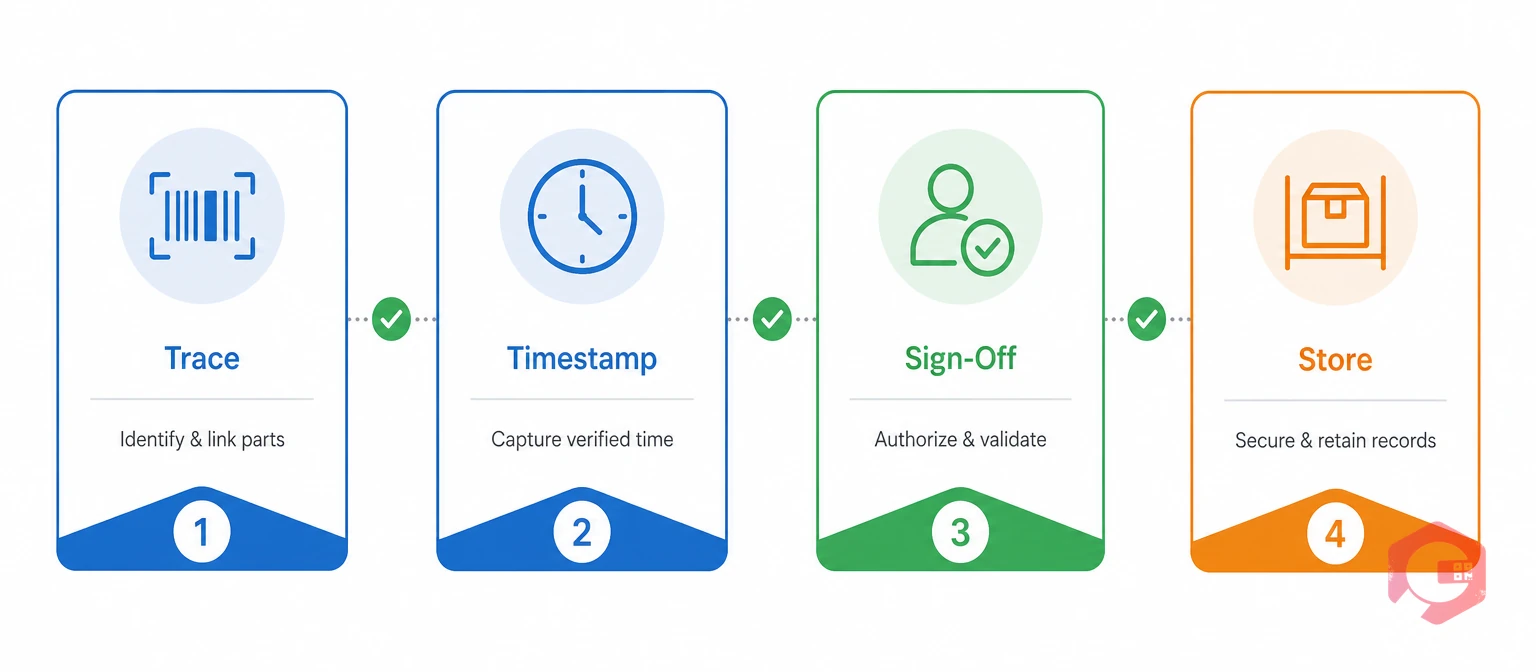
The Claim-Ready Spare Parts Framework:
Teams that hit all four checkpoints rarely get a claim kicked back for documentation alone.
Manually rebuilding a spare parts audit trail after a breakdown is where most claims lose time. Spare parts inventory software captures Trace, Timestamp, and Sign-Off automatically as the work happens.
The most common documentation gap is a parts record that exists but isn't linked to the asset or work order it came from. A technician logs "replaced bearing" in a notebook. Inventory shows one unit leaving the shelf. Nothing connects those two entries to the machine that actually failed.
The financial exposure adds up. Every denied or delayed claim tied to weak documentation becomes unplanned maintenance costs the facility absorbs instead of the insurer. Most of these gaps aren't caused by careless technicians. They're caused by systems that were never built to produce a spare parts audit trail in the first place. A single disputed claim can cost a facility far more in lost reimbursement than the price of the part ever did.
A Computerized Maintenance Management System builds an audit trail as a byproduct of normal work. It's not a separate paperwork task. When a technician closes a work order, the part used, the asset, the timestamp, and the technician's login are already captured together.
Maintenance teams using Cryotos have reported up to 30% reduction in unplanned downtime and 25% faster repair turnaround after consolidating parts and work order data into one system. That same consolidation makes claims documentation retrievable in minutes instead of days. The record isn't assembled after a claim is filed. It already exists.
The core difference between manual tracking and a CMMS audit trail is when the record gets created. Manual systems document what happened after the fact. A CMMS captures it in real time, as part of doing the work.
| Aspect | Manual Tracking | CMMS Audit Trail |
|---|---|---|
| Timestamp accuracy | Filled in from memory, often hours later | Captured automatically at scan or work order close |
| Sign-off | Verbal or handwritten, hard to verify | Digital signature tied to a user login |
| Asset linkage | Manual cross-reference between separate logs | Built-in link between part, work order, and asset |
| Record retrieval | Search through paper files or spreadsheets | Searchable by asset, date, or part in seconds |
| Audit readiness | Reconstructed under time pressure | Available on demand, already complete |
Neither approach changes what actually happened at the asset. Only how fast and how credibly you can prove it changes.
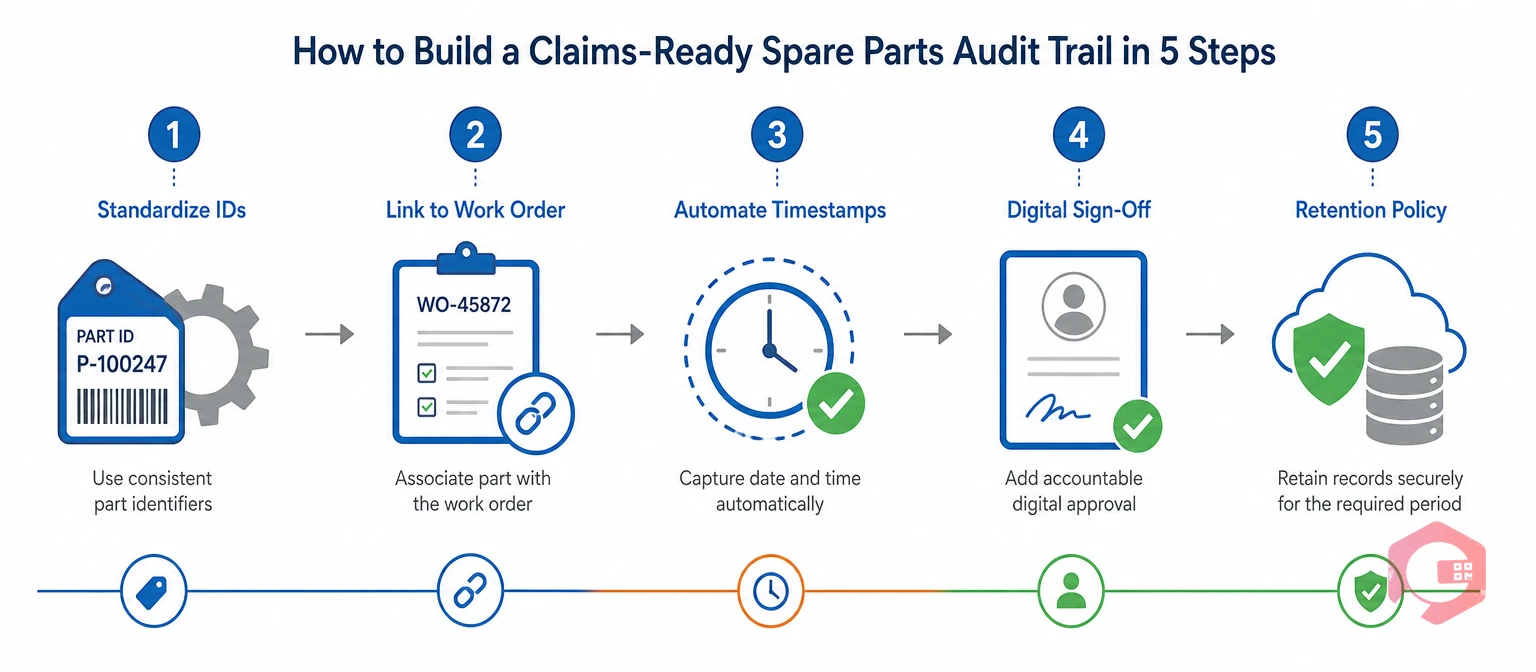
Building a claims-ready audit trail takes five steps: standardize part IDs, link every issue to a work order, timestamp automatically, require digital sign-off, and retain records for your policy's full claim window. None of these require replacing your current inventory system. They just require connecting the pieces you already have, so the record builds itself instead of getting assembled under pressure later.
Teams that formalize these five steps rarely scramble when a claim is filed. A spare parts audit checklist becomes part of daily work instead of a special project.
A spare parts audit trail in an insurance claim is the linked record of which part was used, on which asset, when, and under whose approval. Adjusters use it to confirm the claimed repair actually happened.
Insurers often deny or reduce equipment breakdown claims when the documentation doesn't clearly connect the failed part to the claimed incident. They also push back when maintenance history suggests routine wear instead of a covered event. Missing timestamps or sign-offs make both problems harder to disprove.
Most facilities keep spare parts and maintenance records for at least as long as their policy's claim window, plus any regulatory retention period. That's often three to seven years, depending on the industry. Check your specific policy, since retention rules vary by insurer and asset type.
Yes, for the operational record itself. A CMMS captures the part, asset, timestamp, and sign-off automatically, which covers what most adjusters ask for. You'll still handle the actual claim filing and correspondence with the insurer separately.
Filing without a clear audit trail usually means a delayed claim, since the adjuster has to request supporting documents. It can also mean a reduced payout if you can't fully substantiate the parts and labor claimed. In disputed cases, missing records can lead to denial.
An accurate spare parts audit trail turns a stressful claims process into a quick records request. Schedule a free demo to see how Cryotos links every part, work order, and sign-off automatically as your team works.



Cryotos AI predicts failures, automates work orders, and simplifies maintenance—before problems slow you down.



