

A smart inventory alert is an automated notification triggered when your stock levels reach a predefined threshold - giving you time to reorder before you run out. Unlike a basic low-stock notification, a smart alert factors in demand velocity, supplier lead times, and sales trends to fire at exactly the right moment. According to research by IHL Group, out-of-stock events cost global retailers an estimated $1.8 trillion in lost revenue every year. For e-commerce sellers, a single stockout on a best-selling product can wipe out days of revenue and push customers straight to a competitor

A smart inventory alert is an automated signal that tells you - or your system - that stock for a specific item is approaching a critical level. The "smart" part means the alert isn't just counting units. It's calibrated to your actual sales pace, your supplier's lead time, and any safety buffer you've set. When the math says you'll run out before your next shipment arrives, the alert fires.
Alerts can come via email, mobile push, WhatsApp, or auto-generated purchase orders. The key point: they fire on logic, not because someone remembered to check a spreadsheet.
A basic notification fires when you cross a fixed number - say, "alert when fewer than 50 units remain." That's static. It doesn't react when sales double during a promotion or when your supplier adds two weeks to their lead time. A smart alert is dynamic: it recalculates based on your current sales rate, actual lead time, and safety stock target - so if demand spikes, the threshold adjusts upward automatically and warns you earlier.
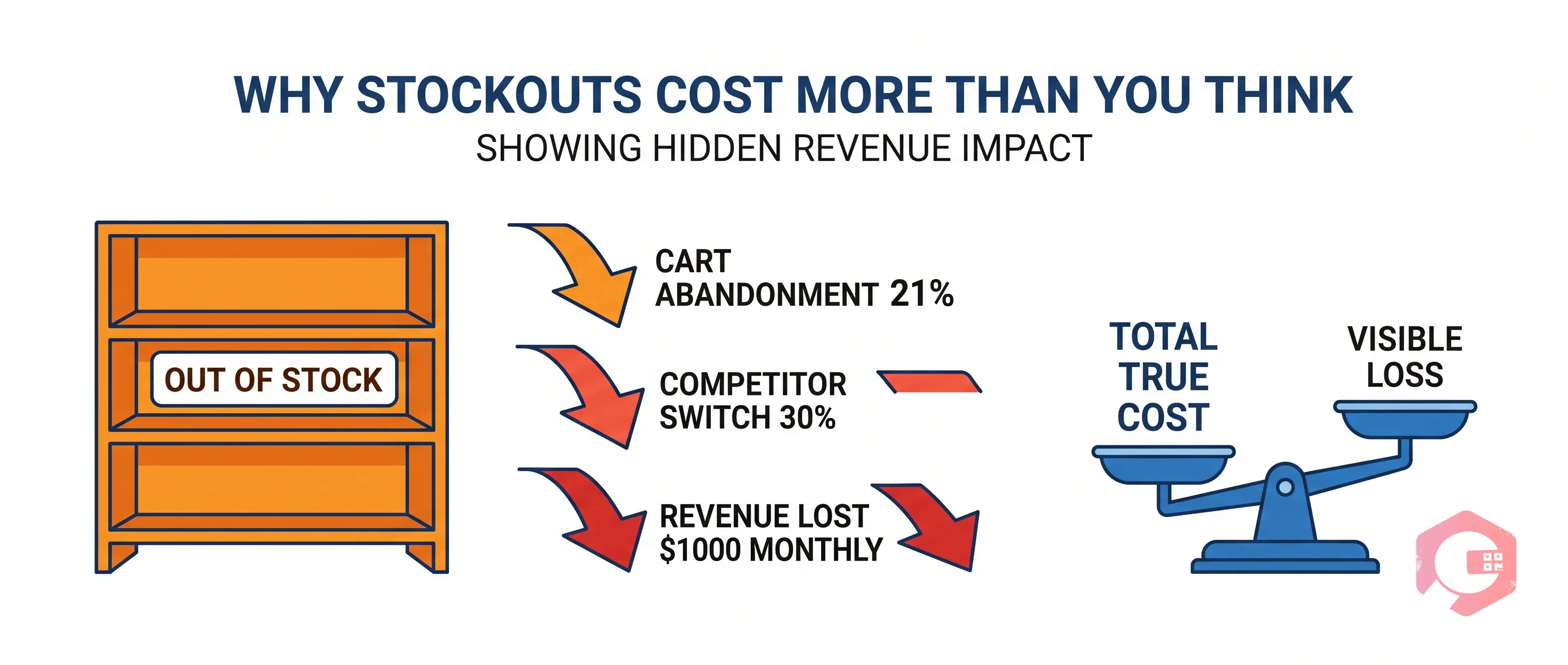
Most sellers focus on the direct loss - a customer sees "out of stock" and doesn't buy. But the full cost runs deeper than one missed transaction.
Research published by McKinsey & Company shows stockouts drive an average 21% cart abandonment rate on e-commerce platforms - and roughly 30% of those customers switch to a competitor rather than wait. For a store doing $50,000 a month in revenue, even a 2% stockout rate on top SKUs translates to over $1,000 in lost monthly revenue, plus the cost of winning that customer back. A well-configured smart alert system protects both revenue and retention.
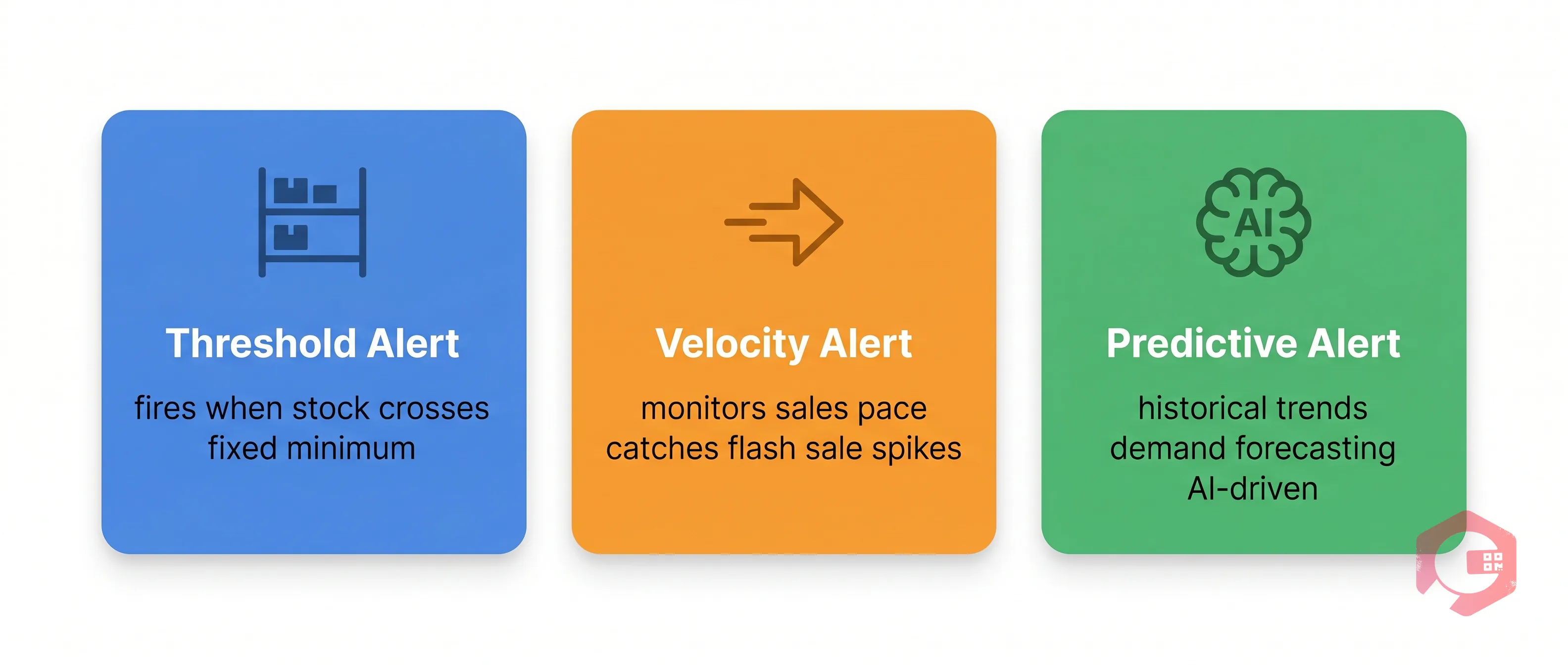
Not all inventory alerts work the same way. The most effective inventory management systems use a layered approach - combining three distinct alert types to cover different risk scenarios.
Threshold alerts fire when stock drops below a set minimum quantity. You define the number; the system watches the count. These are best for slow-moving or predictable items where demand doesn't shift much week to week. Think: spare parts, seasonal accessories, or niche SKUs with stable sales. Set your threshold at your safety stock level, and you'll always have a buffer.
Velocity alerts monitor how fast a product is selling and project when you'll hit zero based on that pace. If a product normally sells 10 units a week but suddenly starts moving 40 units a week during a flash sale, a velocity alert fires early - before your static threshold would even notice the problem. These are critical for high-turnover SKUs and promotional periods.
Predictive alerts use historical data, seasonal trends, and demand forecasting models to anticipate stockout risk before it shows up in your current numbers. According to Gartner, businesses using AI-driven demand forecasting reduce stockout frequency by up to 30% compared to those relying on manual reorder processes. Predictive alerts work best when integrated with an inventory management platform that can pull in sales history and supplier lead time data automatically.
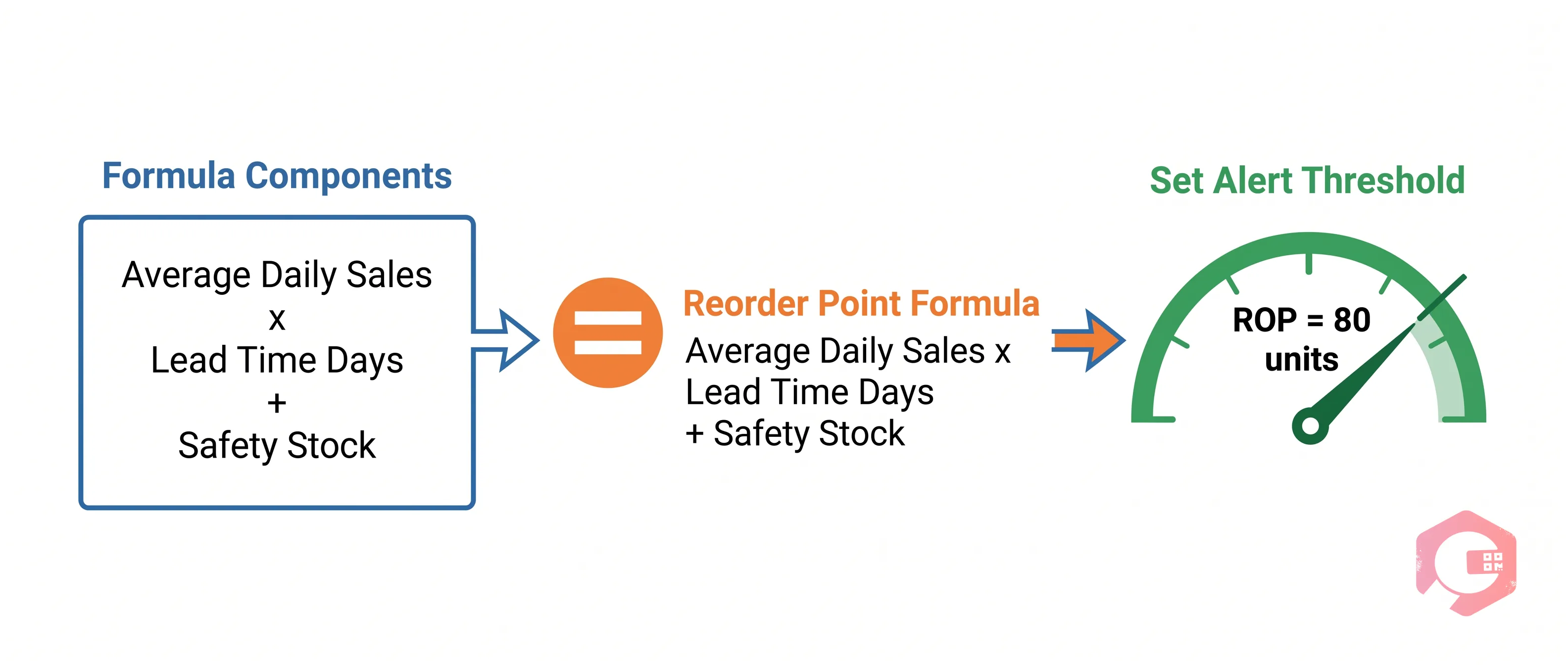
Your reorder point (ROP) is the stock level at which you should place a new order to avoid running out before the next shipment arrives. Getting this number right is the foundation of every smart inventory alert.
The standard formula is:
Reorder Point = (Average Daily Sales × Lead Time in Days) + Safety Stock
Here's a worked example: Suppose you sell an average of 15 units per day of your top SKU. Your supplier takes 4 days to deliver. Your safety stock buffer is 20 units.
ROP = (15 × 4) + 20 = 80 units
That means the moment your stock hits 80 units, your system should trigger a reorder alert. You have exactly enough to cover the 4-day lead time plus a 20-unit safety cushion. Set your smart alert threshold at 80, and you'll never scramble for a last-minute restock again.
For safety stock, a simple starting formula is: Safety Stock = (Maximum Daily Sales − Average Daily Sales) × Maximum Lead Time. This covers you against demand spikes or supplier delays - whichever hits first.
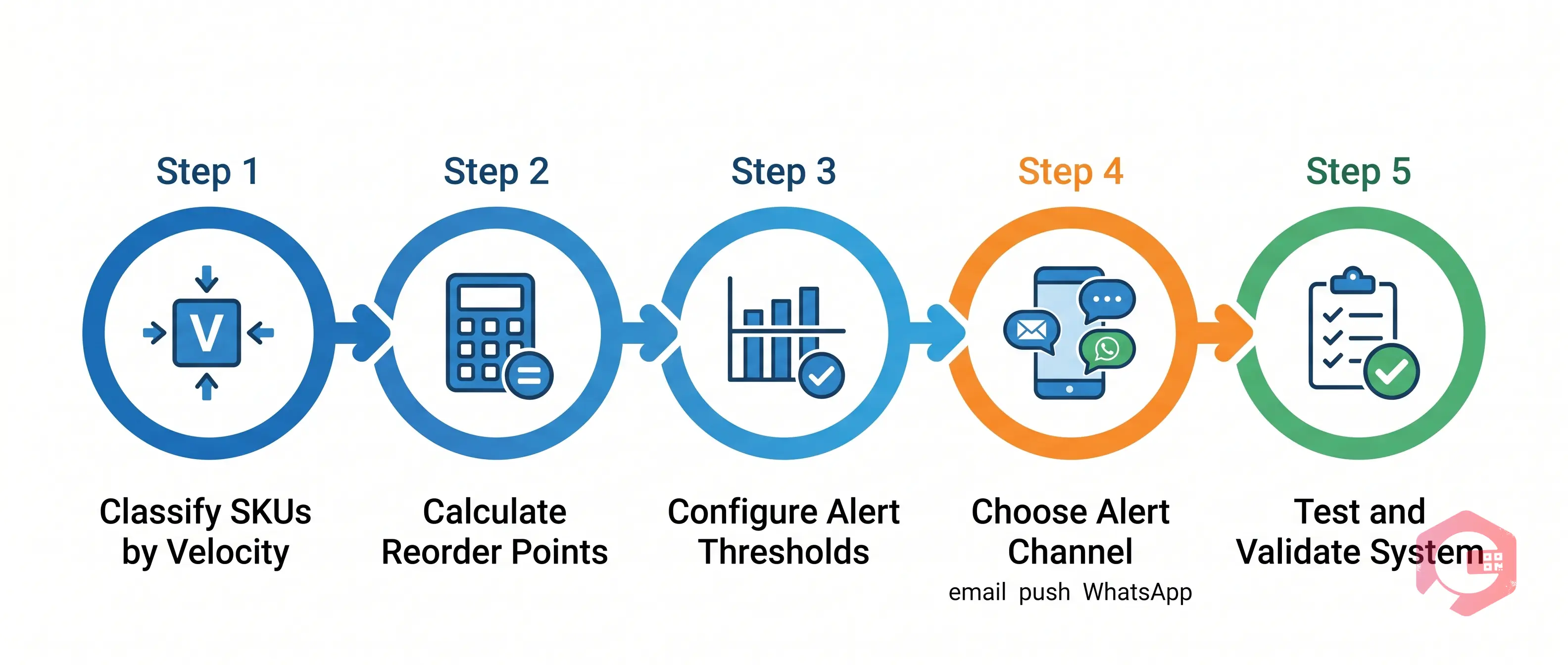
Setting up effective inventory alerts doesn't require a complex system. Follow these five steps to get your alert framework running:
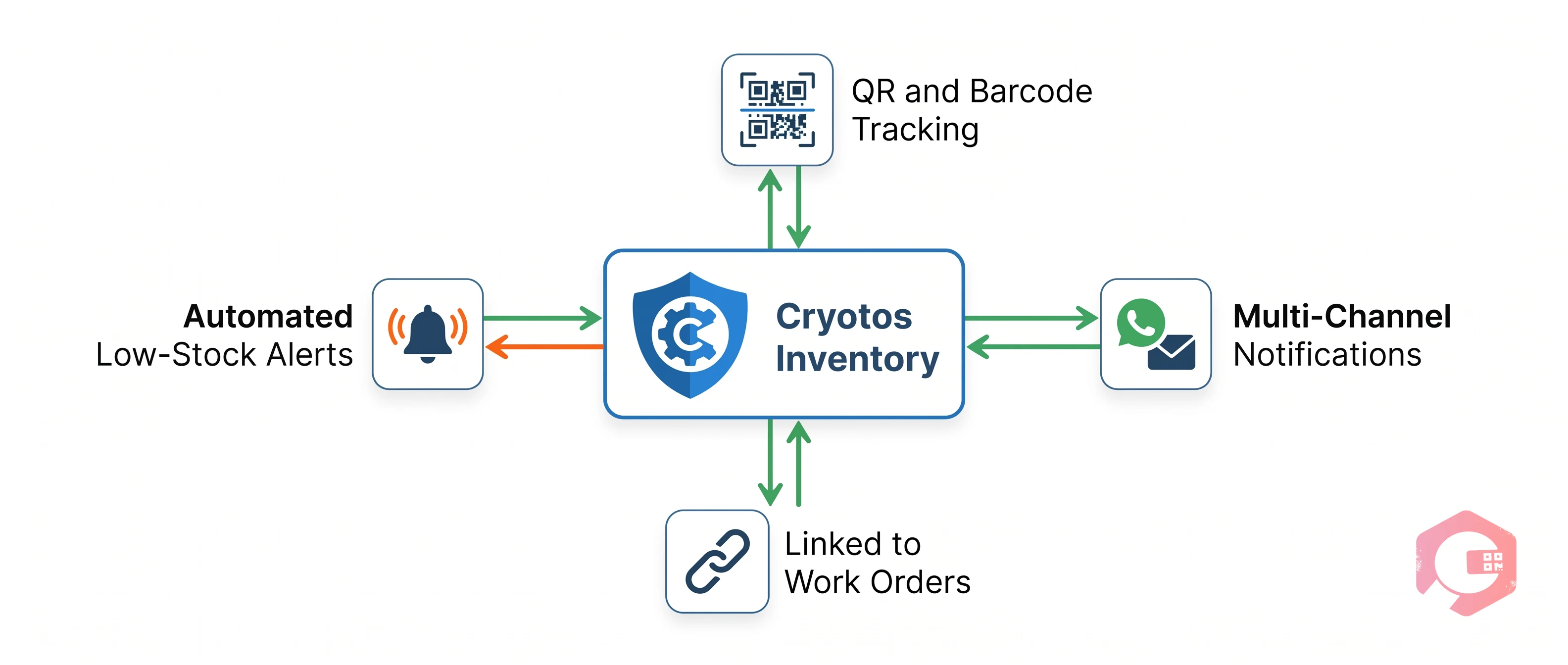
Cryotos's Inventory Management Software gives operations teams real-time stock visibility with QR code scanning, barcode tracking, and automated low-stock notifications the moment stock crosses your defined threshold. You can map your full warehouse structure - aisles, racks, shelves, bins - and set critical thresholds per location, not just per SKU. When a threshold is crossed, Cryotos triggers alerts via email, mobile push, or WhatsApp so the right person acts immediately, not after end-of-day reporting.
Teams using Cryotos report a 30% reduction in unplanned downtime caused by parts unavailability. You can also connect stock alerts directly to your work order management and asset management workflows - so a low-stock alert for a critical spare part automatically triggers a procurement work order with no manual handoff.
Safety stock is a buffer quantity you hold to absorb unexpected demand spikes or supplier delays. The reorder point is the stock level that triggers a new purchase order. Your reorder point includes your safety stock - so when you hit the reorder point, you still have safety stock left to cover you during the lead time. Safety stock is what you hold; the reorder point is when you act.
Yes. Tools like Cryotos send alerts via WhatsApp, email, and mobile push. WhatsApp works best for floor teams who may miss email during busy shifts.
Smart alerts fire based on actual sales velocity and lead times - not a static number. You get notified while you still have time to reorder, rather than discovering a stockout after the fact. Teams using automated alerts respond faster and experience fewer stockout events than those relying on manual checks.
The standard formula - (Average Daily Sales × Lead Time) + Safety Stock- works well for most e-commerce stores. For products with volatile demand, consider using your maximum daily sales rate instead of the average when calculating safety stock. Review and update your reorder points at least quarterly, or after any major change in supplier lead times or sales volume.
Running out of stock isn't just a fulfillment problem - it's a revenue and retention problem. Smart inventory alerts give you the early warning system to stay ahead of demand, protect your best-selling SKUs, and keep customers from defecting to a competitor. Whether you're managing a single Shopify store or a multi-warehouse operation, the right alert setup starts with knowing your reorder points and putting automation in place to act on them. See how Cryotos Inventory Management can automate your stock alerts and keep your operations running without interruption.




Cryotos AI predicts failures, automates work orders, and simplifies maintenance—before problems slow you down.



