How to Prepone or Postpone Schedule Maintenance Without Disrupting Operations

Article Written by:

Ganesh Veerappan

Created On:

April 30, 2026

How to Prepone or Postpone Schedule Maintenance Without Disrupting Operations

Preponing or postponing scheduled maintenance based on team availability or vendor schedules is one of the most common — and most overlooked — challenges in facility and asset management. In most traditional systems, rescheduling means deleting the original plan, recreating the work order, and manually notifying the team — with zero record of what changed or why. Cryotos CMMS solves this cleanly: supervisors and managers can shift any scheduled maintenance forward or backward, preserve every original record, and capture the full change history in an automated audit log — all without touching the underlying schedule or work order.


The Real Problem With Rescheduling Maintenance

Maintenance doesn't always go according to plan. A vendor confirms a service window and then calls in sick the morning of. A critical technician gets pulled onto an emergency breakdown. A planned shutdown gets pushed by production. These are not edge cases — they happen every week in every facility, large or small.

The problem isn't rescheduling itself. It's what most systems force you to do when you need to reschedule. You either delete the scheduled task and recreate it with a new date, or you deactivate the work order and spin up a new one — both of which wipe the original schedule intent and break your compliance trail. For regulated industries like pharmaceuticals, food processing, or oil and gas, this is more than an inconvenience. A missing or altered maintenance record can trigger audit findings, compliance penalties, or equipment failures traced back to undocumented deviations.

What maintenance teams actually need is a way to move scheduled tasks — either earlier or later — without erasing the original plan, without creating duplicate records, and with a complete change log that shows who approved the reschedule, when it was changed, and why. That's exactly what Cryotos delivers.

What Prepone and Postpone Mean in a CMMS Context

In the context of preventive and scheduled maintenance, preponing means moving a scheduled task to an earlier date or time than originally planned — typically because a technician window opens up sooner or because the equipment is available ahead of schedule. Postponing means shifting the task to a later date or time — usually because a technician is unavailable, a vendor is delayed, or production requirements block access to the asset during the originally planned window.

Both actions seem simple on the surface. But in a live maintenance environment, they create downstream effects that a CMMS must handle correctly:

  • Notifications — Any technician, supervisor, or vendor who was notified of the original schedule needs to know the new one automatically.
  • Work order integrity — The rescheduled task should still be traceable to the original schedule, with all its checklists, assigned users, and asset linkages intact.
  • Recurring schedule continuity — If it's a weekly or monthly PM, the next occurrence should still follow the original cadence, not shift permanently from the adjusted date.
  • Audit trail — The date change must be logged automatically with a timestamp, the user who made the change, and the reason if entered.

Cryotos is built to handle all four of these requirements natively — without any manual workarounds required from the maintenance team.
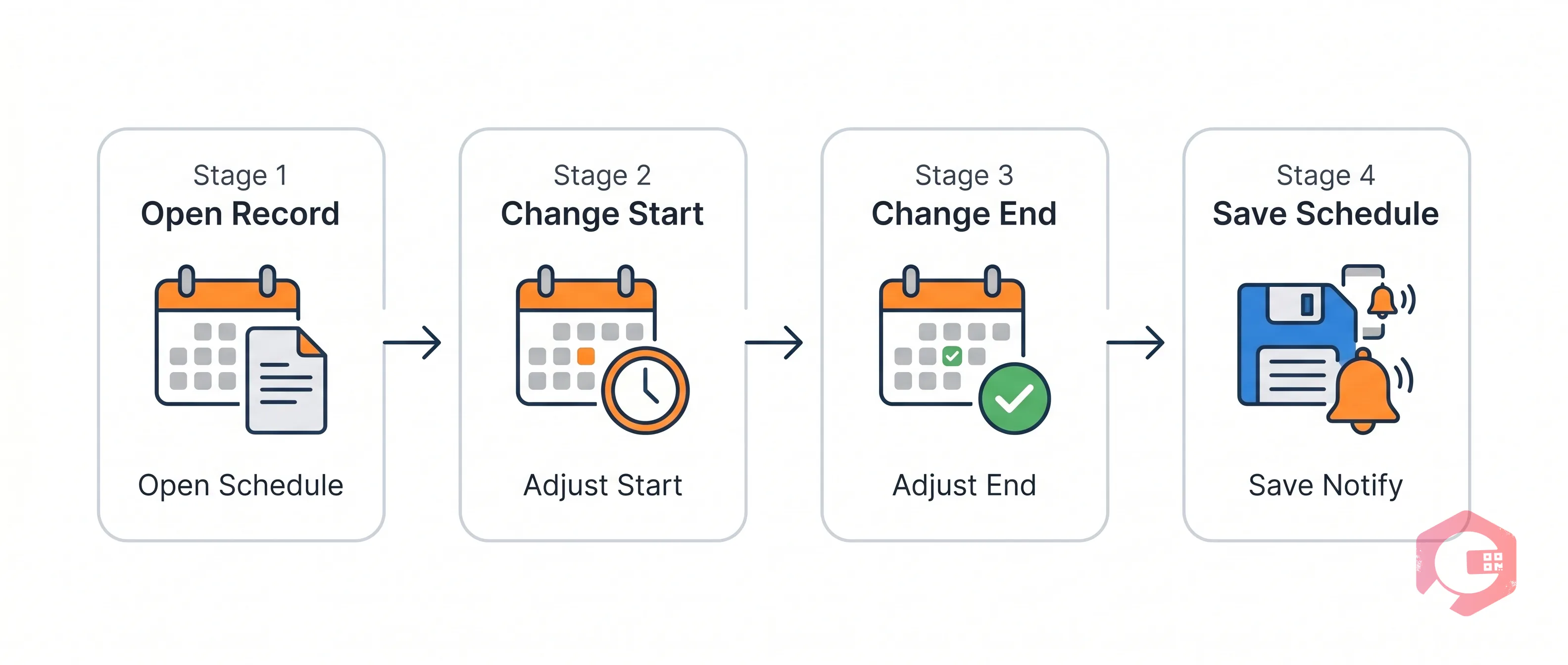
How Cryotos Handles Prepone and Postpone — Step by Step

How to Prepone or Postpone Schedule Maintenance Without Disrupting Operations — workflow

Inside Cryotos, the Schedule Maintenance module gives supervisors and managers a clean interface to adjust the Start Date Time and End Date Time of any scheduled task. Here's how the workflow flows in practice:

Step 1: Open the Scheduled Maintenance Record

From the maintenance calendar or the schedule list view, the supervisor opens the specific Schedule Maintenance card. The record shows all current details — the schedule name, company, workflow, location, asset name, schedule type, assigned users or user groups, and the current start and end date-time. Nothing is pre-populated for change; the supervisor sees exactly what was planned.

Step 2: Adjust the Start Date and Time

To prepone or postpone, the supervisor simply updates the Start Date field. Cryotos provides a calendar picker and individual hour/minute controls with AM/PM toggle — giving precise control over when the task begins. The interface is the same for both preponing and postponing; the direction of the change (earlier or later) is determined by the date and time selected, not by a separate mode or toggle.

Step 3: Adjust the End Date and Time

After updating the start, the supervisor updates the End Date to reflect the new completion window. Cryotos ensures the end time respects the original task duration logic, but gives the user full flexibility to set it independently. This is important when, for example, a vendor can only be on-site for a shorter window than originally planned.

Step 4: Save — Not Delete, Not Deactivate

Critically, the action is Save — not Delete and not Deactivate. The original scheduled maintenance record remains fully intact. The work order linked to it is not cancelled or removed. Only the date-time values are updated. From this single Save action, Cryotos automatically re-notifies the assigned team via mobile, email, or WhatsApp — whichever notification channels are configured — and updates the calendar view to reflect the new schedule.

Why Audit Logs Matter — and How Cryotos Captures Every Change

How to Prepone or Postpone Schedule Maintenance Without Disrupting Operations — problems grid

In any regulated or compliance-sensitive environment, the ability to prove what happened — and when, and who authorized it — is as important as the maintenance work itself. A reschedule that isn't logged is a gap in your compliance record. A reschedule that required deleting the original work order is a red flag in any ISO, FDA, or internal audit.

Cryotos captures every change to a scheduled maintenance record in a persistent audit log. The log entry includes:

  • Timestamp — The exact date and time the change was made, down to the minute.
  • User identity — The name and role of the user who made the change — supervisor, manager, or admin.
  • Field changed — The specific field that was modified (Start Date, End Date, Assigned User, etc.).
  • Previous value — What the field contained before the change.
  • New value — What the field was updated to after the save.

This means if an auditor asks why the quarterly compressor service was moved from April 15 to April 24, the answer is in the system: the record shows the original date, the new date, the name of the supervisor who made the change, and the time it was made. No manual documentation needed. No email threads to dig through. The audit trail is automatic and tamper-evident.

This also protects supervisors and managers. If a question arises about a maintenance gap or a delayed service, the log proves that a conscious decision was made and recorded — not that the task was forgotten or missed.

Benefits for Supervisors and Maintenance Managers

How to Prepone or Postpone Schedule Maintenance Without Disrupting Operations — lifecycle

Supervisors and managers are the people most directly affected by scheduling conflicts. They're the ones fielding calls from vendors who are running late, reassigning technicians when someone calls in sick, and trying to keep production happy while still getting maintenance done. Cryotos is built around this reality.

For Supervisors: Real-Time Schedule Flexibility

A supervisor managing a team of technicians across multiple assets and shifts needs to make fast decisions when plans change. With Cryotos, rescheduling a PM task takes under a minute — open the record, update the dates, save. The system handles re-notification automatically. The supervisor doesn't need to log in to a separate communication tool, send manual emails, or update a spreadsheet. One action in Cryotos triggers the full downstream update.

Because the original schedule and any linked work orders are preserved, the supervisor also doesn't have to worry about losing checklist data, asset linkages, or previously entered notes. Everything carries over. The only thing that changes is the date.

For Managers: Complete Visibility and Accountability

Maintenance managers overseeing multiple supervisors and teams need visibility — not just into what was done, but into what changed and why. Cryotos gives managers a complete picture through its audit logs and dashboard reporting. A manager can see at a glance which schedules were adjusted in a given period, who made the changes, and whether tasks were preponed (indicating proactive team availability) or postponed (indicating resource gaps or vendor delays).

This pattern data is valuable for planning. If the same vendor consistently causes postponements in the third week of the month, that's a procurement conversation supported by system data. If a particular asset's maintenance is routinely preponed, that might indicate the original schedule frequency is too conservative. Cryotos CMMS turns rescheduling actions into operational intelligence.

Role-Based Access Control

Not everyone should be able to reschedule maintenance tasks. Cryotos enforces role-based access, meaning only users with the appropriate supervisor or manager-level permissions can modify Schedule Maintenance records. Technicians can see their assigned tasks and update job progress, but they cannot change the schedule itself. This prevents unauthorized changes and ensures all rescheduling decisions are made by the right people — and logged under their credentials.

Real-World Scenarios: Vendor Delays and Team Unavailability

How to Prepone or Postpone Schedule Maintenance Without Disrupting Operations — scenario

To make this concrete, consider two common scenarios that every maintenance team faces.

Scenario 1: Vendor Cancels at the Last Minute

The air compressor internal service is scheduled for Wednesday at 11 AM. The third-party vendor who handles the specialized lubrication service calls Tuesday evening to say their technician is out sick. The earliest they can reschedule is Friday at 2 PM.

With Cryotos, the maintenance supervisor opens the Schedule Maintenance record for "Air Compressor Internal," updates the Start Date from Wednesday to Friday, adjusts the start time to 2 PM and end time to reflect the expected service duration, and saves. The system logs the change with the supervisor's credentials and the timestamp. The assigned SuperAdmins and any other notified users receive an automatic update. The work order remains active, all checklist items are intact, and the asset history shows a continuous record with no gaps or deletions.

Scenario 2: Team Available Earlier Than Planned

A monthly HVAC filter check is scheduled for the last Friday of the month. The maintenance team finishes their current jobs two days ahead of schedule on Wednesday, and the HVAC units are accessible because production is running a planned downtime. The supervisor wants to take advantage and prepone the filter check to Wednesday afternoon.

The supervisor opens the schedule, moves the start date to Wednesday, sets the time, and saves. Cryotos notifies the assigned technicians of the new time. The audit log records the prepone action. The recurring monthly schedule continues from the original cadence — the next occurrence is still at end of the following month, not shifted forward from the adjusted date. This is a key design feature: rescheduling an individual occurrence doesn't permanently alter the recurring schedule pattern.
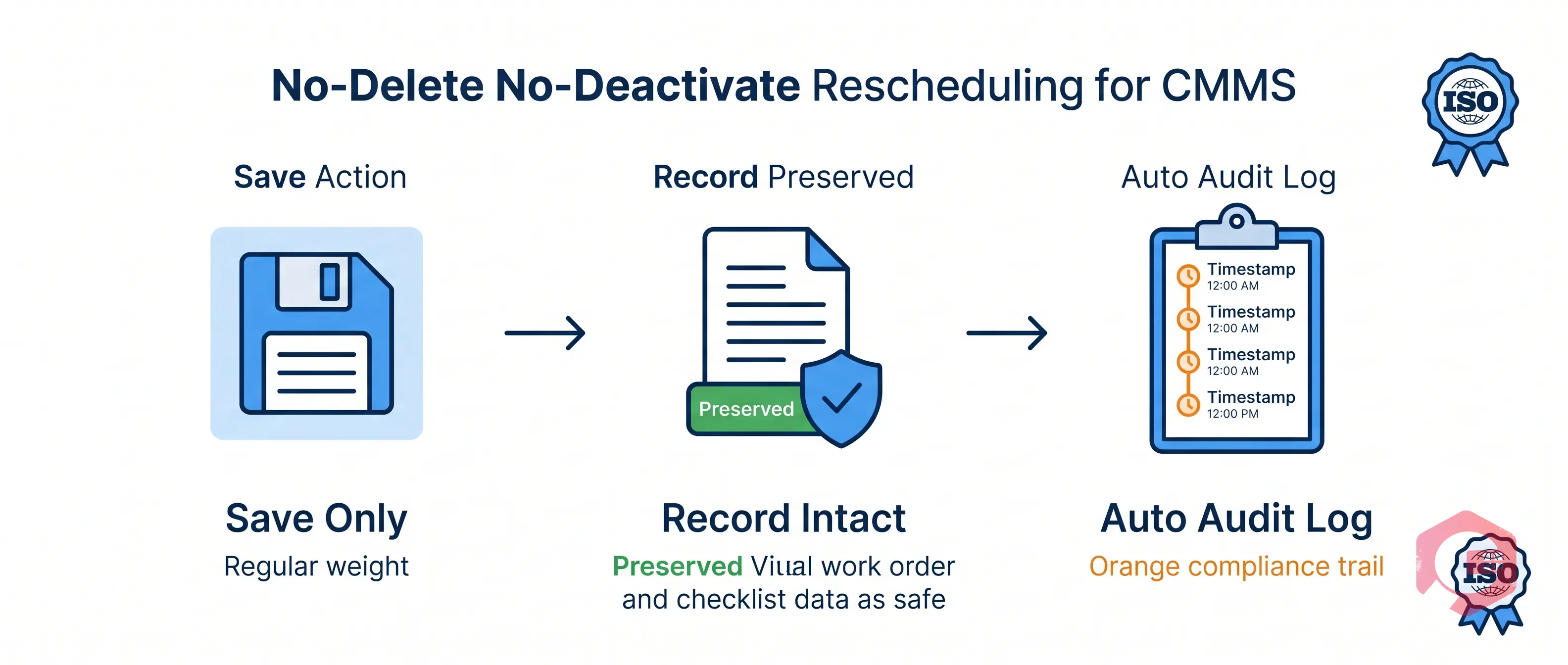
The No-Delete, No-Deactivate Principle

One of the most important principles in Cryotos's approach to schedule management is that rescheduling should never require deletion or deactivation. This isn't just a design preference — it's a compliance and operational best practice that Cryotos enforces by design.

When you delete a schedule, you lose:

  • The original schedule intent — what was planned, for what asset, with what checklist.
  • Any prior linked work orders — completed or in-progress tasks associated with that schedule may become orphaned.
  • The audit trail — there is no record that the schedule existed, only that a new one was created.

When you deactivate a schedule, you create ambiguity — was it deactivated permanently because the asset was retired? Or temporarily because of a rescheduling need? Future users reviewing the record have no way to distinguish the two without reading through notes and email chains.

Cryotos's prepone/postpone approach avoids both problems entirely. The schedule stays active. The work order stays intact. The only change is the date-time values — and that change is documented automatically. This approach aligns with ISO 55001 asset management standards and is defensible in any internal or external audit.

For organizations running work order management at scale — managing hundreds of assets across multiple facilities — this matters enormously. A consistent, non-destructive approach to rescheduling keeps your asset management records clean, your compliance posture strong, and your reporting accurate.

Frequently Asked Questions

Can I reschedule a maintenance task without notifying the technician?

In Cryotos, reschedule notifications are sent automatically based on the notification settings configured for the schedule. If you update the Start Date and save, the assigned user or user group receives a notification via the configured channels (mobile, email, or WhatsApp). If you need to hold off on notifying the team until a decision is finalized, you can draft the change and confirm before saving. Notification preferences can also be managed at the user group level by an admin.

Does postponing a recurring schedule shift all future occurrences?

No. Cryotos is designed so that adjusting an individual occurrence of a recurring schedule (weekly, monthly, etc.) does not permanently shift the entire schedule's cadence. The specific occurrence is rescheduled, but the next occurrence continues from the original recurrence pattern. This ensures that a one-time vendor delay or team unavailability doesn't cascade into a permanent change to your PM frequency.

Who has permission to prepone or postpone a scheduled maintenance task?

Access to modify Schedule Maintenance records is governed by Cryotos's role-based access control. Typically, supervisors and managers are granted this permission. Technicians can view and update their assigned tasks but cannot modify the schedule itself. Admins can configure role permissions to match the organization's approval hierarchy, including requiring manager approval before a reschedule is confirmed.

Where can I find the audit log for a rescheduled task?

Audit logs for Schedule Maintenance changes are accessible directly within the schedule record in Cryotos. The log shows a timestamped history of all field-level changes, including date adjustments, user assignments, and any status updates. Managers and admins can also pull audit log reports from the reporting module to review all schedule changes across assets, locations, or user groups within a defined time period.

What happens to the work order if I postpone the schedule?

When you update the Schedule Maintenance record in Cryotos, the linked work order is updated accordingly — the task date shifts, the assigned users are re-notified, and the work order remains fully active with all its checklist items, asset details, and attachments intact. The work order is never deleted or deactivated as part of the reschedule process. This preserves your complete maintenance history and keeps your asset's service record accurate and uninterrupted.

Managing maintenance schedules around real-world disruptions — vendor delays, staff unavailability, production conflicts — is a daily reality for every maintenance team. The systems you use should make that easier, not harder. Cryotos gives supervisors and managers the flexibility to prepone or postpone any scheduled task in seconds, while automatically preserving every record and capturing every change in a tamper-evident audit log. No deletions. No deactivations. No compliance gaps.

If your team is still relying on spreadsheets, calendar workarounds, or manual email chains to manage schedule changes, it's time to see what a purpose-built CMMS software can do. Explore Cryotos and see how smarter schedule management can reduce administrative overhead, strengthen your audit trail, and keep your maintenance program running on plan — even when plans change.


Want to Try Cryotos CMMS Today? Lets Connect!
Thank you! Your submission has been received!
Oops! Something went wrong while submitting the form.
Related Post

How to Prepone or Postpone Schedule Maintenance Without Disrupting Operations

Calendar
Duration:
6 min read
calendar today
Published on
April 30, 2026
Featured Image

Preponing or postponing scheduled maintenance based on team availability or vendor schedules is one of the most common — and most overlooked — challenges in facility and asset management. In most traditional systems, rescheduling means deleting the original plan, recreating the work order, and manually notifying the team — with zero record of what changed or why. Cryotos CMMS solves this cleanly: supervisors and managers can shift any scheduled maintenance forward or backward, preserve every original record, and capture the full change history in an automated audit log — all without touching the underlying schedule or work order.


The Real Problem With Rescheduling Maintenance

Maintenance doesn't always go according to plan. A vendor confirms a service window and then calls in sick the morning of. A critical technician gets pulled onto an emergency breakdown. A planned shutdown gets pushed by production. These are not edge cases — they happen every week in every facility, large or small.

The problem isn't rescheduling itself. It's what most systems force you to do when you need to reschedule. You either delete the scheduled task and recreate it with a new date, or you deactivate the work order and spin up a new one — both of which wipe the original schedule intent and break your compliance trail. For regulated industries like pharmaceuticals, food processing, or oil and gas, this is more than an inconvenience. A missing or altered maintenance record can trigger audit findings, compliance penalties, or equipment failures traced back to undocumented deviations.

What maintenance teams actually need is a way to move scheduled tasks — either earlier or later — without erasing the original plan, without creating duplicate records, and with a complete change log that shows who approved the reschedule, when it was changed, and why. That's exactly what Cryotos delivers.

What Prepone and Postpone Mean in a CMMS Context

In the context of preventive and scheduled maintenance, preponing means moving a scheduled task to an earlier date or time than originally planned — typically because a technician window opens up sooner or because the equipment is available ahead of schedule. Postponing means shifting the task to a later date or time — usually because a technician is unavailable, a vendor is delayed, or production requirements block access to the asset during the originally planned window.

Both actions seem simple on the surface. But in a live maintenance environment, they create downstream effects that a CMMS must handle correctly:

  • Notifications — Any technician, supervisor, or vendor who was notified of the original schedule needs to know the new one automatically.
  • Work order integrity — The rescheduled task should still be traceable to the original schedule, with all its checklists, assigned users, and asset linkages intact.
  • Recurring schedule continuity — If it's a weekly or monthly PM, the next occurrence should still follow the original cadence, not shift permanently from the adjusted date.
  • Audit trail — The date change must be logged automatically with a timestamp, the user who made the change, and the reason if entered.

Cryotos is built to handle all four of these requirements natively — without any manual workarounds required from the maintenance team.

How Cryotos Handles Prepone and Postpone — Step by Step

How to Prepone or Postpone Schedule Maintenance Without Disrupting Operations — workflow

Inside Cryotos, the Schedule Maintenance module gives supervisors and managers a clean interface to adjust the Start Date Time and End Date Time of any scheduled task. Here's how the workflow flows in practice:

Step 1: Open the Scheduled Maintenance Record

From the maintenance calendar or the schedule list view, the supervisor opens the specific Schedule Maintenance card. The record shows all current details — the schedule name, company, workflow, location, asset name, schedule type, assigned users or user groups, and the current start and end date-time. Nothing is pre-populated for change; the supervisor sees exactly what was planned.

Step 2: Adjust the Start Date and Time

To prepone or postpone, the supervisor simply updates the Start Date field. Cryotos provides a calendar picker and individual hour/minute controls with AM/PM toggle — giving precise control over when the task begins. The interface is the same for both preponing and postponing; the direction of the change (earlier or later) is determined by the date and time selected, not by a separate mode or toggle.

Step 3: Adjust the End Date and Time

After updating the start, the supervisor updates the End Date to reflect the new completion window. Cryotos ensures the end time respects the original task duration logic, but gives the user full flexibility to set it independently. This is important when, for example, a vendor can only be on-site for a shorter window than originally planned.

Step 4: Save — Not Delete, Not Deactivate

Critically, the action is Save — not Delete and not Deactivate. The original scheduled maintenance record remains fully intact. The work order linked to it is not cancelled or removed. Only the date-time values are updated. From this single Save action, Cryotos automatically re-notifies the assigned team via mobile, email, or WhatsApp — whichever notification channels are configured — and updates the calendar view to reflect the new schedule.

Why Audit Logs Matter — and How Cryotos Captures Every Change

How to Prepone or Postpone Schedule Maintenance Without Disrupting Operations — problems grid

In any regulated or compliance-sensitive environment, the ability to prove what happened — and when, and who authorized it — is as important as the maintenance work itself. A reschedule that isn't logged is a gap in your compliance record. A reschedule that required deleting the original work order is a red flag in any ISO, FDA, or internal audit.

Cryotos captures every change to a scheduled maintenance record in a persistent audit log. The log entry includes:

  • Timestamp — The exact date and time the change was made, down to the minute.
  • User identity — The name and role of the user who made the change — supervisor, manager, or admin.
  • Field changed — The specific field that was modified (Start Date, End Date, Assigned User, etc.).
  • Previous value — What the field contained before the change.
  • New value — What the field was updated to after the save.

This means if an auditor asks why the quarterly compressor service was moved from April 15 to April 24, the answer is in the system: the record shows the original date, the new date, the name of the supervisor who made the change, and the time it was made. No manual documentation needed. No email threads to dig through. The audit trail is automatic and tamper-evident.

This also protects supervisors and managers. If a question arises about a maintenance gap or a delayed service, the log proves that a conscious decision was made and recorded — not that the task was forgotten or missed.

Benefits for Supervisors and Maintenance Managers

How to Prepone or Postpone Schedule Maintenance Without Disrupting Operations — lifecycle

Supervisors and managers are the people most directly affected by scheduling conflicts. They're the ones fielding calls from vendors who are running late, reassigning technicians when someone calls in sick, and trying to keep production happy while still getting maintenance done. Cryotos is built around this reality.

For Supervisors: Real-Time Schedule Flexibility

A supervisor managing a team of technicians across multiple assets and shifts needs to make fast decisions when plans change. With Cryotos, rescheduling a PM task takes under a minute — open the record, update the dates, save. The system handles re-notification automatically. The supervisor doesn't need to log in to a separate communication tool, send manual emails, or update a spreadsheet. One action in Cryotos triggers the full downstream update.

Because the original schedule and any linked work orders are preserved, the supervisor also doesn't have to worry about losing checklist data, asset linkages, or previously entered notes. Everything carries over. The only thing that changes is the date.

For Managers: Complete Visibility and Accountability

Maintenance managers overseeing multiple supervisors and teams need visibility — not just into what was done, but into what changed and why. Cryotos gives managers a complete picture through its audit logs and dashboard reporting. A manager can see at a glance which schedules were adjusted in a given period, who made the changes, and whether tasks were preponed (indicating proactive team availability) or postponed (indicating resource gaps or vendor delays).

This pattern data is valuable for planning. If the same vendor consistently causes postponements in the third week of the month, that's a procurement conversation supported by system data. If a particular asset's maintenance is routinely preponed, that might indicate the original schedule frequency is too conservative. Cryotos CMMS turns rescheduling actions into operational intelligence.

Role-Based Access Control

Not everyone should be able to reschedule maintenance tasks. Cryotos enforces role-based access, meaning only users with the appropriate supervisor or manager-level permissions can modify Schedule Maintenance records. Technicians can see their assigned tasks and update job progress, but they cannot change the schedule itself. This prevents unauthorized changes and ensures all rescheduling decisions are made by the right people — and logged under their credentials.

Real-World Scenarios: Vendor Delays and Team Unavailability

How to Prepone or Postpone Schedule Maintenance Without Disrupting Operations — scenario

To make this concrete, consider two common scenarios that every maintenance team faces.

Scenario 1: Vendor Cancels at the Last Minute

The air compressor internal service is scheduled for Wednesday at 11 AM. The third-party vendor who handles the specialized lubrication service calls Tuesday evening to say their technician is out sick. The earliest they can reschedule is Friday at 2 PM.

With Cryotos, the maintenance supervisor opens the Schedule Maintenance record for "Air Compressor Internal," updates the Start Date from Wednesday to Friday, adjusts the start time to 2 PM and end time to reflect the expected service duration, and saves. The system logs the change with the supervisor's credentials and the timestamp. The assigned SuperAdmins and any other notified users receive an automatic update. The work order remains active, all checklist items are intact, and the asset history shows a continuous record with no gaps or deletions.

Scenario 2: Team Available Earlier Than Planned

A monthly HVAC filter check is scheduled for the last Friday of the month. The maintenance team finishes their current jobs two days ahead of schedule on Wednesday, and the HVAC units are accessible because production is running a planned downtime. The supervisor wants to take advantage and prepone the filter check to Wednesday afternoon.

The supervisor opens the schedule, moves the start date to Wednesday, sets the time, and saves. Cryotos notifies the assigned technicians of the new time. The audit log records the prepone action. The recurring monthly schedule continues from the original cadence — the next occurrence is still at end of the following month, not shifted forward from the adjusted date. This is a key design feature: rescheduling an individual occurrence doesn't permanently alter the recurring schedule pattern.

The No-Delete, No-Deactivate Principle

One of the most important principles in Cryotos's approach to schedule management is that rescheduling should never require deletion or deactivation. This isn't just a design preference — it's a compliance and operational best practice that Cryotos enforces by design.

When you delete a schedule, you lose:

  • The original schedule intent — what was planned, for what asset, with what checklist.
  • Any prior linked work orders — completed or in-progress tasks associated with that schedule may become orphaned.
  • The audit trail — there is no record that the schedule existed, only that a new one was created.

When you deactivate a schedule, you create ambiguity — was it deactivated permanently because the asset was retired? Or temporarily because of a rescheduling need? Future users reviewing the record have no way to distinguish the two without reading through notes and email chains.

Cryotos's prepone/postpone approach avoids both problems entirely. The schedule stays active. The work order stays intact. The only change is the date-time values — and that change is documented automatically. This approach aligns with ISO 55001 asset management standards and is defensible in any internal or external audit.

For organizations running work order management at scale — managing hundreds of assets across multiple facilities — this matters enormously. A consistent, non-destructive approach to rescheduling keeps your asset management records clean, your compliance posture strong, and your reporting accurate.

Frequently Asked Questions

Can I reschedule a maintenance task without notifying the technician?

In Cryotos, reschedule notifications are sent automatically based on the notification settings configured for the schedule. If you update the Start Date and save, the assigned user or user group receives a notification via the configured channels (mobile, email, or WhatsApp). If you need to hold off on notifying the team until a decision is finalized, you can draft the change and confirm before saving. Notification preferences can also be managed at the user group level by an admin.

Does postponing a recurring schedule shift all future occurrences?

No. Cryotos is designed so that adjusting an individual occurrence of a recurring schedule (weekly, monthly, etc.) does not permanently shift the entire schedule's cadence. The specific occurrence is rescheduled, but the next occurrence continues from the original recurrence pattern. This ensures that a one-time vendor delay or team unavailability doesn't cascade into a permanent change to your PM frequency.

Who has permission to prepone or postpone a scheduled maintenance task?

Access to modify Schedule Maintenance records is governed by Cryotos's role-based access control. Typically, supervisors and managers are granted this permission. Technicians can view and update their assigned tasks but cannot modify the schedule itself. Admins can configure role permissions to match the organization's approval hierarchy, including requiring manager approval before a reschedule is confirmed.

Where can I find the audit log for a rescheduled task?

Audit logs for Schedule Maintenance changes are accessible directly within the schedule record in Cryotos. The log shows a timestamped history of all field-level changes, including date adjustments, user assignments, and any status updates. Managers and admins can also pull audit log reports from the reporting module to review all schedule changes across assets, locations, or user groups within a defined time period.

What happens to the work order if I postpone the schedule?

When you update the Schedule Maintenance record in Cryotos, the linked work order is updated accordingly — the task date shifts, the assigned users are re-notified, and the work order remains fully active with all its checklist items, asset details, and attachments intact. The work order is never deleted or deactivated as part of the reschedule process. This preserves your complete maintenance history and keeps your asset's service record accurate and uninterrupted.

Managing maintenance schedules around real-world disruptions — vendor delays, staff unavailability, production conflicts — is a daily reality for every maintenance team. The systems you use should make that easier, not harder. Cryotos gives supervisors and managers the flexibility to prepone or postpone any scheduled task in seconds, while automatically preserving every record and capturing every change in a tamper-evident audit log. No deletions. No deactivations. No compliance gaps.

If your team is still relying on spreadsheets, calendar workarounds, or manual email chains to manage schedule changes, it's time to see what a purpose-built CMMS software can do. Explore Cryotos and see how smarter schedule management can reduce administrative overhead, strengthen your audit trail, and keep your maintenance program running on plan — even when plans change.

Want to Try Cryotos CMMS Today?

Get Free Demo

Let AI Take Control of Your Maintenance

Cryotos AI predicts failures, automates work orders, and simplifies maintenance—before problems slow you down.

Try AI-Powered CMMS
🡢