
Material Gatepass: RGP & NRGP Inward Outward Management

Article Written by:

Ganesh Veerappan

Created On:

April 30, 2026

Material Gatepass: RGP & NRGP Inward Outward Management | Cryotos

A material gatepass is a formal document that authorizes the movement of goods, equipment, or materials in and out of a facility. Whether you're managing a manufacturing plant, a warehouse, or a multi-site operation, tracking what leaves and what returns is critical for security, compliance, and inventory accuracy. Without a structured gatepass system, materials slip through untracked, returnable items go missing, and audit trails become impossible to reconstruct.

Modern facilities rely on two core gatepass types: Returnable Gatepass (RGP) and Non-Returnable Gatepass (NRGP). Each type covers both inward and outward movements, and each requires its own approval chain, deadline tracking, and documentation standards. Managing this manually — with spreadsheets or paper forms — invites errors, delays, and compliance gaps.

This guide covers everything you need to know about material gatepass management: the difference between RGP and NRGP, how inward and outward flows work, why deadline tracking for returnables matters, and how Cryotos CMMS automates the entire process end to end.

What Is a Material Gatepass?

A material gatepass is an official authorization slip — digital or physical — that records the movement of items across a facility's boundary. Every item that enters or exits needs to be logged with details like item description, quantity, purpose, sender, receiver, date, and expected return date (for returnable items).

Gatepasses are commonly used in manufacturing, construction, oil and gas, hospitals, data centers, and logistics facilities. They serve three key purposes:


The two primary categories of gatepasses — RGP and NRGP — define whether the material is expected to come back and shape how each movement is tracked and managed.

RGP vs. NRGP: Key Differences

Material Gatepass — problems grid

Understanding the distinction between Returnable Gatepass and Non-Returnable Gatepass is the foundation of any material movement policy.

Returnable Gatepass (RGP)

An RGP is issued when materials or equipment leave the facility temporarily and are expected to return by a defined deadline. Common RGP scenarios include sending machinery to a vendor for repair, loaning tools to a sister facility, or temporarily transferring calibration equipment for external testing.

Key characteristics of an RGP:


Non-Returnable Gatepass (NRGP)

An NRGP is issued for materials that permanently leave the facility — whether sold, scrapped, gifted, consumed off-site, or sent as samples. Since the item won't return, the NRGP closes the record after the outward movement is complete and approved.

Key characteristics of an NRGP:
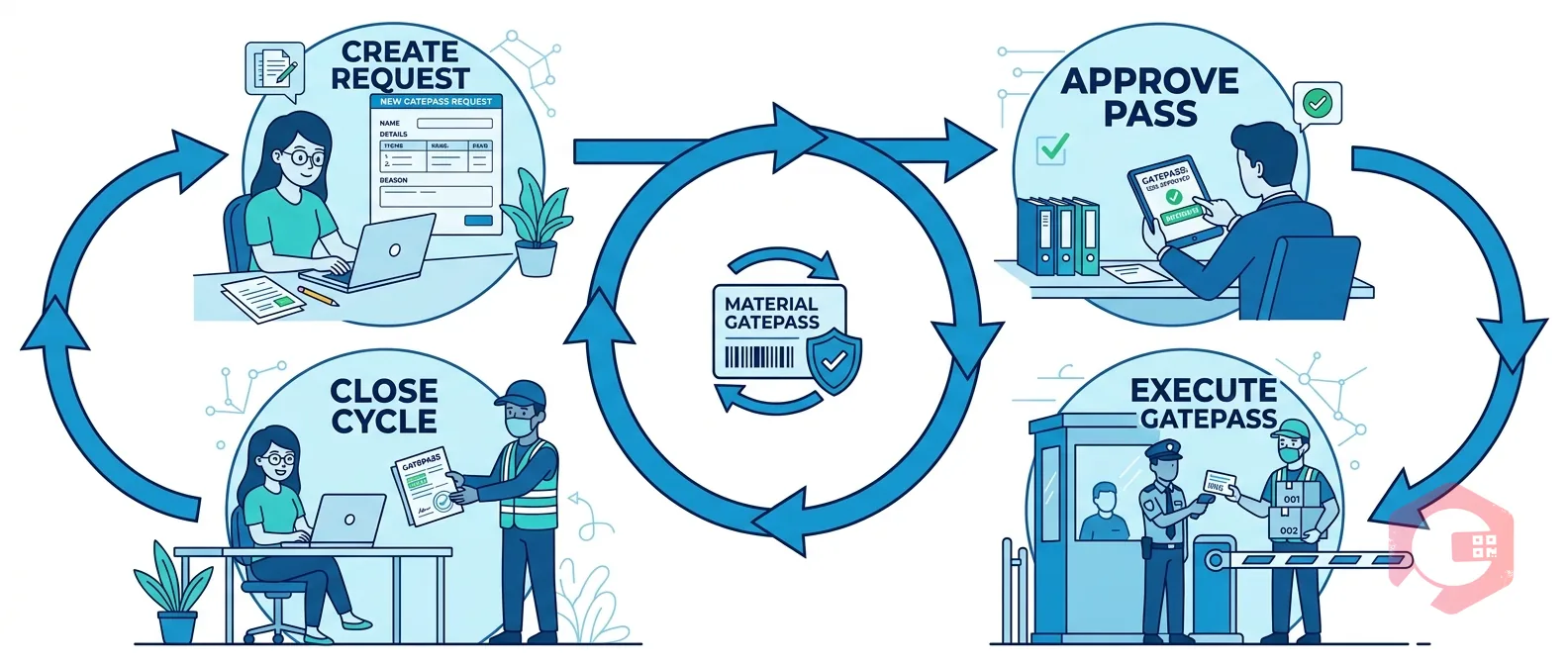


Inward and Outward Gatepass Explained

Material Gatepass — lifecycle

Both RGP and NRGP apply to two directional flows: outward (materials leaving the facility) and inward (materials arriving at the facility). Each direction has its own documentation, approvals, and use cases.

Outward Gatepass (RGP & NRGP)

An outward gatepass is raised when materials move out of the facility's gates. The requester specifies whether the item will return (RGP Outward) or won't (NRGP Outward), providing all relevant details. The security team verifies the pass at the gate and allows the movement only after the required approvals are in place.

Typical outward gatepass scenarios include equipment sent for external repairs (RGP Outward), raw materials returned to suppliers (NRGP Outward), tools loaned to contractors (RGP Outward), and surplus scrap dispatched for disposal (NRGP Outward).

Inward Gatepass (RGP & NRGP)

An inward gatepass is raised when materials arrive at the facility. For RGP Inward, this is typically the return of an item that was previously sent out under an RGP Outward pass — the system matches the incoming item to its original outward record and closes the loop. For NRGP Inward, it covers fresh deliveries, purchases, or received samples that have no prior outward record.

Proper inward gatepass management ensures every item entering the facility is authorized, inspected, and recorded — preventing unauthorized materials from entering the premises or bypassing quality checks.

Why RGP Deadline Tracking Is Non-Negotiable

Material Gatepass — scenario

The most common failure point in gatepass management is the returnable item that never comes back — or comes back months late without anyone noticing. When RGP tracking is manual, deadlines get missed, vendors hold equipment indefinitely, and your inventory records are silently wrong.

Each returnable item must be tracked individually because batched RGPs — where multiple items share one pass — make it impossible to track partial returns. If you send five motors to a vendor and three come back, a batch system marks the pass as "partially returned" with no clear escalation path for the missing two.

Effective RGP deadline tracking requires:


When this tracking is automated, your team doesn't need to manually chase returns — the system does it for them.
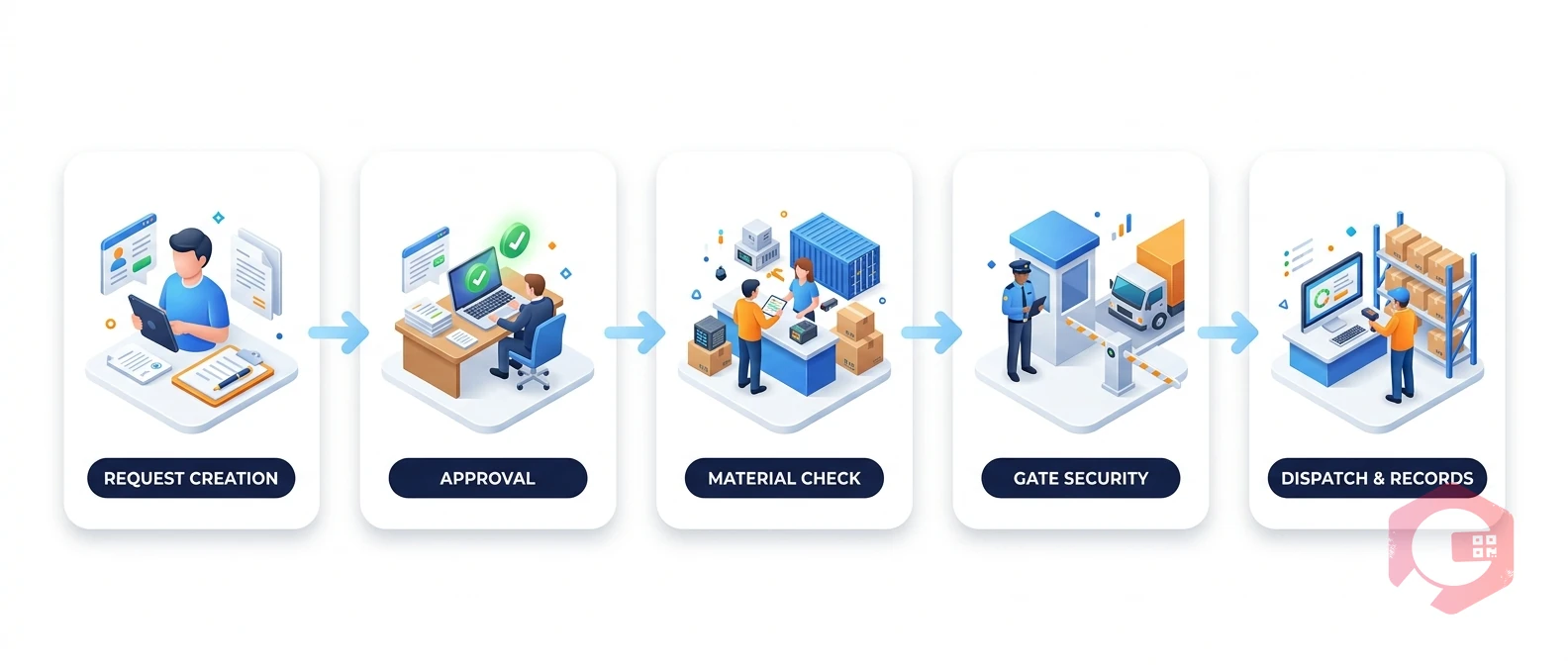
The Approval Process for Inward and Outward Gatepasses

Material Gatepass — workflow

A gatepass without an approval workflow is just a form. Real accountability comes from a structured, multi-level approval chain that ensures the right people authorize every material movement — before it happens, not after.

Outward Gatepass Approvals

For outward movements, the approval chain typically starts with the requester's direct supervisor or department head, then routes to the store or inventory manager who verifies stock availability and updates records, and finally to a security or gate officer who physically allows the movement. High-value items or permanent exits (NRGP) often require an additional finance or senior management sign-off.

The approval should be triggered automatically when the gatepass is submitted — no manual forwarding of emails or paper routing. Each approver gets a notification, reviews the request, and approves or rejects it with comments. Only after all required approvals are captured should the gatepass become active and printable for the security gate.

Inward Gatepass Approvals

Inward approvals serve a different purpose: they verify that what's arriving matches what was expected. For RGP Inward, the system checks the incoming item against the original outward pass. For NRGP Inward (fresh deliveries), the purchase order or advance receipt note is matched before materials are accepted.

A quality inspection step can be embedded directly in the inward approval — the receiving officer logs condition, quantity, and any discrepancies before the final approval closes the inward record. This creates a clean, auditable trail from purchase order through receipt to inventory stock update.

How Cryotos Manages RGP and NRGP

Cryotos CMMS brings the entire material gatepass process — RGP, NRGP, inward, outward, approvals, and deadline tracking — into a single, connected platform. Here's how it works in practice:

Unified Gatepass Creation

Users create a gatepass directly in Cryotos by selecting the type (RGP or NRGP) and direction (Inward or Outward), then filling in item details, quantities, purpose, and — for RGP — the expected return date. The form is structured so no critical field can be skipped, ensuring every gatepass is complete before it enters the approval queue.

Automated Multi-Level Approval Workflows

Cryotos uses its workflow automation engine to route each gatepass through a configurable approval chain. Approvers receive real-time notifications via mobile, email, or WhatsApp and can approve or reject with a single tap from anywhere. Conditional workflows mean high-value items or sensitive material categories automatically trigger additional approver levels without any manual intervention.

Individual RGP Item Tracking with Deadline Alerts

Every item on a Returnable Gatepass is tracked separately in Cryotos. Each item carries its own return deadline, status, and responsible person. As the deadline approaches, Cryotos automatically sends reminder alerts. If the item isn't checked in by the due date, the system escalates to the supervisor and flags the item as overdue on the gatepass dashboard — no manual chasing required.

Inward-to-Outward Record Matching

When an RGP item returns, the inward gatepass is automatically matched to its original outward record. The system closes the loop, updates inventory, and logs the return condition. This matching eliminates duplication, prevents double-counting in stock, and gives auditors a clean, end-to-end movement trail for every returnable item.

Real-Time Dashboard and Reporting

Cryotos provides a live gatepass dashboard showing all open, pending, approved, and overdue passes at a glance. Managers can filter by type, direction, department, or date range and drill down to individual item records. Scheduled reports can be sent directly to inbox, giving leadership full visibility into material movement without needing to log in.

For teams already using Cryotos for asset management or preventive maintenance, the gatepass module connects directly to asset records — so when equipment leaves for repair, it's linked to its asset profile, and its maintenance history travels with it.

Frequently Asked Questions

What is the difference between RGP and NRGP?

RGP (Returnable Gatepass) is issued for materials that are expected to return to the facility by a specific deadline — such as equipment sent for external repairs. NRGP (Non-Returnable Gatepass) is issued for materials that permanently leave the facility, such as scrapped items, sold goods, or consumed materials. Both types apply to inward and outward movements.

Why do returnable gatepasses need separate deadline tracking per item?

When multiple items are bundled under one RGP, partial returns create ambiguity about which items came back and which are still outstanding. Per-item tracking ensures every individual piece has its own status, deadline, and escalation path — so nothing slips through undetected.

What approvals are needed for an outward gatepass?

Outward gatepass approvals typically require sign-off from the requester's supervisor, the store or inventory manager, and the security gate officer. For high-value or permanent exits (NRGP), finance or senior management approval is often added. The exact chain depends on company policy and can be configured differently for RGP vs. NRGP movements.

How does an inward gatepass work for returned RGP items?

When an RGP item returns, an inward gatepass is created and automatically matched to the original outward RGP record. The receiving officer inspects the item, logs its condition, and approves the inward pass. Once approved, the item's status is updated to "returned," inventory is adjusted, and the original RGP is closed in the system.

Can Cryotos handle gatepass approvals on mobile?

Yes. Cryotos's mobile app supports full gatepass creation, approval, and tracking. Approvers receive push notifications and can review and approve gatepasses from anywhere — eliminating delays caused by approvers being away from their desks. The app also works in offline mode, syncing records once connectivity is restored.

Ready to bring structure and automation to your material gatepass process? Cryotos CMMS gives you configurable RGP and NRGP workflows, automated approval routing, per-item deadline tracking, and real-time dashboards — all in one platform. Book a demo today and see how your team can eliminate manual gatepass tracking for good.


Want to Try Cryotos CMMS Today? Lets Connect!
Thank you! Your submission has been received!
Oops! Something went wrong while submitting the form.
Related Post

Material Gatepass: RGP & NRGP Inward Outward Management | Cryotos

Calendar
Duration:
6 min read
calendar today
Published on
April 30, 2026
Featured Image

A material gatepass is a formal document that authorizes the movement of goods, equipment, or materials in and out of a facility. Whether you're managing a manufacturing plant, a warehouse, or a multi-site operation, tracking what leaves and what returns is critical for security, compliance, and inventory accuracy. Without a structured gatepass system, materials slip through untracked, returnable items go missing, and audit trails become impossible to reconstruct.

Modern facilities rely on two core gatepass types: Returnable Gatepass (RGP) and Non-Returnable Gatepass (NRGP). Each type covers both inward and outward movements, and each requires its own approval chain, deadline tracking, and documentation standards. Managing this manually — with spreadsheets or paper forms — invites errors, delays, and compliance gaps.

This guide covers everything you need to know about material gatepass management: the difference between RGP and NRGP, how inward and outward flows work, why deadline tracking for returnables matters, and how Cryotos CMMS automates the entire process end to end.

What Is a Material Gatepass?

A material gatepass is an official authorization slip — digital or physical — that records the movement of items across a facility's boundary. Every item that enters or exits needs to be logged with details like item description, quantity, purpose, sender, receiver, date, and expected return date (for returnable items).

Gatepasses are commonly used in manufacturing, construction, oil and gas, hospitals, data centers, and logistics facilities. They serve three key purposes:


The two primary categories of gatepasses — RGP and NRGP — define whether the material is expected to come back and shape how each movement is tracked and managed.

RGP vs. NRGP: Key Differences

Material Gatepass — problems grid

Understanding the distinction between Returnable Gatepass and Non-Returnable Gatepass is the foundation of any material movement policy.

Returnable Gatepass (RGP)

An RGP is issued when materials or equipment leave the facility temporarily and are expected to return by a defined deadline. Common RGP scenarios include sending machinery to a vendor for repair, loaning tools to a sister facility, or temporarily transferring calibration equipment for external testing.

Key characteristics of an RGP:


Non-Returnable Gatepass (NRGP)

An NRGP is issued for materials that permanently leave the facility — whether sold, scrapped, gifted, consumed off-site, or sent as samples. Since the item won't return, the NRGP closes the record after the outward movement is complete and approved.

Key characteristics of an NRGP:


Inward and Outward Gatepass Explained

Material Gatepass — lifecycle

Both RGP and NRGP apply to two directional flows: outward (materials leaving the facility) and inward (materials arriving at the facility). Each direction has its own documentation, approvals, and use cases.

Outward Gatepass (RGP & NRGP)

An outward gatepass is raised when materials move out of the facility's gates. The requester specifies whether the item will return (RGP Outward) or won't (NRGP Outward), providing all relevant details. The security team verifies the pass at the gate and allows the movement only after the required approvals are in place.

Typical outward gatepass scenarios include equipment sent for external repairs (RGP Outward), raw materials returned to suppliers (NRGP Outward), tools loaned to contractors (RGP Outward), and surplus scrap dispatched for disposal (NRGP Outward).

Inward Gatepass (RGP & NRGP)

An inward gatepass is raised when materials arrive at the facility. For RGP Inward, this is typically the return of an item that was previously sent out under an RGP Outward pass — the system matches the incoming item to its original outward record and closes the loop. For NRGP Inward, it covers fresh deliveries, purchases, or received samples that have no prior outward record.

Proper inward gatepass management ensures every item entering the facility is authorized, inspected, and recorded — preventing unauthorized materials from entering the premises or bypassing quality checks.

Why RGP Deadline Tracking Is Non-Negotiable

Material Gatepass — scenario

The most common failure point in gatepass management is the returnable item that never comes back — or comes back months late without anyone noticing. When RGP tracking is manual, deadlines get missed, vendors hold equipment indefinitely, and your inventory records are silently wrong.

Each returnable item must be tracked individually because batched RGPs — where multiple items share one pass — make it impossible to track partial returns. If you send five motors to a vendor and three come back, a batch system marks the pass as "partially returned" with no clear escalation path for the missing two.

Effective RGP deadline tracking requires:


When this tracking is automated, your team doesn't need to manually chase returns — the system does it for them.

The Approval Process for Inward and Outward Gatepasses

Material Gatepass — workflow

A gatepass without an approval workflow is just a form. Real accountability comes from a structured, multi-level approval chain that ensures the right people authorize every material movement — before it happens, not after.

Outward Gatepass Approvals

For outward movements, the approval chain typically starts with the requester's direct supervisor or department head, then routes to the store or inventory manager who verifies stock availability and updates records, and finally to a security or gate officer who physically allows the movement. High-value items or permanent exits (NRGP) often require an additional finance or senior management sign-off.

The approval should be triggered automatically when the gatepass is submitted — no manual forwarding of emails or paper routing. Each approver gets a notification, reviews the request, and approves or rejects it with comments. Only after all required approvals are captured should the gatepass become active and printable for the security gate.

Inward Gatepass Approvals

Inward approvals serve a different purpose: they verify that what's arriving matches what was expected. For RGP Inward, the system checks the incoming item against the original outward pass. For NRGP Inward (fresh deliveries), the purchase order or advance receipt note is matched before materials are accepted.

A quality inspection step can be embedded directly in the inward approval — the receiving officer logs condition, quantity, and any discrepancies before the final approval closes the inward record. This creates a clean, auditable trail from purchase order through receipt to inventory stock update.

How Cryotos Manages RGP and NRGP

Cryotos CMMS brings the entire material gatepass process — RGP, NRGP, inward, outward, approvals, and deadline tracking — into a single, connected platform. Here's how it works in practice:

Unified Gatepass Creation

Users create a gatepass directly in Cryotos by selecting the type (RGP or NRGP) and direction (Inward or Outward), then filling in item details, quantities, purpose, and — for RGP — the expected return date. The form is structured so no critical field can be skipped, ensuring every gatepass is complete before it enters the approval queue.

Automated Multi-Level Approval Workflows

Cryotos uses its workflow automation engine to route each gatepass through a configurable approval chain. Approvers receive real-time notifications via mobile, email, or WhatsApp and can approve or reject with a single tap from anywhere. Conditional workflows mean high-value items or sensitive material categories automatically trigger additional approver levels without any manual intervention.

Individual RGP Item Tracking with Deadline Alerts

Every item on a Returnable Gatepass is tracked separately in Cryotos. Each item carries its own return deadline, status, and responsible person. As the deadline approaches, Cryotos automatically sends reminder alerts. If the item isn't checked in by the due date, the system escalates to the supervisor and flags the item as overdue on the gatepass dashboard — no manual chasing required.

Inward-to-Outward Record Matching

When an RGP item returns, the inward gatepass is automatically matched to its original outward record. The system closes the loop, updates inventory, and logs the return condition. This matching eliminates duplication, prevents double-counting in stock, and gives auditors a clean, end-to-end movement trail for every returnable item.

Real-Time Dashboard and Reporting

Cryotos provides a live gatepass dashboard showing all open, pending, approved, and overdue passes at a glance. Managers can filter by type, direction, department, or date range and drill down to individual item records. Scheduled reports can be sent directly to inbox, giving leadership full visibility into material movement without needing to log in.

For teams already using Cryotos for asset management or preventive maintenance, the gatepass module connects directly to asset records — so when equipment leaves for repair, it's linked to its asset profile, and its maintenance history travels with it.

Frequently Asked Questions

What is the difference between RGP and NRGP?

RGP (Returnable Gatepass) is issued for materials that are expected to return to the facility by a specific deadline — such as equipment sent for external repairs. NRGP (Non-Returnable Gatepass) is issued for materials that permanently leave the facility, such as scrapped items, sold goods, or consumed materials. Both types apply to inward and outward movements.

Why do returnable gatepasses need separate deadline tracking per item?

When multiple items are bundled under one RGP, partial returns create ambiguity about which items came back and which are still outstanding. Per-item tracking ensures every individual piece has its own status, deadline, and escalation path — so nothing slips through undetected.

What approvals are needed for an outward gatepass?

Outward gatepass approvals typically require sign-off from the requester's supervisor, the store or inventory manager, and the security gate officer. For high-value or permanent exits (NRGP), finance or senior management approval is often added. The exact chain depends on company policy and can be configured differently for RGP vs. NRGP movements.

How does an inward gatepass work for returned RGP items?

When an RGP item returns, an inward gatepass is created and automatically matched to the original outward RGP record. The receiving officer inspects the item, logs its condition, and approves the inward pass. Once approved, the item's status is updated to "returned," inventory is adjusted, and the original RGP is closed in the system.

Can Cryotos handle gatepass approvals on mobile?

Yes. Cryotos's mobile app supports full gatepass creation, approval, and tracking. Approvers receive push notifications and can review and approve gatepasses from anywhere — eliminating delays caused by approvers being away from their desks. The app also works in offline mode, syncing records once connectivity is restored.

Ready to bring structure and automation to your material gatepass process? Cryotos CMMS gives you configurable RGP and NRGP workflows, automated approval routing, per-item deadline tracking, and real-time dashboards — all in one platform. Book a demo today and see how your team can eliminate manual gatepass tracking for good.

Want to Try Cryotos CMMS Today?

Get Free Demo

Let AI Take Control of Your Maintenance

Cryotos AI predicts failures, automates work orders, and simplifies maintenance—before problems slow you down.

Try AI-Powered CMMS
🡢