

Soft services — cleaning, pest control, landscaping, and related contractor-managed activities — account for a significant share of a facility management team's operational workload, yet they're the services most likely to be managed through a combination of WhatsApp messages, shared spreadsheets, and memory. When a cleaning contractor misses a shift, a pest control visit goes undocumented, or a grounds inspection slips through the cracks, the FM operator often finds out from a complaint rather than a system alert. According to the ISO 41001 Facility Management standard, documented evidence of service delivery is a core requirement for compliant FM operations — and that requirement applies to soft services just as much as to plant maintenance or asset repair.
A CMMS closes that gap. This guide walks FM operators through the practical setup — how to schedule each soft service type, what proof-of-completion to capture, how to track vendor SLA compliance, and how to build the audit trail that keeps your operation inspection-ready at all times.

Soft services are the people-delivered, environment-facing services that maintain the cleanliness, safety, and appearance of a facility. Unlike hard services — which involve maintaining physical assets like HVAC systems, lifts, or electrical infrastructure — soft services are typically delivered by contracted service providers on recurring schedules and have a direct, visible impact on occupant experience and regulatory compliance.
The distinction matters for CMMS setup because the two service types require different task structures and evidence requirements:
Most CMMS platforms are designed primarily for hard services. The FM operator's job is to configure the system to handle soft services with equal rigour — using the same work order, scheduling, and reporting infrastructure applied to plant maintenance, but mapped to service zones, contractor vendors, and frequency triggers instead of asset IDs and condition thresholds.

The failure mode for unmanaged soft services is predictable. Services happen when contractors show up, not when they're scheduled. Proof of completion is a WhatsApp message or a paper sign-off sheet that nobody files. When a compliance audit or a client inspection asks for evidence that cleaning was performed on a specific date in a specific zone, the FM operator has nothing to show.
Spreadsheet scheduling creates a false sense of control. The schedule may show daily cleaning for all zones, but there's no mechanism to confirm the task was completed, no alert when it wasn't, and no log of what happened when it was missed. Phone-based coordination with contractors creates accountability gaps — if the contractor doesn't call to confirm, the FM team assumes completion, and nobody finds out otherwise until a complaint surfaces.
These gaps compound at scale. A facility management team managing a commercial complex with 40 zones, three cleaning contractors, a monthly pest control programme, and weekly grounds maintenance cannot track service delivery reliably without a system that creates tasks, captures completion evidence, and flags non-compliance automatically. That's exactly what a properly configured facility management software delivers.
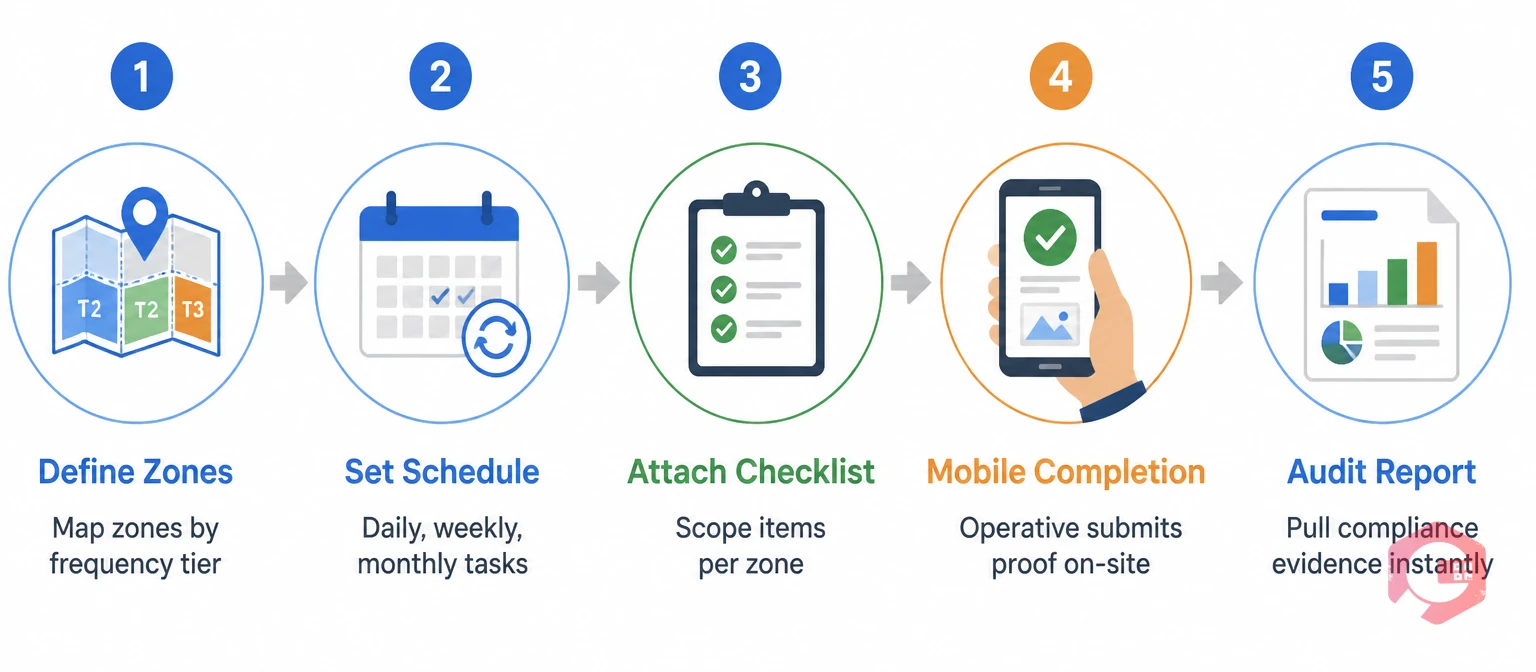
Cleaning is the highest-frequency soft service in most facilities — daily for occupied spaces, weekly for lower-traffic areas, periodic deep-clean for specialist zones. The CMMS setup needs to reflect that frequency variation across zones rather than applying a blanket schedule to the entire facility.
Create a separate recurring task (or PM schedule) for each cleaning frequency tier in your facility. A typical commercial or mixed-use facility will need at minimum: a daily cleaning task for all occupied office and common areas, a weekly deep-clean task for washrooms and high-contact surfaces, and a monthly specialist cleaning task for glass facades, carpets, or food preparation areas.
Each task should specify the zone covered, the contractor responsible, the scope checklist (surfaces wiped, floors mopped, bins emptied, consumables restocked), and the completion evidence required. Linking tasks to specific space zones rather than the facility as a whole means a missed task in Zone B is flagged independently of completed tasks in Zones A, C, and D — rather than being absorbed into an aggregate completion rate.
The preventive maintenance software module handles recurring schedule creation natively — FM operators set the frequency, assign the contractor, attach the checklist, and the tasks generate automatically. No manual creation, no calendar reminders, no coordinator overhead.
For cleaning tasks, proof of completion should capture at minimum: timestamp of task start and completion, name of the cleaning operative who completed the task, photographic evidence of the zone in finished condition, and checklist sign-off for each scope item. For regulated environments — food facilities, healthcare settings, childcare centres — each of these proof elements may be required for regulatory inspection.
The CMMS mobile app enables this capture on-site: the cleaning operative opens the assigned task on their mobile, completes the checklist, photographs the zone, and submits — creating an immutable, timestamped record in the system that the FM operator can retrieve at any time. When an audit asks for evidence of cleaning compliance for the past six months in Zone 12, the FM operator pulls a report in minutes rather than searching paper sign-off books.
Pest control is typically managed by a specialist third-party contractor on a quarterly or monthly visit schedule, with additional reactive visits triggered by reported sightings. The CMMS handles both the scheduled and reactive dimensions of this service.
Set up a recurring preventive maintenance task for each contracted pest control visit — monthly for high-risk environments (food production, warehousing, hospitality), quarterly for standard commercial properties. The task should include the service scope (bait station inspection, rodent trap check, insecticide treatment zones, entry-point sealing), the contractor assigned, and the documentation requirements.
For regulatory compliance, pest control records are often subject to audit by environmental health officers, food safety inspectors, or health and safety regulators. The CMMS task record — with contractor sign-off, treatment log, findings, and remediation actions — constitutes the documented evidence those audits require. According to UK Food Standards Agency guidance, food businesses must maintain written records of pest control measures, treatments applied, and the pest management contractor's recommendations — all of which the CMMS captures automatically as part of the task completion workflow.
Beyond scheduled visits, the CMMS handles reactive pest control through work request creation. When a facility occupant or cleaning operative reports a sighting, they raise a work request via QR code or mobile — the FM operator is notified immediately, the request is classified as pest control, and the contractor is dispatched. The reactive work order is linked to the relevant zone and the last scheduled visit record, giving the contractor context when they arrive and creating a complete infestation-to-resolution event log.
If reactive requests for the same zone exceed a defined threshold within a given period, the CMMS can trigger an escalation — alerting the FM manager to a potential programme failure that needs contractor review rather than another one-off visit. This escalation logic is configured using workflow automation software, with no coding required after initial setup.
Landscaping and grounds maintenance combine routine recurring tasks (weekly mowing, fortnightly hedge trimming, seasonal planting) with weather-sensitive scheduling and periodic inspection requirements. The CMMS handles the recurring layer and provides the framework for weather-triggered adjustments.
Build grounds maintenance tasks in seasonal blocks — a summer schedule with higher mowing frequency and irrigation management, a winter schedule focused on drainage, frost protection, and storm damage response. The CMMS recurring task structure accommodates this through schedule templates that can be activated and deactivated by season, rather than maintaining a single year-round schedule that becomes inaccurate as seasons change.
Weather-triggered deviations — a mowing task skipped because of heavy rain, irrigation paused during a wet week — are logged as task deferrals with reason codes in the CMMS. This ensures the task history reflects what actually happened rather than showing a false completion against a weather-disrupted schedule, and it gives the FM operator accurate data on how many deferrals occurred in a given period and why.
Beyond contractor task completion, grounds quality requires periodic FM-side inspection — checking that completed work meets standard, identifying deterioration that needs additional attention, and capturing evidence for client or occupier reporting. CMMS inspection tasks work identically to cleaning and pest control tasks: a scheduled inspection generates a work order, the FM operative completes the checklist on mobile (lawn condition, planted areas, hard landscaping, drainage gullies, boundary fencing), photographs any defects, and closes the task. Defects identified during inspection automatically generate a follow-up corrective work order assigned to the contractor, with a due date and an SLA for completion.
Use this reference to configure recurring task schedules in your CMMS for the three core soft service categories. Adjust frequencies based on facility type, occupancy density, and contractual requirements:
| Service | Task Type | Frequency | Trigger | Proof Required |
|---|---|---|---|---|
| General Cleaning | Recurring PM | Daily (occupied zones) | Time-based — auto-generates each working day | Checklist sign-off + zone photo |
| Deep Clean | Recurring PM | Weekly or monthly | Time-based — calendar day | Checklist + before/after photos |
| Pest Control Visit | Recurring PM | Monthly or quarterly | Time-based — contractor schedule | Treatment log + contractor sign-off |
| Reactive Pest Response | Corrective Work Order | As needed | Work request from occupant or operative | Sighting report + remediation record |
| Lawn Mowing | Recurring PM | Weekly (summer) / fortnightly (winter) | Time-based with seasonal template | Completion note + photo |
| Hedge / Shrub Trimming | Recurring PM | Fortnightly or monthly | Time-based — seasonal schedule | Before/after photos |
| Grounds Inspection | Inspection Work Order | Monthly | Time-based — FM-side inspection | Checklist + defect photos + follow-up WO |
Every row in this table maps to a recurring task template in the CMMS. Build the template once, assign the contractor or operative, and the system manages the schedule from that point forward — generating tasks, tracking completion, and alerting on misses automatically.
Third-party soft service contractors are managed against contractual SLAs — visit frequency, response time for reactive requests, completion quality standards, and documentation submission deadlines. A CMMS makes SLA compliance measurable rather than assumed.
Every task assigned to a contractor carries a due date and an SLA window. When a task is completed late, completed without required documentation, or missed entirely, the CMMS records the non-compliance event automatically. Over a rolling period — monthly, quarterly — the FM operator can pull a vendor SLA compliance report showing each contractor's performance against every contracted obligation: completion rate, on-time rate, documentation compliance, and reactive response time.
This data transforms contractor review meetings. Instead of a subjective conversation about whether the service has been "generally good," the FM operator presents a factual performance summary — and uses it to identify which contractors are meeting their SLAs, which need improvement plans, and which need contract renegotiation. The Report Builder generates contractor-specific performance reports on demand, formatted for the review meeting without any manual data compilation.
For contracts with penalty clauses for SLA breaches, the CMMS breach log provides the documented evidence base for applying those clauses — rather than relying on memory or disputed paper records.
Cryotos CMMS is built for FM operators who manage a mix of internal maintenance and contracted soft services across complex, multi-zone facilities. The preventive maintenance software module handles all three soft service categories — cleaning, pest control, and landscaping — through recurring task templates that generate automatically, assign to the right contractor, and carry the right checklist for each service type and zone.
The mobile app gives cleaning operatives, pest control contractors, and grounds maintenance crews a simple interface for receiving tasks, completing checklists, and submitting photographic proof of completion on-site — no paper, no separate contractor portal, no manual transfer of records back to the FM team. Every submission is timestamped and stored against the task record, creating an audit trail that the FM operator can produce for any inspection within seconds.
Work requests from facility occupants flow directly into the CMMS via QR code scanning or the mobile app — a cleanness complaint becomes a corrective cleaning task assigned to the relevant contractor within minutes of the report, with the reporter notified of progress automatically via WhatsApp or email through the notification builder.
The vendor SLA tracking and BI Dashboard give FM operators a real-time view of soft service compliance across all contractors and all zones — completion rates, missed tasks, overdue items, and reactive request response times — without pulling a single manual report. For FM operators managing multiple sites, Cryotos provides the same consolidated view across every location from one dashboard, making cross-site soft service performance visible for the first time for many multi-facility operators.
Hard services involve the maintenance and compliance of fixed physical assets — HVAC, electrical systems, lifts, fire suppression, plumbing. They're governed by legal obligations (statutory compliance) and typically require certified engineers. Soft services involve people-delivered, environment-facing activities — cleaning, pest control, landscaping, waste management, security, catering. They're typically contracted to specialist providers and governed by service level agreements and occupier experience standards rather than statutory compliance alone. Both require structured management, documentation, and audit trails, but the task types, proof requirements, and contractor management dynamics differ significantly.
Yes — and this is one of the highest-value use cases for CMMS in FM operations. Contractors are assigned as vendors in the CMMS, tasks are assigned to them directly, and their completion is tracked against the same SLA framework as internal maintenance. The contractor receives their task on mobile, completes the required documentation on-site, and the FM operator sees confirmation in real time without a follow-up call. Any missed or late completion triggers an automatic alert. Over time, the accumulated task and completion data forms the vendor performance record used in contract reviews.
Audit readiness for soft services requires two things: evidence that services were performed as scheduled, and a record of any deviations and how they were resolved. A CMMS provides both automatically. Every completed task generates a timestamped record with checklist sign-off and any attached photos. Every missed task generates a non-compliance log. When an auditor asks for six months of cleaning records for a specific zone, the FM operator exports the task history in minutes. Without a CMMS, that evidence exists only in paper sign-off books and WhatsApp threads — neither of which is audit-ready at short notice.
Frequency depends on facility type and zone usage. High-traffic zones (lobbies, washrooms, canteens, corridors) in commercial or public-facing facilities should be scheduled for daily general cleaning. Offices and meeting rooms typically run well on daily cleaning with weekly deep-clean. Specialist areas — food preparation zones, medical rooms, childcare spaces — often require multiple cleans per day with specific disinfection protocols. Low-traffic storage areas and plant rooms typically need weekly or monthly cleaning. Start with your contractual commitments and map each commitment to a specific zone and task in the CMMS, rather than creating a single facility-wide cleaning task that obscures zone-level performance.
Soft services are not peripheral to FM operations — they're the layer of service delivery that occupants experience every day, and the layer most likely to generate complaints, compliance failures, and contractor disputes when managed informally. Moving cleaning, pest control, and landscaping into a CMMS transforms them from schedule-and-hope activities into tracked, documented, SLA-governed service streams with a complete audit trail behind them.
For FM operators ready to bring their soft services under the same management rigour as their plant and asset maintenance, Cryotos CMMS gives you the recurring task engine, mobile completion capture, contractor SLA tracking, and real-time reporting to make that happen. Book a free demo today and see how your soft services look when they're actually managed.



Cryotos AI predicts failures, automates work orders, and simplifies maintenance—before problems slow you down.



