

Technician availability tracking in a CMMS ensures that work orders are assigned to the right person at the right time — based on real availability, not guesswork. Without it, maintenance managers often overload their best technicians while others sit idle, leading to burnout, delays, and missed SLAs. Knowing who is punched in, who already has an active work order, and which critical assets are mapped to specific users gives you a complete picture before any assignment is made.
In facilities where dozens of work orders are created daily, smart technician assignment isn't a nice-to-have — it's the difference between a reactive maintenance team and a high-performing one. This guide walks through exactly how availability tracking works, why it matters, and how Cryotos CMMS makes it operationally simple.

Most work order assignment failures don't happen because managers make bad decisions — they happen because managers make decisions with incomplete information. When a work order is raised, the typical process is to open a list of technicians, pick someone who seems available, and assign. But that "seems available" part is where the breakdown starts.
A technician might be listed as available in the system but actually be on-site handling an unlogged task. Another might have punched in but not yet acknowledged their previous work order, meaning they're technically still mid-task. Without real-time status visibility, managers are essentially assigning blind.
The downstream effects compound quickly:
The solution isn't more manual oversight — it's surfacing the right availability data at the exact moment a work order is about to be assigned.

Cryotos tracks technician availability through two complementary mechanisms, each capturing a different dimension of whether a technician is actually free right now.
The first signal is the most fundamental: is the technician even on shift? Punch-in and punch-out data tells you exactly who is physically present and on the clock. When a technician punches in via the Cryotos mobile app, their status updates in real time across the system. Managers assigning a work order immediately see who is on-site and who isn't.
This matters more than it sounds. In multi-shift facilities, technicians from the previous shift may still appear in the assignee list even after clocking out. Assigning a work order to someone who has already left creates unnecessary delays and confusion. Punch-based availability filtering removes this noise and shows only currently active technicians as valid assignment targets.
The second signal goes deeper: is the technician engaged with an active task? Once a technician acknowledges a work order in Cryotos — confirming they've started or accepted the job — their status automatically updates to Busy. This status persists until the work order is completed or explicitly closed.
This acknowledgment-based busy signal is what separates true availability from theoretical availability. A technician could be punched in and physically on-site, but if they've already acknowledged a work order, assigning them another concurrent task without visibility is a recipe for one job being deprioritized. The system makes this status visible before any assignment is finalized.
One of the most impactful points in the work order lifecycle is the moment just before conversion — when a work request moves from submitted to assigned and active. This is exactly where Cryotos surfaces technician availability data.
Before a supervisor converts a work request into an active work order, the system displays a live snapshot of each technician's current status:
This pre-conversion visibility does two things: it helps managers make better assignments in real time, and it creates a natural checkpoint to prevent over-assignment. Instead of assigning and hoping for the best, managers can see the full team picture and make a deliberate, informed choice.
For facilities running multiple shifts or departments, this snapshot view is filterable by team, department, or skill set — so a mechanical fault in Building A gets routed to an available mechanical technician, not just the first person on the list.
Not every work order can be handled immediately. When all available technicians are busy or the task is non-urgent, Cryotos allows work orders to be stacked in a queue. This queue system ensures that tasks don't fall through the cracks when no one is immediately free to take them on.
The queue respects priority levels — urgent repairs stay at the top, routine maintenance tasks sit lower. As technicians complete their current work orders and their status returns to Available, the next queued task can be assigned automatically or flagged for manual assignment depending on workflow configuration.
For maintenance teams handling high volumes, queuing is what turns a chaotic inbox of requests into a structured, priority-ordered workflow. Technicians can also see their own upcoming queue through the mobile app, so they're never surprised by their next task — they can plan their movements on the floor accordingly.
This queue visibility also benefits supervisors doing shift handovers. Instead of relying on verbal briefings, the outgoing supervisor can see exactly what's pending, what's in-progress, and what's queued for the incoming shift — all in the CMMS dashboard.
Some assets are too important to leave to generalist assignment. Production line motors, boilers, HVAC systems, or any asset tied to safety compliance — these require technicians who know the equipment inside out. Cryotos supports mapping critical equipment to specific users or teams, so when a work order is raised for that asset, the system immediately knows who the right person is.
This mapping works in tandem with availability tracking. If the mapped technician is available, the work order routes to them. If they're busy or off-shift, the system surfaces their status alongside that of the next best qualified team member — letting the supervisor make a faster, safer call without digging through personnel records or making phone calls.
For asset management in regulated industries, equipment-to-technician mapping also supports compliance. When a specific certification or qualification is required to service an asset, only technicians with that qualification appear in the assignable list. This ensures work orders for specialized equipment never accidentally get routed to someone without the right credentials.
Workload imbalance is one of the most common — and least discussed — problems in maintenance departments. It's rarely intentional: managers assign to familiar names, urgent tasks go to proven technicians, and over time a small group carries a disproportionate load while the rest of the team operates below capacity.
Availability tracking directly addresses this. When a manager can see at a glance that Technician A has three acknowledged work orders and Technician B has none — both currently punched in — the decision to assign the next task to Technician B is easy. Without that visibility, there's no nudge toward balance.
Cryotos reinforces this with reporting: workload distribution reports show how many work orders each technician handled over a given period, average completion time, and time spent per asset category. Supervisors can use these reports in weekly reviews to identify chronic imbalances and adjust team structures or training accordingly.
For teams looking to build a culture of fair assignment and accountability, this data is invaluable. It removes the subjectivity from workload conversations and grounds them in numbers everyone can see.
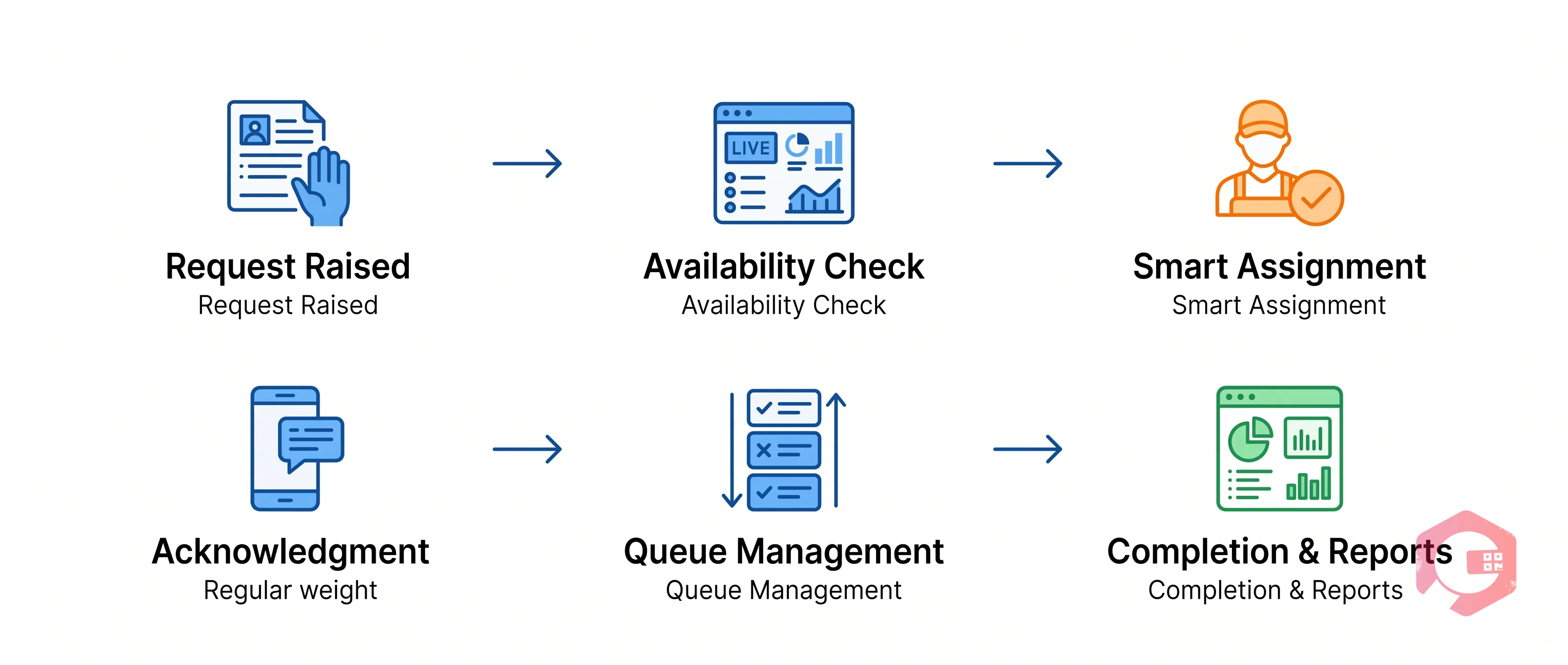
Cryotos ties all of these elements together into a single, connected workflow. Here's how a typical scenario plays out from request to completion:
This loop — from request to assignment to completion to analysis — is what transforms a maintenance department from reactive to systematically optimized. Every data point collected feeds back into smarter decisions for the next work order.
Teams using Cryotos have reported 25% faster repair times and 30% reduction in equipment downtime — largely because the right person is reaching the right asset faster, without the delays caused by poor visibility into who is actually free.
If you're still assigning work orders based on gut feel or a static roster list, Cryotos can change that. Book a demo to see how real-time technician availability tracking works in your facility.
By surfacing each technician's real-time status — whether they're punched in, busy with an active work order, or off-shift — before assignment is made, managers avoid routing tasks to unavailable staff. This eliminates the most common cause of delays: assigning work orders to technicians who can't action them immediately.
Work orders can be placed in a priority queue within Cryotos. The queue is ordered by urgency and wait time, ensuring that when a technician becomes available, the highest-priority pending task is addressed first. Supervisors receive notifications when queue depth reaches configured thresholds.
Yes, supervisors retain the ability to assign work orders regardless of status — useful for urgent or safety-critical situations. The system flags the technician's current status as a warning but does not block the assignment. The additional task then joins the technician's personal queue.
In Cryotos, specific assets can be mapped to designated technicians or teams. When a work order is created for that asset, the mapped technician is highlighted as the preferred assignee. Their availability status is checked in real time, and if they're unavailable, the system surfaces the next qualified option.
Yes. Through the Cryotos mobile app, technicians can view their current active work order, any queued tasks assigned to them, and estimated priorities. This allows them to plan their on-floor movements more efficiently without needing to check in with a supervisor between tasks.




Cryotos AI predicts failures, automates work orders, and simplifies maintenance—before problems slow you down.



