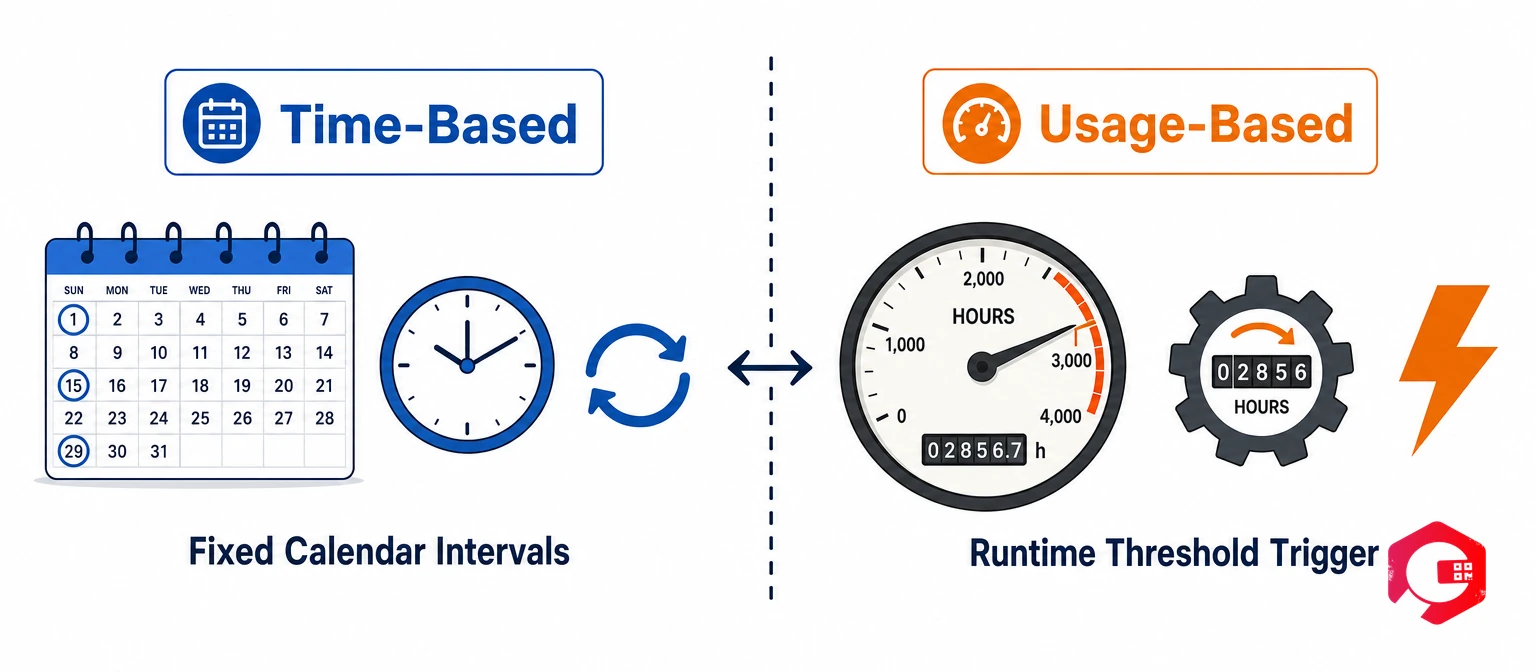
Time-based maintenance and usage-based maintenance are the two most common preventive maintenance scheduling strategies — and choosing the wrong one for an asset can cost you more than a breakdown ever would. Time-based maintenance triggers service at fixed calendar intervals (every 30 days, every quarter). Usage-based maintenance triggers service based on actual asset activity — hours run, miles driven, or cycles completed. According to a Plant Engineering survey, organisations that match their PM scheduling strategy to the right asset type reduce maintenance costs by up to 18% and cut unplanned downtime significantly. The decision is not universal — different asset types, utilisation patterns, and regulatory requirements all point toward different scheduling approaches. This guide breaks down both strategies, when to use each, and how to combine them for assets that benefit from both triggers.
Key Takeaways
Time-based maintenance suits age- and compliance-driven assets: HVAC filters, fire safety equipment, and electrical panels degrade with time regardless of use — calendar-based schedules are the correct approach and often mandatory for regulatory compliance.
Usage-based maintenance is more accurate for wear-driven assets: Fleet vehicles, CNC machines, and compressors wear based on operation, not time sitting idle — servicing them at runtime thresholds prevents both over-maintaining and under-maintaining.
Combined Either/Or scheduling is the most powerful option: For critical assets, triggering a PM at whichever condition comes first (e.g., 500 hours OR 6 months) eliminates the risk of both excessive wear and excessive deferral.
A CMMS with IoT meter integration automates both trigger types: Manual meter tracking fails as fleet or asset counts grow — runtime counters and odometer feeds directly into PM triggers remove human error from the scheduling chain entirely.
What Is Time-Based Maintenance?
Time-based maintenance (TBM) is a preventive maintenance strategy where service tasks are scheduled at fixed calendar intervals — regardless of how much the asset has actually been used. A technician services a compressor every 90 days, changes HVAC filters every month, or inspects fire safety equipment every six months. The schedule is driven purely by the calendar, not the machine’s actual workload.
TBM is the oldest and most widely adopted PM strategy because it requires no special instrumentation and creates a predictable, auditable maintenance schedule. Every compliance-sensitive asset in a facility — fire suppression systems, electrical panels, pressure vessels, emergency lighting — operates on a time-based schedule because regulatory bodies mandate specific calendar intervals, not runtime thresholds.
How Time-Based Schedules Work
A time-based PM schedule is simple by design. You set a start date and a recurrence interval, and a CMMS generates work orders automatically on that cadence. Common examples: daily lubrication checks on high-speed packaging lines, monthly filter replacements on HVAC units, quarterly electrical panel inspections, and annual boiler overhauls. The strength here is predictability — your team knows exactly when work is coming, procurement can plan parts in advance, and compliance audits are straightforward to evidence.
The weakness of pure time-based scheduling is that it ignores actual asset condition. A compressor that ran continuously for 89 of the 90 days gets the same service as one that ran for 15 days. The former is likely overdue; the latter may be over-maintained. For assets with highly variable utilisation patterns, this misalignment accumulates into real cost and reliability problems.
Best Use Cases for Time-Based Maintenance
Safety and compliance equipment: Fire extinguishers, sprinkler systems, emergency lighting, and pressure vessels are legally required to be inspected at specific calendar intervals. Usage data is irrelevant — the regulatory clock runs regardless.
HVAC and building services: Filter replacement, coil cleaning, and belt checks on HVAC systems are driven by time in service and environmental exposure, not runtime hours. A unit that ran at partial load for six months still needs the same filter service as one at full load.
Predictable-utilisation assets: Assets running consistent shift patterns with minimal variation — a continuously running conveyor, a 24/7 chiller plant — are effectively equivalent to time-based schedules since usage and calendar time track closely together.
Low-cost assets where tracking overhead exceeds savings: When the effort of meter setup and tracking exceeds the cost benefit of more precise scheduling, time-based remains the pragmatic choice.
What Is Usage-Based Maintenance?
Usage-based maintenance (UBM) schedules service based on actual asset utilisation rather than elapsed time. Instead of “every 90 days,” the trigger becomes “every 500 operating hours,” “every 10,000 miles,” or “every 50,000 production cycles.” The maintenance clock only ticks when the asset is actually running — making this approach far more accurate for assets with variable usage patterns.
The principle behind UBM is straightforward: most mechanical wear — bearing fatigue, oil degradation, seal wear, brush erosion — is driven by operation, not by calendar days. A forklift that ran 1,200 hours last quarter and 300 hours this quarter should not receive identical service intervals in both periods. Applying time-based scheduling to high-variability assets systematically over-maintains in slow periods and under-maintains in peak periods.
How Usage-Based Schedules Work
Usage-based PM requires a way to track asset activity — a meter, sensor, odometer, or runtime counter. Modern CMMS platforms can read these values automatically via IoT meter reading integrations or manual meter entry, then trigger a work order when the threshold is reached. Common metrics include: operating hours for generators and compressors; mileage for fleet vehicles and forklifts; production cycles for presses, conveyor systems, and injection moulding machines; fuel consumed for diesel generators and mobile plant; and start-stop cycles for assets where each startup creates specific wear (high-pressure pumps, motors with star-delta starters).
When IoT integration feeds live runtime data into the CMMS, PM work orders fire automatically the moment a threshold is hit — without any manual reading, data entry, or scheduler intervention. This removes the most common failure point of usage-based programmes: the human who forgets to log the meter reading.
Best Use Cases for Usage-Based Maintenance
Fleet and mobile equipment: Forklifts, trucks, telehandlers, and mobile cranes have well-established service intervals measured in hours or mileage. Using calendar-based intervals on a vehicle that sits idle for weeks is wasteful; using calendar intervals on a vehicle running double shifts is dangerous.
Production machinery with variable load: CNC machines, injection moulding presses, and stamping lines run at different intensities depending on production schedules. Cycle count is a far better wear proxy than elapsed time for these assets.
High-cost rotating equipment: Centrifugal pumps, compressors, turbines, and gearboxes have expensive service tasks (oil analysis, vibration checks, seal replacements) where over-servicing wastes significant budget and under-servicing risks catastrophic failure.
IoT-connected assets with live telemetry: When an asset is already streaming runtime hours, temperature, or cycle counts to a monitoring platform, using that data to drive PM triggers is a natural and low-effort upgrade from calendar scheduling.
Time-Based vs Usage-Based Maintenance: Key Differences
The table below summarises the core differences to help you match each strategy to the right asset class in your maintenance programme.
Factor
Time-Based Maintenance
Usage-Based Maintenance
Trigger
Fixed calendar interval (days, weeks, months)
Asset activity threshold (hours, miles, cycles)
Scheduling complexity
Low — set date and recurrence
Medium — requires meters or IoT sensors
Accuracy for wear-driven failures
Low for variable-use assets
High — tracks actual operating stress
Risk of over-maintenance
High for low-utilisation assets
Low — PM only fires when threshold is reached
Risk of under-maintenance
High for high-utilisation assets
Low — threshold tracks real wear rate
Compliance suitability
High — most regulations specify calendar intervals
Low — rarely accepted as compliance evidence alone
Best asset types
HVAC, safety equipment, electrical, building services
Fleet, production machinery, compressors, pumps
Data requirements
None beyond a calendar
Runtime counters, odometers, or production cycle data
When to Use Time-Based Maintenance
Time-based maintenance is the right call in four specific situations. Get the decision criteria right and you eliminate a common source of both over-maintained assets (wasted budget) and under-maintained assets (increased breakdown risk).
Degradation is driven by time, not use: Rubber seals harden and degrade with age regardless of whether the asset is running. Lubricants oxidise and lose viscosity over time even in storage. Electrical insulation absorbs moisture from the environment continuously. For these failure modes, calendar intervals are the correct trigger — runtime hours tell you nothing useful.
Utilisation is consistent and predictable: An asset that runs reliably for eight hours per day, five days per week effectively accumulates operating hours at a fixed rate. Calendar-based and runtime-based schedules converge in this scenario — time-based is simpler to administer with no accuracy penalty.
Regulatory standards mandate calendar intervals: Statutory inspection regimes for pressure vessels, lifting equipment, fire protection systems, and electrical installations specify calendar-based intervals in law. These cannot be substituted with usage-based triggers regardless of asset condition. Using asset maintenance management software that tracks statutory due dates alongside planned PMs is essential for compliance auditability.
Asset is low-utilisation but high-consequence: A standby emergency generator that runs only during tests may accumulate few hours per year — but time-in-service still matters for battery condition, fuel quality, and seal integrity. Calendar-based inspection catches time-dependent degradation that runtime hours would never trigger.
When to Use Usage-Based Maintenance
Usage-based maintenance delivers its highest value on assets with highly variable utilisation patterns — where calendar scheduling would either over-maintain during quiet periods or allow excessive wear during peak periods. Apply UBM in these situations:
Variable-shift or seasonal production environments: A manufacturing plant running at 40% capacity in Q1 and 90% capacity in Q3 cannot apply the same fixed maintenance interval across both periods without one being wrong. Usage-based triggers self-correct for volume — the PM fires when the asset has actually done the work, not when the calendar says it should have.
Fleet and mobile equipment with variable dispatch: Forklifts, service vehicles, and mobile plant accumulate wear at rates entirely dependent on dispatch frequency. Runtime-hour thresholds from predictive maintenance data or odometer readings align service intervals with actual wear rather than arbitrary date windows.
High-value rotating equipment: Compressors, centrifugal pumps, and turbines carry expensive service tasks — oil changes, seal replacements, bearing inspections — where the cost of over-servicing across a large fleet is substantial. Usage-based scheduling on these assets typically recovers 15–20% of maintenance budget spent on unnecessary PMs.
IoT-connected assets already streaming telemetry: If an asset is already reporting runtime hours, cycle counts, or energy consumption to a monitoring system, converting those readings into PM triggers is a straightforward upgrade that costs almost nothing incrementally but improves PM accuracy significantly.
Connect runtime data from your assets directly to PM triggers using Cryotos’s facility maintenance software with built-in IoT meter triggers — no manual entry, no missed threshold, no preventable breakdown.
Can You Use Both? Combined Time and Usage Scheduling
Yes — and for many critical assets, using both triggers together is the most effective approach. Combined scheduling eliminates the primary failure modes of each individual strategy: it prevents the usage-only problem of deferring a PM indefinitely on a low-utilisation asset, and prevents the time-only problem of servicing an asset that hasn’t accumulated enough wear to warrant it.
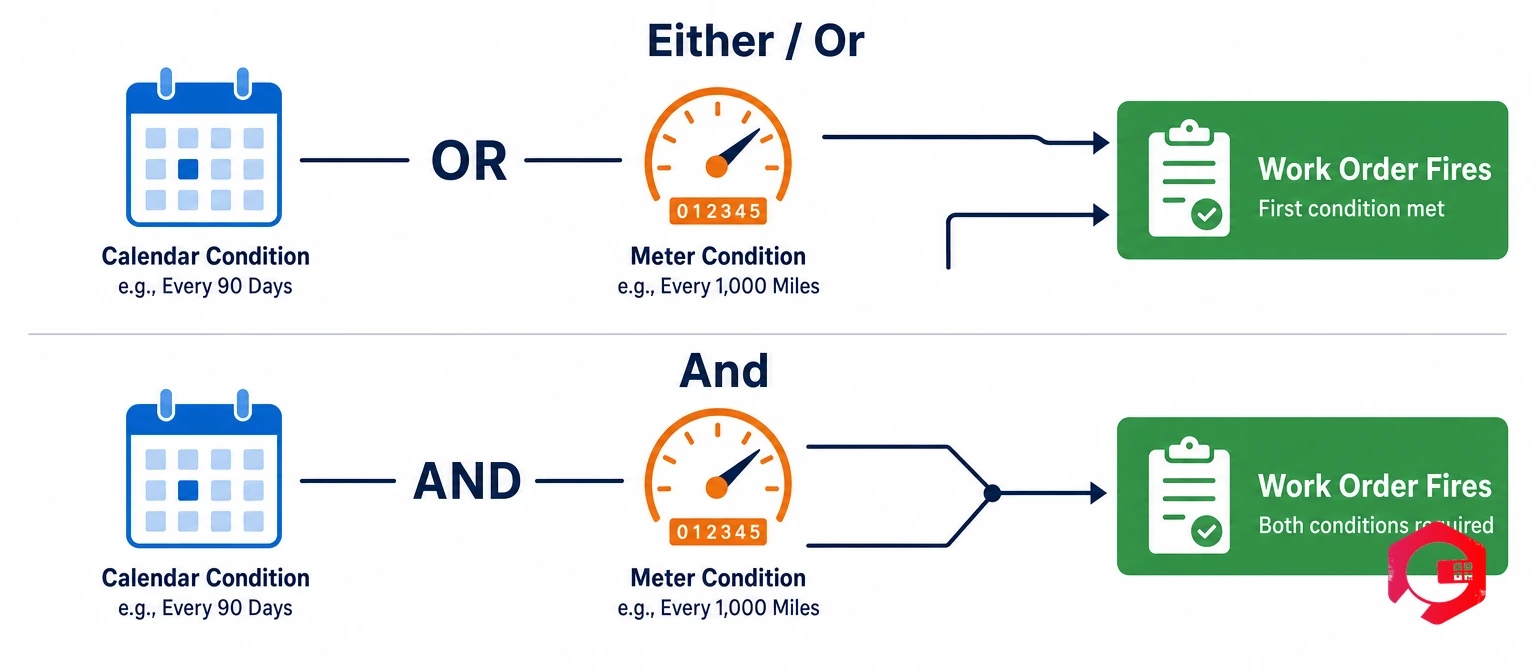
There are two distinct combined scheduling logics, and choosing the right one changes how your maintenance programme behaves:
Either/Or scheduling (whichever comes first): The work order fires when the first condition is reached — whichever occurs earlier. Example: service a generator every 250 operating hours OR every 6 months — whichever comes first. In practice: if the generator runs heavily and hits 250 hours in four months, the PM fires at four months. If it runs lightly and only accumulates 180 hours by month six, the calendar trigger fires instead. Neither scenario allows the asset to go unserviced for longer than the safety net allows. This is the correct logic for critical assets where you want to guarantee a maximum interval regardless of utilisation pattern.
And scheduling (both conditions must be met): The work order fires only when both conditions are satisfied simultaneously. Example: service only after 500 operating hours AND at least 3 months have passed. This logic suits scenarios where you want to prevent unnecessary PMs on a low-utilisation asset — the asset won’t be serviced until it has both accumulated meaningful wear and been in service long enough for time-dependent degradation to be relevant. This prevents over-maintenance on standby assets that would otherwise trigger calendar-based PMs while barely running.
For most critical production assets, Either/Or is the safer default. According to Reliable Plant’s guidance on optimal PM intervals, combining time and usage triggers reduces both over-maintenance costs and unexpected failure rates compared with using either trigger type alone. Use your MTBF calculator to establish baseline failure intervals before setting combined PM thresholds — so the trigger fires before the statistical failure point, not after it.
How to Set Up Time and Usage-Based PM in a CMMS
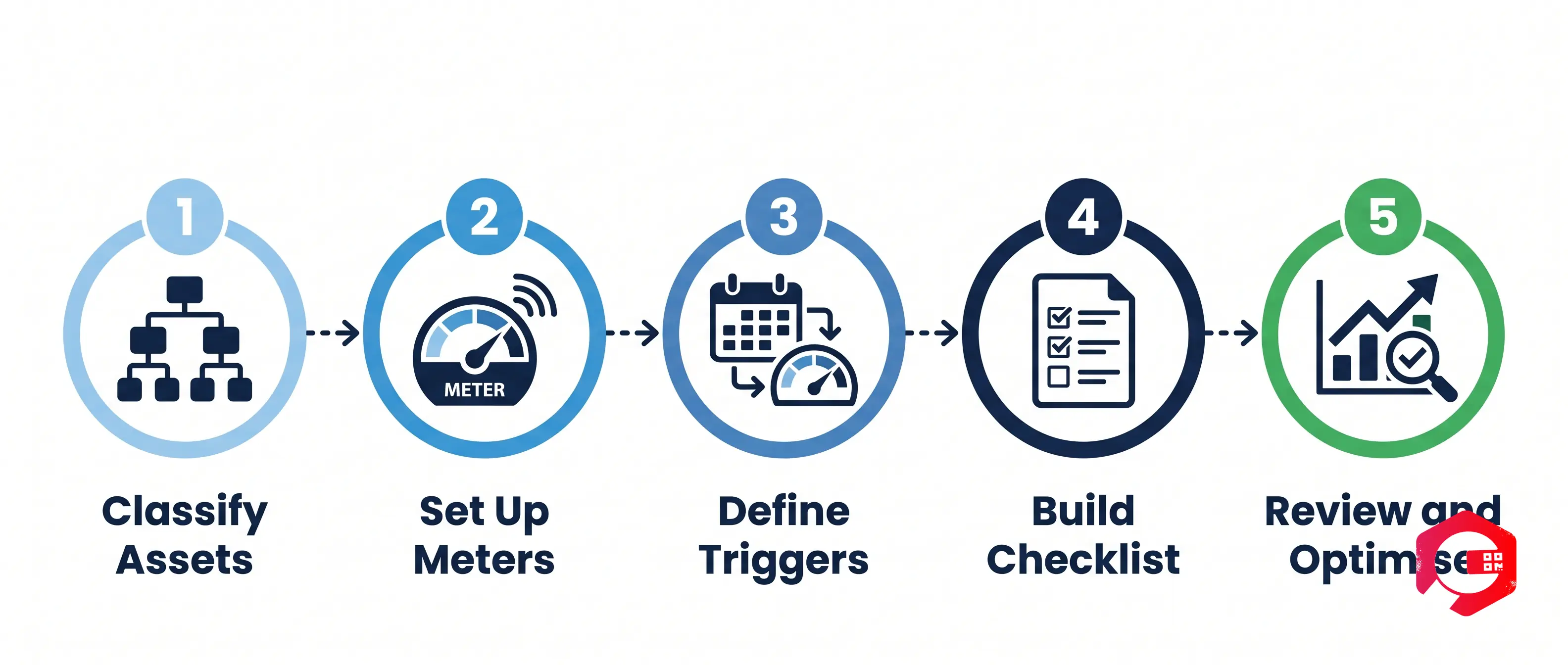
Setting up both trigger types in a preventive maintenance software platform is straightforward when your CMMS supports dynamic scheduling. Follow this five-step process to get both strategies running correctly from day one.
Step 1 — Classify your assets by utilisation pattern: Before setting any triggers, categorise every asset in scope: consistently-run assets (time-based appropriate), variable-use assets (usage-based appropriate), critical assets (combined Either/Or), and compliance-mandated assets (time-based, non-negotiable). This classification drives every scheduling decision downstream.
Step 2 — Set up usage meters: For every asset assigned to usage-based or combined scheduling, configure the relevant meter type in the CMMS — runtime hours counter, odometer, cycle counter, or fuel gauge. Where IoT integration is available, connect the sensor feed directly. Where manual entry is required, assign meter reading as a recurring daily or shift-end task so readings are never missed.
Step 3 — Define PM triggers for each asset: Set the trigger logic — time interval, usage threshold, or combined Either/Or or And logic — for every PM task on every asset. Map trigger thresholds to manufacturer recommendations first, then adjust based on your actual failure history. A threshold set lower than necessary wastes labour; one set higher than necessary increases failure risk.
Step 4 — Build task checklists attached to each PM: A PM trigger that fires without a specific checklist generates inconsistent work. Attach a mandatory task checklist to every PM — including inspection points, lubrication specifications, torque values, and pass/fail criteria. The checklist ensures every technician performs the same tasks regardless of experience level.
Step 5 — Review and optimise after 6–12 months: After accumulating a year of PM and breakdown data, run CMMS reports to identify assets with recurring failures between PMs (threshold too high — reduce interval) and assets with consistently clean PM records and no between-PM failures (threshold potentially too low — consider extending to reduce cost). According to ISO 55000 asset management standards, systematic review and adjustment of maintenance intervals is a core requirement of a compliant asset management programme.
Cryotos CMMS supports both static (time-based) and dynamic (usage-based) PM schedules natively, including Either/Or and And combined trigger logic, IoT meter integration, and automated work order generation across unlimited assets and sites.
Frequently Asked Questions
What is the main difference between time-based and usage-based maintenance?
Time-based maintenance triggers service at fixed calendar intervals regardless of how much the asset was used. Usage-based maintenance triggers service when the asset reaches a specific activity threshold — operating hours, miles, or production cycles. Usage-based is more accurate for wear-driven failures; time-based is easier to administer and better suited for compliance-driven or age-degradation scenarios where regulations specify calendar intervals.
Which assets are best suited for usage-based maintenance?
Usage-based maintenance works best on assets where wear directly correlates with operation: fleet vehicles and forklifts (mileage or hours), CNC machines and injection moulding presses (production cycles), compressors and generators (operating hours), and any IoT-connected asset already streaming runtime telemetry. The defining characteristic is variable utilisation — if the asset’s actual hours per week vary significantly, usage-based scheduling prevents both over-maintaining during quiet periods and under-maintaining during peak periods.
Can I schedule maintenance based on both time and usage in a CMMS?
Yes. Modern CMMS platforms like Cryotos support combined scheduling logic — you can configure a PM to trigger based on whichever condition is met first (Either/Or) or only when both conditions are satisfied simultaneously (And logic). Either/Or is recommended for most critical assets because it guarantees a maximum service interval regardless of how the asset is utilised in any given period.
What happens if I use time-based maintenance on a variable-use asset?
You risk over-maintaining during low-use periods — wasting labour, parts, and budget on an asset that hasn’t accumulated enough wear to warrant service — and under-maintaining during high-use periods — allowing wear to accumulate past the safe service threshold because the calendar trigger hasn’t fired yet. Usage-based scheduling eliminates both failure modes by aligning the service trigger with actual asset wear rather than elapsed time.
The right PM scheduling strategy is one of the highest-leverage decisions in a maintenance programme — it affects cost, reliability, and compliance simultaneously. Schedule a free demo to see how Cryotos helps maintenance teams configure time-based, usage-based, and combined PM triggers for every asset type — and reduce unplanned downtime by up to 30%.