

Condition monitoring is the practice of tracking live equipment data to catch a fault before it causes a breakdown. It uses signals like vibration levels and surface temperature. On its own, a vibration sensor or infrared camera just gives you a number. That number only becomes useful once it crosses a limit and turns into a work order. The work order lives inside your Computerized Maintenance Management System. That's the moment a technician gets sent out. It happens before a bearing seizes or a connection overheats.
Key Takeaways
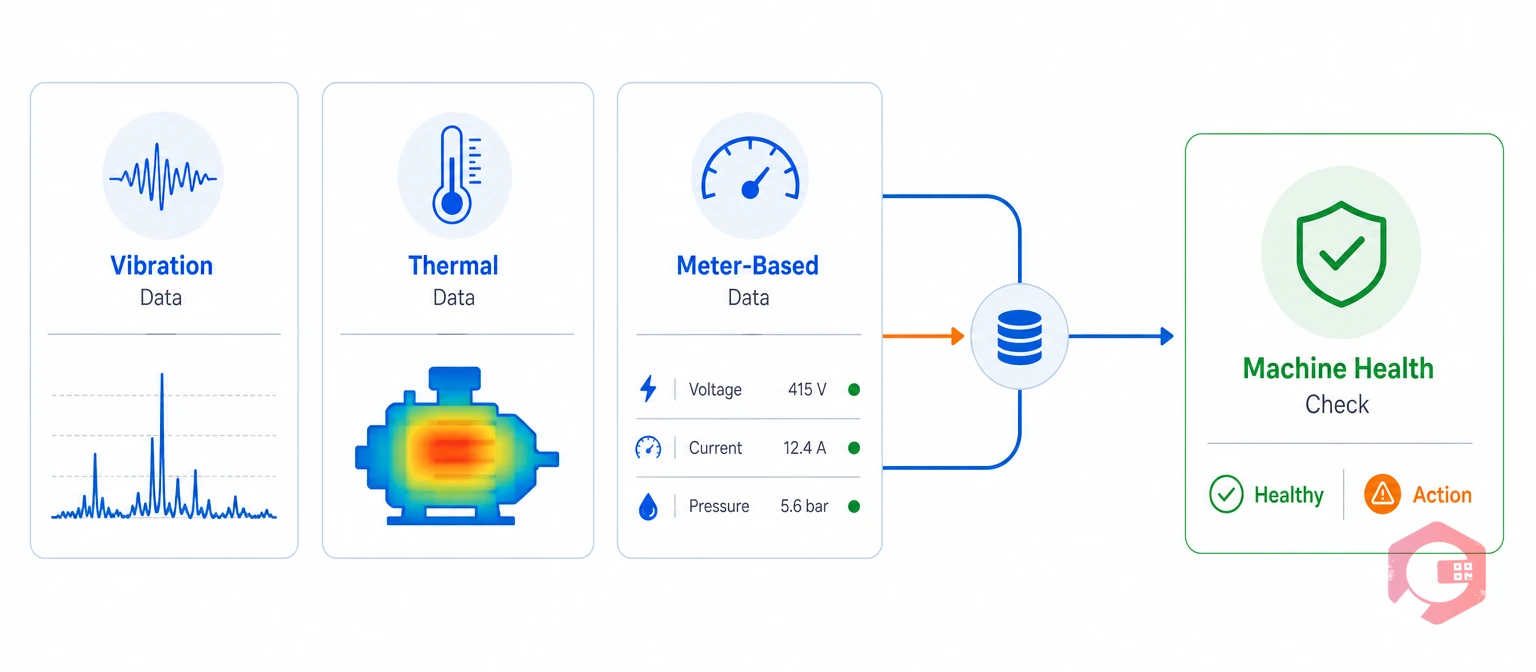
Condition monitoring data is any live reading — vibration, temperature, oil sample, or ultrasonic scan — that shows the real-time health of a machine. Instead of servicing a motor on a fixed calendar, your team checks the machine's actual condition first. You only act when the data tells you to.
Most plants running a condition-based maintenance program combine at least two of these signal types. One technique alone rarely catches every failure mode on a rotating or electrical asset, so a solid condition monitoring setup leans on more than one sensor type.
Vibration analysis and thermography solve different problems. Mixing them up wastes inspection time on the wrong tool for the job.
Plants that run both checks together usually catch more failure types than plants that pick just one. Vibration analysis alone misses electrical hot spots. Thermography alone misses early bearing wear that hasn't made heat yet. That's why a strong condition monitoring program almost always mixes both signal types instead of relying on a single test.
Curious how much runway your assets have left? Check your current MTBF to see how close you are to your next failure window. You can also read more background on vibration as a physical phenomenon if you want the underlying physics.
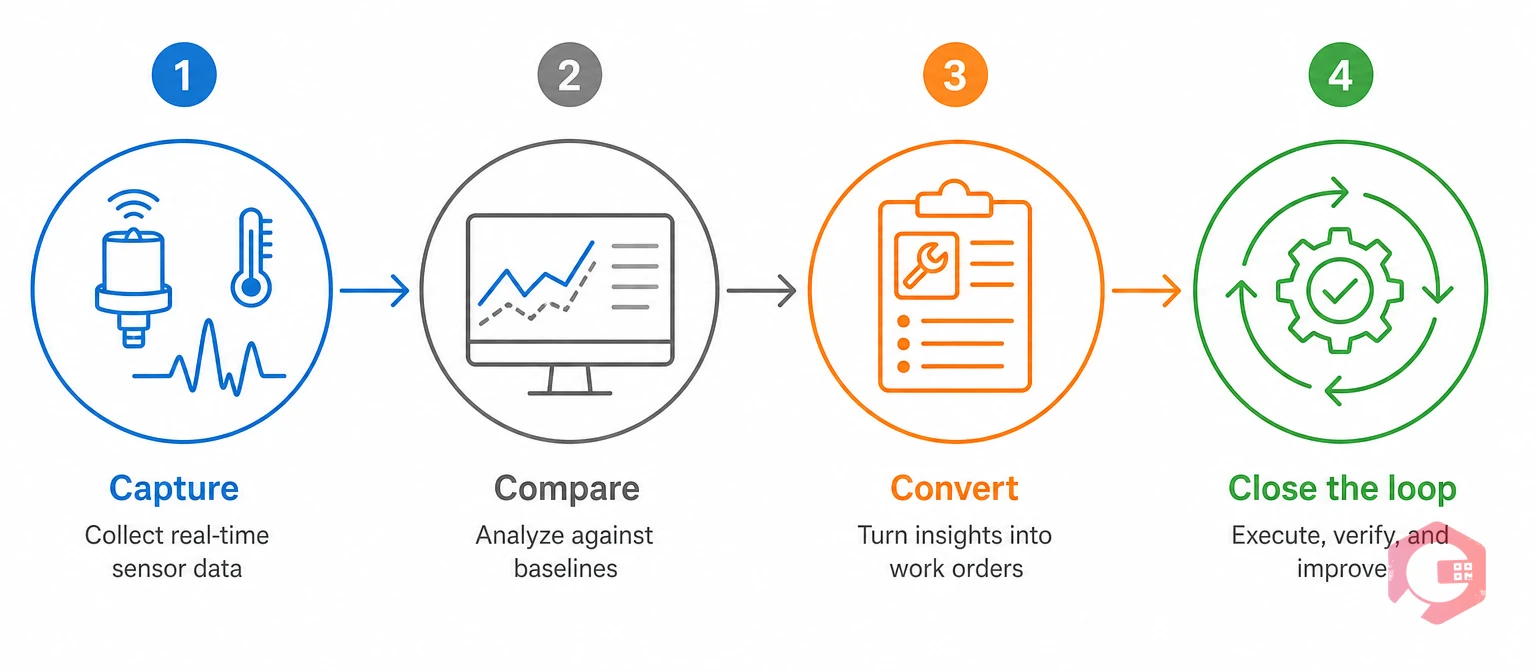
A vibration or thermal reading only creates value once it turns into a work order — not when it just sits on a monitoring screen. That hand-off step is where most stand-alone condition monitoring tools fall short.
The Sensor-to-Work-Order Framework:
Skip the "Convert" step, and your condition monitoring program gives you accurate data with no faster response than a fully reactive shop. The sensor becomes an expensive dashboard number instead of a real trigger.
A threshold is the exact reading that separates a healthy machine from one that needs attention. Set it wrong, and you either flood your team with false alarms or miss a real fault building up.
Vibration severity is often measured against ISO 10816 zones, a set of bands that rate overall vibration speed from "newly commissioned" to "damage likely." Thermal limits are usually set as a rise above ambient temperature, or above a baseline reading taken when the asset was known to run healthy.
Most reliability teams treat vibration analysis threshold-tuning as an ongoing job, not a one-time setup. Asset behavior shifts as parts age, so a good condition monitoring program keeps adjusting its limits over time rather than locking them in once.
Vibration and thermography readings deliver zero maintenance value if they stay outside the system that actually schedules and tracks work. A stand-alone monitoring platform can flag a fault perfectly and still fail your plant, if someone still has to copy that alert into a separate work order tool by hand.
Maintenance teams using a Computerized Maintenance Management System close that gap by tying every sensor reading straight to the asset's maintenance record. Cryotos customers have reported up to 30% lower unplanned downtime and 25% faster repair turnaround once their condition monitoring data fed directly into automatic work order triggers, instead of sitting in a separate dashboard.
This is the same idea behind ISO 55000 asset management standards: data only creates value when it drives a decision. A connected CMMS is what turns a raw reading into that decision automatically, which is the whole point of running a condition monitoring program in the first place.
Think about what happens without that link. A vibration sensor flags a pump trending toward failure. The alert lands in a separate monitoring app that the maintenance planner doesn't check every day. Three days pass before anyone notices. By then, the pump has failed anyway, and the plant eats the same unplanned downtime it was trying to avoid. None of the sensor accuracy mattered, because the data never reached the person who could act on it in time.
Now compare that to a connected setup. The same reading crosses the same threshold. This time, a work order gets created the moment the limit is crossed. The technician's phone buzzes with the asset, the reading, and the repair history attached. The pump gets serviced that same shift, well before it fails. The sensor and the threshold didn't change — only the path between the reading and the technician did. That path is what a CMMS provides, and it's the real reason condition monitoring programs succeed or stall.
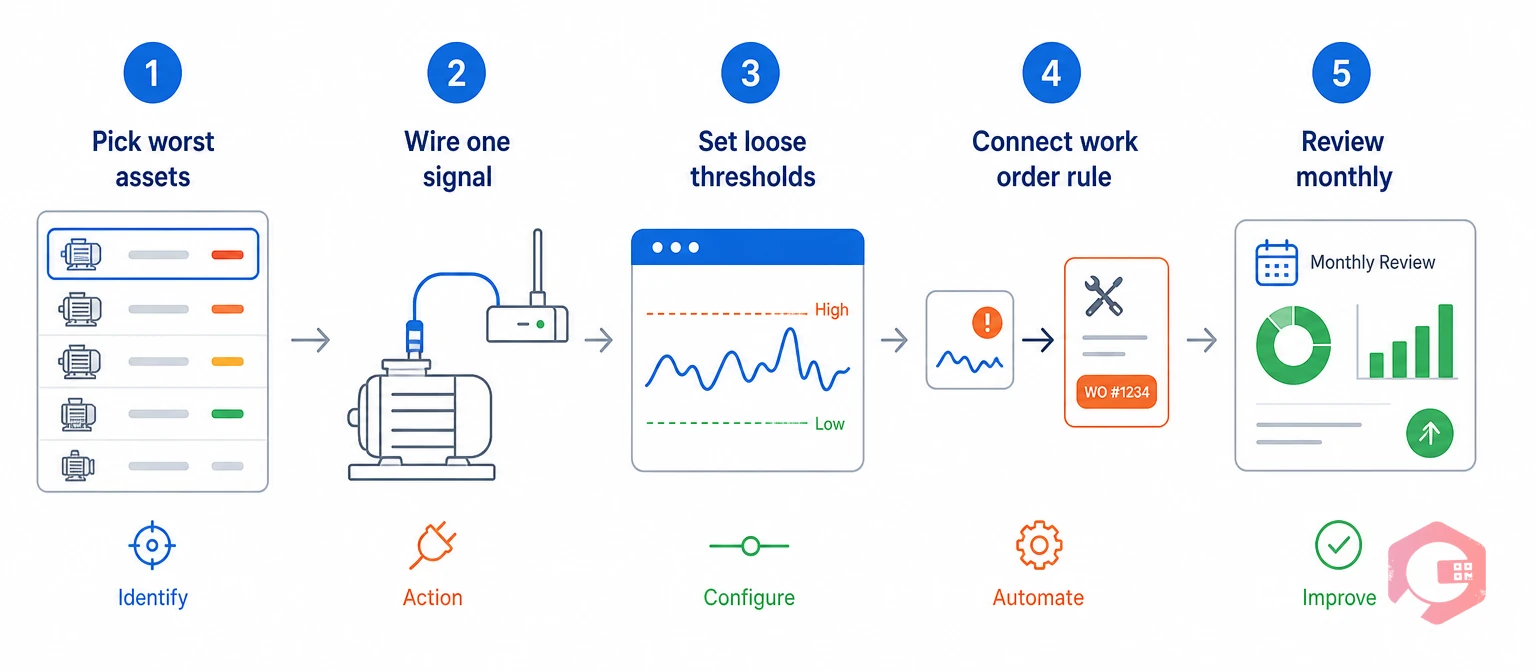
You don't need to sensor every asset on day one. Most plants get better results by starting small and proving the model before they scale it up.
A phased rollout keeps your team from getting overwhelmed. It also gives you real proof — in the form of avoided downtime — before you ask for budget to expand the program to your whole plant. Plant managers who try to sensor everything at once usually stall out within a few months, buried under alerts they haven't had time to tune. Starting small and proving value on a handful of assets is what makes the difference between a program that lasts and one that quietly gets abandoned.
Most maintenance teams that succeed with condition monitoring treat it as a habit, not a one-time project. They check the dashboard weekly. They tune thresholds monthly. They add new assets every quarter. That steady rhythm is what turns a pile of sensor data into a maintenance program that actually prevents failures, rather than just reporting on them after the fact.
Most plants run continuous or weekly vibration checks on critical rotating equipment. Thermography scans on electrical panels and switchgear usually happen monthly to quarterly. Assets with a history of failure, or a high cost to replace, need more frequent condition monitoring checks than low-risk equipment.
No. Condition monitoring works best next to routine preventive maintenance, not instead of it. Some failure types, like corrosion or worn-out lubricant, aren't reliably caught by vibration or heat readings and still need a scheduled inspection.
A false alarm still creates a work order, but the technician logs the finding as "no fault found" after inspecting it. Teams use that result to widen the threshold slightly for that specific asset, which cuts down future false alarms without missing a real one.
It depends on your asset mix. A site with mostly rotating machines gets more value from vibration analysis first. A site with dense electrical gear benefits more from thermography first. Most facilities add the second technique once the first one proves its return, and both feed the same condition monitoring workflow once they're in place.
You don't always need to buy new hardware. Some plants start with handheld vibration meters and portable infrared cameras that a technician carries on a walk-through route. Others move to fixed wireless sensors once they prove the value of a manual route. Either way, the sensor only matters once its readings reach your CMMS and trigger a rule.
Most teams see their first confirmed catch within the first month or two, once thresholds are tuned to the asset. The bigger payoff — a measurable drop in unplanned downtime — usually shows up over two to three quarters, as more assets get added and thresholds get sharper with real data.
A vibration or thermography reading only pays off once it reaches a technician's work queue, not just a monitoring screen. Schedule a free demo to see how Cryotos turns raw sensor data into automatic, trackable work orders.

Cryotos AI predicts failures, automates work orders, and simplifies maintenance—before problems slow you down.



