

A predictive recommendation engine for manufacturing maintenance is a system that reads equipment data and work order history, then suggests the task, parts, and timing for each developing fault. How useful its advice is depends less on the algorithm and more on the data you feed it.
Most plants already have sensors and a work order system, yet their history is too messy to learn from. This guide shows you how to check data readiness, fix the gaps that matter, pick pilot assets, and roll out a predictive recommendation engine in 90 days.
Key Takeaways
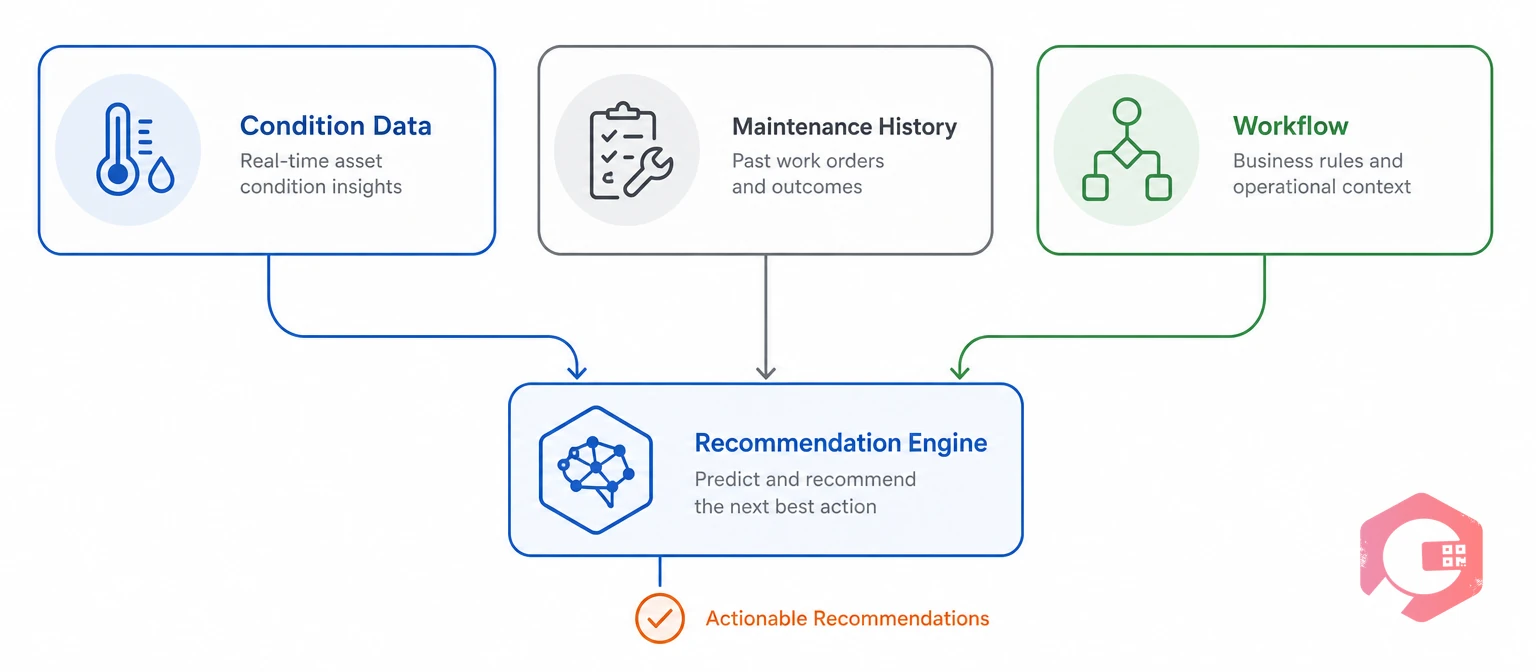
A predictive recommendation engine needs three things: condition data that shows a change, history that shows what fixed it before, and a workflow that turns advice into approved work. It builds on predictive maintenance, and without all three inputs it either stays silent or gives advice nobody trusts.
Maintenance data readiness is the point where your records are complete, coded, and linked enough for software to learn from them. Standards already describe what good looks like. ISO 14224 sets a taxonomy for failure and maintenance data, and ISO 17359 gives general guidelines for condition monitoring programs.
The engine borrows the idea behind a recommender system, but its past choices are your past repairs. Clean history is the biggest single factor in how good its advice becomes.
Score each data area before you connect anything. Run this scorecard in a one-hour review with your planner, a senior technician, and whoever owns the sensor data.
| Data area | Ready when | Common gap | Fix first |
|---|---|---|---|
| Failure history | 12+ months of work orders with failure, cause, and action codes | Free-text notes like "fixed" or "checked OK" | Add coded dropdowns to work order close-out |
| Asset register | Each critical asset has a unique ID, location, and criticality rating | Duplicate or missing asset records | Clean the top 50 critical assets first |
| Condition data | Readings tagged to asset IDs with consistent units and time stamps | Sensors named by PLC tag, not by asset | Map each tag to an asset record |
| Spare parts | Parts linked to the assets and repairs that use them | Parts stored only by item code | Build a parts list for each critical asset |
| Production windows | Planned stops shared with maintenance in advance | Shutdowns decided at short notice | Publish a monthly stop calendar |
| Feedback loop | Technicians record what they actually found | As-found condition never captured | Make findings a mandatory field |
Mark each row as ready, partly ready, or not ready. Most plants find that failure history is the weakest area, so start there.
Want a baseline before your pilot begins? Use the MTBF calculator to record the current time between failures on the assets you plan to cover.

The Data Readiness Ladder shows where your plant stands and what to fix next. Each level builds on the one below, and the engine gives reliable advice from Level 4 upward.
The Data Readiness Ladder:
Most plants sit between Level 1 and Level 2. You don't need Level 5 to start; you need Level 3 on your pilot assets and a clear plan to reach Level 4.
Clean failure history means every closed work order on a pilot asset answers three questions: what failed, why, and what fixed it. Without those answers, the engine has nothing to match a new fault against.
A failure code is a standard label that records what failed, why it failed, and what was done. If you already have an FMEA for an asset, use its failure modes as your starting list.
Go back through the last year of breakdowns on pilot assets and code each one. A planner and a senior technician can usually code around 100 work orders in a day.
Run a short root cause analysis on repeat failures, so the cause field holds the real reason and not just the symptom. Coded history is the fuel every recommendation runs on.
The best pilot assets are critical, fail often enough to learn from, and give a measurable warning signal. Rotating equipment such as motors, pumps, fans, gearboxes, and compressors usually fits all three.
Start with 10 to 20 assets in one area. A small pilot is easier to clean, easier to review, and easier to defend when you ask for a wider rollout.

A 90-day rollout works best when you start with simple rules and add pattern matching only where history is strong. Rules deliver value in the first month while data quality improves in the background.
At day 90, choose the next area based on the numbers, not on enthusiasm.
Technicians follow advice they can check and ignore advice they can't. Guardrails make each recommendation explainable, reviewable, and safe.
Operations that successfully scale these programs treat a planner's "no" as useful data, not as a failure of the system.
Pilot KPIs should show whether the advice is trusted, accurate, and reducing breakdowns. Track them monthly against the baseline you took before day one.
Acceptance rate is the share of recommendations that planners approve before scheduling. It is the earliest sign of whether the engine is earning trust.
Acceptance and confirmed findings usually rise before downtime falls, so give the first quarter time to show results.
A Computerized Maintenance Management System holds the history, parts, and workflows a predictive recommendation engine depends on. Cryotos helps plants climb the Data Readiness Ladder on their pilot assets.
Maintenance teams using Cryotos have reported up to 30% reduction in unplanned downtime and 25% faster repair turnaround. Most plants begin with critical rotating equipment in one area.
Check whether closed work orders on your critical assets record what failed, why, and what fixed it, using standard codes. If most of them are free text, code the last 12 months before you connect sensors.
Ten to twenty critical assets in one area is usually enough. That gives you enough cases to learn from while keeping cleanup and review manageable.
Use a short list of failure mode, cause, and action codes for each asset class. ISO 14224 is a useful reference taxonomy that you can simplify to 10 to 15 codes per class.
Yes. Route-based readings and run hours from a PLC can feed the same rules. Add online sensors later on the assets where early warning matters most.
Simple rules can give useful advice within the first 30 to 60 days. Pattern matching improves as more coded cases build up, usually over several months.
A planner or reliability engineer should approve each one before it becomes a work order. Technicians should be able to add findings and reject advice with a short reason.
Better data turns warnings into the right job at the right time. Schedule a free demo to see how Cryotos prepares your plant's maintenance data for predictive recommendations.



Cryotos AI predicts failures, automates work orders, and simplifies maintenance—before problems slow you down.



