

Warehouse put-away and picking on mobile means storeroom staff and technicians can receive, locate, and issue spare parts directly from a smartphone — with every transaction synced to the CMMS in real time. In a typical MRO storeroom without mobile tools, parts-hunting and manual logging consume up to 40% of a storeroom attendant's shift. Moving put-away and picking to mobile eliminates that waste at the source: a part is registered to its exact bin the moment it arrives, and a technician knows its location before leaving the breakdown site.
This guide covers what mobile put-away and picking actually does, why it matters for spare parts speed, the five features that make it work in practice, how to roll it out, and how Cryotos CMMS handles the full cycle.
Key takeaways:
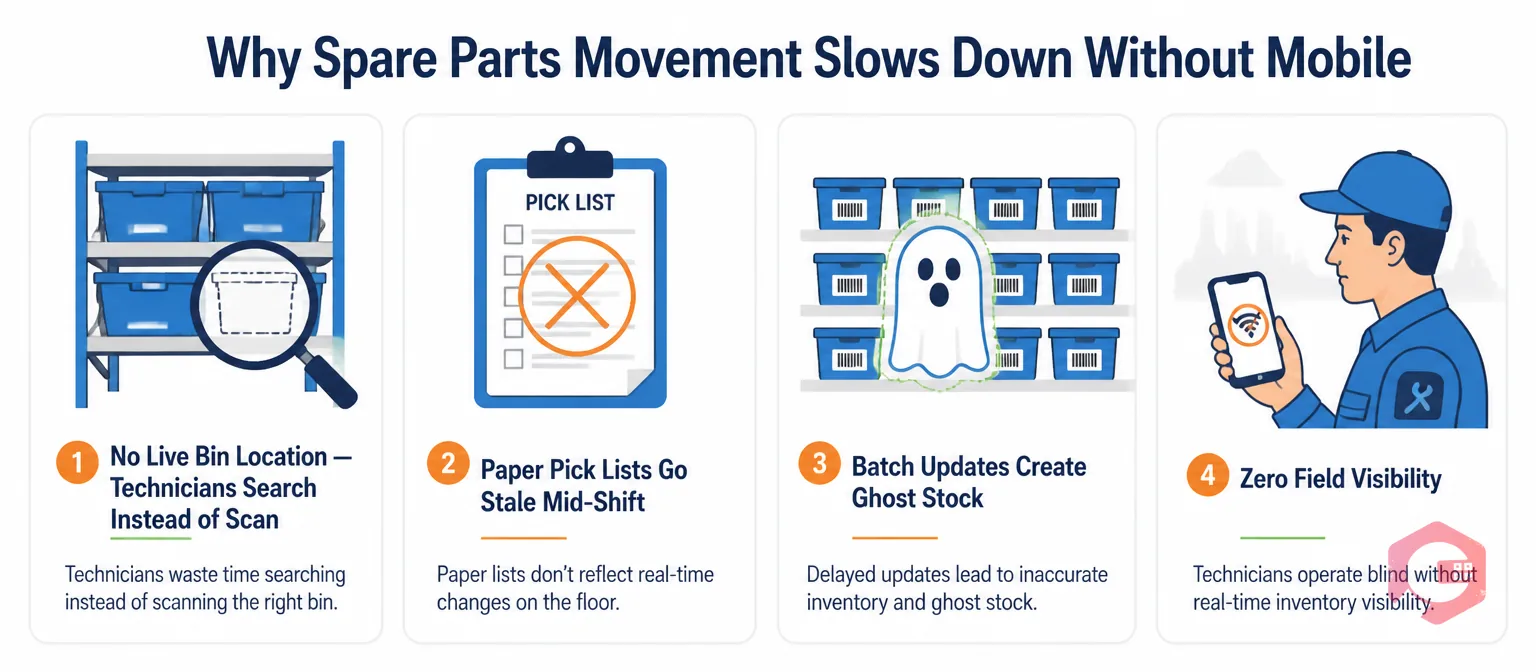
The same four friction points appear in most MRO storerooms, regardless of industry or facility size. They are not caused by bad people — they are caused by information moving slower than parts.
When the warehouse structure exists only in someone's head or a spreadsheet updated last quarter, technicians spend real time walking aisles for a part the system says is in stock. A Plant Engineering survey on MRO best practices found that unlocated parts rank as the top cause of extended repair times in asset-intensive facilities. This is a data problem, not a parts problem.
A pick list printed at 6 AM reflects the work order queue at 6 AM. By 10 AM, two emergency breakdowns have changed priorities, three parts have been consumed on other jobs, and the list is already misleading. Storeroom staff spend the second half of every shift reconciling paper with reality while technicians queue at the counter.
When part movements are entered into the CMMS at shift end rather than at point of issue, the system shows stock levels that diverge from physical reality all day. This ghost stock — parts that appear available but have already been issued — triggers false confidence, prevents accurate reorders, and leads to technicians arriving at a breakdown expecting a part that is not there.
A technician at a failed asset at midnight cannot check part availability without calling someone or walking to the storeroom. Every hour of that dead wait adds directly to Mean Time to Repair (MTTR). Mobile inventory visibility eliminates this — the technician checks stock and bin location from the breakdown site before taking a single step toward the storeroom.
Put-away and picking are two distinct workflows that together cover the full spare parts movement cycle. Most CMMS articles treat them as one thing. They are not — and the distinction determines whether your implementation reduces downtime or just moves paper to a smaller screen.
When a delivery arrives, mobile put-away means the storeroom attendant scans the part barcode and the target bin label. The CMMS registers the association immediately. No batch entry. No divergence between what arrived and what the system records. The output is a live bin map: any technician can see that bearing model 6308-2RS is in Aisle B, Rack 3, Shelf 2, Bin 4 — right now, not as of last week.
A technician needing a part sees the bin location on their phone, walks directly to the bin, scans the part out, and the work order updates automatically — no counter visit, no waiting. Inventory drops in real time. If the part hits its minimum threshold, a reorder alert fires immediately. A repair that used to require two storeroom trips can be completed with a single scan.
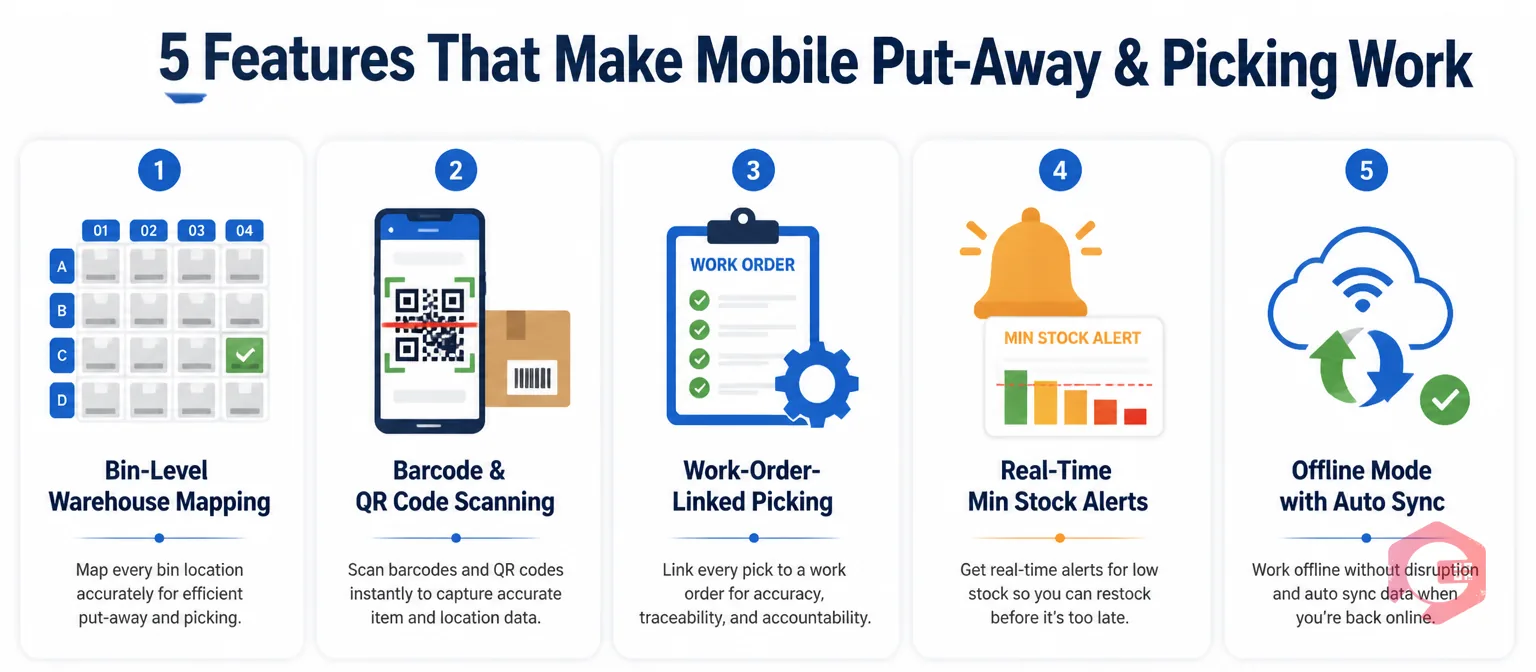
These capabilities separate a genuinely useful mobile storeroom from one that just moves paperwork to a smaller screen.
A focused rollout starting with high-movement critical parts gets you live in 2–4 weeks. Here is the sequence that works.
Start by mapping your warehouse hierarchy in the CMMS — every aisle, rack, shelf, and bin. This foundational data is what makes bin-level picking possible. Incomplete location data at this stage means technicians will still search even with the app open, so it is worth getting right before printing a single label.
Next, print QR bin labels and apply them to physical locations. During put-away, the attendant scans the bin label and the part barcode — the CMMS records the association. During picking, the technician scans the bin to confirm they are at the right location before issuing.
Then configure work-order-linked picking as the default, not an optional step. Set minimum thresholds using 90 days of consumption history as a starting point, and refine after your first stocktake under the new system. Cryotos's spare parts inventory software enforces the work-order link natively and tracks FIFO, LIFO, and average cost valuation so your finance team gets accurate data alongside the operational picture.
On day one, run mobile and paper in parallel for one shift. By day three, most teams are confident enough to retire paper entirely. The MRO inventory checklist is a useful reference for verifying your storeroom is ready before go-live.
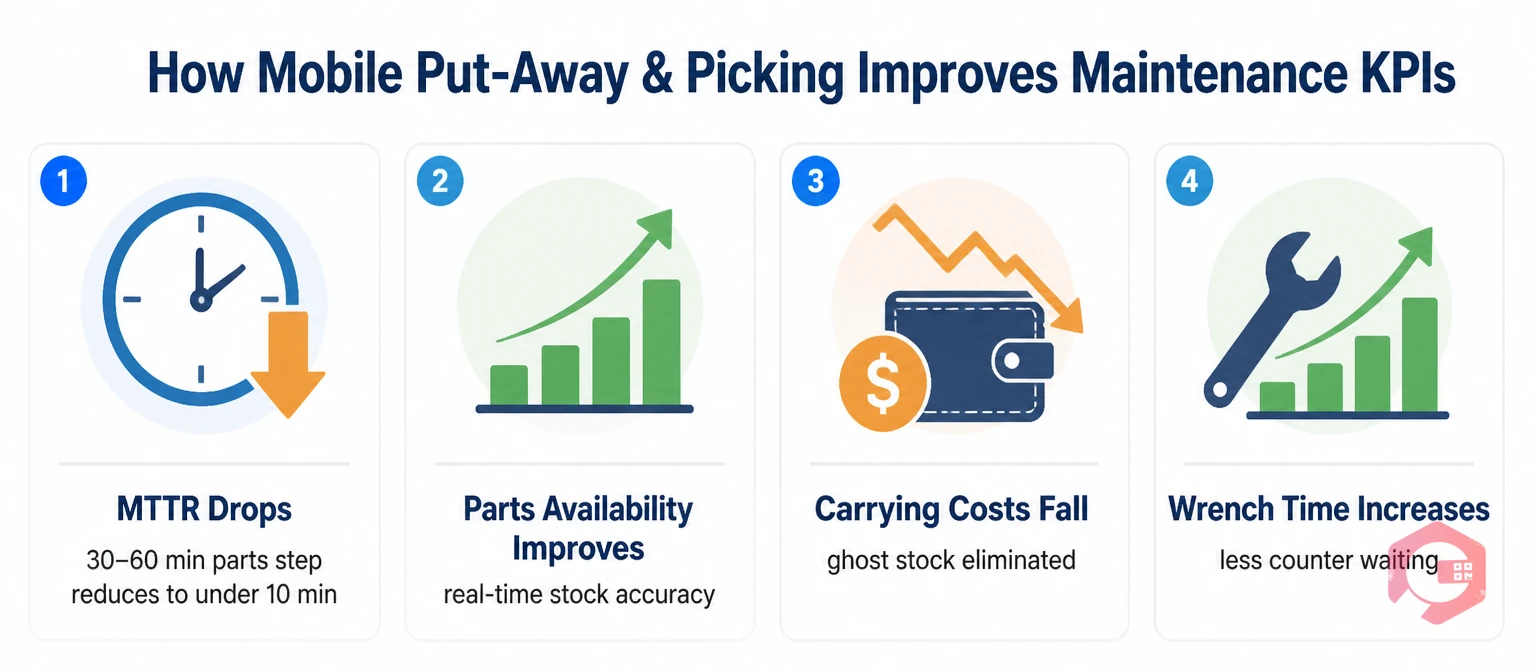
Mobile storeroom workflows move the metrics that plant managers and operations directors track every week — not just storeroom efficiency scores.
MTTR drops because the parts-acquisition step of a repair compresses from 30–60 minutes to under 10. When the bin location is visible before the technician leaves the breakdown, the time between "part identified" and "part in hand" shrinks to a walk and a scan. Every work order that requires a part benefits from this compression.
Parts availability improves because stock levels are accurate in real time. Reorder triggers fire at the right time, and critical spare parts are reliably in stock when breakdowns occur. The inventory control discipline that makes this sustainable is only possible when records update automatically with every transaction.
Carrying costs fall because ghost stock disappears. A facility holding $500,000 in spare parts at 25% annual carrying cost spends $125,000 per year just to store them. Eliminating duplicate orders placed against ghost stock returns meaningful working capital without reducing actual availability.
Wrench time increases because technicians stop waiting at the storeroom counter. Even a 10% improvement in productive maintenance hours across a team of 20 technicians represents significant additional work order throughput per week — with no added headcount. Use the wrench time calculator to quantify what your team stands to recover.
Teams using Cryotos for mobile inventory management report a 30% reduction in downtime and 25% faster repair times. The inventory management module, warehouse mapping, work-order-linked picking, and offline mobile app all work together in a single platform — no separate WMS required, no data re-entry between systems. Request a free demo to see mobile put-away and picking in action for your storeroom.
Mobile put-away is the process of registering incoming spare parts to their exact bin location at the point of receipt using a smartphone scan, so the CMMS reflects the physical location immediately. Mobile picking is issuing parts against a specific work order from the correct bin, with the transaction recorded in real time. Together they eliminate the data lag that causes ghost stock, missed reorders, and parts-search delays.
Mobile picking gives technicians live bin location data before they enter the storeroom. Instead of searching or waiting at a counter, a technician sees the exact location on their phone, walks directly to the bin, scans the part out, and returns to the breakdown. A parts-acquisition step that previously took 30–60 minutes compresses to under 10 — cutting MTTR on every work order that requires a storeroom trip.
It must — and any system that does not support offline mode is not suitable for industrial storerooms. Basements, cable rooms, and remote plant areas routinely have poor Wi-Fi. Offline mode records scan events locally on the device and syncs automatically when connectivity returns. Without it, staff revert to paper the moment signal drops, and all real-time benefits disappear.
A dedicated WMS handles high-volume logistics: wave picking, carrier management, multi-dock coordination. An MRO storeroom rarely needs that. A CMMS inventory module covers what maintenance storerooms actually require: bin-level location, work-order-linked picking, minimum stock alerts, and consumption history tied to specific assets. Combining both in a single CMMS eliminates the data re-entry and integration overhead of running separate tools.
A rollout covering your top 50–100 critical spare parts can go live in 2–4 weeks. The main tasks are mapping the warehouse hierarchy in the CMMS, printing and applying QR bin labels, and running one training session for storeroom staff and technicians. A full migration covering all SKUs typically takes 6–10 weeks depending on the size of your parts catalogue and the accuracy of your existing inventory data.




Cryotos AI predicts failures, automates work orders, and simplifies maintenance—before problems slow you down.



