

A CMMS (Computerized Maintenance Management System) is software that centralizes maintenance data and automates the workflows your team uses every day — work orders, preventive maintenance schedules, asset records, spare parts inventory, and compliance reporting. Instead of juggling spreadsheets, paper logs, and disconnected tools, a maintenance management system gives every technician, supervisor, and manager a single source of truth for everything related to asset upkeep.
This guide explains exactly what a CMMS is, how it works, what features matter most, and how to evaluate whether a platform fits your operation — whether you are managing a single facility or a multi-site enterprise.
A CMMS is a software platform that creates, assigns, tracks, and closes maintenance work — and stores the full history of every asset, inspection, and repair — so your team can plan ahead instead of react.
CMMS platforms are used by maintenance managers, reliability engineers, facility managers, and operations teams in manufacturing plants, hospitals, hotels, utilities, food processing facilities, data centers, and any other environment where physical assets require regular upkeep. The common thread is that each of these teams manages more assets, work orders, and compliance obligations than a spreadsheet or paper log can reliably handle.

CMMS stands for Computerized Maintenance Management System. Each word matters:
You may also see the terms CMMS software, maintenance management software, or enterprise maintenance management used interchangeably. All refer to the same category of tool.
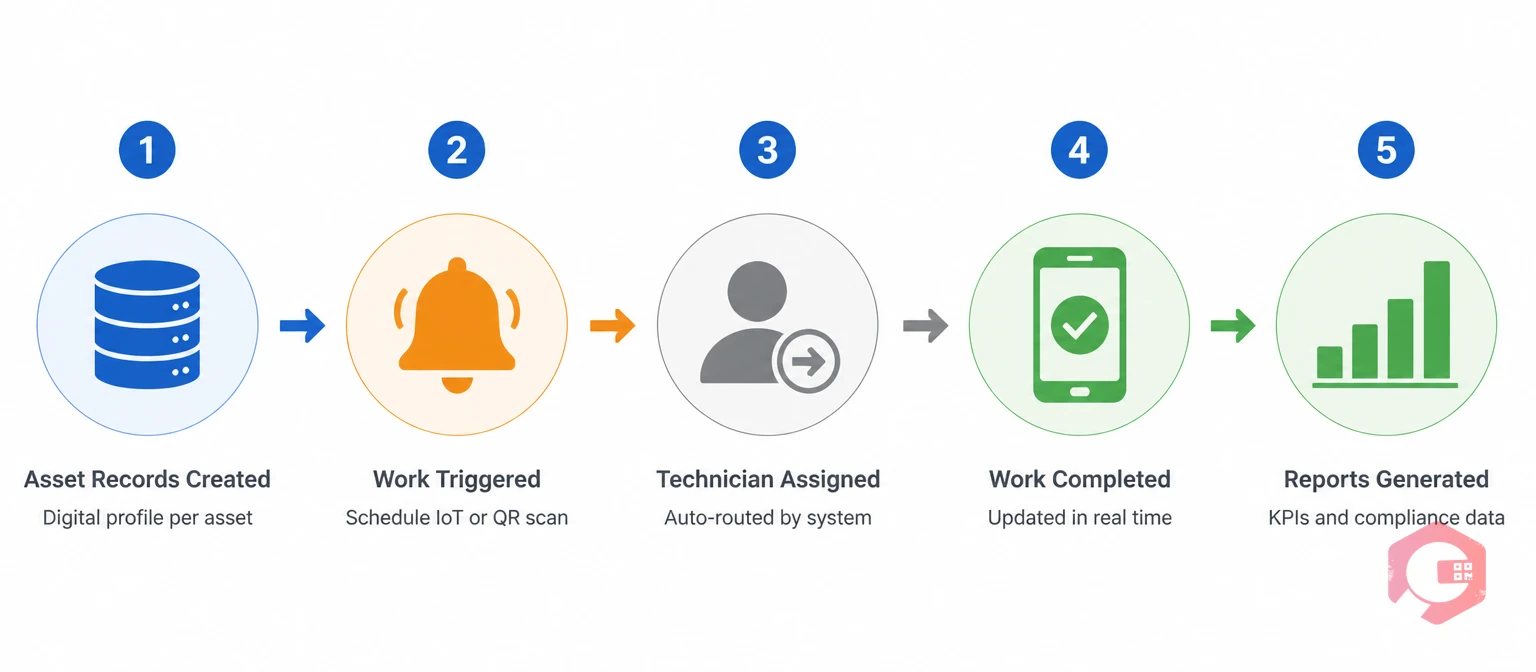
At its core, a CMMS works by connecting three things: your assets (equipment, facilities, vehicles), your people (technicians, supervisors, contractors), and your work (work orders, PMs, inspections).
Here is the basic flow:
The result is a closed loop: every maintenance action is planned, tracked, documented, and fed back into better decisions for the next cycle.
The best CMMS platforms share a common set of capabilities. Understanding what each one does helps you evaluate whether a platform fits your specific operation.
Work orders are the operational heartbeat of any CMMS. A robust work order management module lets teams create, assign, prioritize, and track jobs from request to close. AI-powered platforms like Cryotos can create work orders automatically via voice command or a photo — eliminating manual data entry in the field. Automated escalations and real-time notifications ensure nothing falls through the cracks.
A CMMS automates the scheduling of recurring maintenance tasks based on time intervals, meter readings, or condition triggers. Instead of relying on someone to remember when the next service is due, the system generates work orders automatically when the trigger condition is met. This is the foundation of moving from reactive to planned maintenance.
Every asset in your facility gets a digital record containing its full maintenance history, warranty information, associated documentation, spare parts list, and maintenance cost summary. This record follows the asset through its entire lifecycle — from commissioning to decommission. Technicians can access the full history from a mobile device on the shop floor.
A CMMS tracks spare parts inventory in real time, links parts to the assets and work orders that consume them, and alerts the procurement team when stock falls below minimum levels. This eliminates the twin problems of emergency procurement (expensive) and parts hoarding (wasteful).
Every work order, PM completion, downtime event, and parts transaction generates data. A CMMS aggregates this data into dashboards and reports that let managers track MTBF, MTTR, PM compliance, asset downtime, and maintenance costs — without manual spreadsheet compilation.
Field technicians need to access and update work orders from the floor, not from a desk. A mobile-first CMMS lets technicians receive assignments, read asset history, update job status, capture photos, and log parts — all from a smartphone or tablet. This is non-negotiable for any operation with a dispersed workforce.
The terms CMMS and EAM (Enterprise Asset Management) are often used interchangeably, but they represent different scopes.
A CMMS focuses primarily on maintenance operations — work orders, PMs, asset records, and spare parts. It is the right tool for maintenance teams who need to plan and track maintenance work efficiently.
An EAM covers everything a CMMS does, plus broader asset lifecycle management functions: capital planning, financial depreciation, procurement integration, and regulatory compliance reporting at the enterprise level. EAMs are typically deployed by large organizations managing significant capital asset portfolios across multiple sites.
For most maintenance teams — even large ones — a modern CMMS covers all necessary functionality. EAM typically becomes relevant when the finance and procurement dimensions of asset management need to be integrated with the maintenance data at an enterprise scale. Read the full CMMS vs EAM comparison for a detailed breakdown.
A CMMS is not limited to preventive maintenance. It manages every maintenance type your team runs:
The CMMS provides the work order and documentation framework for all of these. The maintenance strategy — which type to apply to which asset — is a separate decision driven by criticality analysis and reliability engineering.
Different roles interact with a CMMS in different ways, and a good platform supports all of them:

The business case for a CMMS is well-documented. Organizations that move from reactive to planned maintenance with a CMMS report measurable improvements across every operational KPI.
The right CMMS for your team depends on your operation size, asset complexity, maintenance team structure, and integration requirements. Here is a practical framework for evaluation:
CMMS implementation succeeds or fails based on data quality and change management, not software configuration. A proven implementation sequence:
For a detailed implementation roadmap, see the CMMS implementation guide.
The terms are used interchangeably. CMMS is the formal acronym for the category. Maintenance software, maintenance management software, and maintenance tracking software all describe the same class of tool — a platform that centralizes work orders, PMs, asset records, and maintenance data.
Not exactly. A CMMS focuses on maintenance operations. An EAM (Enterprise Asset Management) system includes CMMS functionality plus broader lifecycle management — financial depreciation, capital planning, and enterprise-level procurement integration. For most maintenance teams, a modern CMMS covers all required functionality.
A focused implementation with a clean asset register and defined PM schedules can be operational in 4–8 weeks for a single site. Multi-site enterprise deployments typically run 3–6 months. The largest variable is the quality of the incoming asset data — teams with well-maintained equipment registers move significantly faster.
ROI varies by starting point and operation type, but common benchmarks include 10–30% reduction in maintenance costs, 20–30% reduction in unplanned downtime, and 15–25% improvement in technician productivity in the first year. Use the CMMS ROI calculator to model the numbers for your specific operation.
Yes. Modern CMMS platforms are available at price points and complexity levels that work for teams of 2 to 2,000. The operational benefits — visibility, PM automation, and audit documentation — are valuable at any scale. The implementation effort scales with asset count and team size, not with the tool itself.
A CMMS is the operational foundation of any serious maintenance program. The question is not whether your team needs one — it is which platform fits your operation and how quickly you can get it configured and adopted. Request a demo of Cryotos CMMS to see how the platform handles your specific asset types and workflow requirements.




Cryotos AI predicts failures, automates work orders, and simplifies maintenance—before problems slow you down.



