

Office and administrative TPM fails even when shop-floor TPM succeeds because the office has no equivalent to a stalled machine. There's no OEE score for a stuck approval. There's no named owner for a missing signature. Total Productive Maintenance built its reputation on the factory floor. A leaking valve or a stopped conveyor forces immediate attention. Purchasing, HR, and maintenance admin don't break the same visible way. The discipline that transformed uptime on the shop floor quietly stalls the moment it reaches a desk.
This gap is structural, not motivational. It's why plants report strong OEE gains alongside chronic delays in approvals, permits, and paperwork. This guide breaks down why office and administrative TPM fails, and what actually closes the gap.
Key Takeaways
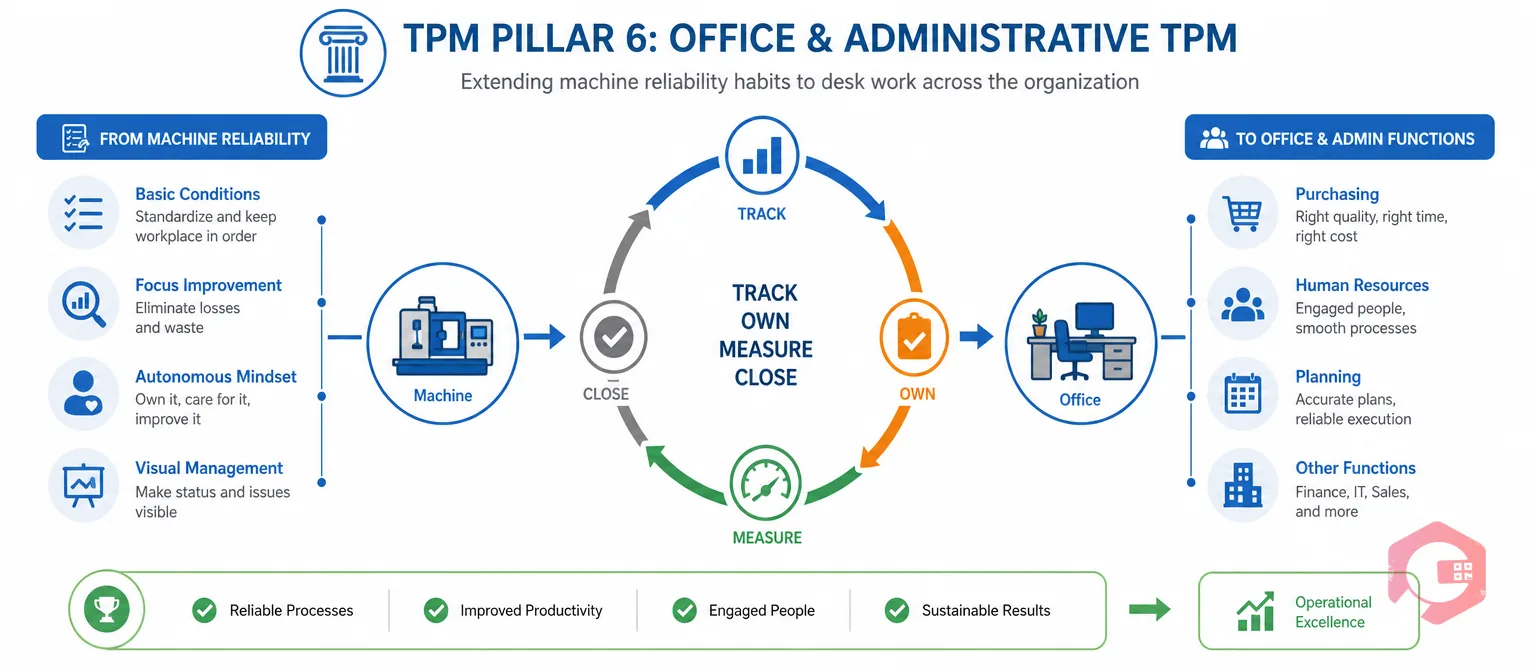
Office and administrative TPM is Pillar 6 of Total Productive Maintenance. It applies the reliability habits used on machines to non-production work like purchasing, HR, and planning. The same idea sits at the core of any Computerized Maintenance Management System: track it, own it, measure it, close it. Office and administrative TPM asks a simple question — can you apply that same loop to a desk process, not just a machine?
Maintenance teams that succeed with shop-floor TPM often assume administrative TPM will follow the same playbook. It rarely does. The office was never built with the visual cues or ownership habits that make the shop floor work.
This isn't a small pillar to skip. Every office delay eventually shows up as a shop-floor number, even though nobody tracked it as one.
Shop-floor TPM succeeds because equipment failure is hard to ignore, and decades of tools exist to track, own, and fix it.
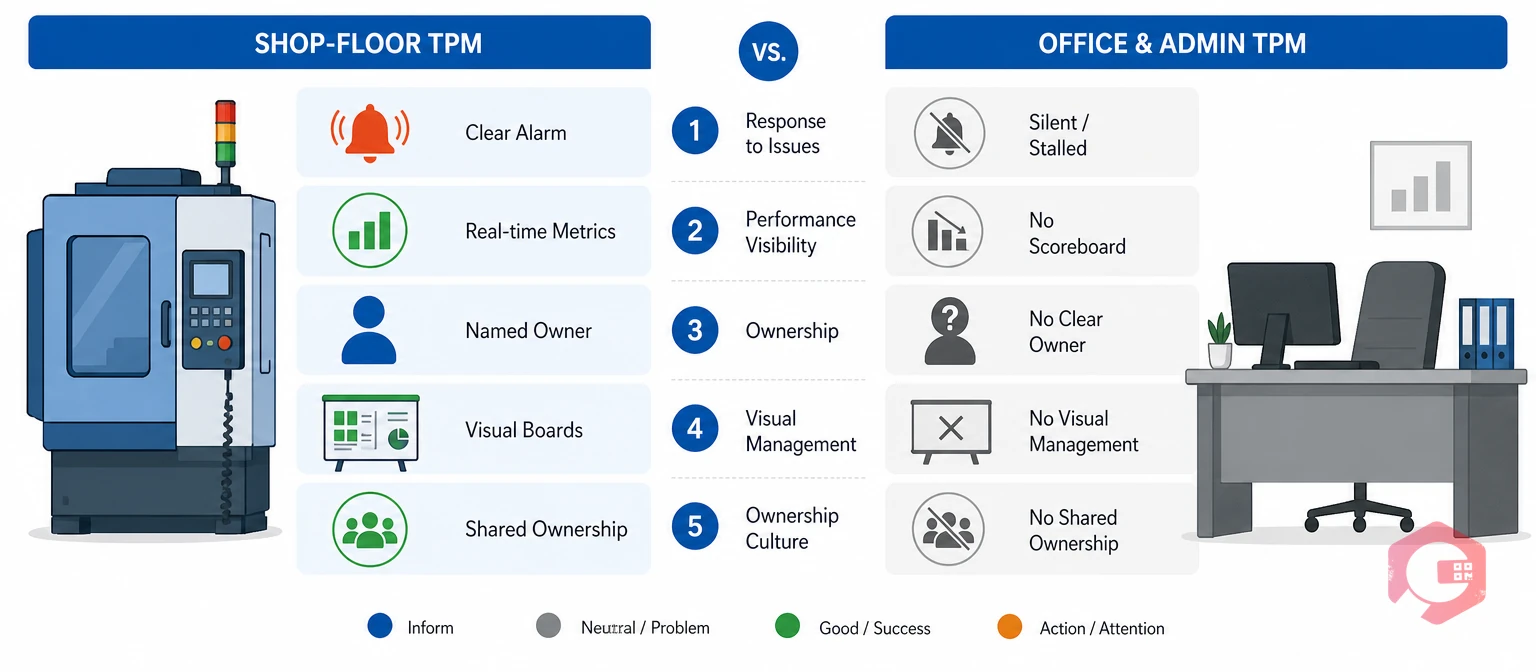
The real difference between shop-floor TPM and office and administrative TPM comes down to five gaps in structure, not a difference in effort.
| Factor | Shop-Floor TPM | Office and Administrative TPM |
|---|---|---|
| Visible failure signal | Stopped machine, alarm, or leak | None by default — a stalled approval looks like a normal inbox |
| Core metric | OEE, MTTR, MTBF | Usually none — no equivalent scoreboard exists |
| Ownership model | Named operator owns a named machine | Shared, often unowned responsibility |
| Visual management | Andon boards, 5S, red-tag systems | No default equivalent for inboxes or shared drives |
| Software coverage | Decades of plant-floor CMMS tooling | Most CMMS platforms stop at the plant floor |
This is the practical difference behind every shop floor vs office TPM comparison. One side has forty years of infrastructure. The other has almost none.
Curious where your own plant stands on the metric side of this comparison? Use the OEE calculator to check your shop-floor score before tackling the office side.
Office and administrative TPM fails for structural reasons. Staff motivation is rarely the real problem — missing infrastructure is.
A desk process never looks broken the way a leaking machine does. A stuck purchase order doesn't hiss or spark. That's the core reason office TPM examples are so hard to find online. Practitioners struggle to describe a failure mode that has no physical symptom, so it gets ignored until it costs real time.
Shop floor has OEE. Office and administrative TPM usually has nothing comparable. That's why administrative TPM pillar content so often stays theoretical instead of measurable. Without a number to track, teams can't tell if the office pillar is actually improving or just getting more attention this quarter.
Operators own one specific machine. Office staff rarely own one specific workflow end to end. So autonomous maintenance in office settings tends to dissolve into shared, unowned responsibility. Everyone assumes someone else will catch the delay, and often no one does.
Most maintenance software stops at the plant floor. A single work order management system that also tracks permits, sign-offs, and admin requests closes that gap. It treats an unsigned purchase order with the same discipline as an overdue PM, instead of letting it sit in a separate, unwatched system.
Office staff often see TPM as someone else's initiative, not their own. Plant KPIs rarely get tied to the office delays that caused them in the first place. A shared BI dashboard that reports on both domains makes that link visible instead of anecdotal, which makes it much harder to ignore.
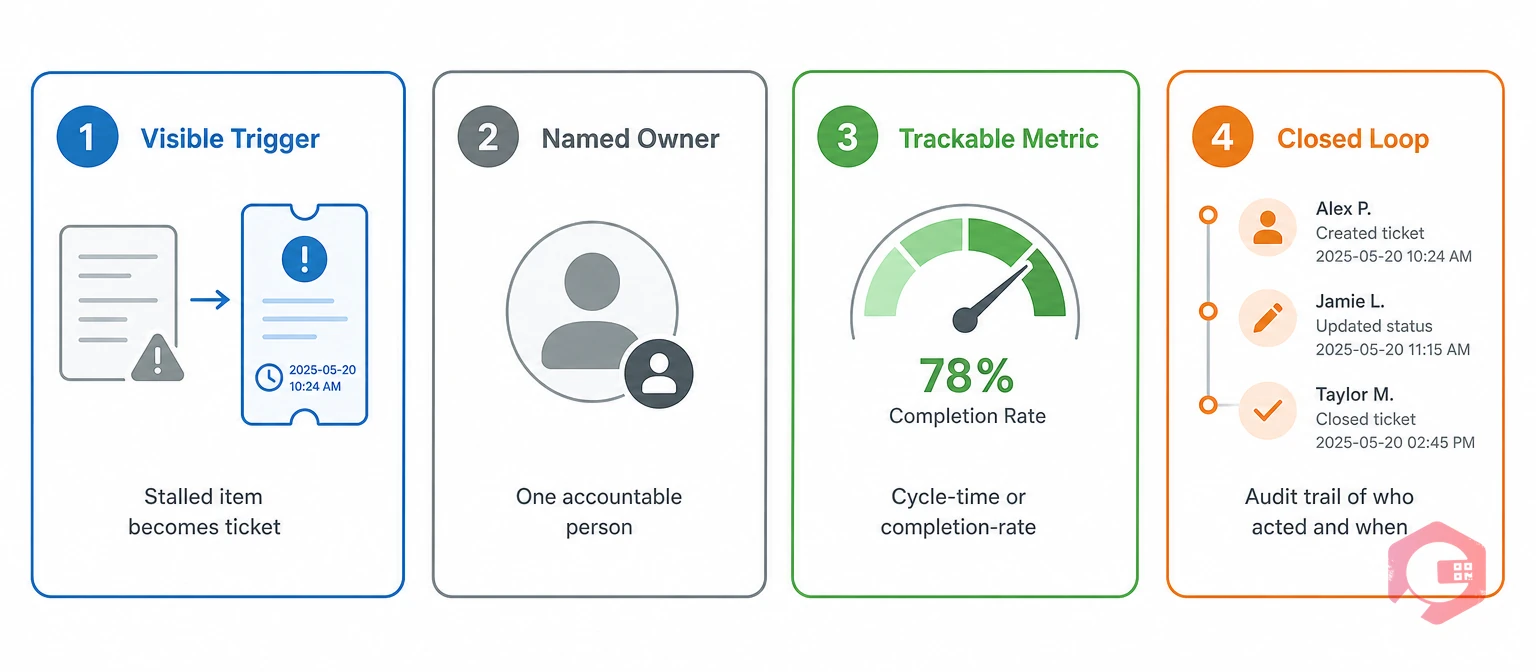
Most attempts at office and administrative TPM stall because they copy shop-floor language without copying its structure. This framework names the four elements every administrative process needs in order to behave like a piece of equipment.
The Office TPM Ownership Framework:
Apply all four elements to one process at a time. Trying to roll out the whole framework at once across every department is the fastest way to stall it before it starts.
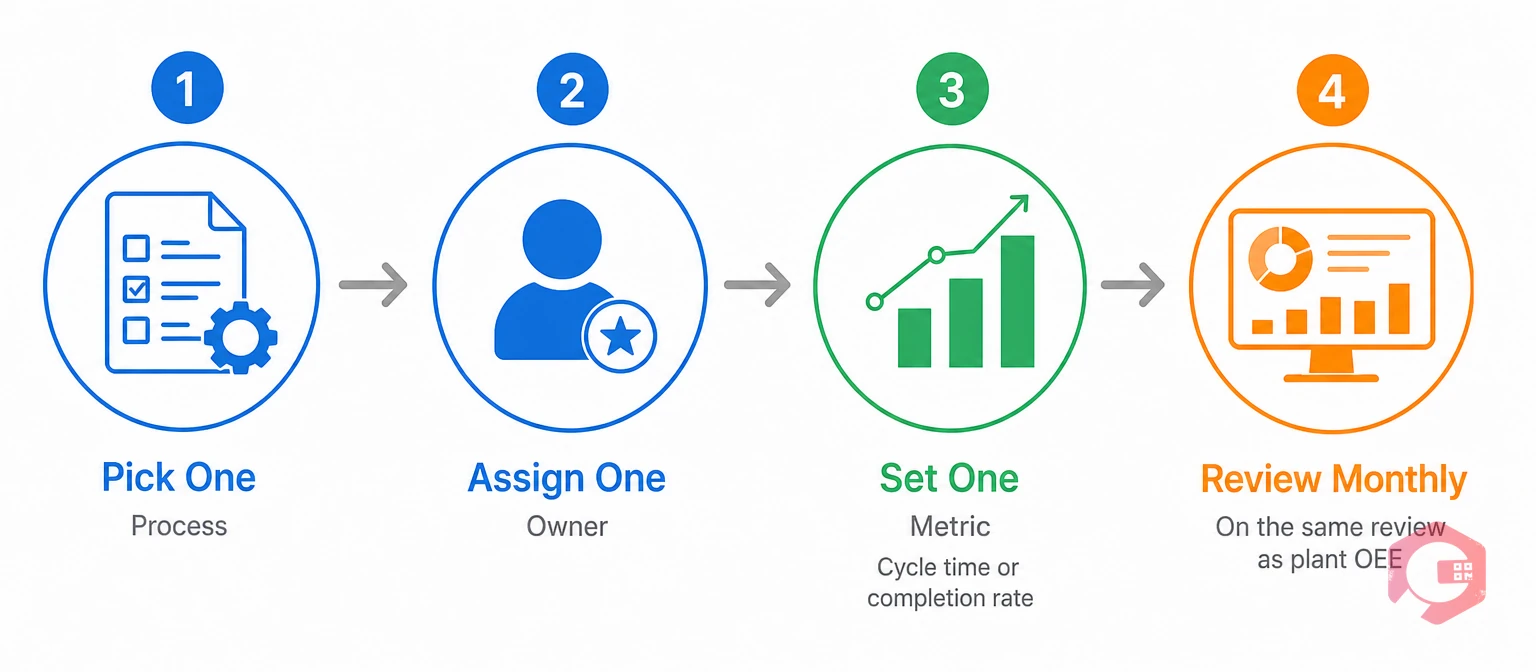
Digitizing office TPM starts with giving admin work the same trackable structure autonomous maintenance already gives machines. Most facilities that try this manually, with shared spreadsheets or email chains, see the habit fade within a quarter.
A CMMS for office TPM changes that by making every administrative breakdown a tracked, owned, and reportable item on the same platform as plant maintenance. Maintenance teams using Cryotos have reported up to 30% reduction in unplanned downtime and 25% faster repair turnaround. Those gains extend further once the same discipline covers permits, approvals, and administrative work requests too.
A practical rollout looks like this:
The result is a delayed sign-off that gets flagged, owned, and closed exactly like a delayed PM, instead of disappearing into an inbox until someone remembers to chase it down. Over a few months, that shift changes how the office feels day to day. Instead of chasing status by walking over to someone's desk, staff check one dashboard. Instead of guessing who owns a stalled request, the system already says so, and the team spends far less time hunting for answers that used to take a whole afternoon to track down.
Office and administrative TPM is Pillar 6 of the 8 pillars of TPM. It extends the reliability discipline built for machines, including visible failure signals, named ownership, and trackable metrics, to non-production functions like purchasing, HR, and maintenance administration.
It fails because the office lacks the infrastructure that makes shop-floor TPM work. There's no visible failure signal, no OEE-equivalent metric, no default ownership model, and no software that treats administrative delays with the same discipline as a machine fault.
Common starting points include turning purchase order approvals into trackable tickets, assigning a named owner to every permit sign-off, and reporting administrative cycle time alongside plant OEE on one shared dashboard.
A CMMS supports autonomous maintenance in office settings by giving each staff member a personal, filtered view of only the workflows they own, plus a full audit trail. That builds the same ownership habit operators already have on the floor.
No. Start with one high-friction process and one owner, then prove the metric moves before adding a second process. Teams that try to launch office and administrative TPM everywhere at once usually see it stall within a few weeks.
Research on Total Productive Maintenance and asset management standards like ISO 55000 both point to the same conclusion covered in reliability engineering research: programs that stop at the plant floor leave real value unclaimed. Closing that gap is what turns office and administrative TPM from a slogan into a working system. Schedule a free demo to see how Cryotos runs shop-floor and office TPM on one platform.



Cryotos AI predicts failures, automates work orders, and simplifies maintenance—before problems slow you down.



