

A work order audit trail is a time-stamped log of every change made to a work order — from the moment it's created to the moment it's closed. A CMMS captures who made each change, what they changed, and when, giving maintenance teams a complete, tamper-evident record they can use for compliance reporting, dispute resolution, and operational reviews.
Without a reliable audit trail, maintenance teams face a familiar problem: a work order closes, something goes wrong downstream, and nobody can explain what happened or who approved what. That gap in accountability creates compliance risk and operational blind spots that are hard to close after the fact.
This guide walks through exactly what a work order audit trail should capture at each lifecycle stage — and how to make sure nothing slips through the cracks.
Key Takeaways
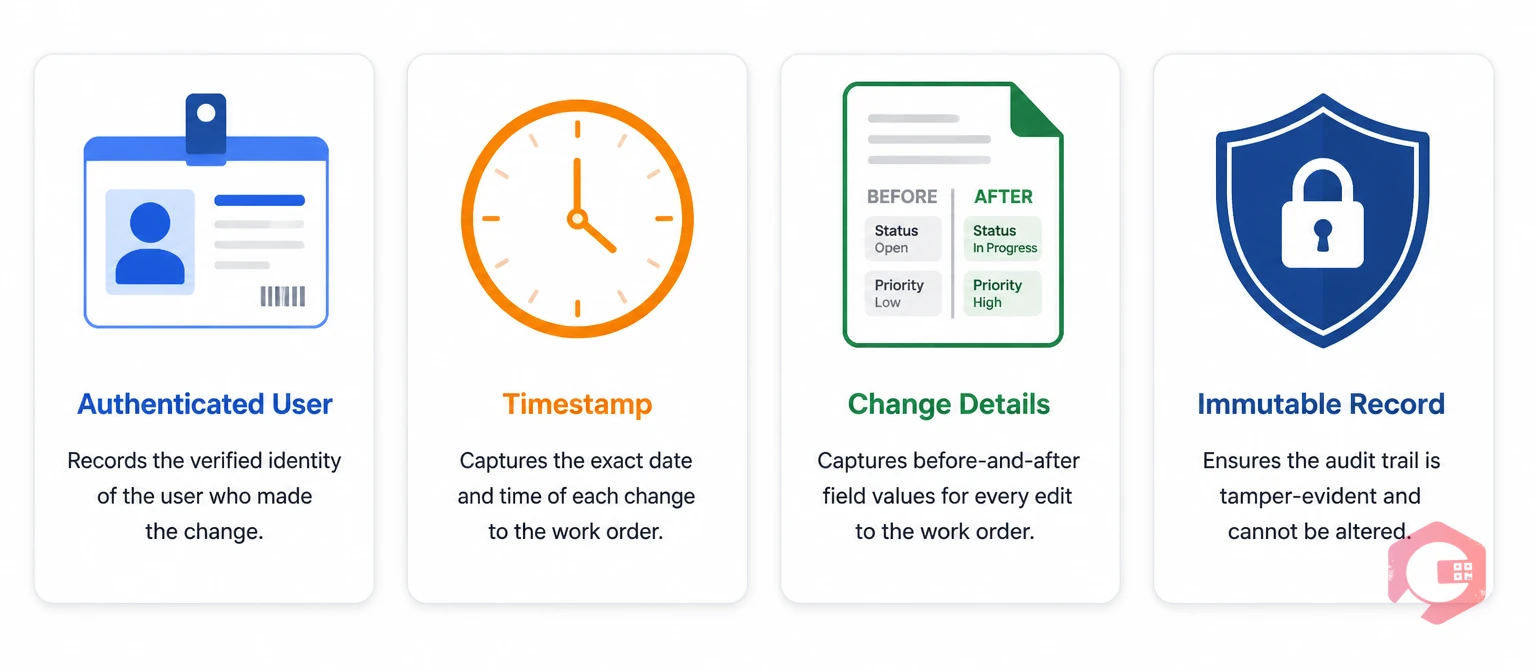
A work order audit trail is a sequential, immutable log that records every action taken on a work order throughout its lifecycle. Think of it as a chain of custody for maintenance work: every status change, field edit, file attachment, technician reassignment, and closure approval is captured with a user ID, timestamp, and before/after value.
This matters because maintenance records are legal documents in regulated industries. Under OSHA recordkeeping requirements and industry-specific standards, organizations must demonstrate that maintenance activities were performed correctly, by qualified personnel, and verified by an authorized signatory. An audit trail is how you prove it.
These two terms sound interchangeable but they serve different purposes. Work order history shows you what the final state of a work order looks like — completed date, assigned technician, parts used. An audit trail shows you every version it went through to get there.
If a work order was reassigned three times before completion, history shows you the final technician. The audit trail shows you all three assignments, who changed them, and at what time. That level of detail is what separates a defensible maintenance record from a compliance gap.

Audit trails aren't just a compliance checkbox. They're an operational tool that gives maintenance managers visibility into how work actually gets done — versus how it was planned.
In industries like food and beverage, pharmaceuticals, healthcare, and oil and gas, maintenance records are subject to external audits. Regulators don't just want to know that maintenance happened — they want the full chain of evidence: who raised the work order, who approved it, who performed the work, what parts were used, and who signed off at closure.
Standards like ISO 55000 asset management and FDA 21 CFR Part 11 require electronic records to include user authentication and audit trail data for every modification. A paper log or spreadsheet simply can't meet that bar.
When equipment fails shortly after a maintenance visit, the first question is always "what was done?" A full audit trail answers that question in seconds. You can see exactly which technician completed the task, what checklist items they marked off, whether they flagged any anomalies, and who approved the closure.
That accountability cuts both ways. It protects technicians from being blamed for failures caused by upstream issues, and it gives managers the data they need to address genuine performance problems with specific evidence rather than guesswork.
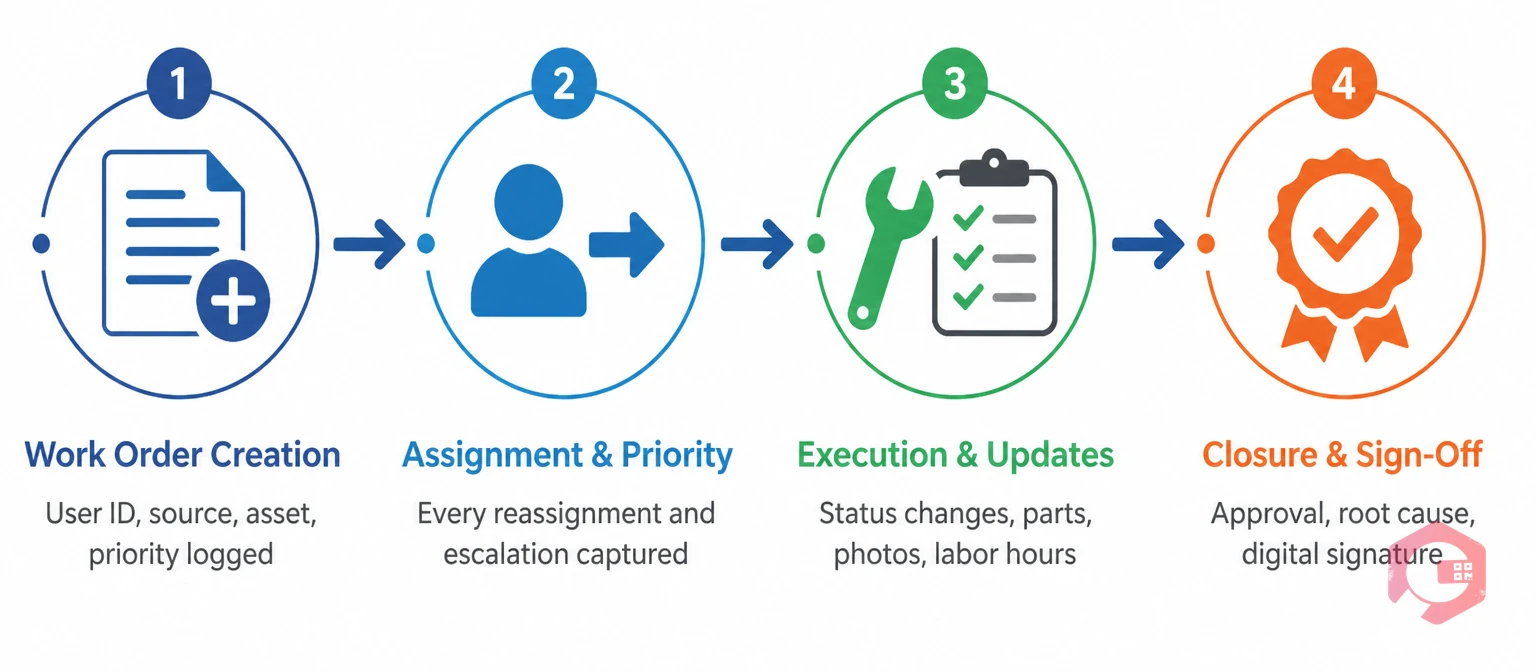
The most common audit trail gap isn't missing data at closure — it's missing data at creation and mid-execution. Here's what a complete log looks like at each lifecycle stage.
The audit trail begins the moment a work order is raised. A work request or direct work order creation should log the originator's user ID, the timestamp, the asset or location linked, the priority assigned, and the initial description. If the work order was triggered by a sensor alert, IoT reading, or preventive maintenance schedule, that trigger source should be captured too.
Every reassignment should create an audit entry. If a work order is assigned to Technician A, then escalated to a supervisor and reassigned to Technician B, the log must capture both changes — including the reason for reassignment if your system supports it.
Priority changes also belong here. A P3 (low priority) work order that gets bumped to P1 (critical) mid-week because an asset is failing represents a significant operational decision. If that escalation doesn't appear in the audit trail, you have a documentation gap.
This is often the most active phase of the audit trail. Every status change (In Progress, On Hold, Waiting for Parts) should be logged with a timestamp. Checklist completions, part consumption, labor hours logged, photos uploaded, and notes added all constitute auditable events.
If a technician marks a task complete but then reverts it — because they realized a step was missed — both actions should appear in the log. This is the kind of mid-execution correction that paper records almost never capture, but that can be critical evidence in a post-incident investigation.
Closure is where most audit trails get the most attention, but it's only valuable if the earlier stages are complete. At closure, the log should capture: who approved closure, the final status (Completed, Cancelled, Deferred), any root cause analysis notes, parts and costs recorded, and the digital signature or approval token of the authorizing user.
If your process requires a second-level sign-off — for example, a supervisor reviewing work before an asset goes back into service — that counter-signature should also appear as a discrete audit entry.
See how Cryotos work order management captures every field change automatically at every stage, with no manual logging required.
Many teams still rely on spreadsheets, paper forms, or email threads to track work order changes. Here's how that compares to a CMMS audit trail in practice:
| Audit Capability | Manual Tracking (Spreadsheet / Paper) | CMMS Audit Trail |
|---|---|---|
| Who made each change | Depends on who filled in the form — easily forgotten or faked | Auto-logged with authenticated user ID |
| Exact timestamp per change | Rarely captured; date-only at best | Millisecond-level timestamp on every entry |
| Before/after field values | Not captured — only the final value is visible | Every field edit shows old value and new value |
| Tamper resistance | Anyone with file access can edit history | Immutable log — past entries cannot be altered |
| Compliance reporting | Manual export, high error risk | Auto-generated reports with full change history |
| Closure sign-off | Signature on paper form — not linked to identity system | Digital signature tied to authenticated user account |
| Search and retrieval | Manual search through files or emails | Filter by asset, user, date range, or change type |
The gap isn't just convenience — it's the difference between a record that holds up under audit and one that doesn't.
Even teams using a CMMS can end up with incomplete audit trails if they don't configure the system correctly or train technicians on the right data entry practices.
Cryotos logs every field-level change on every work order automatically — no manual entry, no gaps. Every edit creates an immutable audit entry with the user's identity, the exact timestamp, and the before/after values for each changed field.
The platform's user role level access controls restrict which users can edit which fields at each stage of the work order lifecycle. That means you not only have a log of what changed — you have a system that enforces who is allowed to make each type of change in the first place.
The report builder lets you generate audit trail exports filtered by asset, technician, date range, or change type — formatted for regulatory submission or internal review. NIST SP 800-92 guidance on audit log management recommends centralized log collection and automated review — exactly what a CMMS audit trail provides at scale.
A work order audit trail creates a verifiable record of every change made to a work order from creation to closure. It supports regulatory compliance, helps resolve disputes about what work was done and by whom, and gives maintenance managers visibility into how work flows through their teams in practice versus how it was planned.
Every audit trail entry should include: the user ID of who made the change (not just their name), the exact timestamp, the field that was changed, the value before the change, and the value after the change. Entries triggered by system actions (such as automated status changes from IoT alerts) should also record the trigger source.
In a well-configured CMMS, post-closure edits are either restricted or generate a new audit entry that makes the edit visible. Best practice is to require a reopening event — logged with a reason and authorizing user — before any post-closure changes are permitted. This preserves the integrity of the original closure record.
Retention requirements vary by industry. OSHA requires most workplace safety records to be kept for 3-5 years. FDA-regulated environments often require 7 years or more. ISO 55000 aligns retention with the asset lifecycle. Check the specific regulatory requirements for your industry and configure your CMMS retention settings accordingly — don't rely on a default.
A work order report summarizes the final outcome: what was done, how long it took, what parts were used. An audit trail records the process: every intermediate state, every change, every person involved at each step. Reports tell you what happened; audit trails tell you how and why it got to that outcome.
Ready to close your audit trail gaps? Schedule a free demo to see how Cryotos automatically logs every work order change with full user attribution and timestamp accuracy — so your records are always audit-ready.




Cryotos AI predicts failures, automates work orders, and simplifies maintenance—before problems slow you down.



