

A work order backlog triage is the practice of systematically reviewing every open work order in your CMMS, sorting each one into a clear action category, and assigning the right next step — before the backlog grows too large, too old, or too opaque to manage effectively. Most maintenance leads review their backlog reactively, when a supervisor asks or when a crisis makes the pile suddenly visible. The ones who consistently control their maintenance operations review it weekly, on a fixed schedule, using a defined triage routine that takes less than 30 minutes. According to SMRP maintenance benchmarking data, world-class maintenance organisations maintain a controlled backlog of no more than two weeks of available labour capacity. Most industrial facilities run two to four times that figure — not because they have too many work orders, but because they lack the weekly discipline to sort, prioritise, and close them.
Key Takeaways

Work order backlog triage is the structured weekly process of reviewing all open work orders, assigning each one to an action category, and ensuring that the right work is visible to the right people at the right time. The term triage comes from emergency medicine — the practice of rapidly sorting patients by severity to ensure the most critical receive immediate attention while others are appropriately directed. The same principle applies to maintenance work order management: not every open work order needs the same urgency, the same response, or even any response at all.
A backlog, in maintenance terms, is the set of approved, open work orders that have not yet been started. This is distinct from the work order queue for the current day or week, which represents work that has already been assigned and is being executed. The backlog is the reservoir from which future work is drawn — and its health directly determines how well the maintenance team can plan, resource, and prioritise work beyond the current shift.
A healthy backlog contains only work orders that are genuinely pending: correctly scoped, properly approved, parts-ready or parts-identified, and assigned to an appropriate future period. An unhealthy backlog contains aged work orders that no longer reflect current asset conditions, work requests that were never properly scoped or approved, duplicate requests for the same fault, and work that has been completed on the floor but never closed in the system. The triage routine is the mechanism that keeps the backlog healthy — by actively managing every item in it rather than letting age and volume obscure the real state of the maintenance programme.
The weekly triage is specifically a maintenance lead's activity, not a planner's or a manager's. The lead has the operational knowledge to distinguish a work order that needs immediate action from one that can be deferred, the authority to reassign or close items that no longer belong in the active backlog, and the daily contact with technicians to know which items are practically executable in the coming week. When triage is delegated entirely to a planner or managed only at the manager level, the operational judgement needed to make the right call on borderline items is consistently missing.
Monthly backlog reviews are better than nothing, but they consistently fail as a backlog management mechanism for one reason: a month is too long for the decisions that matter most in maintenance. In four weeks, a work order that was correctly categorised as low-priority at the last review may have become urgent because the asset's condition has deteriorated. A work order that was waiting on parts may have its parts arrive and then sit unactioned because no one checks the backlog between review cycles. A set of duplicate work requests may accumulate on the same asset, creating a confusing pile that takes an hour to untangle — instead of the five minutes it would have taken to catch them in week one.
Weekly triage also builds a fundamentally different operational discipline. When every maintenance lead knows that the backlog will be reviewed every Monday morning, the informal work order management habits that grow up around infrequent formal reviews — verbal work queues, supervisor text threads, personal notebooks — never develop, because the system is up to date enough to trust. The CMMS becomes the authoritative record of what needs to be done, rather than a system that gets updated when something goes wrong. According to Plant Engineering benchmarking research, facilities with weekly maintenance review cycles achieve PM compliance rates 18% higher than those relying on monthly reviews — a direct result of the tighter feedback loop between planned work, execution, and replanning.
The 30-minute target is not aspirational — it is the operational constraint that makes the routine sustainable. A triage review that routinely takes two hours becomes the first thing dropped when operational pressure builds. Thirty minutes, scheduled at the same time every week, is achievable with the right CMMS filters and a disciplined triage protocol. The time investment scales with backlog size, but a team that runs weekly triage consistently never accumulates the volume that makes the process genuinely burdensome.
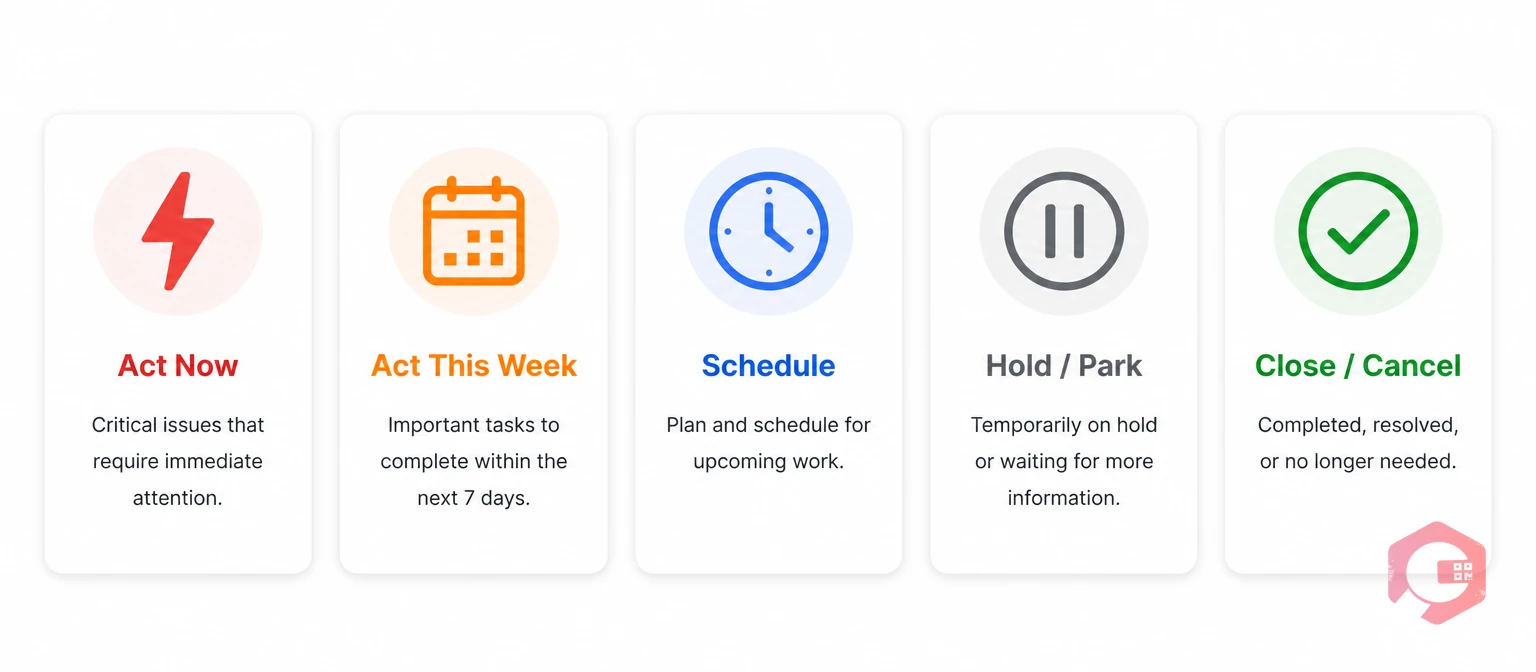
Every open work order belongs in exactly one of five triage categories. The category determines the immediate next action — not a future review, not a note to come back to, not a tentative priority. When leads assign every work order to a clear category at each weekly review, the backlog stays actionable and transparent.
Category 1: Act Now. Work orders that must be started within the current working day. These are safety-critical faults, production-critical failures, or compliance deadlines that cannot be deferred. A work order that enters the Act Now category should already have a technician name attached and a start time committed. If it is in the backlog and has not been started, something in the assignment process has failed — the triage session is the point where that failure is caught and corrected.
Category 2: Act This Week. Work orders that need to be completed within the current work week. These are high-priority corrective repairs that are not production-stopping, PM tasks with imminent due dates, and condition-based work orders triggered by sensor alerts or inspection findings that indicate developing failure. Each Act This Week item should have a technician assigned and a day within the week targeted. Work orders that remain in Act This Week for more than two consecutive weeks without execution have escalated to Act Now or need to be examined for what is blocking them.
Category 3: Schedule. Work orders that are correctly scoped, approved, and parts-ready — or nearly so — but that are not required this week. These are the core of a healthy planned maintenance backlog: work that is properly prepared and waiting for the right execution window. Schedule items should have a target week attached and should be reviewed weekly to confirm they remain correctly prioritised and have not aged into Act This Week territory.
Category 4: Hold / Park. Work orders that are blocked: waiting for parts, waiting for a shutdown window, waiting for a permit, or waiting for an engineering decision. Held work orders are correctly open and should remain in the backlog — but they need a specific, trackable reason for their hold status and a target date for the hold to be resolved. Work orders that have been on hold for more than four weeks without a hold reason review are candidates for escalation or cancellation. The hold category is where unmanaged backlogs silently accumulate — leads who never review their held items discover months later that the hold reason no longer exists and the work could have been completed weeks ago.
Category 5: Close / Cancel. Work orders that should not remain open. This includes: work completed on the floor but never closed in the system, duplicate requests for the same fault, requests that are no longer valid because asset conditions changed, work that was superseded by a different work order or a capital project, and work that was incorrectly created and never properly scoped. Closing or cancelling work orders is an active management responsibility — not a failure. A backlog that contains no closed or cancelled items at any review cycle is a backlog whose lead is reluctant to make decisions. Every work order that is incorrectly open adds noise to the backlog and consumes planning overhead that should be directed at real work.
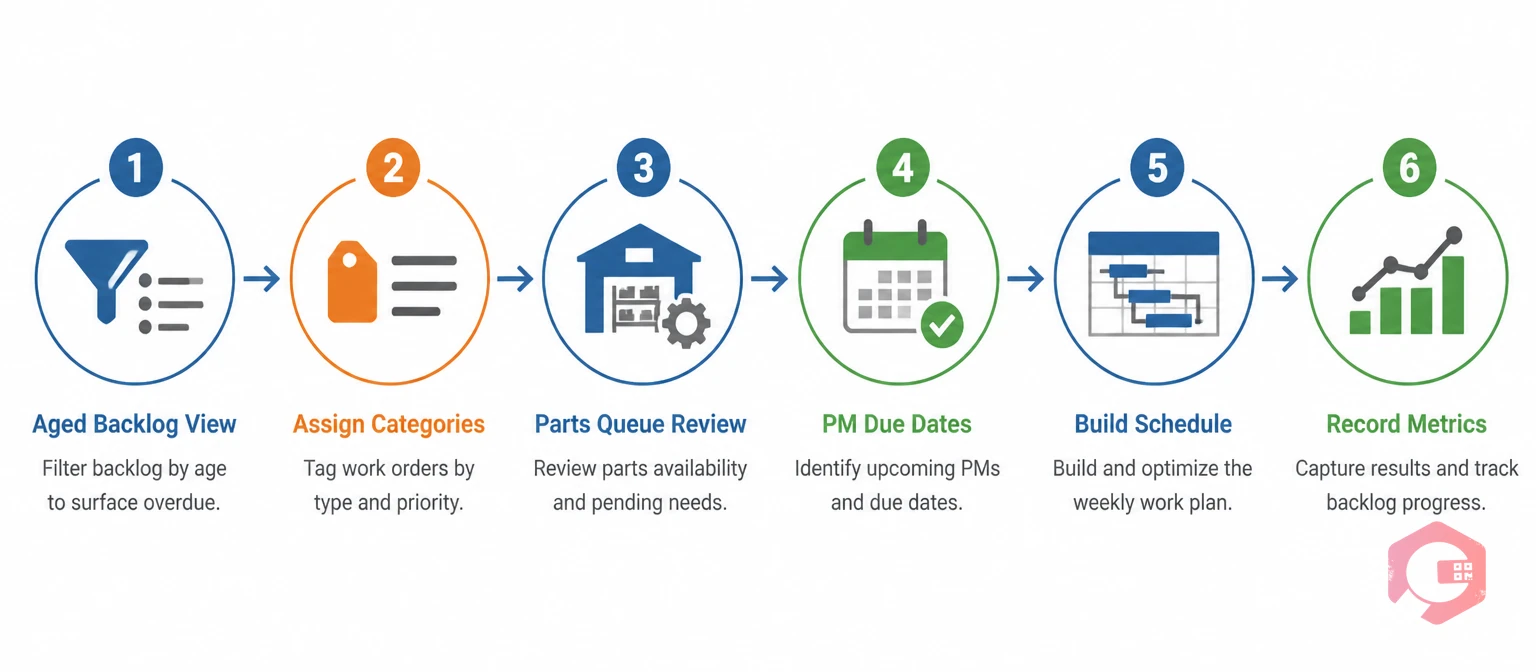
The routine has six steps and should be completed in sequence. Allocate 30 minutes at the start of the week — Monday morning before the first shift briefing is the most effective timing, because the triage outcome directly informs the week's work assignments.
Step 1 — Pull the aged backlog view. Open the CMMS and apply a filter: all open work orders, sorted by age descending, grouped by priority class. This view puts the oldest high-priority items at the top where they belong. Work orders that have been open more than twice their target completion time for their priority class are the first items to review. An emergency work order open for more than two days needs an immediate explanation. A standard corrective work order open for more than three weeks needs a decision: is it still valid, is it blocked, or has it simply been forgotten?
Step 2 — Assign a triage category to every aged item. Working through the aged view, assign each item to one of the five triage categories. For Category 4 holds, confirm or update the hold reason and target resolution date. For Category 5 close/cancel items, close them in the system with a disposition note before moving on. This step should take no more than 15 minutes for a well-maintained backlog; if it regularly takes longer, the backlog has grown beyond the weekly routine's capacity to manage and a backlog reduction sprint is needed.
Step 3 — Review the parts-blocked queue. Apply a secondary filter: all work orders with a "waiting for parts" status. For each item, confirm the parts order status — has the order been placed, when is delivery expected, and is the work order still correctly prioritised for the period when parts will arrive? Work orders whose parts arrived more than a week ago but are still showing as parts-blocked are a common source of phantom holds. Cryotos's spare parts inventory software links parts reservation and receipt status directly to the work order — so the parts-blocked filter shows only genuinely blocked items, not ones where parts have arrived but the work order status was never updated.
Step 4 — Confirm PM compliance and upcoming due dates. Switch to the PM schedule view and check which PMs are due in the next 14 days. Any PM due within seven days without a scheduled technician assignment is an Act This Week item that needs to be pulled into the week's schedule. Any PM overdue by more than one interval needs an immediate explanation and either a scheduled catch-up date or a formal risk-accepted deferral with a supervisor sign-off. Cryotos's preventive maintenance software shows upcoming PM due dates in a calendar and list view, with overdue items flagged in red — so this step takes under five minutes in a well-configured system.
Step 5 — Build the week's assignment schedule. With the triage categories confirmed and the PM due list reviewed, build the week's assignment schedule. Act Now items are assigned for today. Act This Week items are distributed across the week by technician availability, job duration, and asset location clustering. Schedule items are confirmed for their target week or moved if capacity constraints require it. The output of this step is a committed weekly work schedule that every technician can access through the mobile app before their first job of the week.
Step 6 — Record the backlog health metrics. At the end of each triage session, note four numbers: total open work orders, total work orders older than the threshold for their priority class, total work orders on hold, and total PMs overdue by more than one interval. Track these weekly in a simple chart. The trend of these four numbers tells you whether backlog management is improving, stable, or deteriorating — and gives you the evidence to request additional labour capacity if the backlog is systematically growing despite consistent management effort. Your BI Dashboard in Cryotos can be configured to surface all four of these metrics automatically at the start of each week, so the recording step requires only a screenshot rather than manual compilation.
The most practical backlog management tool is a simple set of age-based escalation rules that automatically flag work orders that have exceeded their acceptable open duration for their priority class. These rules do not replace the triage judgement of the maintenance lead — they ensure that items which need attention do not quietly age past the point where the original urgency is still relevant.
A practical escalation framework for most industrial maintenance operations: Emergency work orders (safety or production-critical failure, asset down) — flag if open more than 4 hours without a technician assigned, escalate to supervisor if open more than 24 hours without closure. High-priority corrective work orders (significant performance degradation, partial production impact) — flag if open more than 3 working days without a technician assigned, escalate if open more than 10 working days without completion. Standard corrective work orders (non-urgent faults, no immediate production impact) — flag if open more than 10 working days, review for hold or cancel if open more than 30 working days. PM work orders — flag if overdue by more than 20% of the interval length, escalate if overdue by more than one full interval.
These thresholds are starting points, not absolutes. Operations with very high asset criticality should tighten the emergency and high-priority thresholds. Facilities with long shutdown windows and planned maintenance programmes may find that standard corrective work orders appropriately sit open for longer while waiting for the next scheduled maintenance window. The key principle is that every open work order has an expected time horizon, and anything that exceeds that horizon without a documented explanation is a management failure waiting to happen. According to Reliable Plant maintenance management guidance, facilities that implement and enforce age-based backlog escalation reduce their average backlog age by 35–45% within six months — primarily by catching and closing phantom holds and stale work orders that no formal review process was surfacing.
Three mistakes recur across maintenance leads who attempt weekly triage but do not sustain improvement. Understanding them before they happen is the fastest path to avoiding them.
The first is triaging by gut feel rather than by defined category. When the five categories are not explicitly defined and communicated to the team, leads default to a vague priority ranking that means different things to different people on different days. A work order that is "medium priority" in one lead's mental model is Category 3 to one supervisor and Category 1 to another. The triage categories are only consistent when they are written down, agreed on, and applied uniformly — not when they exist informally as a shared assumption.
The second mistake is never using Category 5. Leads who are reluctant to close or cancel work orders allow the backlog to accumulate noise indefinitely. Every stale, duplicate, or invalid work order that is never cancelled is a permanent tax on every future triage session — it has to be seen and considered every week before being set aside again. The discipline of actively closing and cancelling invalid items is what keeps the triage routine efficient. Closing a work order with a clear disposition note is not an admission that the work does not matter — it is evidence that the system is being actively managed. The work order management software in Cryotos supports cancellation with reason codes, so the decision is recorded and auditable rather than appearing as a mysterious disappearance from the backlog.
The third mistake is treating the triage as a reading exercise rather than a decision exercise. Leads who review the backlog, note its contents, and make no changes to any item's status, assignment, or category have done nothing to improve the backlog's health. Every item reviewed in a triage session must result in an action: a category assignment, a status change, a new assignment, a hold reason update, or a closure. A backlog item that exits a triage session in exactly the same state it entered is a failure of the triage process — it means the lead looked at the item and deferred the decision to next week's session.
The weekly triage routine is only sustainable when the CMMS makes it fast. A triage process that requires building custom reports, exporting to spreadsheets, or manually counting items will not survive operational pressure. Cryotos's maintenance management software is configured to surface the triage views that make the weekly routine a 30-minute discipline rather than a half-day exercise.
The aged backlog view is available as a saved filter: all open work orders, sorted by age within priority class, with colour-coded age indicators that immediately flag items that have exceeded their threshold. Leads open this view at the start of the triage session and work through it from top to bottom — no manual sorting, no spreadsheet export, no counting. Items that need to be moved to a different category, updated with a new hold reason, or closed can be actioned directly in the view without opening each work order individually.
The parts-blocked queue is a separate filter that shows only work orders with an active parts hold, with the expected parts arrival date visible in the list. When parts are received in inventory and matched against a work order, Cryotos automatically updates the work order status and sends a notification to the assigned technician and their lead — so parts-blocked items leave the queue without requiring manual review.
The PM due-date view shows all PMs due in the next 14 days in a calendar format, with overdue items flagged in red and unassigned PMs highlighted for immediate action. The triage step that would take 20 minutes of manual calendar checking in a paper-based system takes two minutes in Cryotos.
The report builder allows maintenance leads to configure a standing weekly backlog health report that is automatically generated and delivered every Monday morning — containing the four backlog health metrics (total open, aged past threshold, on hold, PMs overdue) alongside the trend from the previous four weeks. This report is the input to the triage session and the evidence base for any escalation conversation with operations or maintenance management. The weekly triage routine, supported by the right CMMS views and reports, converts backlog management from an ad hoc crisis response into a consistent operational discipline that compounds over time. Schedule a free demo to see how Cryotos configures these triage views for your specific backlog structure and priority framework.
Work order backlog triage is the structured weekly process of reviewing all open work orders in a CMMS, assigning each one to a clear action category (act now, act this week, schedule, hold, or close/cancel), and ensuring that every item has a defined next action. It is distinct from a general backlog review because it produces a committed decision for every work order reviewed — not a ranking or a priority list, but a specific next step. The goal is to prevent the backlog from accumulating stale, blocked, or invalid work orders that obscure the real operational picture and consume planning overhead without contributing to maintenance output.
SMRP benchmarks define a healthy backlog as two to four weeks of available labour capacity in planned work. This means a team with 20 technicians at 40 hours per week has a capacity of 800 labour-hours per week, and a healthy backlog contains 1,600–3,200 hours of approved, ready-to-execute work orders. A backlog below two weeks of capacity risks running out of planned work and defaulting to reactive maintenance. A backlog above four to six weeks of capacity signals that work is being created faster than it can be executed, that work orders are not being closed, or that significant stale and invalid items are artificially inflating the total.
A well-maintained backlog at a team of 10–20 technicians should be triageable in 20–35 minutes per week. The first few sessions after implementing the routine will take longer — typically 60–90 minutes — because there are likely a significant number of stale, duplicate, and held items to work through. After four to six weeks of consistent weekly triage, the routine reaches its steady-state duration. If the triage consistently takes more than an hour per week in a mature operation, the backlog is either too large for the current capacity, the CMMS filters are not configured to support rapid review, or the team is not using Category 5 (close/cancel) appropriately.
A work order backlog is a list of approved, open work orders that are pending execution — work that has been identified, scoped, and is awaiting assignment or execution within the normal planning cycle. Deferred maintenance is the accumulation of maintenance work that has been deliberately postponed beyond its intended execution window, usually because of budget, resource, or access constraints. The distinction matters because work order backlog is a normal operational condition that is managed through weekly triage, while deferred maintenance represents an accepted risk that needs to be tracked separately, reported to management, and actively managed to prevent asset deterioration from reaching a critical threshold.
No — a work order that has been physically completed should never appear in an active backlog view. If it does, it means the work order was not closed in the CMMS when the job was finished — which is a closure lag problem, not a backlog problem. The presence of completed-but-unclosed work orders in a triage view is a signal that same-session work order closure is not being enforced. The triage session is the appropriate moment to identify these items, close them with a retrospective closure note, and use the pattern of unclosed completions to reinforce the same-session closure expectation with the team.


Cryotos AI predicts failures, automates work orders, and simplifies maintenance—before problems slow you down.



