

A work request asks for maintenance. A work order authorizes and plans it. The request says what is wrong. The work order says what to do, who does it, and when. Approval happens at both points, and usually by different people.
Teams that blur the two end up with unclear approvals, slow response, and weak records. This guide defines each term, compares them side by side, and shows who approves what at every stage. It also gives you a simple model for setting approval rules and shows how a computerized maintenance management system (CMMS) enforces them.
Key Takeaways
This table shows the main differences at a glance. The sections below explain each one.
| Attribute | Work Request | Work Order |
|---|---|---|
| Purpose | Reports a problem or asks for work | Authorizes and plans the job |
| Raised by | Anyone: operators, technicians, staff, tenants | Planner, supervisor, or an automatic trigger such as a PM schedule |
| Level of detail | Short description, asset, location, urgency | Scope, steps, parts, skills, safety notes, time estimate, due date |
| Approval | Accepted, returned for more detail, or rejected | Approved to schedule, then signed off when the work is done |
| Outcome | Becomes a work order, or is closed with a reason | A finished job with a complete history |
| Record it creates | Proof that the need was reported | Proof of the work done, time spent, parts used, and cost |
The simplest way to remember it: a request starts the conversation, and a work order carries out the decision.

A work request is a formal ask for maintenance work to be looked at. It is the first step in the maintenance workflow. Anyone who notices a problem or sees a way to improve safety can raise one.
A request is not a promise that work will happen. It is an input. A planner or supervisor decides what happens next.
A short, clear request saves a phone call later. Ask requesters to include:
Cryotos work requests can be raised from the web or mobile app. Teams can also add QR codes on assets, so a requester scans the code and the asset is already filled in.
A work order is an approved, planned job for the maintenance team. It holds everything a technician needs to finish the work safely and on time. It also becomes the permanent record of what was done.
Work orders do not always start as requests. Four sources are common:
This is why a request is only one path to a work order. With work order management, every source feeds the same queue, so planners see all work in one place.
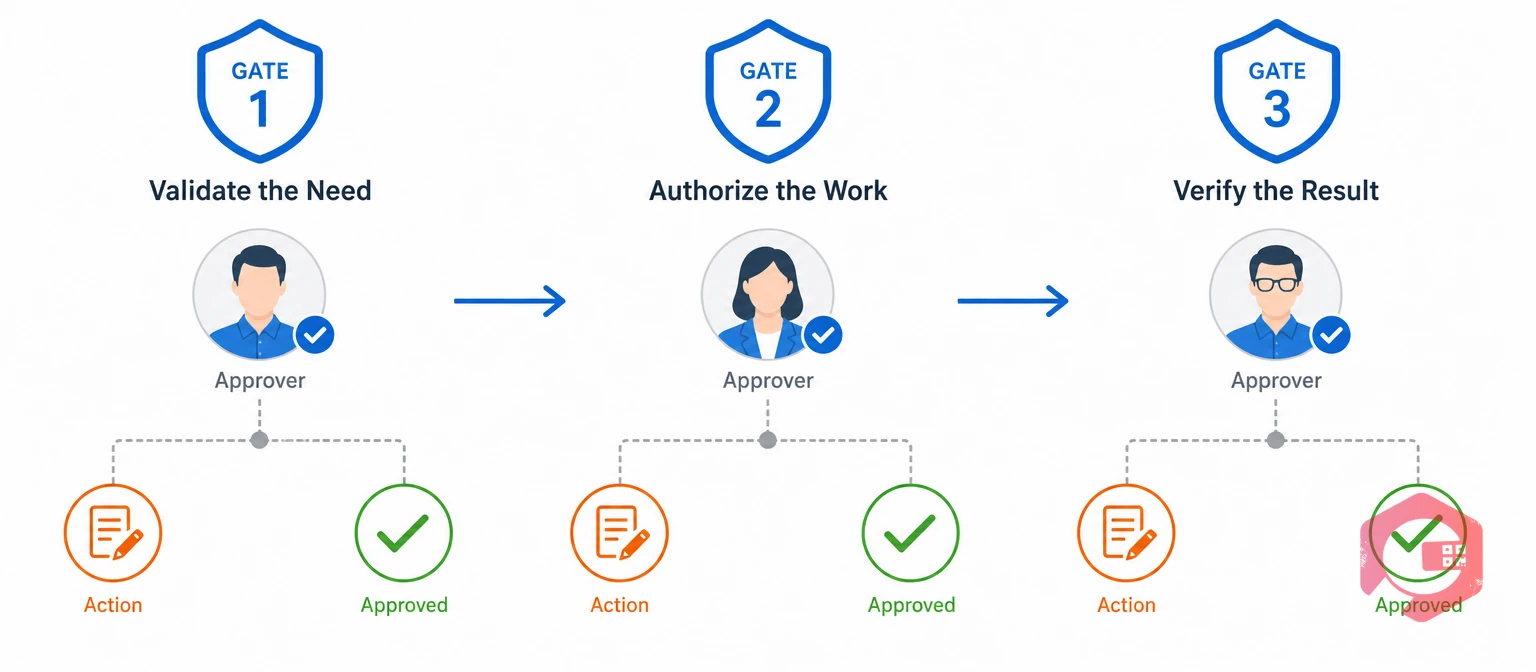
The Three-Gate Approval Model gives each stage of maintenance work one clear approver. It stops two common problems: jobs that start with no approval, and jobs that wait because no one knows who should sign.
The planner or supervisor checks that the request is real, not a duplicate, and worth acting on. This gate answers one question: should we do anything about this?
The planner builds the job plan. A maintenance manager or budget owner approves it when the job crosses a limit you set, such as a cost threshold, a safety risk, or an outside contractor. This gate answers: is the plan, cost, and safety approach acceptable?
Illustrative scenario: an operator reports a leaking hydraulic hose on a press. The supervisor approves the request at Gate 1. The planner writes a work order with parts and a lockout step. The repair needs a contractor, so the maintenance manager approves the cost at Gate 2.
After the technician finishes, a supervisor reviews the record before the work order closes. In many teams, the requester also confirms the problem is fixed. This gate answers: was the job done right?
Audits under quality and asset management standards, such as ISO 9001 and ISO 55001, often ask for evidence of who authorized and completed work. Three clear gates produce that evidence automatically.
Use this matrix as a starting point. It is illustrative, so set your own cost limits, safety rules, and job titles.
| Situation | Raised by | Request approved by | Work order approved by | Closed out by |
|---|---|---|---|---|
| Routine low-cost repair | Operator or staff | Supervisor | Planner | Supervisor or requester |
| Safety-critical defect | Anyone | Supervisor, with safety lead alerted | Maintenance manager | Maintenance manager and safety lead |
| High-cost or contractor job | Supervisor | Maintenance manager | Manager or budget owner | Manager |
| Planned PM task | No request needed | Not applicable | Planner, through the PM schedule | Technician, then supervisor |
| Emergency breakdown | Operator or technician | Verbal or fast-track approval | Supervisor, reviewed afterward | Manager, after the repair |
Two rules keep the matrix practical. First, emergencies can use fast-track approval, but the record must be reviewed afterward. Second, PM work needs no request because the schedule itself is the approval.
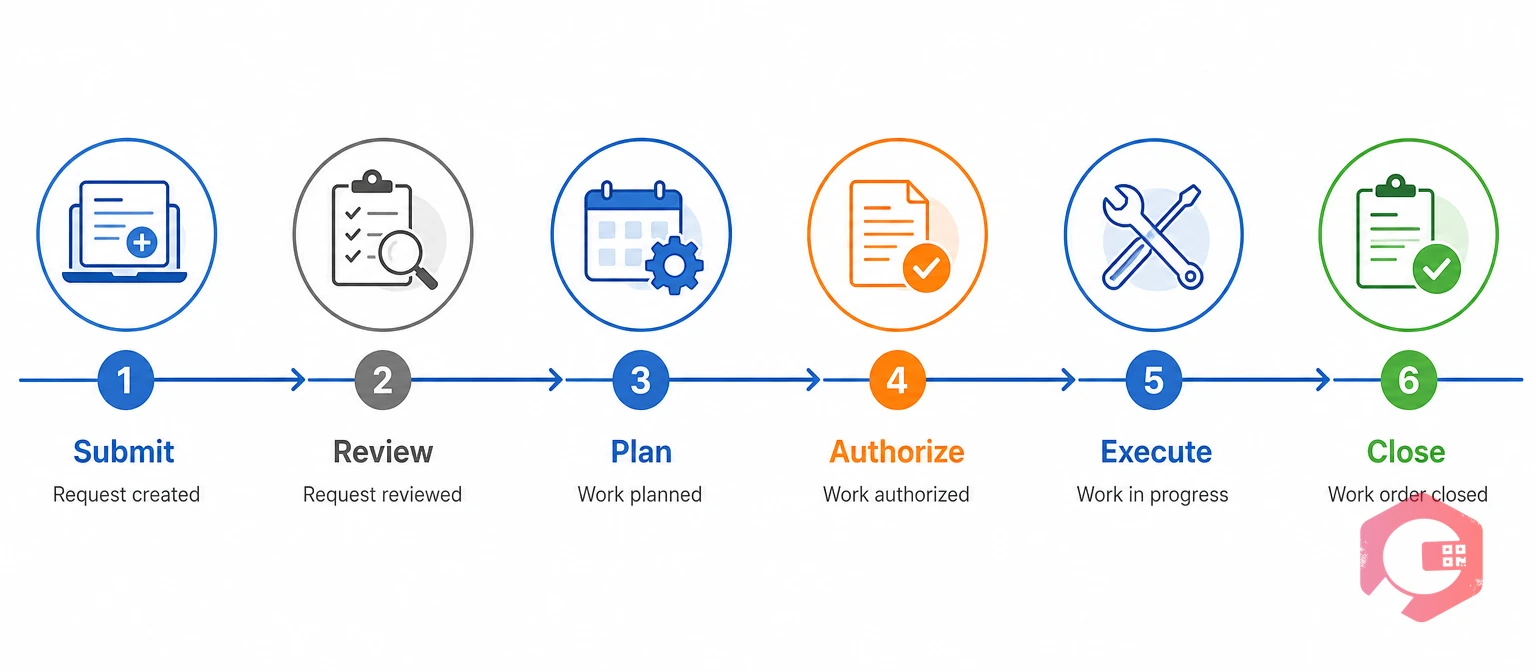
Here is the full path, with the gate that applies at each step:
You can set these steps up once with workflow automation, so each request follows the same route every time.
Most approval problems come from a few habits. Maintenance teams that avoid these keep work moving:
Fixing these costs very little and improves both response time and data quality.
A CMMS makes the three gates automatic instead of relying on emails and memory. Cryotos supports each stage:
Maintenance teams using Cryotos have reported up to 30% reduction in unplanned downtime and 25% faster repair turnaround. These are general results across maintenance programs, not figures for approvals alone. For approvals, the practical gain is clear ownership and a complete record for every job.
A work request reports a need and asks for review. A work order authorizes the job and holds the full plan, including scope, parts, safety steps, and due date.
Anyone you allow, including operators, technicians, office staff, and tenants. Most teams keep requests open to many people so problems get reported early.
Usually a planner or supervisor. They check that the request is valid and not a duplicate, then approve it, return it for more detail, or reject it with a reason.
The planner often approves routine jobs. A maintenance manager or budget owner approves jobs above a cost limit, with safety risk, or that need a contractor.
No. Preventive maintenance schedules, inspection findings, and sensor alerts can create work orders directly. A request is only one way in.
Yes. Reject duplicates, non-maintenance items, and requests with no valid need. Always record the reason so the requester understands the decision.
Clear approvals turn maintenance from a guessing game into a repeatable process. Schedule a free demo to see how Cryotos handles requests, approvals, and work orders from first report to final sign-off.



Cryotos AI predicts failures, automates work orders, and simplifies maintenance—before problems slow you down.



