

To design a work order template that reduces incomplete closures, define what done means for each job type, require only the fields needed to close, make the right answer easy to enter, and block closure until the record is complete. A well-built template fixes the problem at the source instead of chasing technicians afterward.
An incomplete closure is a work order marked complete without labor, parts, cause, downtime, findings or sign-off. This guide gives you eight design steps, a field worksheet and a framework to test your own template.
Key Takeaways

An incomplete closure is a work order marked complete without the information that makes the closure useful. The work order says the job is finished, but the record cannot prove it, cost it or teach anyone from it.
The damage reaches every metric built on closed jobs. A peer-reviewed study of heavy mobile equipment found that historical work order records frequently contain missing or incorrect failure mode, maintenance action and status fields. Standards such as ISO 55000 and SMRP metrics assume the records are reliable in the first place.
A definition of done is a written statement of what a complete closure contains for one job type. A template without one leaves every technician to guess.
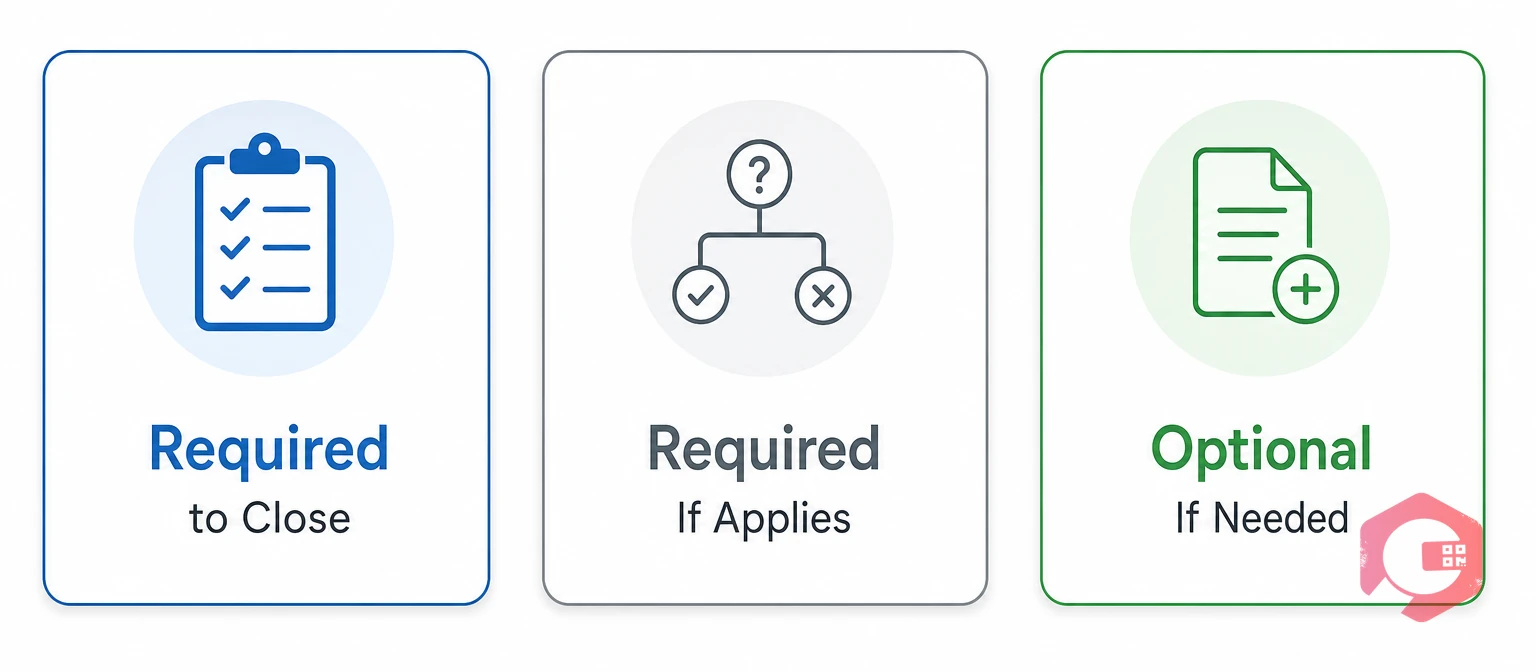
Sort every field into three tiers, and keep the first tier short. When a screen asks for too much, technicians fill the minimum or type junk to get past it.
Test each required field with one question: which decision or metric uses it? If nobody can answer, remove the field.
A work order template needs fields in the order the work happens. Use this worksheet as a starting point, then adjust it for each job type.
| Stage | Field | Entry Type | Required to Close? |
|---|---|---|---|
| Identify | Asset | Pre-filled or QR scan | Pre-filled |
| Identify | Priority and due date | Pick list and date | Pre-filled |
| Plan | Procedure and safety notes | Pre-filled text | Pre-filled |
| Execute | Checklist steps | Pass or fail, reading, photo | Yes |
| Record | Labor | Named person and hours | Yes |
| Record | Parts used | Catalog pick or None used | Yes |
| Record | Cause | Short pick list | Yes, for repairs |
| Record | Downtime start and end | Date and time | Yes, for production assets |
| Record | Findings and remedy | Short text | Yes, for repairs |
| Record | Follow-up needed? | Yes or no | Yes |
| Verify | Sign-off | Signature | Yes |
| Verify | Supervisor review | Approve or return | High-risk jobs only |
Maintenance teams often ask for too much at creation and too little at closing. Shift the effort to the closing fields, because they feed MTTR, job cost and root cause analysis.
Start every job with the right details by using structured work requests that feed straight into your templates.
Make the right answer the easy answer by pre-filling what the system knows, replacing free text with pick lists, and validating what technicians enter. Required fields alone do not guarantee accurate data.
Link cause codes to root cause analysis, so repeat failures trigger a deeper review. A short, honest cause list beats a long one nobody trusts.
Match each job type to its own work order template, because one template for every job guarantees gaps. Routine jobs drown in irrelevant fields, while breakdowns miss the ones that matter.
| Job Type | Must Capture to Close | Extra Gate | Keep Light |
|---|---|---|---|
| Preventive maintenance | Checklist answers, readings, labor, parts if used | An out-of-range reading forces a follow-up | Cause and downtime |
| Breakdown repair | Cause, remedy, labor, parts, downtime, follow-up | Supervisor review on critical assets | Photos, unless safety-critical |
| Inspection or compliance | Every step, readings, evidence, signature | No closure with unanswered steps | Parts and cause |
| Request or minor task | Short remedy note and labor | None | Everything else |
Each template carries only the fields its job type needs, which keeps the closing screen short.
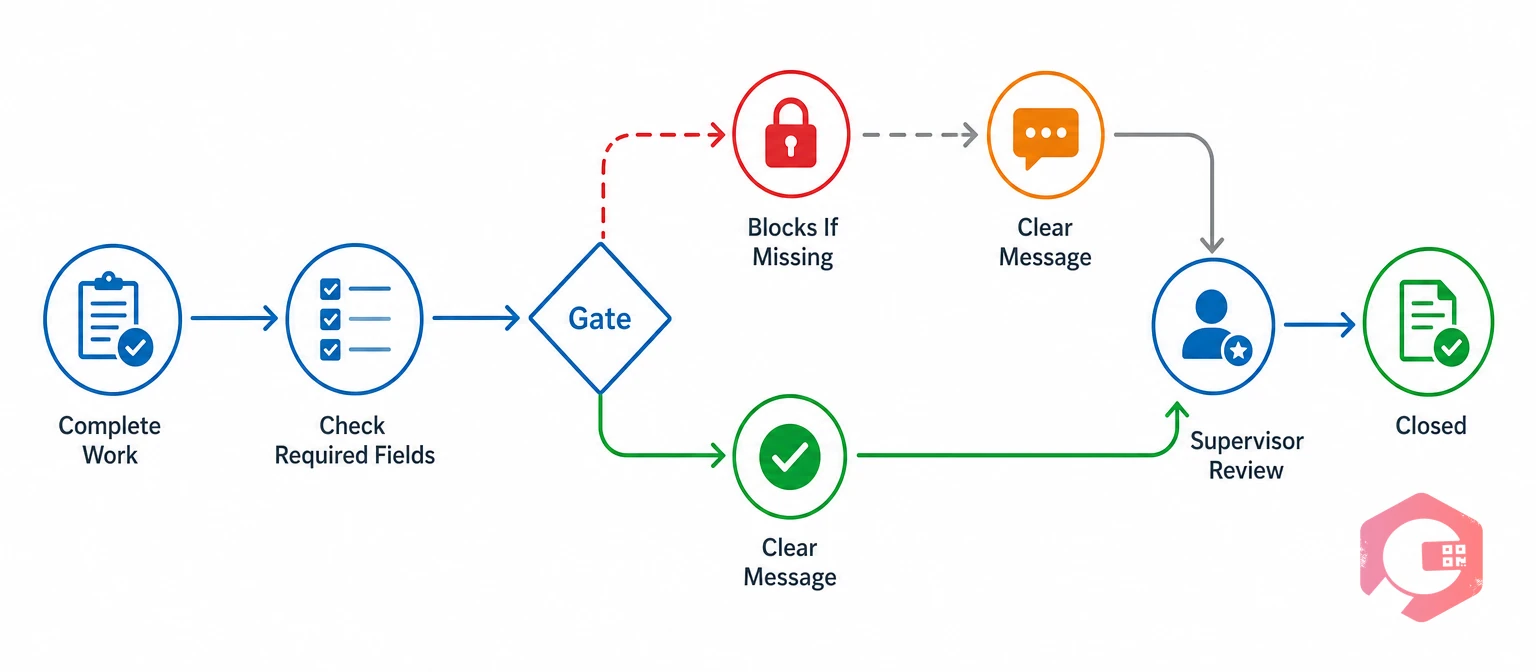
A closure gate is a rule that stops a work order from closing until the required information is present. Gates work only when the template behind them is fair, and when the message says exactly what is missing.
Add supervisor review where risk or cost is high, and let supervisors send work back with a comment. A returned job with a note teaches more than a silent edit. Closing on the spot also avoids end-of-shift batch closing from memory.
Measure closure quality every month with a few indicators, and review them with the crew. People improve what they can see.
Set targets from your own baseline. Pull 50 closed work orders per job type, score them against your closing fields, and start from that result.
Many junk entries trace back to design mistakes, not careless technicians. Fix the design first, then coach the crew.
Announce every template change and explain why, so crews do not find new required fields in the middle of a shift.

Test any work order template against four checks before you roll it out. A field that fails a check should change or go.
The DONE Closure Framework:
Pilot the result with one crew for two to four weeks and ask what slowed them down. Fix that before you scale it.
Cryotos does not decide what done means for your team. It makes your definition enforceable. As a Computerized Maintenance Management System, it keeps checklists, time logs, parts used, photos and sign-offs on one work order.
In practice, a technician scans the asset QR code, follows the checklist, logs time and parts, picks a cause and flags any follow-up. The gate then checks the record before the job closes.
Maintenance teams using Cryotos have reported up to 30% reduction in unplanned downtime and 25% faster repair turnaround. Complete closures are what make numbers like these measurable.
A work order template should include the asset, priority, instructions, a checklist, labor, parts, cause, downtime, findings, follow-up and sign-off. Which fields are required depends on the job type.
Keep the closing fields short, pre-fill what you can and gate closure with clear messages. Then review completeness monthly so the team sees the effect of their entries.
Make mandatory only what every job of that type needs, such as labor, a completed checklist and sign-off. Use conditional requirements for fields like downtime, cause and photos.
Keep the list short enough to choose from without scrolling. Review the share coded Other each month, and split a code only when a clear pattern appears.
You can, but nothing enforces required fields, and paper or spreadsheet forms are often completed from memory later. A system with gates, mobile entry and an audit trail gives you more control.
Yes. A CMMS can hold separate templates by job type, require closing fields, capture labor and parts on the job, and report completeness. The team still has to agree what done means first.
A work order template works best when it asks for less and enforces what matters. Schedule a free demo to see how Cryotos helps your team close every work order with complete, reliable records.



Cryotos AI predicts failures, automates work orders, and simplifies maintenance—before problems slow you down.



