

Workflow automation handles subcontractor dispatch and sign-off in multi-tenant buildings by replacing a chain of phone calls, emails, and paper forms with a single orchestrated digital process — one that notifies the right subcontractor, confirms tenant access, enforces the entry sequence, captures digital sign-off from the correct stakeholder, and stores the complete audit trail against the work order record, without any single person having to manually coordinate each step.
In a multi-tenant building, getting a subcontractor in and out safely is never just a maintenance task. It's a coordination problem involving the FM company, the subcontractor, the affected tenant, building security, and often the building owner. When any one of those parties doesn't respond, doesn't confirm, or doesn't sign off correctly, the job stalls — and the SLA clock doesn't care. According to IFMA's facilities management operations research, coordination failures between FM companies and their subcontractor networks are among the top three causes of SLA breaches in commercial property management. Workflow automation closes the gap by making the coordination happen inside the system, not through someone's inbox.
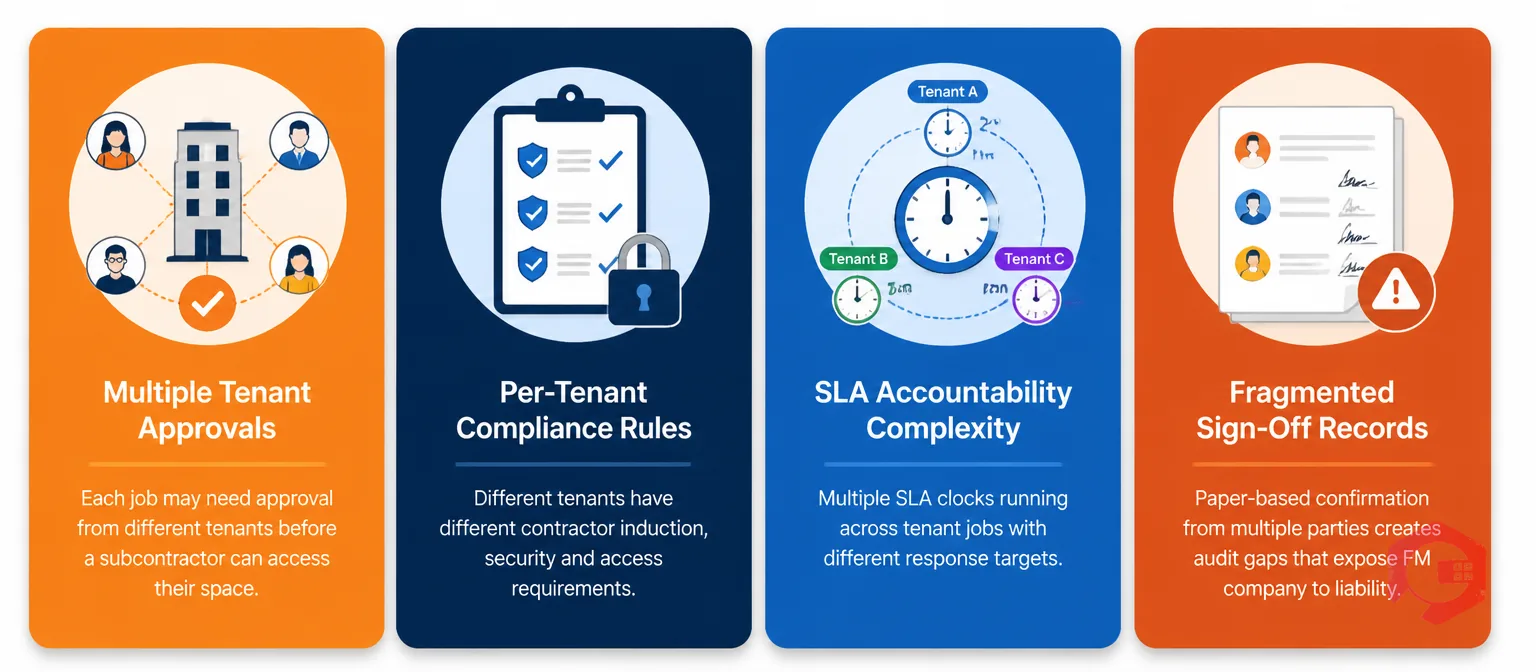
In a single-occupancy building, dispatching a subcontractor is relatively straightforward: raise a job, send the subcontractor's details to the building manager, confirm access, and get a signature on completion. There are two stakeholders — the FM company and the occupier — and the process is short enough to manage informally.
A multi-tenant commercial building operates nothing like this. A single fault in a shared mechanical plant room may affect three tenants on different floors. The FM company holds the maintenance contract with the building owner. The subcontractor has a commercial relationship with the FM company. Each tenant has its own facilities contact who must authorise access to their demised space. Building security has its own contractor sign-in process. And the building owner may require documented evidence that the work was completed to a specific standard before releasing payment or renewing the contract.
That is five separate parties with five separate information needs, connected by a maintenance event that may need to be resolved within four hours to meet the SLA. When those five parties are coordinated through a series of phone calls and email threads, the process is fragile. Responses go into spam. Calls go unanswered. Sign-off sheets get lost. The SLA breaches. The workflow automation module in a CMMS replaces that fragile chain with a structured, triggered, and tracked process that moves through each stakeholder automatically.
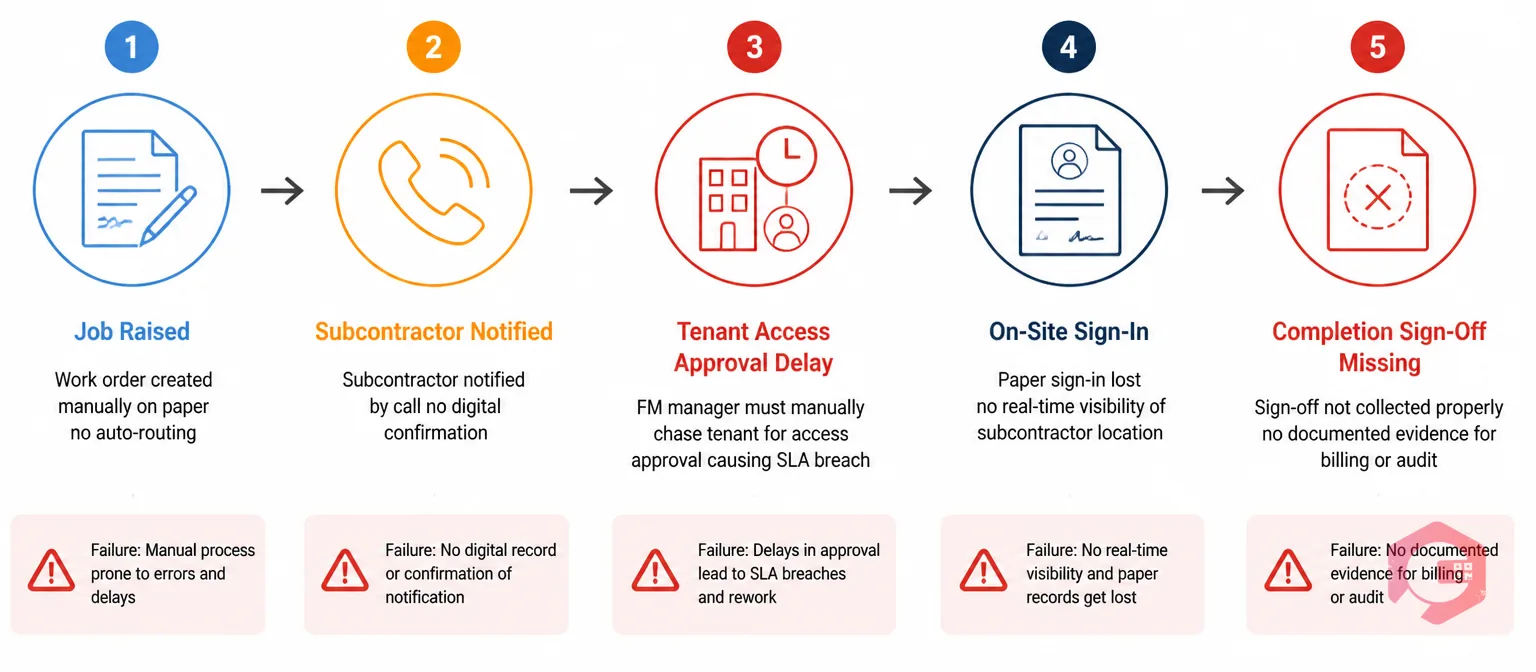
The subcontractor dispatch process in a multi-tenant building has five distinct handoff points. Each one is a place where a paper-based or email-based process can drop the baton — and where workflow automation picks it up.
The first handoff is the most basic: when a fault is raised — by a tenant, a building manager, or an automated sensor alert — who gets notified, and how quickly? In an unautomated process, the fault might arrive in a shared FM inbox, wait for someone to triage it, and then get forwarded to the right person for allocation. In a building with multiple tenants raising faults across different asset categories, this triage queue becomes a delay generator.
Workflow automation eliminates the queue by routing the fault to the right team or individual the moment it's raised, based on rules defined in advance: fault category, affected area, time of day, and priority level. A P1 fault in the shared plant room at 2 AM routes directly to the on-call engineer and the duty FM manager simultaneously. A P3 fault in a tenant's leased office routes to the FM helpdesk with a 24-hour response window. The routing is instant, consistent, and documented — no triage queue, no missed notifications.
Once the fault is categorised, it needs to be assigned to a subcontractor with the right skills, the right certifications for the building's safety requirements, and availability within the SLA window. In a paper-based process, this allocation depends on someone knowing which subcontractors are available, checking their certification status manually, and contacting them by phone or email to confirm they can attend.
Workflow automation does this matching against a pre-configured subcontractor register. The system knows which contractors are approved for which work categories, which certifications they hold and when those expire, and — if integrated with scheduling — which contractors have capacity within the required response window. The allocation fires automatically, the subcontractor receives a job notification with the site address, access instructions, and job details, and their acceptance is recorded in the system. No phone tag. No manual checking of an Excel spreadsheet for who's certified.
This is the handoff point that causes the most SLA breaches in multi-tenant buildings, and the one that receives the least attention in most FM software documentation. Even if the subcontractor is dispatched immediately and arrives on time, they cannot access a tenant's demised space without the tenant's confirmation. If the tenant's facilities contact hasn't been notified, hasn't responded, or is simply unavailable, the subcontractor waits. The clock runs. The SLA breaches.
Workflow automation handles this by triggering tenant access notification as a parallel step the moment the subcontractor is dispatched — not as a manual follow-up. The tenant receives an automated notification specifying which contractor is attending, when they're expected, what work they'll perform, and which areas they'll need access to. The tenant confirms digitally. If confirmation doesn't arrive within a defined window, the system escalates automatically to the tenant's secondary contact or to the building manager. The subcontractor doesn't arrive at a locked floor. The SLA is protected.
When the subcontractor arrives, they need to check in formally, acknowledge site safety rules, and — for plant room or mechanical work — complete a permit-to-work sequence before starting. According to HSE guidance on managing contractors, the duty holder for a premises is responsible for ensuring that contractors understand the site's safety rules and that those rules are enforced at the point of entry — a requirement that paper sign-in books and verbal briefings fulfil inconsistently. In most multi-tenant buildings, this is handled through a paper sign-in book at reception and a verbal or paper permit process with the building engineer. The sign-in record is rarely linked to the specific work order. The permit is rarely stored in a place the FM company can retrieve during an audit.
Workflow automation connects arrival, sign-in, and PTW into a single sequential process that runs through the subcontractor's mobile device. On arrival at the building, the subcontractor checks in digitally — which timestamps their arrival against the work order and triggers a notification to the building engineer that work is about to commence. The PTW steps are presented in sequence: the contractor acknowledges each safety requirement, the authorised person on site digitally confirms that isolation steps have been completed, and work is permitted to start only after every step is confirmed. The sequence is enforced by the system, not by memory or paper.
Sign-off at completion is where multi-tenant dispatch most visibly breaks down on paper. The subcontractor completes the job, fills in a paper completion sheet, and gets a signature from whoever is available — which in a multi-tenant building might be a security guard, a passing tenant, or nobody at all. The FM company receives a scanned paper form two days later. The building owner receives nothing until the FM company's monthly report. The tenant who raised the fault doesn't know the job is closed.
Workflow automation defines in advance whose sign-off constitutes valid completion for each job category. A plant room repair requires sign-off from the building engineer. A fault in a tenant's leased space requires sign-off from the tenant's facilities contact. A compliance inspection requires sign-off from the building owner's appointed representative. When the job reaches completion status, the system automatically routes the sign-off request to the correct person — with the job description, the work performed, and any completion photos attached. The sign-off is digital, timestamped, and stored against the work order record the moment it's given.
The SLA clock in a multi-tenant FM contract runs from fault notification to confirmed resolution. Every unconfirmed step in the dispatch chain — subcontractor not yet accepted, tenant access not yet confirmed, sign-off not yet received — represents time on the clock that isn't being covered by active work. According to RICS guidance on facilities management service delivery, demonstrating SLA compliance in multi-occupier buildings requires documented evidence of every step in the service fulfilment chain — not just the final resolution timestamp. Without automated escalation, that time disappears into unanswered emails and voicemails.
Automated escalation rules in a workflow system define how long each step can remain unresponded before the system acts. If a subcontractor hasn't accepted a job within 20 minutes of dispatch, the system automatically offers the job to the next available approved contractor. If a tenant hasn't confirmed access within 30 minutes of notification, the system sends a follow-up to the tenant's secondary contact and simultaneously alerts the FM helpdesk. If a sign-off hasn't been received within two hours of job completion, the system escalates to the FM manager.
Each escalation is documented in the work order timeline — so if an SLA breach does occur, the FM company has a complete record of every notification sent, every response received, and every escalation triggered. That record is the difference between an SLA breach that's defensible and one that isn't. According to the BSI guidance on facilities management information management, FM companies managing multi-occupier buildings are increasingly expected to maintain digital audit trails of all maintenance coordination events — a requirement that automated escalation records satisfy automatically.
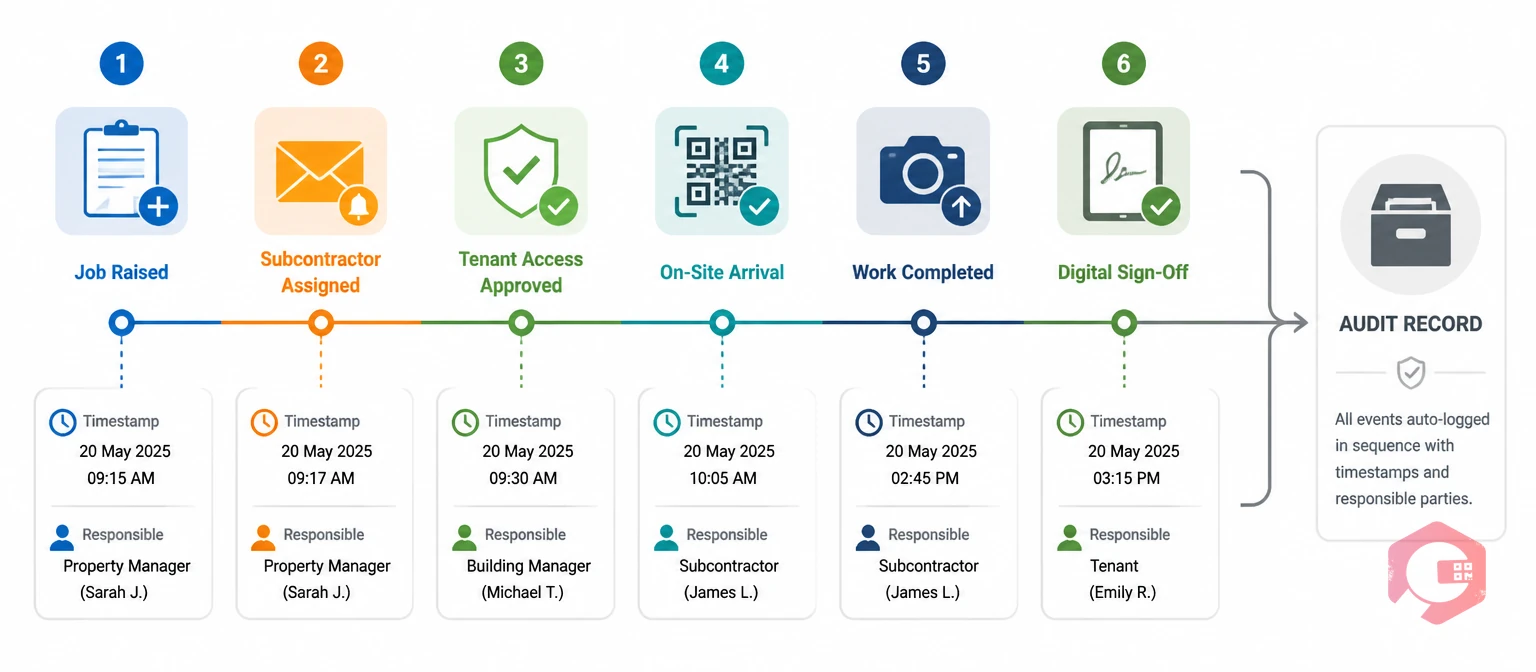
One of the most significant operational benefits of workflow automation for subcontractor dispatch is what it produces as a byproduct: a complete, timestamped audit trail of every event in the dispatch lifecycle. Building owners, tenants, and contract managers increasingly want to see this trail — not just as evidence when something goes wrong, but as a standard part of the service reporting they receive.
When workflow automation is running, the audit trail for a single subcontractor visit in a multi-tenant building looks like this: fault raised at 09:14 by tenant on Floor 4; routed to FM helpdesk at 09:14; categorised as P2 HVAC fault at 09:22; subcontractor allocated and notified at 09:23; subcontractor accepted at 09:31; tenant access notification sent to Floor 4 facilities contact at 09:23; tenant access confirmed at 09:44; subcontractor arrived on site at 10:48; PTW steps completed and authorised at 10:52; work started at 10:54; work completed at 12:17; completion sign-off requested from tenant at 12:17; sign-off received at 12:31. Total time from fault to confirmed resolution: 3 hours 17 minutes. SLA met.
Every timestamp in that record was generated automatically by the workflow. Nobody compiled it manually. And every entry is retrievable in seconds — against the work order, against the asset, against the tenant, or against the subcontractor — for any date range, for any audit or dispute that arises in the following 12 months. The Report Builder in Cryotos allows FM companies to extract this audit trail in a formatted report that can be shared with building owners as part of the monthly performance pack.
Cryotos CMMS is built to handle the multi-stakeholder complexity of subcontractor dispatch in multi-tenant and commercial property environments. The platform's workflow engine supports conditional routing, parallel notifications, automated escalation, and digital sign-off — connecting every stakeholder in the dispatch chain within a single tracked process.
Key capabilities for subcontractor dispatch in multi-tenant buildings:
FM companies managing multi-tenant portfolios with Cryotos consistently report fewer SLA breaches, faster subcontractor response times, and cleaner audit trails for building owner reporting — outcomes that flow directly from replacing an ad-hoc coordination process with a structured, automated one. If your current subcontractor dispatch process relies on someone remembering to send the right email to the right person at the right time, Cryotos CMMS gives your operations team the workflow infrastructure to make it systematic.
Workflow automation for subcontractor dispatch is a CMMS feature that replaces manual coordination — phone calls, emails, paper forms — with a structured digital process. When a fault is raised, the workflow automatically allocates the right subcontractor, notifies the tenant for access confirmation, enforces the PTW entry sequence on arrival, and routes sign-off to the correct approver at completion. Every step is triggered automatically, tracked in real time, and stored as a timestamped audit record against the work order.
The workflow fires an automated access notification to the tenant's designated facilities contact the moment a subcontractor is dispatched — not as a manual follow-up. The notification includes the contractor's details, expected arrival time, work description, and the areas they'll need to access. The tenant confirms digitally. If confirmation doesn't arrive within the configured window, the system escalates automatically to the tenant's secondary contact or the building manager, without any manual intervention from the FM team.
Valid sign-off depends on the job type and location, and this is configured in the workflow in advance. A repair in a tenant's leased space typically requires sign-off from the tenant's facilities contact. A plant room or shared services repair requires sign-off from the building engineer or FM manager. A compliance inspection may require sign-off from the building owner's appointed representative. The workflow routes the sign-off request to the correct person automatically — so the FM company always has the right signature, not just whoever happened to be available.
Automated escalation rules define how long each step in the dispatch chain can remain unresponded before the system acts. If the subcontractor hasn't accepted within the configured window, the job is offered to the next available approved contractor. If tenant access hasn't been confirmed, the system contacts the secondary tenant contact and alerts the FM helpdesk. Each escalation is documented with a timestamp in the work order timeline — so if an SLA breach does occur, the FM company has a complete record of every notification and response to support any contractual discussion with the building owner or tenant.
A fully automated dispatch process produces a timestamped record of every event: fault raised, routing decision, subcontractor allocated and accepted, tenant access notified and confirmed, arrival checked in, PTW steps completed and authorised, work start and finish times, and sign-off received. Every entry is generated automatically by the workflow — no manual compilation required. This record is stored against the work order and retrievable by asset, building, tenant, or subcontractor for any subsequent audit, dispute, or contract performance review.
Subcontractor dispatch in a multi-tenant building is not a single transaction. It's a chain of five or more handoffs between parties who have different information needs, different response patterns, and different ideas about what constitutes a properly closed job. When that chain is managed through phone calls and email threads, it works well on quiet days and fails systematically on busy ones — producing the SLA breaches, missing sign-offs, and audit gaps that make FM contract management harder than it needs to be.
Workflow automation doesn't just digitise the process. It makes the process enforceable — every step triggered automatically, every non-response escalated without human intervention, every sign-off routed to the right person, and every event stored as an auditable record. That's the difference between a subcontractor dispatch process that depends on people doing the right thing and one that ensures the right thing happens regardless.
If your current dispatch process is a series of hope-and-check-back steps, book a free Cryotos demo to see how the workflow automation module handles multi-tenant subcontractor dispatch from fault to sign-off in a real commercial property environment.




Cryotos AI predicts failures, automates work orders, and simplifies maintenance—before problems slow you down.



