How to Build a Yearly Maintenance Budget Inside Your CMMS?

Calendar
Duration:
8 min read
calendar today
Published on
May 20, 2026
Featured Image

A yearly maintenance budget built inside your CMMS is a forward-looking cost plan that uses your actual work order history, PM schedules, and asset data to forecast what maintenance will cost — and then tracks every dollar spent against that forecast in real time. According to the Society for Maintenance and Reliability Professionals (SMRP), best-in-class facilities spend between 2% and 4% of their Replacement Asset Value (RAV) on maintenance annually. This guide walks you through the exact steps to build a yearly maintenance budget inside your CMMS.

What a CMMS-Based Maintenance Budget Actually Looks Like

Maintenance budget cost categories: labour, parts and inventory, contractors and external services, capital and major overhauls | Cryotos

A maintenance budget built inside a CMMS is fundamentally different from a spreadsheet estimate. The four cost categories that every maintenance budget should cover are:

  • Labor: Internal technician hours across planned and reactive work, including overtime.
  • Parts and inventory: Spare parts consumed on PM tasks and corrective repairs, linked directly to your inventory management module.
  • Contractors and external services: Third-party maintenance, specialist repairs, and AMCs. Often the largest single line item and the hardest to forecast without historical data.
  • Capital and major overhauls: Planned replacement of end-of-life assets, major overhaul campaigns, and refurbishments.

Step 1: Pull Your Baseline Data From Last Year’s CMMS Records

Every accurate maintenance budget starts with what actually happened. Pull three key reports: work order history and actual costs, downtime and reactive repair costs, and PM compliance gaps. According to Reliable Plant research, reactive maintenance costs 3 to 9 times more per event than planned work when you factor in overtime labor, emergency parts premiums, and secondary damage.
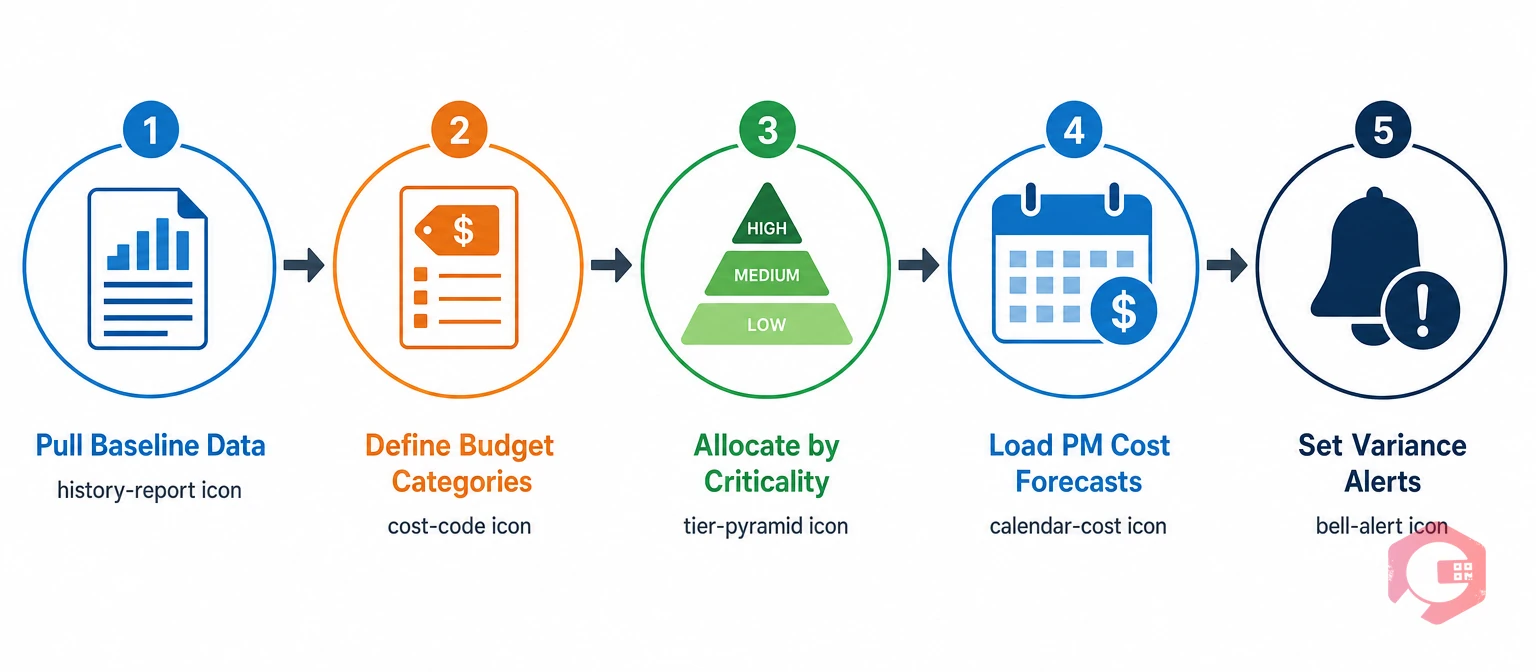
How to Build Your Yearly Maintenance Budget

5-step maintenance budget process: pull baseline data, define categories, allocate by criticality, load PM cost forecasts, set variance alerts | Cryotos

Follow these 5 steps to build a data-backed maintenance budget inside your CMMS:

  • Step 1: Pull baseline data from last year’s CMMS work order history.
  • Step 2: Define budget categories inside the CMMS using consistent cost codes by work type, asset, and department.
  • Step 3: Allocate costs by asset criticality tier — not a flat percentage increase across all assets.
  • Step 4: Load PM schedules and cost forecasts so the CMMS builds an automatic monthly spend forecast.
  • Step 5: Set up budget tracking and variance alerts so overspend is caught before it becomes a problem.

Step 3: Allocate Costs by Asset Criticality Tier

Asset criticality budget tiers: Tier 1 critical assets highest allocation, Tier 2 important assets regular PM, Tier 3 non-critical run to fail | Cryotos

Not every asset in your facility deserves the same level of budget allocation. The right approach is to allocate by criticality tier:

  • Tier 1 — Critical Assets: Assets whose failure directly stops production or creates a safety risk. Highest PM frequency, most thorough budget allocation, and a dedicated capital reserve for planned replacement.
  • Tier 2 — Important Assets: Assets that slow production when they fail but have workarounds. Budget for regular PM and set a corrective repair allocation based on last year’s actual spend per asset.
  • Tier 3 — Non-Critical Assets: Assets where a run-to-fail strategy is acceptable. Minimal budget allocation appropriate here.

Common Maintenance Budget Mistakes (And How a CMMS Prevents Them)

Common maintenance budget mistakes: gut feel budgeting, no planned vs reactive split, mid-year cost changes, no capital reserve, inventory costs missed | Cryotos

The patterns that bust maintenance budgets are consistent across industries:

  • Budgeting by gut feel instead of data: Using last year’s budget plus a flat percentage increase without reviewing actual spend per asset.
  • No separation between planned and reactive spend: When every work order goes into a single bucket, you cannot see whether reactive costs are crowding out your PM program.
  • Forgetting mid-year cost changes: Contractor rate increases, parts price inflation, and new assets added mid-year all affect the original budget.
  • No capital budget for aging assets: Running critical assets past their economic life because there is no budget line for replacement.
  • Inventory costs left off the budget: Parts consumed in maintenance are often tracked separately from labor and contractor costs, creating an incomplete picture.

Frequently Asked Questions

What percentage of asset value should I budget for maintenance?

The SMRP benchmark for world-class maintenance spend is 2% to 4% of Replacement Asset Value (RAV) per year. Operations that run reactive-heavy programs typically spend 5% to 8% of RAV because emergency repairs cost far more than planned work.

How do I calculate my maintenance budget for next year?

Start with your CMMS work order history from the past 12 months. Sum labor, parts, and contractor costs by asset and category. Add the planned cost of next year’s PM schedule, any known capital replacements, and a contingency reserve of 10 to 15% for unplanned corrective work.

Can CMMS software track maintenance spending automatically?

Yes. When work orders are configured with cost codes and parts consumption is linked to the inventory module, a CMMS like Cryotos tracks actual maintenance spend in real time against your budget targets. The BI Dashboard shows actual-versus-budget by category, asset, department, and time period without any manual data entry.

If your facility is still building maintenance budgets in spreadsheets and tracking spend manually, the gap between your plan and your actuals will widen every year. See how Cryotos connects your CMMS data to your maintenance budget and schedule a demo to walk through the setup for your facility.


Want to Try Cryotos CMMS Today?

Get Free Demo

Let AI Take Control of Your Maintenance

Cryotos AI predicts failures, automates work orders, and simplifies maintenance—before problems slow you down.

Try AI-Powered CMMS
🡢