

Asset elimination in facility management is the formal process of permanently retiring an asset from your active inventory, maintenance schedules, and facility management software records. It is not the same as switching a machine off or moving it to a storage room. It means closing every record — your CMMS, finance register, and insurance policy — so the asset no longer generates costs, work orders, or planning errors.
According to a U.S. Government Accountability Office report, inaccurate asset inventories cause organisations to over-insure and misallocate maintenance spend, costing large facilities hundreds of thousands of dollars annually. This guide gives you a practical, CMMS-backed framework for identifying which assets to eliminate, how to do it without compliance gaps, and how to keep your asset records accurate at every stage.
Key Takeaways

Asset elimination is the deliberate, documented removal of a physical asset from every system that tracks it — your asset tracking records, maintenance schedules, financial registers, and insurance policies. It is the final administrative step in an asset’s lifecycle, and it is the step most facilities skip.
When a machine breaks down beyond repair, most teams do the obvious thing: they stop using it and call someone to take it away. What they rarely do is close the CMMS record, notify the insurer, and update the fixed asset register. That gap — between physical removal and administrative closure — is where ghost assets are born.
Three terms get used interchangeably in facility management conversations, but each describes a distinct action. Confusing them is how records stay open long after equipment has left the building.
| Term | What It Means | Record Closed? |
|---|---|---|
| Decommissioning | Taking an asset offline and out of active service. The asset may still physically exist and remain in records pending a final disposal or elimination decision. | No — asset stays in CMMS as inactive |
| Disposal | The physical act of removing the asset from the facility via sale, scrap, donation, or destruction. | Partially — physical asset is gone but records may still be open |
| Elimination | Complete removal from all operational, financial, and maintenance records. The final step that fully closes the asset lifecycle and prevents ghost asset buildup. | Yes — record is archived and fully closed |
Skipping elimination after disposal is the most common mistake facility managers make. The machine leaves the building, but it lives on in your CMMS, your insurance policy, and your PM calendar — quietly costing you every single month.

Industry estimates suggest up to 30% of assets tracked in CMMS systems are ghost assets — items consuming budget and planning cycles despite being long gone from the floor. In large facilities, this translates to significant annual waste across insurance, parts, and labour costs. According to the Society for Maintenance and Reliability Professionals (SMRP), clean asset registers are one of the top drivers of maintenance cost reduction in high-performing facilities.

The hardest part of asset elimination is making the call. These five signals indicate an asset has crossed the threshold where repair no longer delivers positive ROI — and where holding on is costing you more than letting go.
Gut feel should not drive asset elimination decisions. Your downtime tracking data is the most objective tool you have — and when used correctly, it tells you exactly when an asset has hit its economic end of life.
Track MTBF and MTTR per asset over rolling 12-month windows inside your CMMS. The elimination threshold most reliability engineers use is clear: when MTBF drops below 30 days for a critical asset and MTTR climbs above 8 hours, the economic case for elimination is usually stronger than the case for continued repair.
A well-configured CMMS surfaces these trends automatically, so elimination decisions are grounded in data rather than reactive crisis management. When the numbers cross your defined thresholds, the CMMS flags the asset for an elimination review — before your maintenance team burns another month of budget on a losing battle. According to ISO 55000, organisations should maintain documented, data-driven criteria for asset renewal and disposal decisions as part of a structured asset management system.
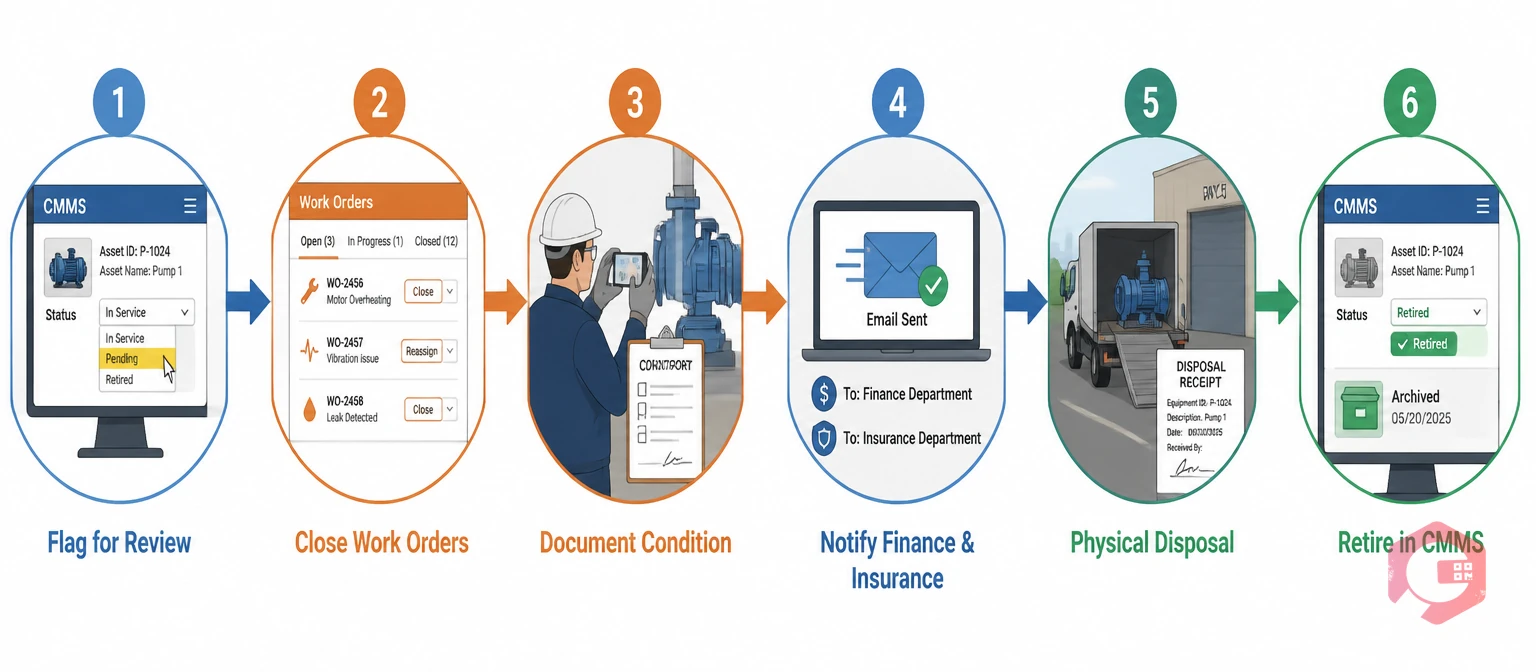
Asset elimination done correctly follows a structured sequence. Skipping steps is where facilities create compliance gaps, financial errors, and the ghost asset problems discussed above. Work through these six stages in order:
Use this checklist each time an asset moves through the elimination process. Embed it inside your standard asset and equipment inspections checklist workflow so no step falls through the cracks during a busy period.
Managing asset elimination through spreadsheets and email chains is exactly where ghost assets multiply. Every step that requires a manual hand-off between a maintenance team, a finance department, and an insurer is a step where the process can stall — and the record stays open for another year.
Cryotos gives facility teams a structured, auditable path from active service to full retirement. The facility maintenance software flags condition changes the moment they are logged against an asset, routes elimination reviews to the right approvers, and keeps the full audit trail inside the same system where the asset’s entire service history lives. You do not have to chase emails to confirm whether finance has been notified or whether the insurance team received the removal request.
Facilities using Cryotos report a 30% reduction in downtime and 25% faster repair times — partly because clean, accurate asset registers eliminate the noise of ghost asset work orders and keep maintenance teams focused on real equipment. Schedule a free demo to see how Cryotos helps your facility keep asset records accurate and your maintenance budget aligned with reality.
Disposal is the physical act of removing an asset from the premises via sale, scrap, or donation. Elimination is the administrative process of removing it from all records — CMMS, insurance, and financial registers. Disposal without elimination leaves ghost assets in your system. Both steps are required to fully close out an asset and prevent ongoing cost leakage.
Always archive, never delete. Setting an asset to “retired” status removes it from active dashboards and PM scheduling while preserving the full repair history for future benchmarking. Deleted records cannot be recovered for audits, warranty claims, or replacement cost analysis — and regulators may require historical asset records in certain industries.
Best practice is a full physical asset verification audit once per year, cross-referenced against your CMMS register. Facilities that run this annually typically clear 5–15% of their asset list on the first pass. Schedule the audit alongside your annual facility inspection planning cycle to keep the process consistent.
The clearest triggers are MTBF falling below 30 days, repair costs exceeding 50% of replacement value, or the asset falling out of regulatory compliance. Your CMMS should be configured to flag these thresholds automatically so elimination reviews happen proactively rather than after the next breakdown.
Yes. ISO 55000 provides the framework for asset management across the full asset lifecycle, including end-of-life decisions. It requires that organisations maintain documented, data-driven criteria for asset renewal and disposal — which is exactly what a structured elimination process delivers. Compliance with ISO 55000 principles also supports better audit outcomes and insurance negotiations.



Cryotos AI predicts failures, automates work orders, and simplifies maintenance—before problems slow you down.



