
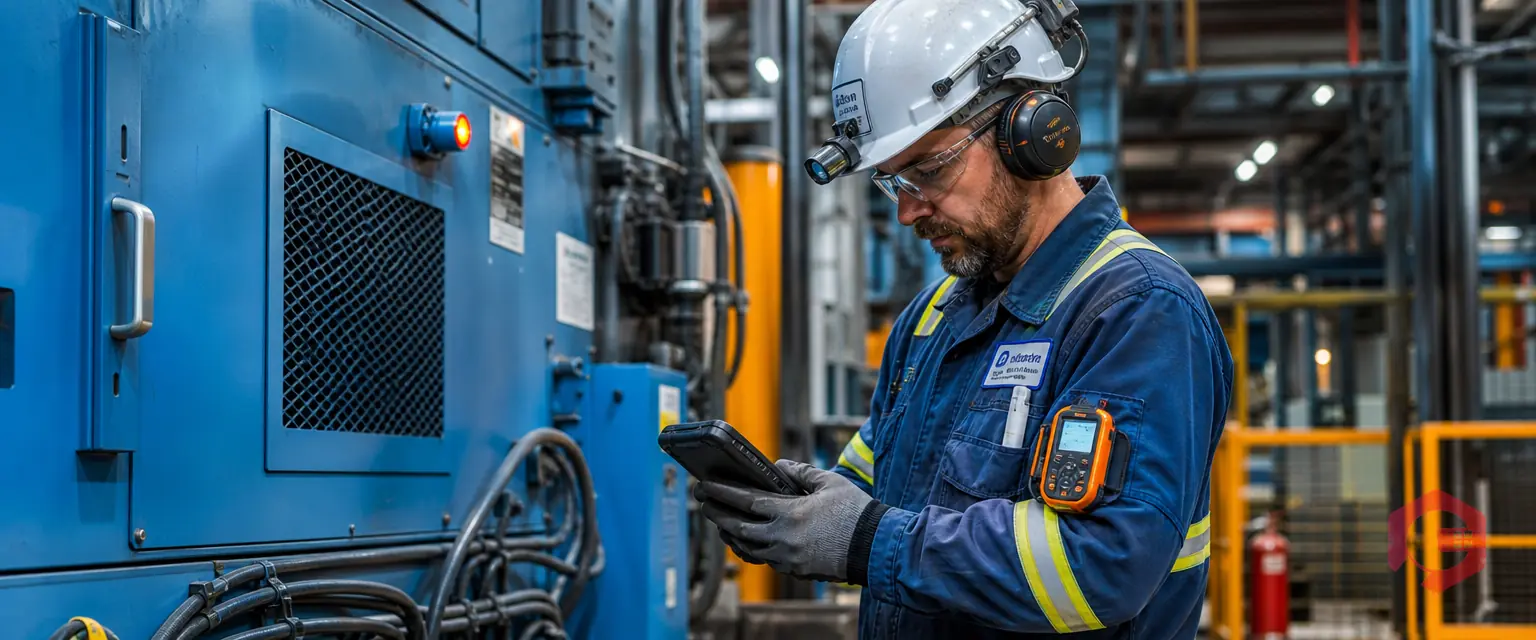
Failure codes captured at the technician stage are short labels recorded on a work order at closure that describe why a piece of equipment failed. When the person who made the repair picks the code, the data is accurate from the start, and every downstream analysis — from repeat-failure tracking to spare parts planning — works with facts instead of guesses.
Most maintenance teams lose failure data not because they lack a system, but because the wrong person codes the failure at the wrong time. A supervisor coding from memory hours later, or a planner guessing from a vague note, introduces errors that compound across hundreds of work orders. This guide walks through a practical method for capturing failure codes at the technician stage so the data is right the first time.
Key Takeaways
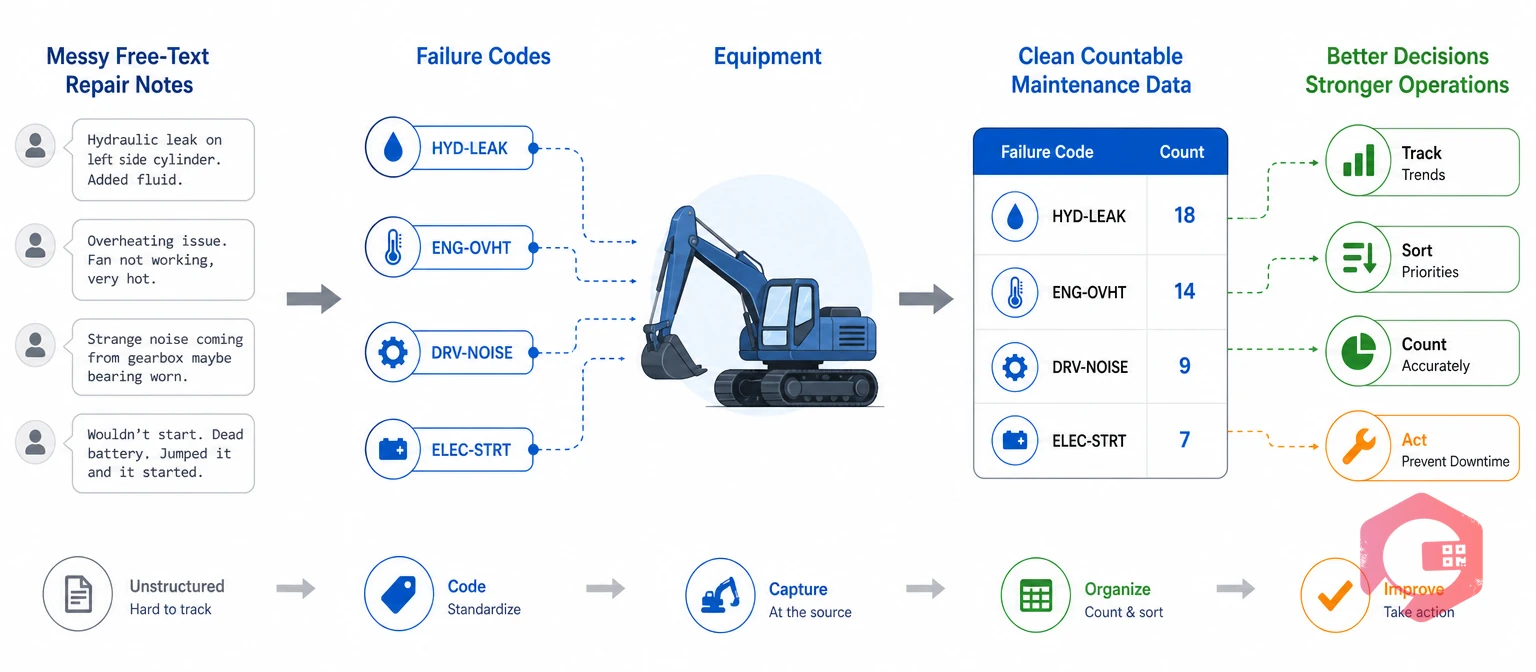
A failure code is a standardized short label that records the confirmed cause of an equipment failure on a completed work order. Bearing wear, belt slippage, sensor drift, and seal leak are typical examples.
Failure codes matter because they turn free-text repair notes into countable, sortable data. Without them, a maintenance team closes thousands of work orders a year and has no reliable way to answer basic questions: which failure happens most often, which one costs the most downtime, and which one keeps coming back on the same asset.
Failure code quality is how closely the codes on closed work orders match what actually failed. Low quality — caused by guessing, skipping, or miscoding — makes every downstream report unreliable.
A Computerized Maintenance Management System stores the failure code on each closed work order automatically, so the counts build as jobs close. The quality of every report and dashboard downstream depends on whether the right code was picked at the right moment.
Capturing failure codes at the technician stage means the person who diagnosed and repaired the fault selects the code before the work order closes. This matters because the technician has first-hand evidence that nobody else in the workflow has seen.
The technician has just opened the machine, identified the failed component, and completed the repair. At that moment, the cause is clear. An hour later, the details start to blur. A day later, a supervisor coding from a handwritten note picks the most plausible code, not the most accurate one.
Good failure data starts at the point of repair, and that point belongs to the technician. Cryotos work order management supports technician-stage code capture by placing the failure code field directly in the mobile closure screen, so the code is selected before the order can close.
When failure coding happens away from the repair, three problems grow over time. First, accuracy drops because the coder is working from memory or secondhand notes. Second, consistency drops because different supervisors interpret the same note differently. Third, completeness drops because a task done after the fact is easy to skip when the next urgent job arrives.
A coding delay is the gap between the moment a repair is completed and the moment someone records the failure code. Even a few hours of delay reduces the chance of picking the right code, and delays of a day or more often result in the code being skipped entirely.
The result is a failure database full of gaps, duplicates, and miscoded entries. Reports built on that data point the team toward the wrong priorities. A plant that spends months chasing a failure trend that does not exist — because the codes were wrong — wastes time, parts, and trust in the system.
Accurate codes captured at the technician stage feed directly into five maintenance decisions that most plants make weekly or monthly.
None of these decisions work when the data behind them is unreliable. The technician-stage capture is the foundation that makes all of them possible.
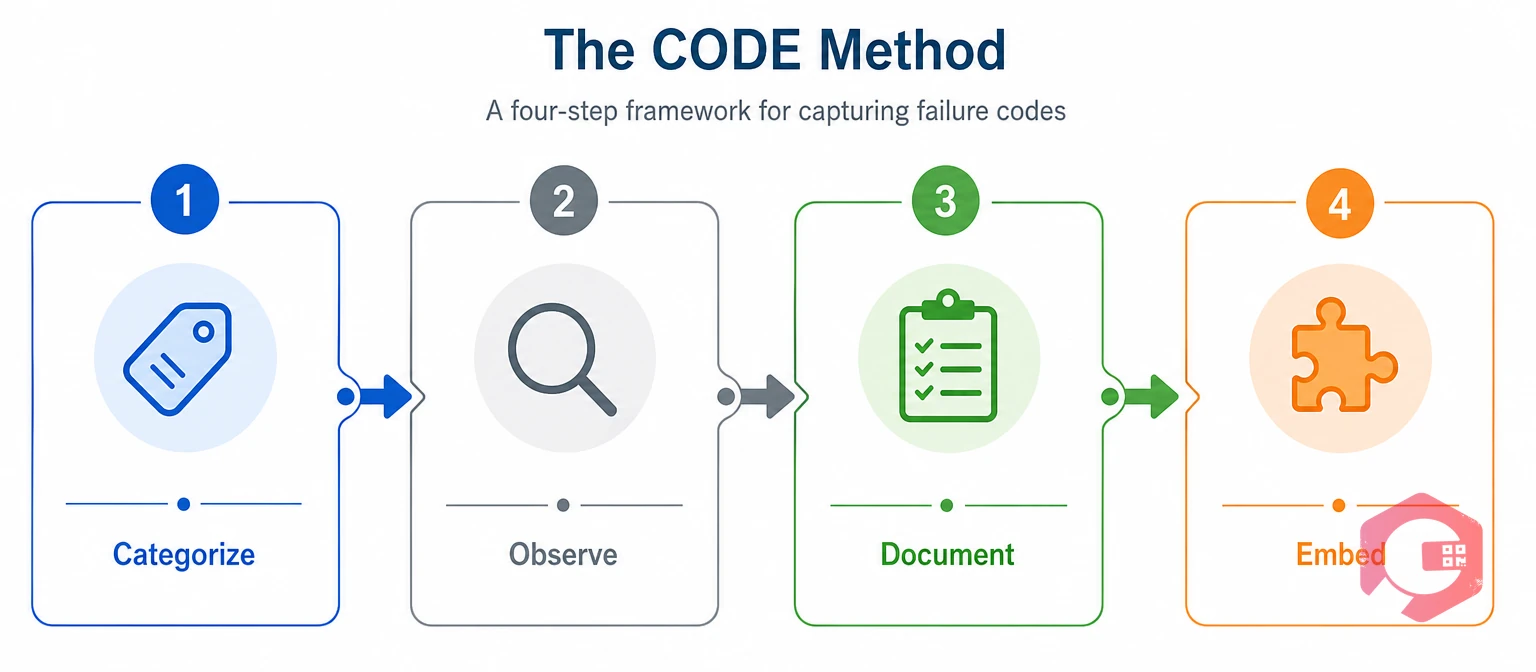
The CODE Method is a four-step framework that helps technicians pick the right failure code at the right time, every time. It works at the point of repair and fits inside the work order closure screen.
The CODE Method for Failure Code Capture:
The first step narrows the list. Instead of scrolling through 30 codes, the technician picks a category and sees only the 6 to 8 codes under it. The second step prevents guessing: the technician compares what they see to the one-line definition on the code. The third step locks the code in at the right moment. The fourth step makes sure the system enforces the habit.
Root cause analysis depends on accurate failure codes. When the CODE Method is followed, the RCA team starts with reliable data instead of spending the first hour verifying whether the code on the work order matches what actually happened.
Use the root cause analysis investigation checklist alongside your failure code capture to connect every coded failure to a structured investigation when the same code appears repeatedly.
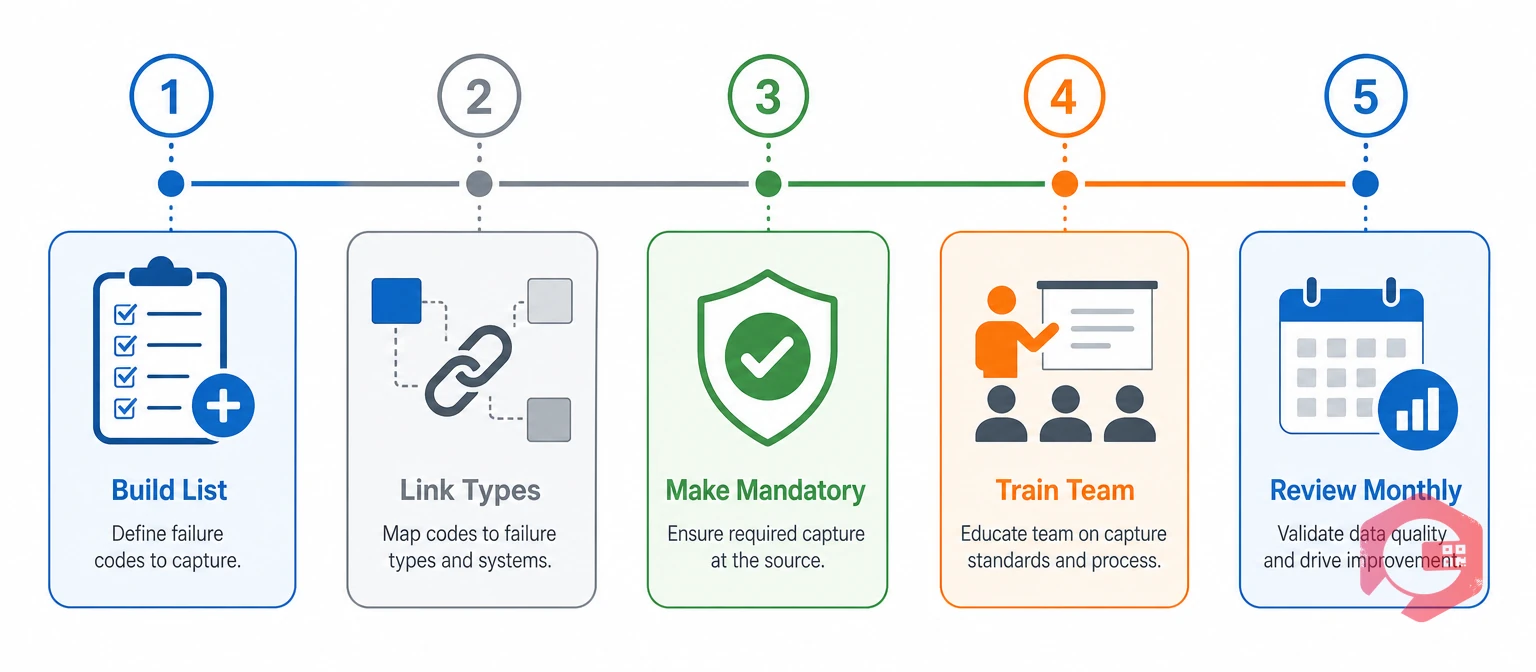
Setting up failure code capture at the technician stage takes five steps: build the code list, link codes to issue types, make the field mandatory, train the team, and review monthly. Most plants get clean data within 60 days if they follow this order.
Start with 15 to 30 failure codes grouped under three to five failure types. Each code needs a one-line definition that removes ambiguity. "Bearing wear" is clear. "Mechanical problem" is not.
A well-built code list reads like a short menu, not an encyclopedia. The technician should be able to find the right code in under 10 seconds. If it takes longer, the list is too long or poorly organized.
An issue type is the symptom reported at the start of a work request — grinding noise, fluid leak, machine stopped. A failure code is the confirmed cause recorded at closure. Linking them shows which symptoms lead to which root causes over time.
Map each failure code to the one or two issue types it most commonly follows. When the technician closes the order, the system can suggest likely codes based on the original issue type, which speeds up selection and improves accuracy.
Over time, these links reveal patterns that the maintenance team can act on. If "grinding noise" leads to "bearing wear" in 80% of cases, a vibration check added to the PM plan catches it before the bearing fails completely.
If a work order can close without a failure code, it will. Configure the system so the closure button is inactive until a code is selected. This single rule is the highest-impact change in the entire setup.
Allow "Other" only when it includes a written note. Review every "Other" entry monthly — if the same note appears three or more times, it needs its own code.
A 30-minute hands-on session works better than a policy document. Walk the team through the full code list, show the one-line definitions, and run three to five practice scenarios using recent work orders the team recognizes.
The code champion role is temporary but important. New habits stick faster when there is a go-to person on the floor who can resolve a question in 30 seconds instead of leaving the technician to guess.
Run a 15-minute monthly review of code usage. Check for codes that are overused, underused, or never used. Merge codes that overlap. Retire codes that have zero entries after 90 days. Add a new code only when a genuine pattern needs a label.
The monthly review also catches "Other" abuse early. If Other is the top code, the list is missing something the technicians see regularly. Pull the notes from every "Other" entry, group them by theme, and create new codes for the themes that appear more than twice.
The most common mistake is building a code list so long that technicians pick whatever is closest instead of what is correct. Six mistakes appear repeatedly in plants that struggle with failure code quality.
Code drift is the gradual loss of meaning in a failure code list that is never formally reviewed. It happens slowly and is hard to spot until the reports stop making sense.
Fix these six and the failure code data becomes reliable enough to drive PM changes, spare parts decisions, and management reviews.
A CMMS makes failure code capture easier by placing the code selection inside the work order closure workflow on a mobile device, so the technician picks the code at the point of repair without a separate step.
Maintenance teams using Cryotos have reported up to 30% reduction in unplanned downtime and 25% faster repair turnaround, and accurate failure codes are a key part of that result. When every closed job carries a verified code, the 5 Whys investigation starts with facts instead of assumptions.
Better codes mean better analysis, and better analysis means fewer repeat breakdowns. The CMMS does not replace the technician's judgment — it gives that judgment a structured place to land where it can be counted and acted on.
An issue type is the symptom a requester reports when creating a work order, such as "grinding noise" or "fluid leak." A failure code is the confirmed cause the technician records after completing the repair, such as "bearing wear" or "seal degradation." The issue type describes what someone noticed; the failure code describes what actually failed.
Most plants get the best results starting with 15 to 30 clearly defined codes grouped under three to five failure types. A short list keeps technician entries consistent. Add a new code only when a real pattern appears more than a few times in the monthly review.
The technician has first-hand evidence of the failure — they opened the machine, saw the damaged component, and completed the repair. A supervisor coding from a handwritten note or memory introduces translation errors. The closer the code selection is to the actual repair, the more accurate the data.
Heavy use of "Other" means the code list is missing causes the technicians see regularly. Review every "Other" entry monthly. When the same description appears three or more times, create a dedicated code for it. If "Other" is the top code, the list needs immediate revision.
Most plants see usable patterns within 60 to 90 days of consistent capture. The first month builds the data. The second month reveals the top three to five failure codes by frequency and downtime. By the third month, the maintenance team can make PM changes and spare parts decisions based on the coded data.
Accurate failure codes start at the technician's hands and end in better maintenance decisions. Schedule a free demo to see how Cryotos places failure code capture inside the mobile work order closure screen so every job carries the right code from the start.



Cryotos AI predicts failures, automates work orders, and simplifies maintenance—before problems slow you down.



