

Maintenance escalation rules are pre-set conditions that move a breakdown up the chain and open a root cause analysis when a repair runs too long. The rules that work measure actual repair time, meaning the hours a technician spends working on the asset. They ignore the gaps between ticket clicks such as "created," "assigned," and "closed." A ticket that sat in a queue overnight does not prove the fault was hard to fix.
When escalation keys off ticket timestamps, teams end up investigating slow paperwork instead of hard failures. This guide shows how to separate real repair time from admin delay, set thresholds by asset criticality, and build rules in your maintenance system that send the right faults to RCA.
Key Takeaways

Maintenance escalation rules tell your system when a job needs more attention, a higher skill level, or a formal investigation. Each rule pairs a condition, such as a repair running past four hours, with an action, such as adding a reliability engineer to the job.
An RCA trigger is a rule that opens a root cause analysis automatically when a failure meets a set condition. Teams use root cause analysis to find out why an asset failed, not just how to get it running again.
Programs that follow reliability-centered maintenance, TPM, and ISO 55000 all expect failures to feed back into the maintenance plan. SMRP benchmarks and most reliability teams treat repair time as a core metric, but the metric only helps when it counts real work.
Escalation rules are only as good as the clock they read, so the choice of timer matters more than the rule itself.
Ticket clicks make poor RCA triggers because they record when someone touched the software, not when someone touched the machine. The gap between the two is often bigger than the repair itself.
Picture a gearbox fault logged at 6 p.m. The night shift waits for a part, the day shift fits it in 40 minutes, and the planner closes the ticket the next afternoon. The ticket shows 22 hours, but the actual repair took under an hour.
A common mistake is to write maintenance escalation rules that fire when ticket age passes 24 hours. That rule sends the 22-hour gearbox ticket to investigation, while a 3-hour bearing change that repeats every week never escalates at all.
Want to see how much admin delay sits inside your numbers? Run a few recent jobs through the free MTTR calculator twice, once with ticket time and once with labor time, and compare the results.
Actual repair time is the hands-on time technicians spend diagnosing, fixing, and testing an asset. It starts when the first technician begins work and stops when the asset passes its run test. Wait time and admin time sit outside it.
| Measure | Ticket Time | Actual Repair Time |
|---|---|---|
| Starts when | The work order is created | A technician starts hands-on work |
| Stops when | Someone clicks "close" | The asset passes its run test |
| Includes | Queue, travel, parts waits, permits, admin | Diagnosis, repair, adjustment, testing |
| Main data source | Status change timestamps | Labor timers with pause reason codes |
| Best used for | Response and workflow speed | Fault difficulty and repair skill |
| Value as an RCA trigger | Low, because delays hide the real cause | High, because long work signals an unclear failure mode |
Both clocks matter, but they answer different questions. Ticket time tells you how well your workflow moves, while actual repair time tells you how hard the failure was to fix. Classic mean time to repair was always meant to measure the second one.
Use ticket time to manage dispatch and admin, and let actual repair time drive the maintenance escalation rules that decide which failures deserve an investigation.

The Four-Clock Escalation Framework splits every breakdown into four separate timers, so your maintenance escalation rules can send each delay to the person who can fix it. A single ticket clock blends all four, which is why one rule cannot route them well.
The Four-Clock Escalation Framework:
Long wrench time means the fault was hard to find, the failure mode is not well understood, or the repair method is wrong. Those are root cause questions. A long wait clock, by contrast, points at stocking or permit flow, and an RCA on the machine will not fix a missing spare.
Maintenance teams that separate the clocks also get cleaner wrench time data for planning. In practice, this means each delay owner sees only the jobs they can act on.
Four clocks give four owners, and that removes the guesswork about who should respond when a job runs long.
A maintenance escalation rules matrix lists the wrench-time thresholds that fire each level of response. Use the example below as a starting point, then adjust the numbers to your own failure history.
| Asset Criticality | Wrench Time Trigger | Escalation Level | RCA Method | Owner and Due Date |
|---|---|---|---|---|
| High (safety or bottleneck) | Over 2 hours on a single job | Level 2: reliability engineer joins the job | Full RCA with fishbone and 5 Whys | Reliability engineer, 5 days |
| High | Over 4 hours total in 30 days for one failure mode | Level 3: maintenance manager | Full RCA plus FMEA update | Maintenance manager, 7 days |
| Medium | Over 4 hours on a single job | Level 2: area supervisor | 5 Whys | Area supervisor, 7 days |
| Medium | Over 8 hours total in 30 days for one failure mode | Level 2: area supervisor | 5 Whys plus failure data review | Area supervisor, 10 days |
| Low | Over 8 hours on a single job | Level 1: lead technician review | Quick 5 Whys | Lead technician, 10 days |
| Any | More than 2x the median repair time for that failure code | Level 2: planner flags for review | 5 Whys | Planner assigns, 7 days |
The cumulative rows matter as much as the single-job rows. A 90-minute repair that comes back every week never trips a single-job limit, but it adds up to six hours a month and quietly eats capacity.
For most triggered jobs, a structured 5 Whys session is enough, so save full fishbone studies for high-criticality assets. A clear matrix keeps your maintenance escalation rules predictable for everyone on the floor.
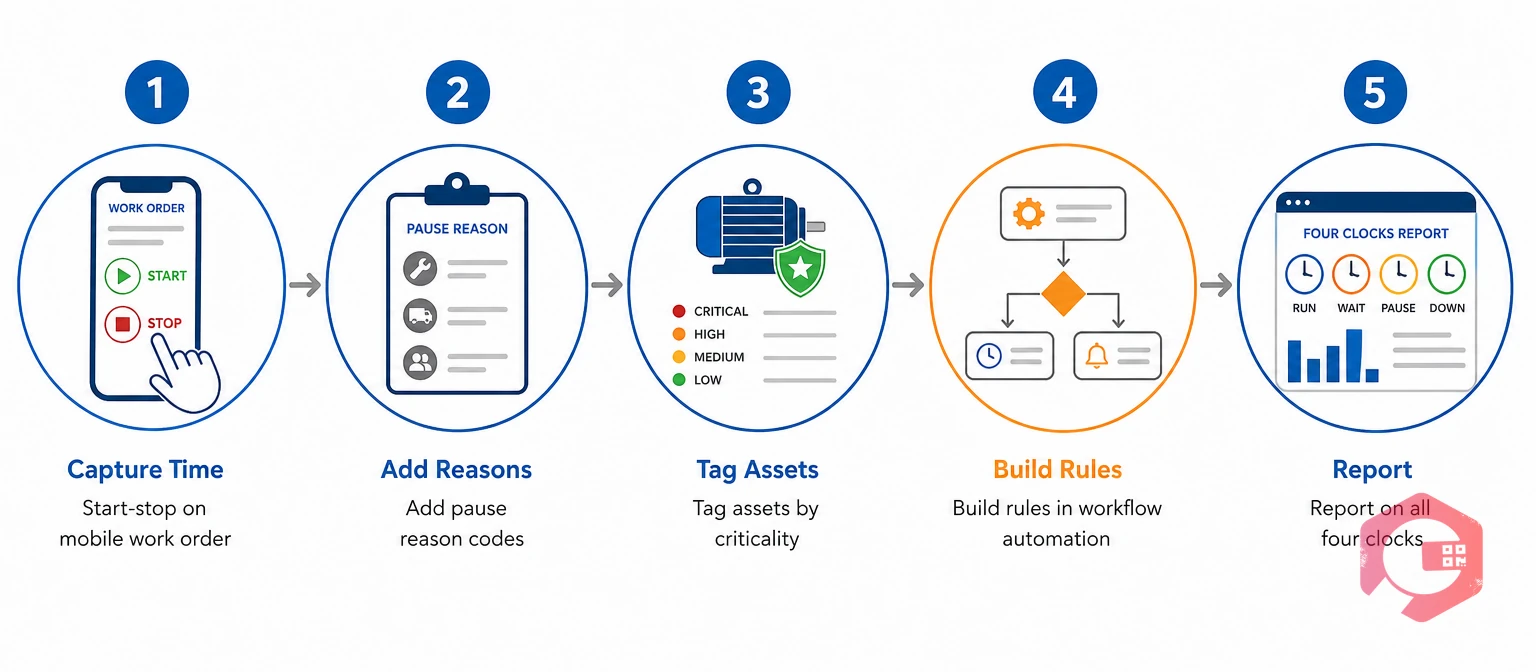
You can set up repair-time triggers in a Computerized Maintenance Management System in five steps. Most of the work is about capturing clean labor time, not writing complex logic.
Give technicians a start, pause, and stop timer inside the mobile app. Work order management that records labor at the asset, not at a desk, is the base for every rule that follows.
Make the technician pick a reason each time they pause: waiting for parts, permit, isolation, contractor, or production hold. Each code moves time from the wrench clock to the wait clock, so delays stop inflating repair time.
Rank assets as high, medium, or low based on safety, production impact, and redundancy. The criticality tag decides which row of your matrix applies to each job.
Use workflow automation to write maintenance escalation rules as a condition plus an action. For example, if wrench time passes 2 hours on a high-criticality asset, notify the reliability engineer and create a linked RCA task with a due date.
Show response, wait, wrench, and restore time side by side for every asset. Downtime tracking by asset and department makes it clear which delays belong to maintenance and which belong to stores or production.
Maintenance teams using Cryotos have reported up to 30% reduction in unplanned downtime and 25% faster repair turnaround. Much of that gain comes from sending long repairs to investigation early, instead of letting them repeat.
Most repair-time escalation programs fail on data habits, not on rule logic. Watch for these problems in the first 90 days.
Clean timers and firm closure checks matter more than clever thresholds, because maintenance escalation rules can only act on the data your crews record.
Response time runs from the moment a fault is reported until a technician reaches the asset. Repair time covers only the hands-on work to diagnose, fix, and test it. Slow response points to dispatch or staffing problems, while long repair time points to a hard or poorly understood failure.
Many plants trigger RCA when wrench time passes 2 hours on a high-criticality asset, 4 hours on a medium asset, or 8 hours on a low one. A second rule fires when repair time is more than twice the median for that failure code. Set the final numbers from your own 12-month labor history.
Yes, they can run entirely on work order and labor data. You only need start, pause, and stop timestamps from technicians, plus pause reason codes and an asset criticality tag. Sensors can add triggers later, but they are not required to start.
Ticket close time includes queue time, parts waits, permit delays, and late admin clicks that have nothing to do with the repair. Using it inflates MTTR and hides which faults are truly hard to fix. Labor timers with pause codes give a far more accurate repair time.
Start with tight rules only on high-criticality assets, then widen coverage as your team builds capacity. Use cumulative rules rather than single-job rules for low-criticality equipment. Review trigger volume each quarter and adjust thresholds, so investigations stay manageable.
Escalation should follow the work on the machine, not the clicks in the system. Schedule a free demo to see how Cryotos captures actual repair time on every work order and triggers RCA only when a failure truly needs one.



Cryotos AI predicts failures, automates work orders, and simplifies maintenance—before problems slow you down.



