
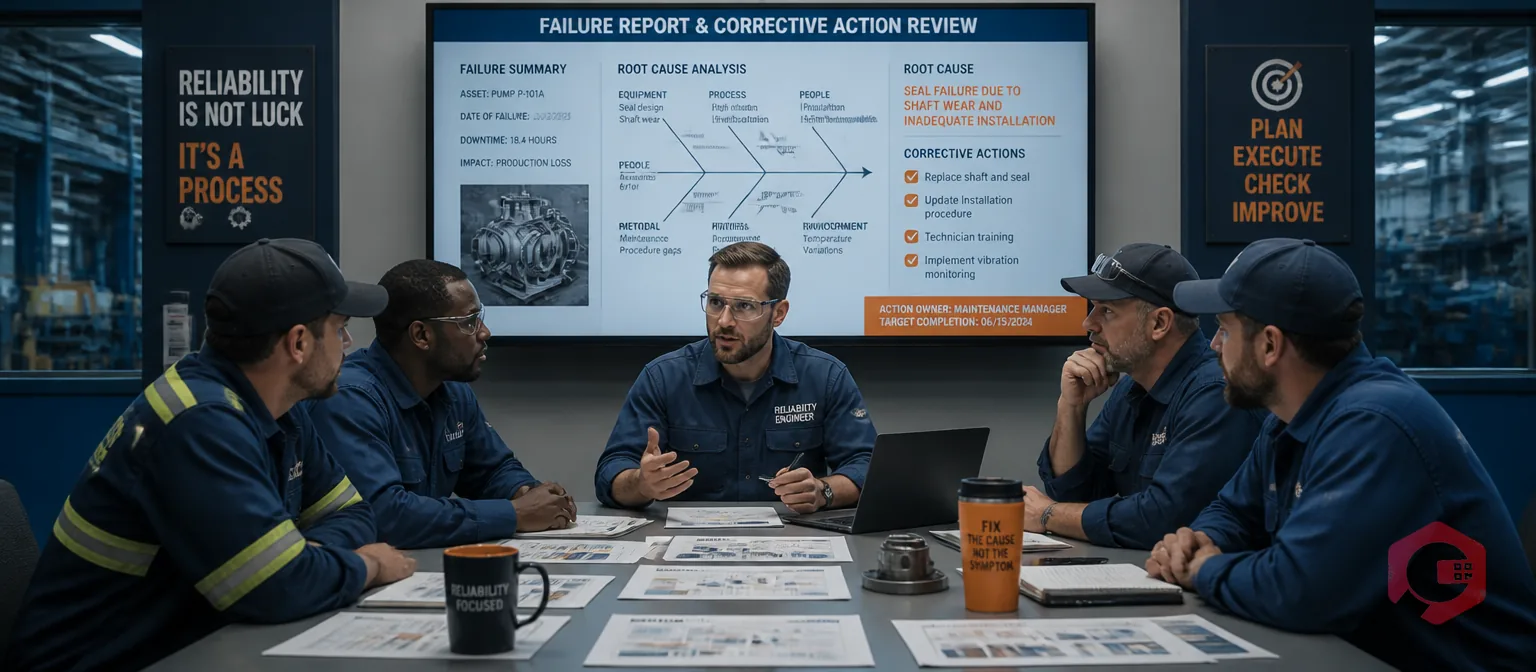
FRACAS — Failure Reporting, Analysis, and Corrective Action System — is a structured methodology for capturing every equipment failure, tracing it to its root cause, and closing the loop with verified corrective actions. When implemented inside a CMMS, FRACAS transforms from a manual documentation exercise into an automated reliability engine that prevents recurring failures before they stop your production.
According to a Reliable Plant study on reliability improvement programs, organizations that implement a formal FRACAS process reduce repeat equipment failures by 40–60% within the first year. Without a CMMS to structure the workflow, most FRACAS programs stall at the reporting stage and never deliver that improvement.
This guide walks you through each phase of FRACAS and shows exactly how to implement it using your CMMS — with the workflows, data fields, and automation triggers that turn theory into measurable reliability gains.
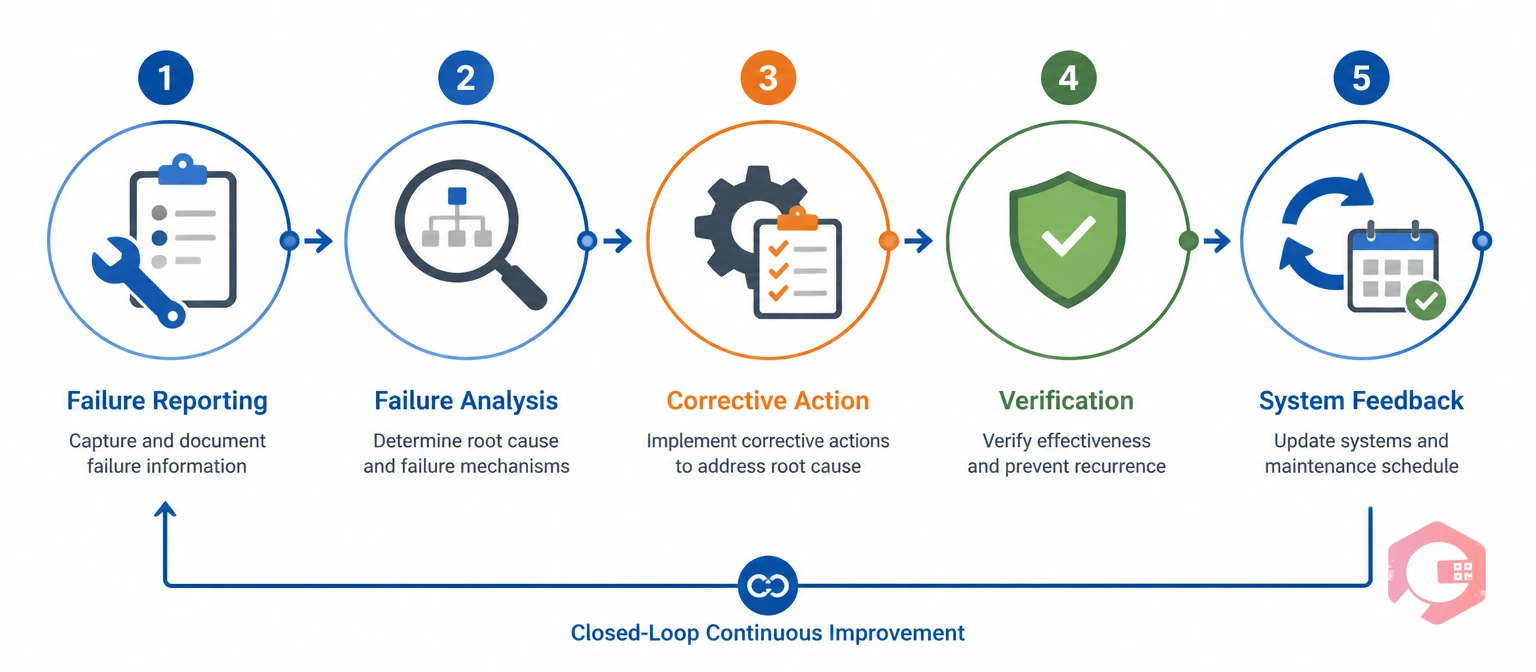
FRACAS is a closed-loop process built around five phases: Failure Reporting, Failure Analysis, Corrective Action, Corrective Action Verification, and System-Level Feedback. The "closed loop" is the key — every failure that enters the system must exit with a verified fix and an updated maintenance strategy. Nothing gets parked indefinitely.
The reason FRACAS matters is simple: most maintenance teams are good at fixing equipment, but poor at learning from failures. The same compressor fails every six weeks. The same pump seal gives out every quarter. Without a structured system for capturing and analyzing these patterns, teams keep repeating the same reactive repairs.
Industries where FRACAS is most widely used include defence and aerospace (MIL-STD-2155 mandates it), pharmaceutical manufacturing, oil and gas, and any capital-intensive environment where repeat failures carry significant safety or financial consequences. But the principles apply to any maintenance operation where asset reliability directly affects production output.
A CMMS provides the infrastructure that makes FRACAS practical at scale. Without it, you are managing failure reports in spreadsheets, analysis in email threads, and corrective actions in someone's task list — three systems that never talk to each other. A CMMS unifies all five FRACAS phases in a single workflow where each step triggers the next automatically.
Here is what the CMMS contributes to each phase:
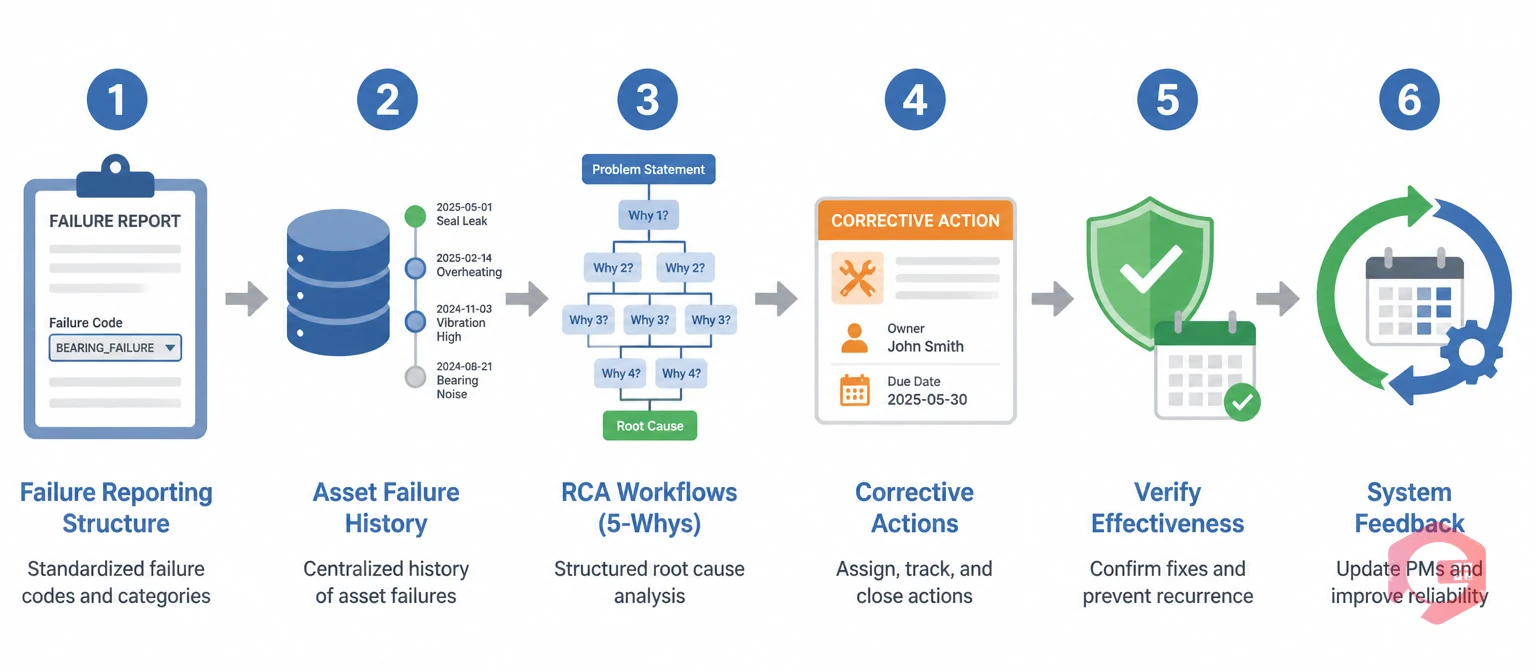
Before any failures can be analyzed, they need to be reported in a structured, consistent format. The most common reason FRACAS programs fail is that failure data is too inconsistent to analyze — every technician describes the same failure mode differently, making it impossible to identify patterns.
In your CMMS, configure a standardized failure reporting template that captures: the asset ID and location, the failure mode (using a predefined failure code library), the detection method (operator observation, alarm, scheduled inspection), the time of failure onset versus time of discovery, and the downtime duration from failure to restoration. Failure codes should be defined in advance and structured in a hierarchy — for example, Category: Mechanical → Sub-category: Bearing → Mode: Wear. Cryotos's work order management supports custom failure code fields that technicians select from a dropdown during work order creation, making structured reporting fast and consistent on mobile.
FRACAS analysis depends on pattern recognition. A single failure tells you almost nothing. Twenty failures on the same asset class over 18 months tells you exactly where to focus your reliability engineering effort. Your CMMS becomes the database that makes this possible.
Every work order closed on an asset should contain a completed failure code, a root cause field, and the corrective action taken. Over time, this creates an asset-level failure history that the next technician, reliability engineer, or maintenance manager can query instantly. Using asset tracking in Cryotos, each physical asset carries a permanent maintenance record — accessible by scanning a QR code on the machine — so failure history is always available in the field, not just at a desktop.
The "Analysis" in FRACAS is where most of the reliability value is created. A thorough root cause analysis identifies not just what failed, but why — and specifically, what systemic condition allowed the failure to occur.
Within your CMMS, configure an RCA workflow that is triggered automatically when a work order is closed for certain failure categories — particularly any failure that caused unplanned downtime exceeding a defined threshold (for example, more than two hours). The RCA workflow should require the technician or engineer to complete a 5 Whys analysis before the work order can be formally closed. According to the American Society of Mechanical Engineers, 5 Whys analysis resolves the correct root cause in over 80% of maintenance failure cases when applied by a trained technician. Cryotos has a built-in 5 Whys root cause analysis tool integrated directly into the work order closure workflow, making this a system-enforced step rather than an optional one.
A root cause without a corrective action is just documentation. The corrective action phase converts analysis findings into concrete changes — to maintenance procedures, PM intervals, spare parts stocking levels, operator training, or equipment design.
Each corrective action should be created as a separate work order in your CMMS, linked back to the original failure record and the completed RCA. The corrective action work order carries an assigned owner, a due date, and a priority level. It also specifies the type of action: a one-time repair, a PM schedule update, a procedure revision, or a spare parts reorder. This linkage is critical — it creates a full audit trail from failure to fix that you can report on during compliance audits or reliability reviews. Linking corrective actions to your preventive maintenance software means that once a corrective action is verified, the updated PM interval takes effect automatically on the next schedule cycle.
Verification is the step that makes FRACAS a closed-loop system rather than an open-ended one. Without it, you have no way to know whether the corrective action actually resolved the root cause or just masked a symptom temporarily.
In your CMMS, configure a verification trigger that fires automatically a defined number of days or operating hours after a corrective action is closed — for example, 30 days or 500 runtime hours, depending on the asset type. The verification task is assigned to a reliability engineer or senior technician, who confirms that the failure mode has not recurred and that the asset is performing within expected parameters. If the failure recurs before verification, the CMMS re-opens the FRACAS record and escalates it for deeper analysis. This automatic re-escalation is what closes the loop and prevents problems from being written off prematurely. Your workflow automation settings handle the trigger and assignment without any manual intervention required.
The final phase of FRACAS — and the one that delivers the most long-term value — is feeding verified corrective actions back into the broader maintenance system. This is where individual failure events become organizational reliability knowledge.
System feedback takes four concrete forms in a CMMS. First, PM schedule updates: if the root cause was a worn bearing that should have been replaced at 1,000 hours but was only scheduled at 1,500, the PM interval is updated to 900 hours as a conservative buffer. Second, failure code library expansion: new failure modes discovered through FRACAS are added to the standard code library so future technicians can report them consistently. Third, spare parts stocking updates: if a corrective action required an emergency part order, the minimum stock threshold for that part is increased in the inventory module. Fourth, operator training flags: if the root cause involved operator error or incorrect procedure, a training record is created and linked to the affected team. Using the BI Dashboard in Cryotos, reliability managers can track all four feedback categories across the asset fleet in real time — making the system improvement visible rather than implicit.
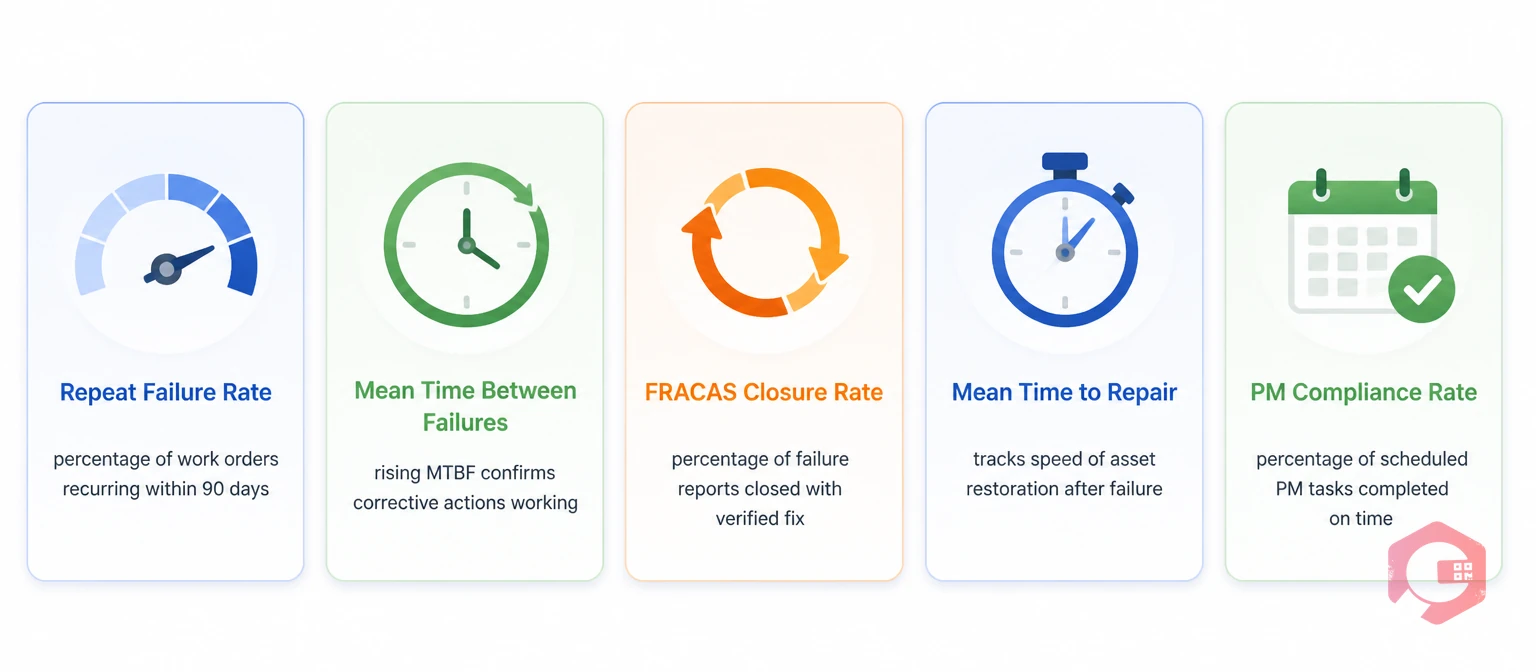
Measuring FRACAS effectiveness requires the right metrics. A CMMS that captures structured failure data can calculate these automatically from work order records:
According to a Plant Engineering maintenance excellence survey, facilities with formal closed-loop failure analysis programs achieve PM compliance rates 35% higher than those relying on reactive-only maintenance. This directly translates into fewer unplanned failures and lower total maintenance cost per asset.
Most FRACAS programs fail not because of a flawed methodology, but because of implementation gaps that are entirely avoidable.
FRACAS does not operate in isolation. It is one component of a broader reliability framework that also includes FMEA (Failure Mode and Effects Analysis) and Reliability-Centered Maintenance. Understanding how they connect helps you build a maintenance program that improves systematically.
FMEA is a proactive tool used during equipment design or commissioning to predict which failure modes are most likely and most consequential. FRACAS is the reactive counterpart — it captures what actually fails in service and compares real failure data against the FMEA predictions. When a failure mode occurs that was not anticipated in the FMEA, FRACAS triggers an update to the FMEA record. When a failure mode occurs that was anticipated, FRACAS verifies whether the planned mitigation was effective. RCM uses both the FMEA and the FRACAS data to determine the optimal maintenance strategy for each asset — deciding which failures to prevent, which to predict, and which to allow to fail safely. A CMMS that holds all three — maintenance history, failure codes, and PM schedules — makes this three-way relationship manageable at scale.
FRACAS delivers the strongest ROI in industries where equipment failures carry high costs or safety consequences — defence and aerospace, pharmaceutical manufacturing, oil and gas, heavy manufacturing, and utilities. However, any capital-intensive operation where repeat failures are eroding uptime and maintenance costs can implement FRACAS effectively using a CMMS.
A basic FRACAS structure — failure codes, RCA workflow, corrective action tracking — can be configured in a CMMS in two to four weeks. The system starts delivering data immediately. Measurable reliability improvements typically appear within three to six months, once enough failure history accumulates to identify and address pattern failures. Full maturity, where the PM schedule is continuously updated by FRACAS findings, usually takes 12 to 18 months.
Yes. A CMMS-based FRACAS can be run by maintenance supervisors and senior technicians without dedicated reliability staff. The key is building the analysis and verification steps into the work order workflow itself — so the process is followed as part of normal maintenance operations, not as a separate program requiring specialist oversight. The built-in 5 Whys tool and mandatory RCA fields in a CMMS make this practical for maintenance teams of any size.
FRACAS systematically identifies which failure modes consume the most spare parts and which parts are consistently unavailable at the time of a breakdown. Corrective actions from FRACAS directly inform minimum stock threshold decisions in the inventory module — so parts that caused emergency procurement delays are pre-positioned, and parts that were over-stocked due to incorrect failure assumptions are reduced. Facilities using FRACAS-informed inventory management typically reduce spare parts carrying costs by 15–25% within the first year.
If you are ready to stop firefighting and start building a maintenance program where failures stay fixed, Cryotos CMMS gives your team the structured failure reporting, built-in root cause analysis, automated corrective action tracking, and real-time reliability dashboards to run a complete FRACAS program without a dedicated reliability engineering department. Book a free demo today and see how Cryotos closes the loop on your repeat failures.




Cryotos AI predicts failures, automates work orders, and simplifies maintenance—before problems slow you down.



